
Zeiss cinemizer OLED Manual de usuario

Operating instructions

Introduction Requirements 1
The multimedia video glasses 2
Overview Contents of the package 3
cinemizer OLED controls 4
Battery box controls 5
Usage Powering on 6
Wearing comfort 7
Nose pad adapter 7
Ear clips 8
Acuity adjustment 9
Earpieces 10
Stereo audio jack 12
Volume 13
Integrated battery 14
Battery status 15
Battery charging 17
HDMI®connection 19
iPod/iPhone and iPad connection (30 pin) 20
iPod/iPhone and iPad connection (lightning) 21
Other playback devices via cinch video cable 22
Travel case 23
Additional functions 3D support 24
3D formats supported 25
OSD settings 28
Activation of the OSD 28
Navigation in the OSD 29
Video 31
Aspect 36
Contrast 38
Info 38
Advanced 39
Exit 41
Accessories Adapter kit for iPod and iPhone (30 Pin) 42
Headtracker (movement sensor) 43
Light shield 45
Further information Troubleshooting 46
Technical support 46
Index 47
Overview

1
Requirements
ATTENTION: For your own safety, read the complete instructions on the
usage of the cinemizer ® OLED multimedia video glasses in this manual,
the safety information in the quick guide for the cinemizer OLED multime-
dia video glasses (provided in the package and available from
www.zeiss.com/cinemizer/documents) and the instructions for the
devices to which the cinemizer OLED multimedia video glasses are con-
nected, before you use the cinemizer OLED.
The following are required to use the cinemizer OLED video glasses:
- A device with a USB connection for charging the battery, if necessary,
- A playback device, e.g. a computer, iPod/iPhone, gaming console, etc.
- A connection adapter (HDMI®, iPod/iPhone), or connection cable (3.5mm
4-pin jack to cinch)
If a stationary image (e.g. a log-on screen or permanently displayed
image/icon) remains on the screen for an extended period, you may still
see it as a feint residual image, even after the image has been changed.
This is termed "burn-in". For this reason avoid the playback of unchang-
ing images! If feint residual images are visible, they can be eliminated
by playing back varied content that fills the screen.
Introduction
!
Introduction
Registration
Please register at www.zeiss.com/cinemizer/registration to receive
notifications directly when a firmware update is available.

2
The multimedia video glasses
As you look into the cinemizer OLED video glasses you will obtain the visual im-
pression of a television picture with a screen diagonal of 105 cm at a distance
of 2 metres.
The ergonomic design and simple acuity adjustment between -5 and
+2 dioptres for each eye make the cinemizer OLED video glasses very
convenient to wear, even for the wearers of spectacles.
The stereo 3D support converts the cinemizer OLED multimedia video glasses
into a portable 3D screen of universal application with which you can im-
merse yourself in virtual worlds.
Introduction

3
Contents of the package
cinemizer ® OLED at a glance
Travel case
Battery box
cinemizer-HDMI®adapter
(HDMI®mini jack type C)
HDMI®to mini HDMI®
Adapter cable
Mini USB cable
Video cable 3.5mm to 3 x cinch
cinemizer OLED
Nose pad
Adapter A + B
Earpiece
with ear cap (medium)
Ear caps
(in 2 sizes
small/large)
Ear clip
Quick guide and safety instructions
Quick Guide
Overview

4
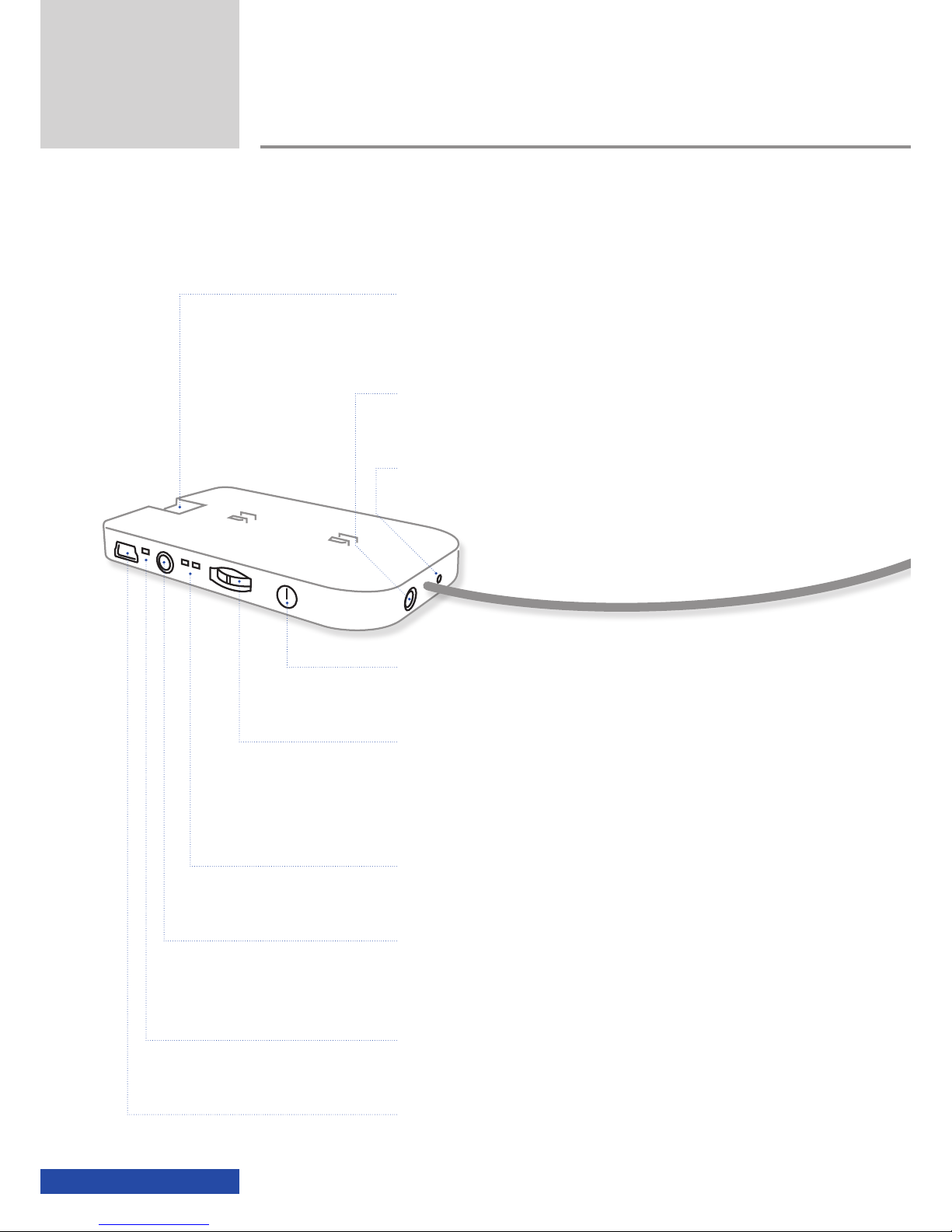
cinemizer OLED controls
Overview
Ear clip
for fixing the glasses ergonomically
Removable earpiece
Earpiece storage clip (magnetic)
for the safe storage of the earpieces
Nose pad
for the ergonomic adjustment of the position of the
glasses
Viewing window
for different eye distances (59-69mm)
Adjustment wheel
for the stepless adjustment of the acuity for each eye
(-5 to +2 dioptres)
5
Battery box controls
Overview
On/Off button
video glasses
Multifunction switch
for activating the On-Screen Display (OSD), switching between 2D and 3D
mode and for adjusting the volume
Mode LEDs
2D/3D mode display
AV-in jack
for connecting (3.5mm, 4-pin) other playback devices
Battery status LED
charging/battery status display
Mini USB jack
for charging the battery
cinemizer socket
for the connection of the HDMI®adapter or optionally an iPod/iPhone
adapter
Earpiece jack
for the connection of stereo earpieces (3.5mm)
Reset button
for resetting the video glasses

6
Powering on the cinemizer OLED video glasses
Power on the cinemizer OLED video glasses by briefly pressing the On/Off but-
ton until the mode and then the battery status LEDs illuminate.
If an LED does not illuminate green after pressing the On/Off button, the
battery is probably discharged and you should charge the battery for the
cinemizer OLED video glasses using a USB cable. If the battery has been fully
discharged, it can take up to 15 minutes until the battery status LED starts to
flash on charging the cinemizer OLED via USB.
As long as video signal is not provided via the cinemizer HDMI®adapter or
iPod/iPhone adapter, the text "NO SIGNAL" appears on the virtual screen in
the multimedia video glasses. If a signal is not provided within 2 minutes of
powering on, the cinemizer OLED power off automatically (time out).
Powering off the cinemizer OLED video glasses
If powered on, the cinemizer OLED can be powered off by pressing the On/Off
button. The battery status and video mode LEDs go out.
Usage
Usage

7
Nose pad adapter
The soft silicone nose pad adapter ensures you find it pleasant to wear the
cinemizer OLED glasses on your nose. Due to anatomical differences in the
shapes of faces and noses, comfort can be improved using the optional nose
pad adapters A and B.
The nose pad can be fastened in 3 different ways:
1) Nose pad without adapter
2) Node pad with adapter A
3) Nose pad with adapter B
The simplest method is to try all 3 ways and decide
which suits you best.
Adapter B
Usage
Adapter A
!

8
Ear clips
The ear clips for the cinemizer OLED help both to securely attach the glasses to
your head and to reduce the weight on your nose. You can then comfortably
wear and use the cinemizer OLED video glasses for an extended period.
Prior to putting on the cinemizer OLED video glasses, please push the ear clips
a little to the rear, put on the glasses and then push the ear clips from the
rear to your ears.
Prior to putting away the cinemizer OLED multimedia video glasses in the
travel case, you should remove the ear clips and place them loose in
the travel case. In this way the ear clips are not subjected to mechanical
forces that may irreparably damage them.
Usage
!
1 2 3
Otros manuales para cinemizer OLED
1
Tabla de contenidos
Otros manuales de Gafas 3D de Zeiss


Manuales populares de Gafas 3D de otras marcas


Silhouette
Silhouette TITAN DESIGN Instrucciones de montaje

Soundcore
Soundcore Frames Manual de usuario

Wiseup
Wiseup GL2000 Manual de usuario

Eschenbach
Eschenbach MaxTV Manual de usuario

Mini Gadgets
Mini Gadgets GLSun720 Manual de usuario

Happy Electronics
Happy Electronics Mindroid Glasses Manual de usuario


