YouKits TJ5A Manual de usuario

1
OPERATION GUIDE
TJ5A is a high sensibility, high-performance portable multi-band SSB/CW transceiver, used with
DDS as LO, offering wide frequency coverage and fine tuning rate. A signal of 0.1uV is
discernible with this transceiver. The Doubly Balanced Diode Ring Mixer makes strong signal
handling capability possible.
Features:
Low RX current Drain
High-Performance AGC
Large built-in speaker
40 Memories
Dual VFO’s
Memory-VFO Transfer
Low power tuning up mode
USB socket for DigiPan
Band extending connector
Operating Frequency:
3.500000 – 4.000000
7.000000 – 7.300000
10.10000 – 10.15000
14.000000 – 14.350000
18.068000 – 18.168000
21.000000 – 21.450000
(With band extending module, 60m and 12m bands available)
Mode:
LSB, USB, CW, TUN
Tuning Rate:
10 Hz, 100 Hz, 1 kHz, 10 kHz, 100 kHz
IF:
9 MHz (Single conversion super-heterodyne)
Sensitivity:
0.3uV
Operating Power:
12 – 12.6 V
Physical Parameters (WHD):
180 x 58 x 200 mm
Weight: 1.5 kg (1.85 kg with 12 V 4.4 Ah Li-ion battery pack)

2
Current Drain:
MODE
CURRENT
Rx (Internal battery power)
200 mA
Rx (External power supply)
320 mA
Tx (SSB)
3.5 A
Tx (CW)
2.7 A
Output Power:
MODE
OUTPUT
SSB
Adjustable from 0.3 - 20 W
CW
Adjustable from 0.3 - 10 W (Can be adjusted to
20W)
TUN
10 - 20 mW (Can be set from 1 mW – 10 W)
Output spurious: -50dB
TJ5A’s transmit signal complies with the FCC spectral purity requirement.

3
1. Front Panel
Controls and Indicator
VOL – Volume control / Power switch. Turn clockwise to turn on the power and to increase
volume. When a click is heard, the power is turned on. The LCD panel LED should become
illumimated. Turn counter-clockwise to decrease volume and to turn off the power. When a click
is heard, the power is off.
PWR – Transmission power control. Turn clockwise to increase the drive. Tx power can be
adjusted from 0.3 – 10 W (CW), 0.3 – 20W (SSB).
RIT – Rx increment tuning. Variable range: +150 Hz / -50Hz
TUNE – The big knob on the right side is the Frequency Tuning / Tuning Rate knob. Rotate
clockwise is frequency up, counter-clockwise frequency down. Press the knob to select the tuning
rate. The sequence is 10 Hz, 100 Hz, 1 kHz, 10 kHz, and 100 kHz.
Power Indicator – The LED above the TUNE knob is green when TJ5A is turned on. It turns red
in transmission.
MOD – Press to select LSB, USB, CW, and TUN. In CW mode, the displayed frequency is
exactly the sender’s frequency. In CW mode MIC is disabled. The MIC socket is used as the Key
socket.
A / B – VFO selecting / Memory clearing. Press to select VFO A or VFO B. In MEM state, hold
the button until all the memories are cleared.

4
V / M – VFO / MEM switching. Press to switch between VFO and MEM. Turn TUNE to select
the memory number.
MEM – Frequency saving / MEM to VFO transfer. Press to save the frequency to the memory.
Press MEM, the memory number appears. The dashes indicate the blank state of the memory. Turn
TUNE to select the MEM position you want to store the frequency to. MEM00 – MEM39 can be
used to store the frequency. Frequency saving can be canceled by pressing MOD or STEP.
In the following case, MEM01 is not vacant. A frequency 14.200.000 is saved in this position. You
can rotate TUNE knob to find a vacant position.
How to transfer the frequency in MEM to VFO A or B? First, press V/M to enter MEM state.
Second, press MEM to find the VFO’s. Now VFO A or B appears on the left corner on LCD. (A or
B depends on which VFO is in use before pressing V/M. Third, press A/B button or rotate TUNE
knob to select the VFO you want to transfer the memory to (either A or B). Fourth, press MEM to
transfer the frequency in the memory to the VFO you have selected. Finally, press V/M button to
enter the VFO to which you have transferred the frequency.

5
Let us study the following example:
Transfer MEM00 (18.068 ) to the VFO B.
Press MEM, and the following data is displayed:
Select VFO B by pressing A/B button or rotating TUNE knob.
Press MEM to transfer MEM 00. The following is displayed:
Press V/M to enter VFO B.

6
S-Meter/Power Meter:
In receive the bargraph shows relative signal strength. Each bar represents one level. The second
bar indicates a signal of 12uV is injected.
In transmit the output power is also displayed. Each bar represents one level. The first bar
indicates 3 Watts. The third bar indicates 5W; the sixth bar indicating 10W.
Note 1: The S-Meter levels are approximate, and accurate calibration is not supported.
Note 2: The output power levels are approximate, and accurate calibration is not supported.

7
Connectors
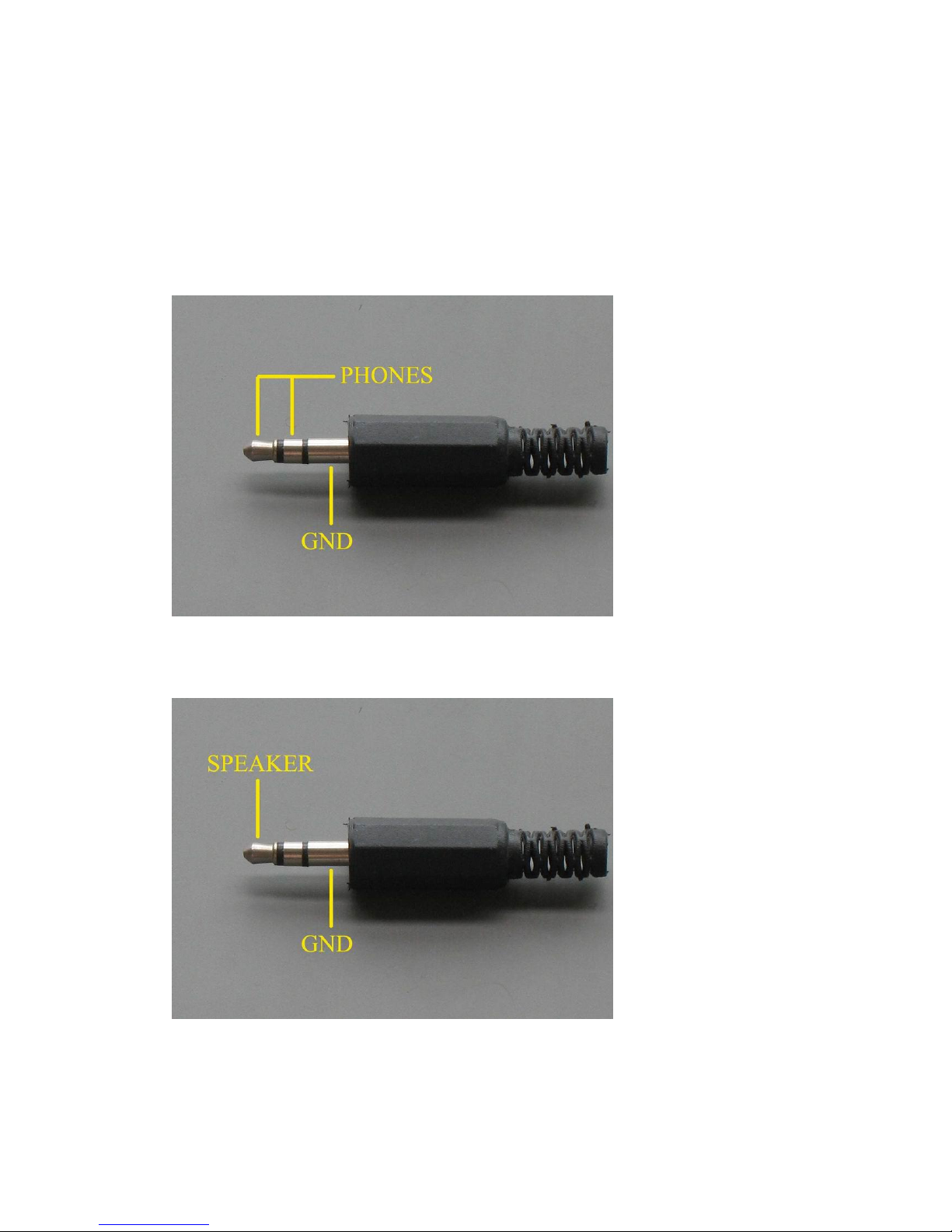
MIC – MIC / CW key jack. Use 3.5mm stereo plug. The tip is PTT / KEY, the ring next to the tip
is MIC; the sleeve close to the base GND.
PH – Earphone / speaker 3.5-mm jack. Either earphones or speaker can be used. When the
earphone or speaker is plugged in, the built-in speaker is disconnected. The tip and ring are in
parallel. The sleeve is GND. The stereo earphones can be used. Never use the 3.5mm mono type
plug. The long plug sleeve short-circuits the ring connection.
The speaker can be connected to either the tip or the ring, since tip and ring are in parallel. Never
use the 3.5-mm mono type plug. The long plug sleeve short-circuits the ring connection.
Do not connect the speaker with the amplifier to PH socket with an ordinary cable. In this case a
cable with attenuating network is required.

8
2. Connectors on Right Side
USB – This connector can be connected to the computer sound card for DigiPan.
DC 12V – DC power connection. The power connector uses two contacts. The left contact (facing
the right side of the radio) provides the negative connection to the power supply. The right contact
is the positive connection. The unit requires 12 to 12.6 VDC.
CHG – 2.1 mm coaxial plug to charge the battery (center positive). The battery is charged no
matter what position the switch is set.
ANT – The M16 connector on the right side is the antenna socket. Connect 50 ohm antenna to this
connector.
3. Battery Pack
The 12 V 4.4 Ah battery pack is optional (Not included in the rig). The battery can be placed in the
battery compartment.
Important!
Do not place the battery pack under the rear screw holes. The screws might touch the battery when
the cover is fastened.

9
Do not place the battery pack tightly against the heat sink. Leave a gap between the battery pack
and the heat sink.
Please notice the polarity the battery pack. Wrong polarity will not power the transceiver.
4. Operation
If you do not have the battery pack, use a DC 12V or 12.5 V power supply with the supplied plug.
Warming-up time
It takes about 5 -10 minutes for the TJ5A to stabilize. A drift of 10 – 20 Hz might be noticed
during the warming-up period.
Receiving signal
Connect the antenna and turn on the power. Signals or noise can be heard. A signal of 0.1uV is
discernible with this transceiver. Rotate the TUNE knob to the frequency you want. For
compactness, TJ5A has no band switch. Therefore, use fast tuning rate (For example, 10 kHz or
100 kHz) as the band switch to get to the meter band so as to save time, and then use the fine
tuning rate (100 Hz or 1 kHz) to search signals or tune accurately. Rotating RIT facilitates +150
Hz/-50Hz frequency shift. However, RIT does not affect transmitting frequency. In transmission
the shift is canceled automatically. RIT is usually set in the middle position.
SSB operation
In LSB or USB mode, press PTT to enter transmission mode. Speak to the handmic and your
voice is transmitted. The output power can be adjusted through PWR knob.
High-performance MOS RF transistors are used for the driver (RD06HHF1) and output transistors
(A pair of RD16HHF1’s), offering super-quality transmitting signals.

10
CW operation
In CW mode MIC is disabled. MIC socket is
used as KEY socket. Press the CW key or PTT
on the handmic, and CW signal is transmitted.
A 1 kHz side tone can be heard from the
speaker. The side tone level is not controlled
by VOL. It is pre-set to a certain level, which
can be adjusted to meet the personal desire. If
the side tone level does not suit you, adjust
VR6 on the main board to obtain your desired
level. Open the upper cover the TJ5A. Find
VR6. Turn counter-clockwise to reduce the
side tone level; turn clockwise to increase the
side tone level. When carrying out the side
tone level adjusting, please set the power level
to the lowest. Press KEY and adjust VR6 until the desired side tone level is obtained.
TUN Mode
In this mode, PWR control is disabled. A pre-set low level carrier (10 - 20 mW) is transmitted
when KEY or PTT is pressed for the purpose of tuning up the antenna. However, you may set a
carrier level you prefer. Adjust VR5 to reduce or increase the carrier level. Turn counter-clockwise
to reduce the carrier level; turn clockwise to increase the carrier level. The level can be adjusted
from 1mW – 10 W.
IMPORTANT!
Never try the long key at the full power output. This would overheat the power transistors.
Always use half or lower power or TUN mode to tune the tuner.
Use the matched high efficient antenna such as the dipole, V-dipole, Yagi, long wire with a tuner.
Low efficient antenna, such the small diameter loop, short whip, the shortened wire of a few
meters, etc. are not recommended, which would degrade the sensitivity of TJ5A, and lower audio
output.
Otros manuales para TJ5A
3
Tabla de contenidos
Otros manuales de Transceptor de YouKits

YouKits
YouKits TJ2B Instrucciones de uso

YouKits
YouKits DIG 40 QRP Manual de usuario

YouKits
YouKits HB-1B MK4 Manual de usuario

YouKits
YouKits TJ2B Manual de usuario

YouKits
YouKits HB-1A MK2 Manual de usuario

YouKits
YouKits TJ5A Manual de usuario

YouKits
YouKits TJ5A Manual de usuario

YouKits
YouKits EK-1A Manual de usuario

YouKits
YouKits EK-1A Instrucciones de operación

YouKits
YouKits EK-1B Manual de usuario