
Yadea YDX1 Manual de usuario

https://www.yadea.com User Manual

INDEX 01
02
03
04
Maintenance and After-sales
05
Appendix
SafetyWarning
How to Use
1.Scooter Assembly
2.Vehicle Activation
3.Battery Charging
4.Folding and Carrying
1.ProductDescription
2.Function Description
1.Correct Driving Instructions
2.Safety Instructions
1.Maintenance and Servicing
2.After-sales Service
1.Parameter List
2.Troubleshooting
3.Trademark and Legal Statement
Product Intruduction

PRODUCT INTRODUCTION
PART1 Product Description
Attention
When unpacking the electric scooter, please carefully check the contents of the package. If any missing or damaged, please contact local
authorized service station or the after-sales E-mail: afterservice03@Yadea.com. It is recommended to retain the outer packaging for at least
15 days in case you need to ship the scooter in the future.
Installation toolsScrew × 6User Manual
Charging adapterCharger
PRODUCT INTRODUCTION
Component Diagram
Stem
Handlebar
Folding buckle
Turn signal
Rear lights
¦ěðƓƓěǡěČƧŭƓ
Dual-action disc brake
Kickstand
Folding wrench
HƓŭŢƧƓěǡěČƧŭƓ
Headlight
Charging port
Shock absorber of front cantilever
®ŁēěƓěǡěČƧŭƓ
Shock absorber of
rear cantilever
Drum brake
Product Accessories

PRODUCT INTRODUCTION
Instruction to Handlebar Function
Brake lever
Turn signal button Multi-function button
Folding latch
Electric throttle
Bell
Description Function Description
Function Description
Turn signal button
Electric throttle
Brake lever
Folding latch
Bell
Long press the button to turn on/ off
Short press * 1 for headlight switch
Short press * 2 for gear switch
Short press * 3 for metric switch
Power on/off the left/right turn signal.
ijƧěƓƐŭLJěƓŭŢǠƓƛƧƛŗŁēěċǍijŭŭƧƯŢƧŁŗƓěðČļŁŢĴðƛƐěěēŭij˚ŔŠļƧļěŢƐƓěƛƛŁƧƧŭ
accelerate and release to decelerate.
After power on, squeeze the brake lever, the scooter motor will brake and the tail
ŗŁĴļƧLJŁŗŗǡðƛļ
After folding the scooter, hook the latch of stem to the buckle for safety.
It is used to alert pedestrians
PRODUCT INTRODUCTION
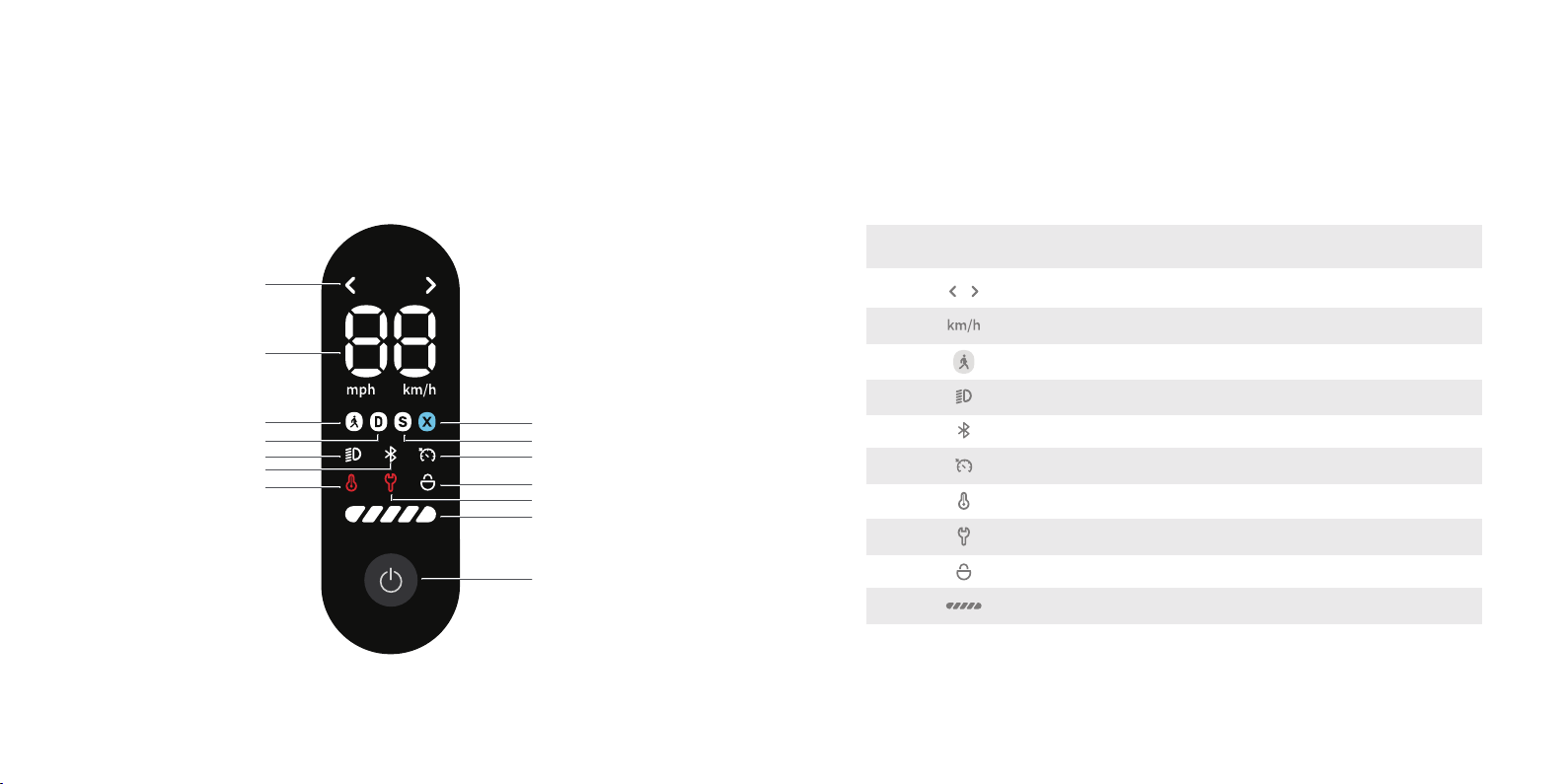
Dashboard
Pedestrian Mode
Turn signal
Headlight
D Mode
Abnormal temperature
Bluetooth
Multifunction button
Speed
PRODUCT INTRODUCTION
Dashboard
Description Icon displayNo.
Turn signal
Speed
Speed Mode
Headlight
Bluetooth
Cruise control
Fault warning
Parking Mode
Battery level
1
2
3
4
5
6
7
8
9
10
Light up if the left/right turn button is pressed.
Light up if the headlight is turned on and light off if turned off.
Light up if the Bluetooth is connected and light off if disconnected.
Light up if the cruise control function is enabled.
In case of fault, the fault icon lights up and the fault code is displayed.
Light up if “Bluetooth Parking” is enabled via “Yadea” App.
Display the remaining battery of the scooter.
Icon
S MODE
Cruise control
Parking Mode
Fault warning
Battery level
X MODE
Switch between imperial (mph) and metric (km/h) systems via
“Yadea” App.
Show the current riding Pedestrian Mode, D Mode, S Mode,
and X Mode.
If the battery pack or electric thermometer overheats, the
overtemperature icon lights up.
Abnormal
temperature

Multi-function button
PRODUCT INTRODUCTION
PART2 Function Description
1
3
4
2
Press once & long press
Power on, and the screen lights up. (It will be turned off automatically after 10 min without operation.)
Press once or long press it to power off, and the screen lights off.
Press once & short press
Turn on/off the headlight.
Press twice & continually short press
CǍČŗŁČðŗŗǍƛLJŁƧČļƧļěsŭēěƛƧļěƛČŭŭƧěƓŁƛƛěƧƧŭ'sŭēěijŭƓƧļěǠƓƛƧƛƧðƓƧƯƐðijƧěƓēěŗŁdžěƓǍ
the scooter will keep the pre-shutdown Mode when it is turned on again after power-off.
Press three times & continually short press
Switch between the imperial (mph) and metric (km/h) systems.
#VVGPVKQPỽ6JG:OQFGKUFKUCDNGFD[FGHCWNVYJGPNGCXKPIVJGHCEVQT[CPFTGSWKTGFVQDGWPNQEMGFCHVGT
EQPPGEVKPIVQVJGUEQQVGTXKC;CFGC#22#HVGTWPNQEMKPI[QWECPUYKVEJTKFKPIOQFGUXKCRTGUUKPI
VJGOWNVKHWPEVKQPDWVVQP
Pedestrian Mode
D Mode
S Mode
X Mode
Mode Instruction
Extreme Speed Mode; apply stronger acceleration, recommended to
use after mastering the riding skills.
EN17128
6km/h
15km/h
25km/h
25km/h
UL
6km/h
15km/h
32km/h
32km/h
Push Mode; suitable for pushing the scooter to make beginners
familiar with riding.
Drive Mode; suitable for daily riding.
Sports Mode; recommended to use after mastering the riding skills.

The “Bluetooth parking” function is disabled by default before delivery, and can be enabled via “Yadea ” APP after the
scooter is bound.
In parking Mode, the screen is off and only the parking icon is displayed; the button function is locked, and the throttle
and Brake lever are disabled. In parking mode, if the battery runs out, the Mode is automatically canceled.
After parking for 6 hours, this Mode will be canceled automatically and the scooter will automatically shut down.
VŢƐðƓŔŁŢĴŠŭēěŁijƧļěƛČŭŭƧěƓŁƛēěƧěČƧěēƧŭdžŁċƓðƧěŭƓŠŭdžěƧļěċƯǗǗěƓLJŁŗŗðŗðƓŠðŢēƧļěijƓŭŢƧðŢēƓěðƓŗŁĴļƧƛǡðƛļ
until there is no abnormality.
Bluetooth Parking
The cruise control function can be enabled through the “Yadea ” APP.
After the scooter power on, in the D, S or X Mode, press the thumb throttle to maintain a constant position unchanged
for 8 seconds, the buzzer will beep once and the scooter will enter the cruise control Mode, then release the throttle,
and the scooter will continue to drive at the current speed.
When driving in cruise control Mode, hold the brake handle/press the thumb throttle again to disable the cruise control
function, and the scooter will return to normal driving control.
Attention:To avoid danger and accidents, do not use the cruise control function under complicated road conditions or
bad weather.According to regulatory requirements, only the UL version is suitable for this function, and the actual
product shall prevail.
Cruise control
The scooter’s tilting attitude can be detected over the ride. When the body tilts at an angle of 45°, the power supply of
the scooter will be automatically turned off to avoid secondary injury.
Gyroscope
The “Energy Recovery” function can be enabled through the “Yadea ” APP. Energy recovery intensity: Adjustable at
high, medium and low levels.
During the ride, squeeze the brake lever to activate the electronic brake, store electrical energy through the energy
recovery brake, and further convert it into driving energy.
Energy recovery

HOW TO USE
PART1 Scooter Assembly
Installation Steps
Connect the power cable within the handlebar to the
main line connector of the vertical stem, and install
the handlebar onto the vertical stem.
2
Lock the screws with the hex wrench within the
installation tool.
3
After installation completely, plug the charging
plug into the charging port and connect the
power supply to charge for 2-3 seconds to
activate the battery, and then you can turn on
the scooter to ride.
4
Unfold the stem and secure the folding wrench to
stabilize the scooter.
1
3ʐFix the scooter and stem during installation to avoid
injury caused by tipping.
4ʐDo not turn on the power supply before the installation is
completed. When installing components, please apply
appropriate force to avoid component damage or scooter
body failure.
1ʐPlease follow the instructions to install the
components. Improper installation may cause
safety risks.
2ʐWhen installing the handlebar, please set it in
the correct angle.
Attention

HOW TO USE
PART2 Vehicle Activation
Activation Procedure
1ʐOpen the “Yadea” APP.Follow the
prompts on the APP screen to complete
account registration and login.
2、Scan the QR code on the scooter
ċŭēǍŭƓǠŢēƧļěēědžŁČědžŁð
Bluetooth, and bind the scooter.
3ʐWatch the video “Driving Guide” in its
entirety, and then click "Activate" or
watch the video again.
4ʐThe scooter is activated successfully.
Please start your ride.

HOW TO USE
PART3 Battery Charging
Charging method
Attention
Please charge the scooter with Yadea original charger, and do not use any charger of other brand and Model.
Do not connect the power supply and charger if the charger or power socket is wet.
If the red indicator on the charger is steady on, the battery is under charging. If the green indicator is steady on, the
battery is fully charged and the power supply should be disconnected promptly.
The charging port cap should be covered tightly when not charging or after charging.
It is recommended to place the scooter outdoors to charge, but to protect it from rain and sun exposure.
HOW TO USE
PART4 Folding and Carrying
How to fold the scooter
Hold the stem and push the safety button
with thumb to open the folding wrench, and
then fold down the stem.
Open the wrench, align it to the position
of the folding buckle, hook the folding
latch of the stem to the buckle to
complete the whole folding steps.
Open the charging port cap and connect the charger properly.
2
2
2
1
Tabla de contenidos
Otros manuales de Scooter de Yadea


