
X-Rite i1Display Pro Plus Manual de usuario

i1Display Pro PLUS
i1Display Pro
i1Display Studio
Quick Start Guide
Kurzanleitung
Manuel de démarrage
Guida introduttiva
Průvodce nastavením
クィックスタートガイド
快速入门指南

Důležité upozornění Bezpečnostní upozornění
INFORMACE O ZAŘÍZENÍ
Používání tohoto zařízení jiným způsobem, než jaký specifikuje společnost X-Rite, Incorporated, může
narušit integritu designu a stát se nebezpečným.
VAROVÁNÍ: Tento přístroj není určen k použití ve výbušném prostředí.
ADVERTENCIA – NO use este aparato en los ambientes explosivos.
AVVERTIMENTO – NON usare questo apparecchio in ambienti esplosivi.
WARNUNG: Das Gerät darf in einer explosiven Umgebung NICHT verwendet werden.
AVERTISSEMENT: Cet instrument ne doit pas être utilisé dans un environnement explosif.
Instrukce k odstranění: Prosím, elektronické zařízení likvidujte na příslušném místě k likvidaci
elektronického odpadu určeném.
Pokud je tento výrobek používán způsobem, který není specifikován v pokynech, může být narušena bezpečnostní
ochrana poskytnutá zařízením nebo bude nefunkční.
Neoprávněná demontáž zařízení má za následek neplatnost všech záručních nároků.
!
CE Deklarace
X-Rite, Incorporated tímto prohlašuje, že toto zařízení je ve shodě se základními požadavky a dalšími příslušnými
ustanoveními směrnic 2014/35/EU (LVD), 2014/30/EU (EMC),aRoHS 2015/863.

CZ
JP
CN
1. i1Display 2. Quick Start Guide 3. Software download instructions
1. i1Display 2. Kurzanleitung 3. Softwaredownloadanweisungen
1. Instrument i1Display 2. Guide de démarrage 3. Instructions de téléchargement du logiciel
1. i1Display 2. Guida introduttiva 3. Istruzioni per scaricare il software
1. i1Display 2.Průvodce nastavením 3. Instrukce ke stažení aplikace
1. i1Display ディスプレイ 2. 基本操作の手引き 3. ソフトウェアのダウンロード手順書
1. i1Display 显示器 2. 快速入门指南 3. 软件下载说明
EN
DE
FR
IT
Package Contents Lieferumfang Contenu du coffret Contenuto della confezione
Obsah balení パッケージ内容 包装内容
Software Information Softwareinformationen Informations sur le logiciel
Informazioni sul software Informace k aplikaci ソフトウェア情報 软件信息
i1Display Studio i1Studio xrite.com/geti1Studio
i1Display Pro i1Proler xrite.com/geti1Proler
i1Display Pro PLUS i1Proler xrite.com/geti1Proler
CZ
JP
CN
EN
DE
FR
IT
Device
Gerät
Périphérique
Dispositivo
Přístroj
装置
设备
Software Application
Software
Application logicielle
Applicazione software
Použijte aplikaci
ソフトウェア
软件应用程序
Download URL
Download-URL
URL de téléchargement
URL di download
Adresa ke stažení
ダウンロード リンク下
载 URL

CZ
JP
CN
Před prvním použitím přístroje musíte stáhnout a do počítače instalovat příslušnou aplikaci dle předchozí
tabulky. USB kabel přístroje nezasunujte do počítače dříve, než je instalace ukončená.
1. Pro přístroje i1Display Pro ai1Display Pro PLUS, navštivte www.xrite.com/geti1Profiler pro stažení aplikace
i1Profiler do počítače.
V případě přístroje i1Display Studio, navštivte www.xrite.com/geti1Studio pro stažení aplikace i1Studio do
počítače.
2. Projděte si všechny informace v této příručce před prvním použitím přístroje. Pro další informace navštivte,
prosíme, webovou stránku www.xrite.com.
装置を使用する前に、ソフトウェアをコンピューターにインストールする必要があります。
ソフトウェアをインストールするまで、装置の USB ケーブルはコンピューターに挿入しないでください。
1. i1Display Pro および i1Display Pro PLUS 装置には、i1Profiler ソフトウェアをダウンロードし、コンピ
ューターにインストールしてください。(ダウンロードリンク → https://www.xrite.com/geti1Profiler)
i1Display Studio 装置には、i1Studio ソフトウェアをダウンロードし、コンピューターにインストールしてくださ
い。(ダウンロードリンク → https://www.xrite.com/geti1Studio)
2. 新しい装置を使用する前に、本取扱説明書の手順をお読みください。詳細は https://www.xrite.co.jp
をご覧ください。
需要将软件应用程序安装到计算机上,然后才能使用设备。
在安装了软件应用程序之前,请不要将仪器的 USB 电缆插入计算机。
1. 对于 i1Display Pro 和 i1Display Pro PLUS 设备,请访问 www.xrite.com/geti1Profiler 下载
i1Profiler 应用程序,然后在计算机上安装软件应用程序。对于 i1Display Studio 设备,请访问
www.xrite.com/geti1Studio 下载 i1Studio 应用程序,然后在计算机上安装软件应用程序。
2. 在开始使用新设备请前,请先阅读本《快速入门指南》中的所有说明。请访问 www.xrite.cn,了
解有关详细信息。
EN
DE
FR
IT
Installation 1 Installation 1 Installation 1 Installazione 1 Instalace 1 インストール 1 安装 1
Before you can use your device, you will need to install the software application onto your computer.
Please do not plug in the instrument USB cable to your computer until after you have installed the software application.
1. For the i1Display Pro and i1Display Pro PLUS devices, visit www.xrite.com/geti1Profiler to download the i1Profiler
application and install the software application on your computer.
For the i1Display Studio device, visit www.xrite.com/geti1Studio to download the i1Studio application and install the software
application on your computer.
2. Review all of the instructions in this Quick Start Guide before you start using your new device. For more detailed
information, please visit www.xrite.com.
Sie müssne vor der Verwendung des Geräts die Software auf Ihrem Computer installieren.
Bitte schließen Sie das USB-Kabel erst an den Computer an, nachdem Sie die Software installiert haben.
1. Gerät i1Display Pro und i1Display Pro PLUS: Laden Sie i1Profiler von www.xrite.com/geti1Profiler herunter, und installieren
Sie die Software auf Ihrem Computer.
Gerät i1Display Studio: Laden Sie i1Studio von www.xrite.com/geti1Studio herunter, und installieren Sie die Software auf
Ihrem Computer.
2. Lesen Sie diese Kurzanleitung sorgfältig, ehe Sie Ihr neues Gerät erstmalig verwenden. Weitere Informationen finden Sie
unter www.xrite.com.
Avant de pouvoir utiliser votre périphérique, vous devez installer l‘application logicielle sur votre ordinateur.
Veillez à installer l‘application logicielle AVANT de connecter le câble USB de l‘instrument à votre ordinateur.
1. Pour les périphériques i1Display Pro et i1Display Pro PLUS, visitez www.xrite.com/geti1Profiler pour télécharger l‘application
i1Profiler et installez-la sur votre ordinateur.
Pour le périphérique i1Display Studio, visitez www.xrite.com/geti1Studio pour télécharger l‘application i1Studio et installez-la
sur votre ordinateur.
2. Passez en revue toutes les instructions de ce guide de démarrage rapide avant de commencer à utiliser votre nouveau
périphérique. Pour obtenir des informations plus détaillées, visitez www.xrite.com.
Prima di poter utilizzare il dispositivo, è necessario installare l‘applicazione software sul computer.
Non collegare il cavo USB dello strumento al computer finché non è stata installata l‘applicazione software.
1. Per i dispositivi i1Display Pro e i1Display Pro PLUS, visitare www.xrite.com/geti1Profiler per scaricare l‘applicazione
software i1Profiler e installarla sul tuo computer.
Per il dispositivo i1Display Studio, visitare www.xrite.com/geti1Studio per scaricare l‘applicazione software i1Studio e
installarla sul tuo computer.
2. Leggere tutte le istruzioni di questa Guida introduttiva prima di iniziare a utilizzare il nuovo dispositivo. Per maggiori
informazioni, visitare il sito Web all‘indirizzo: www.xrite.com.
CZ
JP
CN
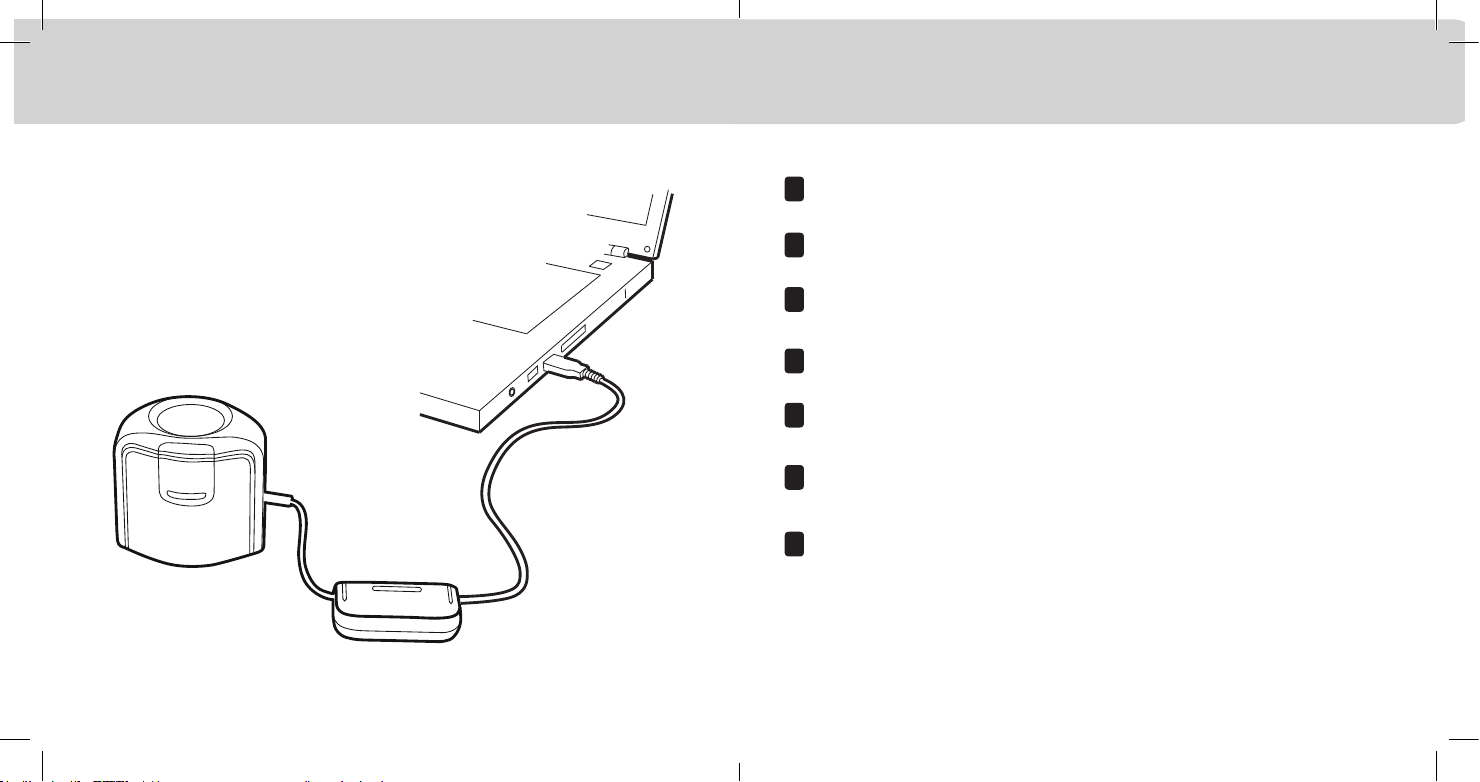
After you have completed the software installation process, attach the device to your computer’s USB port.
Bitte schließen Sie nach Abschluss der Installation das Gerät an den USB-Anschluss Ihres Computers an.
Une fois le processus d’installation du logiciel terminé, connectez le périphérique au port USB de votre ordinateur.
Dopo aver completato il processo d’installazione del software, collegare il dispositivo alla porta USB del computer.
Poté, co dokončíte instalaci aplikace, připojte zařízení do konektoru USB v počítači.
.ソフトウェアのインストールが終了後、装置をコンピューターの USB ポートに接続してください。
完成软件应用程序安装过程后,将设备连接到计算机的 USB 端口。
EN
DE
FR
IT
Installation 2 Installation 2 Installation 2 Installazione 2 Instalace 2 インストール 2 安装 2

CZ
JP
CN
1. Ambient Diffuser Arm. 2. Ambient Diffuser
1. Lichtdiffuserhalter 2. Lichtdiffuser
1. Bras du diffuseur ambiant 2. Diffuseur ambiant
1. Braccio del diffusore della luce ambientale 2. Diffusore della luce ambientale
1. Držák rozptylky okolního osvětlení 2. Difuzor - rozptylka okolního osvětlení
1. 環境光拡散アーム 2. 環境光拡散
1. 周围光源扩散器机臂 2. 周围光源扩散器
EN
DE
FR
IT
Overview 1 Übersicht 1 Présentation 1 Cenni generali 1 Přehled 1 概要 1 概览 1
12

CZ
JP
CN
Ambient diffuser arm snaps into place over measurement optics. Be sure to lift up on ambient diffuser arm before
attempting to rotate into different measurement positions.
Lichtdiffuserhalter rastet über der Messoptik ein. Lichtdiffuserhalter muss angehoben werden, ehe er in die
verschiedenen Messpositionen gebracht werden kann.
Le bras du diffuseur ambiant s‘enclenche sur l‘optique de mesure. Veillez à soulever le bras du diffuseur ambiant avant
de tenter de le faire pivoter dans d‘autres positions de mesure.
Il braccio del diffusore della luce ambientale si aggancia in posizione sopra le ottiche di misurazione. Prima di ruotare lo
strumento in posizioni di misurazione differenti assicurarsi di aver sollevato il braccio del diffusore della luce ambientale.
Držák rozptylky je v základní pozici na místě měřící optiky a je tak její krytkou. Ujistěte se, že držák před otočením do
jiné pozice lehce nadzvednete.
環境光拡散アームは、測定オプチクス上にカチッとはまるように取り付けます。環境光拡散アームを他の測定位置
に回転する際は、必ず上に持ち上げてから回転してください。
周围光源扩散器机臂扣在测量镜头之上。尝试旋转周围光源扩散器的位置前,请确保向上提起周围
光源扩散器机臂。
EN
DE
FR
IT
Overview 2 Übersicht 2 Présentation 2 Cenni generali 2 Přehled 2 概要 2 概览 2

CZ
JP
CN
Measuring Modes
1. Ambient Light Measurement 2. Emissive Light Measurement 3. Projector Measurement
Messmodi
1. Umgebungslichtmessung 2. Emissionslichtmessung 3. Projektormessung
Modes de mesure
1. Mesure de la lumière ambiante 2. Mesure de la lumière émissive 3. Mesure du projecteur
Modalità di misurazione
1. Misurazione Luce ambientale 2. Misurazione Luce d‘emissione 3. Misurazione Proiettore
Měřící módy
1. Měření okolního světla 2. Měření emisního světla 3. Měření světla z projektoru
測定モード
1. 環境光の測定 2. ディスプレイ放射光の測定 3. プロジェクターの測定
测量模式
1. 周围光源测量 2. 放射光测量 3. 放映机测量
EN
DE
FR
IT
Overview 3 Übersicht 3 Présentation 3 Cenni generali 3 Přehled 3 概要 3 概览 3
1 2
3

CZ
JP
CN
For display measurements: 1. Lift up on ambient diffuser arm. 2. Rotate ambient diffuser arm to rear
position. 3. Ambient diffuser arm will snap into place when located in rear position.
Monitormessung: 1. Lichtdiffuserhalter anheben. 2. Lichtdiffuserhalter nach hinten drehen.
3. Lichtdiffuserhalter rastet ein, wenn er richtig positioniert ist.
Pour les mesures d‘écran : 1. Soulevez le bras du diffuseur ambiant. 2. Faites pivoter le bras du diffuseur ambiant en
position arrière. 3. Le bras du diffuseur ambiant s‘enclenche lorsqu‘il se trouve en position arrière.
Per misurazioni di uno schermo: 1. Sollevare il braccio del diffusore della luce ambientale. 2. Ruotare il braccio del
diffusore della luce ambientale in posizione posteriore. 3. Il braccio del diffusore della luce ambientale si aggancia
quando collocato in posizione posteriore.
Měření displeje: 1. Nadzvedněte držák difuzeru 2. Otočte držákem difuzeru do zadní pozice 3. Držák difuzeru zapadne
na své místo jakmile se otočí do zadní pozice.
ディスプレイ測定: 1. 環境光拡散アームを持ち上げます。 2. 環境光拡散アームを後方位置に回転させます。
3. 環境光拡散アームは、後方位置にカチッとはまるように取り付けます。
对于显示器测量: 1. 提起周围光源扩散器机臂。 2. 旋转周围光源扩散器机臂至后端位置。
3. 周围光源扩散器机臂将卡入后端位置。
EN
DE
FR
IT
Monitor measurement 1 Monitormessung 1 Mesure de moniteur 1 Měření monitoru 1 Medición del monitor 1 モニタ測定 1 显示器测量 1
1
2
3

CZ
JP
CN
To adjust the position of the counter weight, depress the button on the counter weight and slide counter weight
simultaneously to desired location.
Position kann mit Taste auf dem Gegengewicht angepasst werden. Taste drücken und halten, und Gegengewicht in
gewünschte Position schieben.
Pour régler la position du contrepoids, appuyez sur le bouton situé sur le contrepoids tout en faisant coulisser le
contrepoids à l‘emplacement désiré.
Per regolare la posizione del contrappeso, premere il pulsante sul contrappeso e contemporaneamente farlo scorrere
nella posizione desiderata.
Umístěte protizávaží tak, že mírně zmáčknete tlačítko na něm a posuňte jej po kabelu na potřebné místo. Poté
tlačítko uvolněte.
バランスウェイト(錘)の位置を調整するには、バランスウェイトのボタンを押しながら同時にバランスウェイトを動
かします。
要调整平衡锤的位置,请下压平衡锤上的按钮并同时将平衡锤滑动至所需位置。
EN
DE
FR
IT
Monitor measurement 2 Monitormessung 2 Mesure de moniteur 2 Měření monitoru 2 Medición del monitor 2 モニタ測定 2 显示器测量 2
1
2
Este manual sirve para los siguientes modelos
2
Tabla de contenidos
Otros manuales de Equipo de prueba de X-Rite


Manuales populares de Equipo de prueba de otras marcas

SMART
SMART KANAAD SBT XTREME 3G Series Manual de usuario

Agilent Technologies
Agilent Technologies BERT Serial Manual de usuario

Agilent Technologies
Agilent Technologies N3280A Manual de usuario

Vernier
Vernier Go Direct Voltage Manual de usuario

Lifeloc
Lifeloc R.A.D.A.R. Manual de usuario

Fluke
Fluke T5-600 Instrucciones de funcionamiento e instalación


