Wurkkos HD15 Manual de usuario

HD15 User Manual
Wurkkos HD15 is a professional, bright angle-head flashlight and tool lamp,
designed for multiple indoor and outdoor activities like camping, hiking, fishing
or hunting. With the supplied headband it can also be used as a headlamp. It is
powered by a single 18650 lithium-ion rechargeable battery, is rechargeable via
USB-C (both type A-C and C-C cables) and can also work in reverse as a
powerbank to charge external USB-devices. Moreover, HD15 comes with an
adjustable lanyard, a magnetic tailcap and a sophisticated user interface for
flexible and convenient one hand operation.
Samsung’s LH351D and Luminus SST20 emitter in neutral white tint (5.000K)
enable HD15 to provide both spotlight and floodlight in one single flashlight.
Using 90CRI for floodlight result in great color rendition at close ranges.

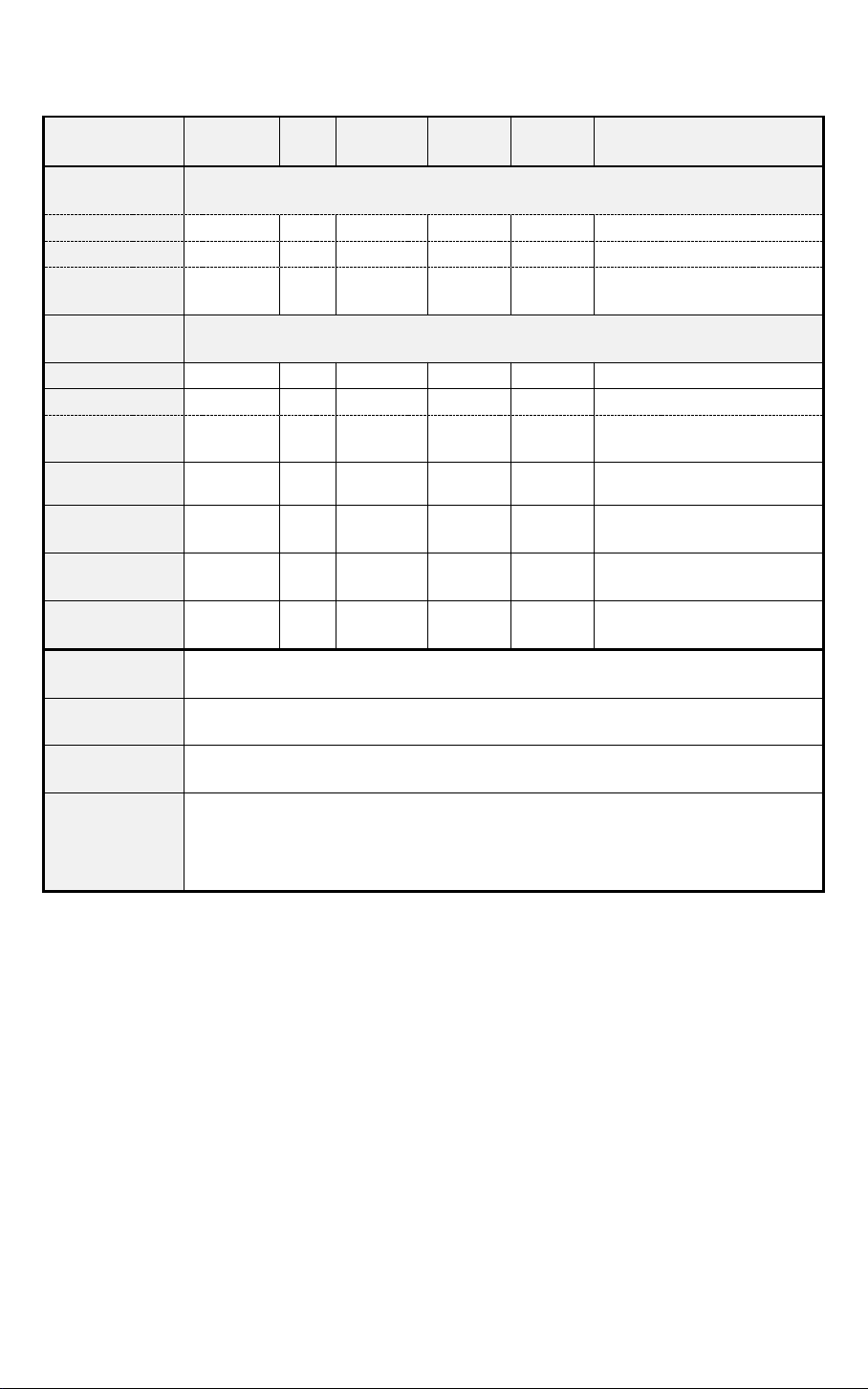
ANSI/NEMA FL1 Chart
Mode
Moonligh
t
Low
Medium
High
Turbo
Strobe / SOS / Beacon
Luminous
Flux [lm]
Spotlight
1
10
120
400
1.000
1.000/120/1.000
Floodlight
1
10
120
400
1.000
1.000/120/1.000
Spot +
Flood
2
20
240
800
2.000
2.000/240/2.000
Beam
Distance
[m]
Spotlight
-
14
53
88
148
-
Floodlight
-
8
25
35
75
-
Spot +
Flood
-
16
54
97
151
-
Runtime
Spotlight
333h
111
h
13h30mi
n
4h
3h30mi
n
7h/10h30min/15h45min
Floodlight
333h
93h
13h
3h30mi
n
2h45mi
n
5h30min/8h15min/12h22m
in
Spot +
Flood
230h
58h
7h 20min
2h 8min
1h
45min
3h30min/5h15min/7h52mi
n
Impact
Resistance
1m / 3.28 ft.
Water
Resistance
IP-68 (up to 2m / 6.56 ft. under water)
Charging
Specificatio
n
USB-C port, 5V 2A max
Notes
The above mentioned parameters are based on tests according to international
flashlight testing standards (ANSI/NEMA FL1) using one 3.000 mAh 18650 lithium-
ion battery in our laboratory. Results may vary with different battery or under
different environmental conditions.
Specifications
Emitter: 1x Samsung LH351D 5.000K 90CRI + 1x Luminus SST20 5.000K 70CRI
Operating voltage: 2.7V – 4.2V
Battery options: 1x 18650 or 1x 18650 lithium-ion battery
Dimension: 112mm (length) x 27.4mm (head diameter)
Weight: 78g / 0.15lb (without battery)
Flashlight body: Aerospace grade 6061 grade aluminum alloy, CNC
manufactured to hard-anodized to military grade specification type III, anti-
abrasive finish to get solid built body, anti-crash geometry and better heat
exchange.
Water resistance i.a.w. IP-68 (up to 2m / 6.56 ft. under water)
Reverse polarity protection to protect against improper battery installation.

Advanced Temperature Regulation (ATR) technology: ATR automatically
reduces the brightness level when the driver temperature reaches 60°C to
prevent overheating
Low voltage warning
Power Indicator
The LED indicator in the side switch shows the power status for 5 seconds after
turning HD15 on.(Power LED indicator shows at one side of the switch)
Green = remaining battery power is good (more than 30%).
Red = remaining battery power is poor (less than 30%).
Flashing Red = critical power, replace or recharge battery as soon as
possible.
Low Voltage Protection: If the battery’s voltage is lower than 2.7V, HD15 turns
off automatically to avoid battery damage by overdischarge.
Recharging & Powerbank Feature
HD15 has a USB-C port for convenient recharging of its battery. Please connect it
with the supplied USB-C cable and use a USB power adapter. You may use any
other USB-C cable for charging - both type A-C and type C-C cables work.
HD15 is also able to work as a powerbank, charging external USB-devices from its
internal battery. Please note that depending on the external device you may
need a different USB-cable (e.g. C to C or C to microUSB or C to Apple Lightning)
than the one supplied with HD15.
Charging/Reverse Charging Indicator (LED indicator shows at the switch):
Charging = Flash RED; Full Charge = Green
Reverse Charging/Powerbank = Green
It will Flash RED when the power is not enough to support discharge and turn off
discharge
When remove USB cable indicator will turns off automatically.
Getting started
Before using the flashlight, unscrew the tail cap, remove the battery and remove
the insulating plates on the battery’s poles. Afterwards reinsert the battery with
the anode side (+) towards the head, then screw the tailcap back on. Now, use
the supplied USB-C cable (or any other USB-C cable) to charge the battery in the
flashlight. Once finished the power indicator will turn green to report a full
battery.

Battery Specifications
Battery Type
Dimension &
Quantity
Nominal Voltage
Compatible
Rechargeable li-
ion battery
18650 x 1
3.7V
Yes (recommended)
Battery Installation
Unscrew the tailcap to insert one 18650 battery with the anode side (+) towards
the head, then screw the tailcap back on.
Operation Instructions
Important advice:
Click means press and immediately release the button. Hold means press and
keep holding the button.
When HD15 is OFF:
Action
Consecutive
Action
Triggered Result
Hold 2s
1 click
Turn ON using Moonlight mode
Turn OFF
1 click
-
Turn ON with mode memory (using last used
mode/settings)
2 fast
clicks
Turn ON with Turbo mode (last used LED mode)
2 fast clicks
Cycle to Strobe mode (both LEDs at full power)
2 fast clicks
Cycle to SOS mode (both LEDs at full power)
2 fast clicks
Cycle to Beacon mode (both LEDs at full power)
1 click
Turn OFF from any of these modes
3 fast
clicks
-
Check battery status
Green = remaining battery power is good (more than
30%).
Red = remaining battery power is poor (less than 30%).
Flashing Red = critical power, replace or recharge battery
as soon as possible.
4 fast
clicks
Electronic Lockout (Lock/Unlock)
Hold
Temporary moonlight mode while pressing button
The lockout function will prevent accidental activation,
e.g. in one’s pocket or backpack.

When HD15 is ON:
Action
Consecutiv
e Action
Triggered Result
Hold
Change brightness (low > medium > high) on current LED
selection
Click +
Hold
Cycle LED modes (spotlight only > floodlight only > both
LEDs)
Selected brightness for each LED mode and which LED mode
was last used are memorized
1 click
-
Turn OFF
2 fast
clicks
Activate Turbo mode (last used LED mode)
2 clicks
Cycle to Strobe mode (both LEDs at full power)
2 clicks
Cycle to SOS mode (both LEDs at full power)
2 clicks
Cycle to Beacon mode (both LEDs at full power)
1 click
Return to previous standard mode from any of these
modes. Another single click will turn OFF the light.
Operating HD15 for a long time on high brightness modes or while reverse
charging will warm the flashlight up. This is normal.
Troubleshooting and Maintenance
Disassembling the sealed head can damage the flashlight and voids the
warranty.
Wurkkos Ltd. recommends using high-quality brand batteries. Damage by
defective batteries void the warranty.
Remove the battery if the flashlight will not be used for an extended period
of time.
To prevent self-discharge or accidental activation during storage or
transportation, unscrew the tailcap by half a turn or remove battery.
Every 6 months threads should be wiped with a clean cloth followed by a thin
layer of silicone grease.
To maintain a proper level of waterproofness, replace worn-out o-rings with
an approved spare (2 pieces are shipped with initial order).

Troubleshooting: Clean battery contacts regularly as dirty contacts may
impair the performance of the flashlight. If you experience problems (flicker,
shine intermittently or failure to turn on) the following root causes and
solutions should be tried:
Reason A: The battery needs replacement (Battery voltage is below 2.7V).
Solution: Replace battery with an approved type of fully charged battery.
Reason B: Threads, PCB board contact or other contacts are dirty.
Solutions: Please clean the contact points with a cotton swab soaked in
rubbing alcohol.
Reason C: The flashlight will not turn on upon first use.
Solution: Please do not forget to remove the insulation stickers from the
battery on first use.
If the above methods do not work please refer to the warranty policy before
contacting your authorized distributor.
Please contact us if you have any questions. If your product is defective please
contact us for refund or replacement within warranty period.
Wurkkos Limited:
Tel: +86-137-28792565
E-mail: wurkkos@foxmail.com
Web: www.wurkkos.com
Address: No.1 Qinglin Industrial Center, Guanlan Street, Longhua New District,
Shenzhen 518000, China

HD15 Bedienungsanleitung
Die Wurkkos HD15 ist eine professionelle, helle Winkelkopf- und Werkzeuglampe
für diverse Innen- und Außenaktivitäten wie z.B. zum Camping, Wandern, Angeln
oder zur Jagd. Mit dem beiliegenden Kopfband kann sie auch als Kopflampe
verwendet werden. Die HD15 wird mit einem 18650 Lithium-Ionen Akku
betrieben, kann via USB-C (sowohl mit Typ A-C als auch C-C Kabeln) wieder
aufgeladen und sogar als Powerbank genutzt werden, um externe Geräte zu
laden. Darüber hinaus zeichnet sich die HD15 durch eine verstellbare
Handschlaufe, eine magnetische Kappe sowie eine ausgeklügelte Steuerung aus,
die eine flexible und bequeme Einhandbedienung ermöglichen.
Mit Samsungs LH351D und Luminus SST20 LED in neutralweißer Lichtfarbe
(5.000K) bietet die HD15 sowohl flutiges als auch spotlastiges Licht in einer
einzigen Taschenlampe. Dank 90CRI wird zudem eine hohe Farbwiedergabe bei
der Ausleuchtung des Nahbereichs ermöglicht.

ANSI/NEMA FL1 Tabelle
Leuchtstufen
Moonlig
ht
Low
Medium
High
Turbo
Strobe / SOS / Beacon
Lichtstrom
[lm]
Spotlicht
1
10
120
400
1.000
1.000/120/1.000
Flutlicht
1
10
120
400
1.000
1.000/120/1.000
Spot- &
Flutlicht
2
20
240
800
2.000
2.000/240/2.000
Leuchtweite
[m]
Spotlicht
-
14
53
88
148
-
Flutlicht
-
8
25
35
75
-
Spot- &
Flutlicht
-
16
54
97
151
-
Laufzeit
(Mittelwert)
Spotlicht
333h
111
h
13h30mi
n
4h
3h30mi
n
7h/10h30min/15h45min
Flutlicht
333h
93h
13h
3h30mi
n
2h45mi
n
5h30min/8h15min/12h22
min
Spot- &
Flutlicht
230h
58h
7h
20min
2h
8min
1h
45min
3h30min/5h15min/7h52m
in
Maximale
Falltiefe
1m / 3.28 ft.
Wasserfestigk
eit
IP-68 (bis zu 2m / 6.56 ft. unter Wasser)
Spezifikation
zum Laden
USB-C Anschluss, 5V 2A max
Hinweis
Die o.g. Parameter basieren auf Tests gemäß den internationalen Test-
Standards für Taschenlampen (ANSI/NEMA FL1). Dabei wurde ein 3.000mAh
18650 Lithium-Ionen Akku unter Laborbedingungen verwendet. Die Ergebnisse
sind abhängig vom eingesetzten Akku und den Umgebungsbedingungen.
Spezifikation
Emitter: 1x Samsung LH351D 5.000K 90CRI + 1x Luminus SST20 5.000K 70CRI
Betriebsspannung: 2.7V – 4.2V
Stromversorgung: 1x 18650 Lithium-Ionen Akku
Abmessungen: 112mm (Länge) x 27.4mm (Kopfdurchmesser)
Masse: 78g / 0.15lb (ohne Akku)
Gehäuse: 6061 Flugzeug-Aluminiumlegierung, HA III Hartanodisierung mit
abriebfestem Finish für
einen soliden Lampenkörper mit sturzfestem Aufbau und besserer
Wärmeverteilung
Wasserfestigkeit gemäß IP-68 (bis zu 2m / 6.56 ft. unter Wasser)
Verpolungsschutz gegen falsch herum eingelegte Akkus

Advanced Temperature Regulation (ATR) Technologie: ATR reduziert
automatisch die Helligkeit, sobald die Temperatur am Treiber 60°C erreicht.
So wird ein Überhitzen der Lampe effektiv vermieden.
Tiefentladungsschutz
Akkustandsanzeige
Die LED im Schalter der Lampe zeigt den Akkustand für 5 Sekunden nach
Einschalten der HD15 an. (Die Power-LED-Anzeige zeigt auf einer Seite des
Schalters)
Grün = Die Akkuleistung ist noch ausreichend (mehr als 30%).
Rot = Die Akkuleistung ist schwach (weniger als 30%).
Rotes Blinken = Kritischer Akkustand, der Akku sollte baldmöglichst
ersetzt bzw. geladen werden.
Tiefentladungsschutz: Um eine Tiefentladung des Akkus zu verhindern, schaltet
sich die HD15 automatisch ab sobald die Spannung des Akkus unter 2.7V fällt.
Auflade- und Powerbank-Funktion
Der Akku des HD15 lässt sich bequem über den USB-C-Port aufladen. Verbinden
Sie die Lampe mit dem mitgelieferten USB-C-Kabel und einem USB-Ladegerät.
Alternativ können Sie andere USB-C-Kabel verwenden - sowohl Typ-A-C- als auch
Typ-C-C-Kabel funktionieren.
Der HD15 kann auch als Powerbank verwendet werden, um externe USB-Geräte
über den internen Akku aufzuladen. Bitte beachten Sie, dass je nach externem
Gerät ein anderes Kabel als das mitgelieferte (z.B. C auf C, C auf microUSB oder C
auf Apple Lightning) verwendet werden muss.
Lade-/Nachladeanzeige (LED-Anzeige zeigt im Schalter):
Aufladen = blitzrot; Volle Ladung = grün
Reverse Charging / Powerbank = grün
Sie blinkt rot, wenn die Stromversorgung nicht ausreicht, um die Entladung zu
unterstützen und die Entladung auszuschalten
Wenn das USB-Kabel entfernt wird, erlischt die Anzeige automatisch
Inbetriebnahme
Bevor Sie die Taschenlampe in Betrieb nehmen, schrauben Sie die hintere Kappe
ab und entfernen die Papier-Isolierscheiben von den Polen des Akkus. Legen Sie
den Akku mit dem Pluspol (+) zum Kopf der Taschenlampe hin wieder ein und
schrauben die hintere Kappe wieder fest zu. Laden Sie anschließend den Akku in
der Lampe mit dem beiliegenden (bzw. einem anderen geeigneten) USB-C Kabel
und einem geeigneten Ladegerät auf. Sobald der Ladevorgang beendet ist,

leuchtet die Ladeanzeige der Lampe grün. Sie können alternativ zum 18650 Akku
auch einen 18650 Akku mit der beiliegenden Adapterhülse verwenden.
Akku Spezifikation
Akku Typ
Größe und
Menge
Nennspannung
Verwendung
möglich?
Wiederaufladbarer Li-
Ion Akku
18650 x 1
3.7V
Ja (empfohlen)
Bedienung
Wichtiger Hinweis:
Ein Klick bedeutet Drücken und sofortiges Loslassen des Schalters. Mehrere
Klicks (z.B. 2 Klicks) müssen sehr schnell aufeinander folgen. Ein Halten bedeutet
dauerhaftes Gedrückthalten des Schalters.
Die Lampe ist AUSGESCHALTET:
Aktion
Nächste
Aktion
Ergebnis
Halten
für 2s
1 Klick
EINSCHALTEN im Moonlight Modus
AUSSCHALTEN
1 Klick
-
EINSCHALTEN (auf letzter verwendeter Einstellung)
2
Klicks
EINSCHALTEN im Turbo Modus (zuletzt verwendeter LED-
Modus)
2 Klicks
Wechsel zum Strobe Modus (beide LEDs auf Höchstleistung)
2 Klicks
Wechsel zum SOS Modus (beide LEDs auf Höchstleistung)
2 Klicks
Wechsel zum Beacon Modus (beide LEDs auf Höchstleistung)
1 Klick
AUSSCHALTEN von jedem dieser Modi
3
Klicks
-
Überprüfen des Akkustands
Grün = Die Akkuleistung ist noch ausreichend (mehr als 30%).
Rot = Die Akkuleistung ist schwach (weniger als 30%).
Rotes Blinken = Kritischer Akkustand, der Akku sollte
baldmöglichst ersetzt bzw. geladen werden.
4
Klicks
Elektronische Einschaltsperre (EIN/AUS)
Halten
Temporärer Moonlight Modus während der Schalter gedrückt
wird
Diese Funktion verhindert ein versehentliches Einschalten der
Lampe, z.b. in der Hosentasche oder im Rucksack.
Tabla de contenidos
Idiomas:
Otros manuales de Flash de Wurkkos