
WorkPro LightMouse LM-5 Manual de usuario

User Manual
Rev. 12.03.01


INDEX
Before Starting 3
Contents of the package 3
Cautions 3
Information 3
Introduction 4
Features 5
Technical data
Setup and Use 6
WokNet Mode
Art-Net Mode 6
OSC Mode 7
Front Panel
Rear panel
Worknet mode configuration 10
ArtNet mode configuration 10
Web Server 11
1 User Manual
5
6
8
9

Use & Programming 20
Program 20
Live 22
Execute 24
OSC Commands Implementation 25
DMX Control 26
Edit 36
Play 47
Reply Messages
2 User Manual
59
About ouchOsc 14
LM-5 Layouts & TouchOsc 15
Copying Layouts
Linking TouchOsc & LM-5
15
17
Considerations about TouchOSC
and LM 5 58

BEFORE STARTING
Contents of the package
•1 x LightMouse LM-5
•1 x External power supply DC 5V 500mA
•1 x User manual
Cautions
•
•
•
•
•
Information
To reduce the risk of electric shock or fire, do not expose this appliance to rain or moisture.
Do not spill water or other liquids on the unit.
Turn off the unit immediately, in case to detect malfunctions. If you detect smoke or unusual
odor from the equipment, stop using and unplug it.
Do not open the unit. Thre are not serviciable elements inside. Do not dismantle or modify
the unit, it will void the warranty
Do not try to repair it. Repairs by unqualified persons may cause damage or malfunction.
Contact an authorized service
•
humidity levels. The internal oxidation, can cause damage.
• Do not hit the unit. This product may malfunction, if subject to severe hits and vibrations.
• Keep away from strong magnetic fileds. Not use or place unit near equipment generating
strong electromagnetic radiation or magnetic fields. Heavy loads of these fields as radio
emitters, may interfere with or affect the internal circuitry of the product.
• Cleaning. Because of the smoke residue or dust, clean the outside of the required units.
Use a conventional glass cleaner and a soft cloth.
• Copyright. No section of this manual may be reproduced, transmitted, transcribed, stored in
any system or translated into any language deninguna form or medium without permission.
Keep the unit dry. This product is not water resistant and can malfunction if exposed to high
3 User Manual

INTRODUCTION
The LM-5 LightMouse of WORK makes the lighting control at events and facilities, may finally
be something accessible to everyone, not just a territory restricted to people with technical
training in lighting.
Thanks to it can be controlled through open protocol OSC (Open Sound Control), the LM-5
LightMouse allows end users to design their own lighting console appropriate to their needs, in
order to control the installation using WIFI connection through your iPhone or Android device.
This means that the user can generate a console adapted both installation requirements as to
their knowledge level, eliminating technique barriers techniques, democratizing the lighting control
and making it accessible to everyone.
In addition, the LM-5 LightMouse as close a "Swiss army knife" for lighting controlling. Not only
has ArtNet Node (Ethernet to DMX interface) butcan also be controlled by OSC server to create
DMX data, has an internal memory capable of storing Cues and Cue DMX-lists, with its own
stand and fade time, and allows using 512 DMX channels with 100 scenes and shows.
4 User Manual

Features
-Allows to control and program through WIFI connections up to 512 DMX channels from an
iOS or Android device.
-Memory with up to 100 scenes and 24 shows.
- Save and edit scenes and shows in the internal LM-5 memory.
- It allows to customize the control interface, adapting it to user needs on each facility.
-It works as ArtNet Node -2 compliant at all times.
Technical Data
- Compatible with LM-3E.
- Art-Net 2 node.
- Support OSC protocol.
- Ethernet-DMX Plug & Play receiver.
- Customizable interface.
-Dimensions (W x H x D): 80 x 45 x 80 mm.
-Mains supply: 5V 500mA
- Provides a better feedback of actions, editing and recording scenes and shows
- Makes it possible to integrate lighting control with audio edition and visual production programs
live.
5 User Manual

SETUP AND USE
WorkNet Mode
Art-Net Mode
In WorkNet mode, the LM-5 operates as a receiver of information sent DMX by the device
LM-3E (issuer). Therefore, in this operation mode, the LM-5 always be used in combination
with a LM-3E, and both devices mustconfigured in the same group (or DMX Universe). In this
way, and generalized to more of a receiving device, the information sent by a LM-3E will be
received by LM-5 those configured in the same group as the LM-3E issuer.
Note: Only LM-3E device can be associated with one or more devices LM-5.
WorkNet is a proprietary protocol that runs on any standard network TCP / IP. The protocol is
unicast, in order not to decrease the efficiency of network.
Both the LM-3E as the LM-5 is configured automatically, and need no network configuration. The
IP address and Subnet Mask is obtained automatically, so that both devices are in the same
subnet and and can communicate with each.
In Art-Net mode, LM-5 operates as an Art-Net node itself, receiving all information sent by an
Art-Net emitter. In this case the concept group is replaced by universe, further including the
concept of Subnet, such as specified in Art-Net protocol.
The LM-5 is a plug and play device and requires no network configuration, this is set automatically
obtaining an IP address 2.x.x.x and a subnet mask of 255.0.0.0 as specified by Art-Net protocol.
This mode is enabled and configured using the switches on the rear panel, This point will be
explained later on.
6 User Manual

OSC Mode
In OSC mode (Open Sound Control) LM-5 operates as a lighting console able to store and
playback up to 100 scenes and 24 shows. The LM-5 is a plug and play device, because by
using Zeroconf allows users without experience, in computer networks, to connect the LM-5
with his device quickly and easily.
You just have to configure the input and output ports. It is further explained how to do it.
If the LM-5 is playing a show and suffers a power failure electricity, this will run the show again
automatically supplying again.
If the LM-5 is playing a show stored and receives Art-Net signal, this signal will priority on the
show. This is very useful in installations where it is needed to control timely illumination from a
lighting console.
In this way the configuration of the switches in the rear side does not affect.
Note: If you encounter connection problems between your device iPhone, iPad ... and LM-5,
make sure that our network supports Multicast sending (sending information on a network to
multiple destinations simultaneously), specifically to address 224.0.0.251, in addition to open
port 5353.
If not possible to open the 5353 port, LM-5 did not "discover" automatically, however, you can
connect to it using its IP directly. Contact your Network administrator for more information.
7 User Manual
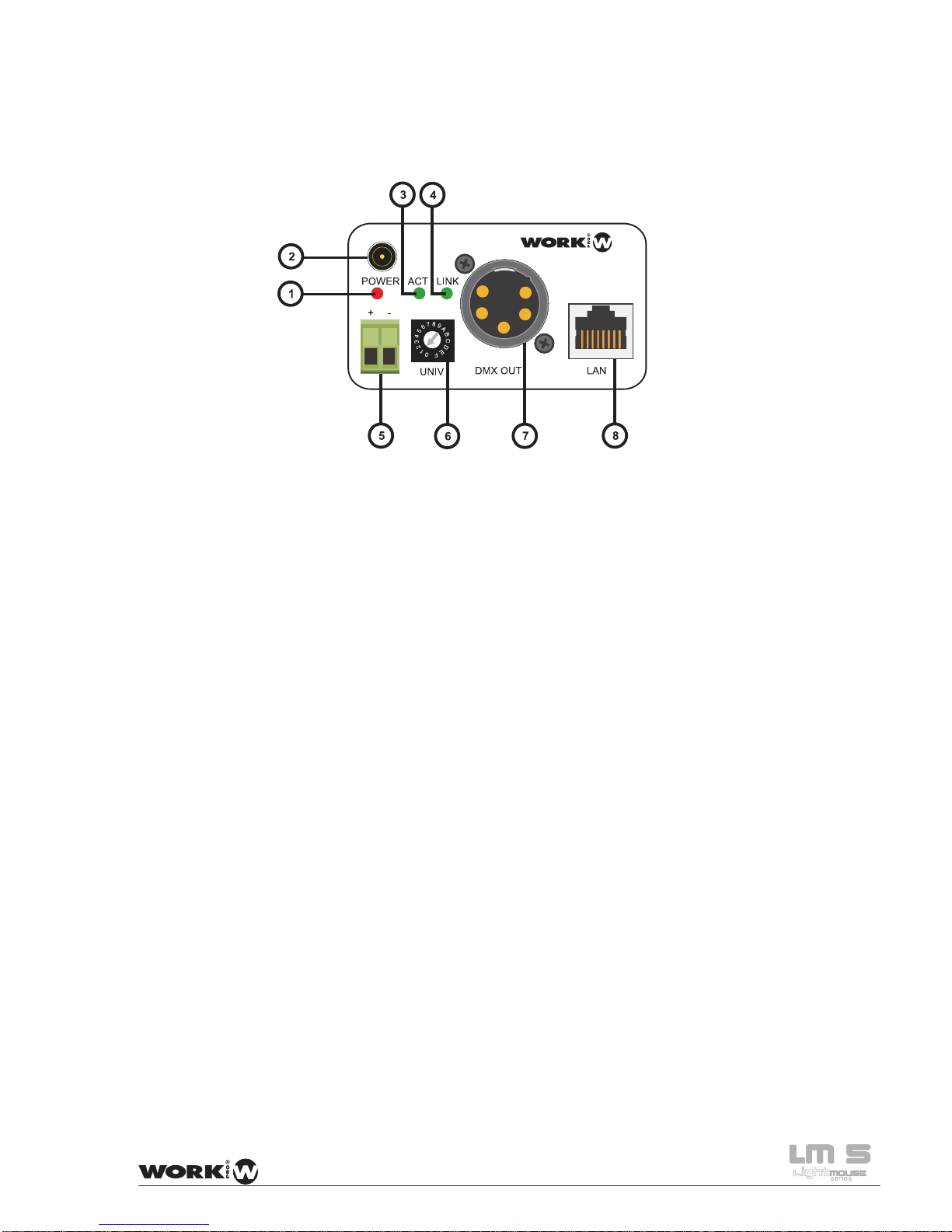
Panel Frontal
1. LED Power: This red LED lits when the unit has power supply.
2. PLUG IN connector Using the included external power supply (5V, 500 mA) it is posible the
feed the unit. Note: It you use this connections, the Terminal Block
(5) must no be used.
3. ACT LED This green LED flicks when the Ethernet port is connected and emitting
or receiving datas.
4. LINK LED: This green LED lits when the Ethernet LAN port is connected
5. Terminal Block Using an external power supply (5V, 500 mA) it is posible the feed the
unit. Note: It you use this connections, the PLUG IN connection
(2) must no be used.
6. Selector Under WORKNET protocol, this selector allows to select up to 16
reception groups (0-F). Each group disposes its own LM-3E emitter,
configured in the same receivers group.
Under Art-Net protocol this selector allows to select one of the 16 DMX
universes inside configurated Subnet.
7. DMX OUT: This XLR-5 connector sends DMX signal to a control line with DMX
compatible devices like moving heads, scanners, RGB drivers, etc.
8. LAN: RJ 45 connector which allows the LM-5 connection to a Ethernet
8 User Manual
Tabla de contenidos
Otros manuales de Equipo de DJ de WorkPro


Manuales populares de Equipo de DJ de otras marcas


thomann
thomann Stairville DJ Lase 40-G MK-III Manual de usuario

Eagletone
Eagletone 6 Eyes Flower Manual de usuario

EuroLite
EuroLite FLD-1508 Manual de usuario

Technical Pro
Technical Pro LG8xSEA Manual de usuario

JB Systems
JB Systems Lounge Laser DMX Manual de usuario

Lightmaxx
Lightmaxx Vega Halo 90 Manual de usuario

Elation
Elation FUZE WASH Z350 Manual de usuario

Maverick
Maverick MK3 WASH Manual de usuario

Infinity
Infinity TF-260C7 Fresnel Manual de usuario

Chauvet
Chauvet EVE E-50Z Manual de usuario

Eliminator Lighting
Eliminator Lighting E 138 Manual de usuario

EuroLite
EuroLite Mini Multicolor LED Flashing Light SC Manual de usuario