
WOOX R7046 Manual de usuario

Smart
PIR Motion Sensor
R7046
Version: 20200421
Quick Start Guide (EN)
Verkorte handleiding (NL)
Kurzanleitung (DE)
Guía de inicio rápido (ES)
Guide de démarrage rapide (FR)
Guida rapida (IT)
Guia de iniciação rápida (PT)
Hurtigstartsguide (DK)
Snabbstartsguide (SE)
Pikaopas (FI)
Krótki przewodnik (PL)
Rychlá příručka (CZ)
Príručka pre rýchly štart (SK)
Gyors útmutató (HU)
Ghid rapid (RO))
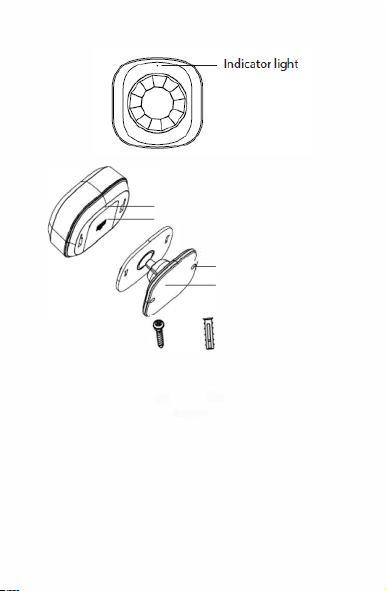
Specification
Battery: CR2450 x 1 (included)
Dimension: 57x57x52mm
Detection angle: 110°
Wireless connection: Zigbee 3.0
Connection distance: indoor 10-30m
Frequency: 2.4-2.483GHz
Working temperature: -10℃ - 50℃
Working humidity: 0-95%RH, no condensation
1
English

Replace battery
6M
2
English

English
Introduction
The smart PIR motion sensor detects movement
and send real-alert notification to smartphone.
Requirement to use
1. Woox home app
2.Woox zigbee gateway (not included)
Installation
1. Pull the insulation sheet from batter y
compartment of the PIR motion sensor.
2. Set up the PIR motion sensor with Woox home
app.
3. It is recommended to install the PIR motion
sensor at 2.2m height. It's detection angle is
110°, detection distance is up to 8 meters.
4. Attach the PIR motion sensor to wall with
provided screws (Machining 4 mm screw hole
with screw driver on PIR motion sensor and
6 mm hole in the wall, and insert expansion
sleeves into the wall) or double -sided
mounting tape.
3

Set up the PIR motion sensor with Woox home
app
1. Download and install the app "WOOX
Home" from Apple App Store or Google Play
Store on your mobile device.
2. Launch the app "WOOX Home".
3. Create a new account or log in to your
existing account.
4. Tap “+” to add the device.
5. Select the applicable product type from the
list of products.
6. Select a Zigbee Gateway.
7. Ensure the indicator light is quick flashing. If
the indicator light isn't flashing: press and hold
the reset button for 5 seconds until the indicator
light starts to quick flashing.
8. Press confirm button in the Woox home app.
9. The app will now search for the device and
register is to your account.
10.Enter the device name.
Support
If you need further help or have comments or
suggestions please visit www.wooxhome.com
English
4
4

Nederlands
5
Introductie
De slimme PIR-bewegingssensor detecteert
beweging en stuurt real-alert meldingen naar de
smartphone.
Vereiste om te gebruiken
1. Woox-thuisapp
2.Woox zigbee gateway (niet inbegrepen)
Installatie
1.Trek het isolatievel uit het batterijcompartiment
van de PIR-bewegingssensor.
2.Stel de PIR-bewegingssensor in met de Woox
Home-app.
3. Het wordt aanbevolen om de PIR-
bewegingssensor op 2,2 m hoogte te installeren. De
detectiehoek is 110 °, de detectieafstand is
maximaal 8 meter.
4.Bevestig de PIR-bewegingssensor aan de muur
met de meegeleverde schroeven (Bewerk 4 mm
schroefgat met schroevendraaier op PIR-
bewegingssensor en
Gat van 6,6 mm in de muur, en spreidhulzen in de
muur steken) of dubbelzijdige montagetape.

6
Nederlands
Stel de PIR-bewegingssensor in met de Woox
Home-app
1. Download en installeer de app "WOOX Home" uit
de Apple App Store of Google Play Store op uw
mobiele apparaat.
2. Start de app "WOOX Home".
3.Maak een nieuw account aan of log in op uw
bestaande account.
4. Tik op "+" om het apparaat toe te voegen.
5.Selecteer het betreffende producttype in de lijst
met producten.
6.Selecteer een Zigbee Gateway.
7.Zorg ervoor dat het indicatielampje snel knippert.
Als het indicatielampje niet knippert: houd de
resetknop 5 seconden ingedrukt totdat het
indicatielampje snel begint te knipperen.
8. druk op bevestigen knop in de Woox home app.
9.De app zoekt nu naar het apparaat en registreert
zich bij uw account.
10. Voer de apparaatnaam in.
Ondersteuning
Als u meer hulp nodig heeft of opmerkingen of
suggesties heeft, bezoek dan www.wooxhome.com

Deutsch
Einführung
Der intelligente PIR-Bewegungssensor erkennt
Bewegungen und sendet eine echte
Alarmbenachrichtigung an das Smartphone.
Voraussetzung zur Verwendung
1. Woox Home App
2.Woox ZigBee Gateway (nicht enthalten)
Installation
1.Ziehen Sie die Isolierfolie aus dem Batteriefach
des PIR-Bewegungssensors.
2. Richten Sie den PIR-Bewegungssensor mit der
Woox Home App ein.
3. Es wird empfohlen, den PIR-Bewegungssensor in
einer Höhe von 2,2 m zu installieren. Der
Erfassungswinkel beträgt 110 °, der
Erfassungsabstand beträgt bis zu 8 Meter.
4. Befestigen Sie den PIR-Bewegungssensor mit
den mitgelieferten Schrauben an der Wand
(Bearbeitung des 4-mm-Schraubenlochs mit dem
Schraubendreher am PIR-Bewegungssensor und 6
mm Loch in der Wand und Expansionshülsen in die
Wand einlegen) oder doppelseitiges
Montageband. 7

8
Deutsch
Richten Sie den PIR-Bewegungssensor mit der
Woox Home App ein
1. Laden Sie die App "WOOX Home" aus dem
Apple App Store oder Google Play Store auf Ihr
Mobilgerät herunter und installieren Sie sie.
2.Starten Sie die App "WOOX Home".
3.Erstellen Sie ein neues Konto oder melden Sie
sich bei Ihrem vorhandenen Konto an.
4. Tippen Sie auf „+“, um das Gerät hinzuzufügen.
5.Wählen Sie den entsprechenden Produkttyp aus
der Produktliste aus.
6.Wählen Sie ein ZigBee-Gateway.
7.Stellen Sie sicher, dass die Anzeigelampe schnell
blinkt. Wenn die Anzeigelampe nicht blinkt: Halten
Sie die Reset-Taste 5 Sekunden lang gedrückt, bis
die Anzeigelampe schnell zu blinken beginnt.
8.Drücken Sie die Bestätigungstaste in der Woox-
Home-App.
9.Die App sucht nun nach dem Gerät und
registriert sich in Ihrem Konto.
10.Geben Sie den Gerätenamen ein.
Unterstützung
Wenn Sie weitere Hilfe benötigen oder
Kommentare oder Vorschläge haben, besuchen
Sie bitte www.wooxhome.com

Espanol
Introducción
El sensor de movimiento PIR inteligente detecta el
movimiento y envía notificaciones de alerta real al
teléfono inteligente.
Requisito de uso
1. Aplicación para el hogar Woox
2.Woox zigbee gateway (no incluido)
Instalación
1. Tire de la lámina de aislamiento del
compartimento de la batería y del sensor de
movimiento PIR.
2. Configure el sensor de movimiento PIR con la
aplicación de inicio Woox.
3. Se recomienda instalar el sensor de movimiento
PIR a 2,2 m de altura. Su ángulo de detección es de
110 °, la distancia de detección es de hasta 8 metros.
4. Conecte el sensor de movimiento PIR a la pared
con los tornillos provistos (mecanizado de orificio
para tornillo de 4 mm con destornillador en el sensor
de movimiento PIR y
Orificio de 6 mm en la pared e inserte manguitos de
expansión en la pared) o cinta de montaje de doble
cara. 9
Otros manuales para R7046
1
Tabla de contenidos
Idiomas:
Otros manuales de Sensor de seguridad de WOOX


