
Wiznet WIZ1000-US Manual de usuario


Copyright © WIZnet All Rights Reserved
WIZ1000 | 2 page
WIZnet’s Online Technical Support
If you want to know more about WIZnet products, please visit WIZnet website
(www.wiznet.co.kr), and you could also put your questions on Q&A Board. Our
engineers will reply you as soon as possible.
C
CL
LI
IC
CK
K
Downloaded from Elcodis.com electronic components distributor

Copyright © WIZnet All Rights Reserved
WIZ1000 | 3 page
Document Revision History
Date Revision Changes
2009-06-26 V1.0 First Release
Copyright Notice
Copyright 2009 WIZnet, Inc.All Rights Reserved.
For more information, please visit our website: http://www.wiznet.co.kr
Downloaded from Elcodis.com electronic components distributor

Copyright © WIZnet All Rights Reserved
WIZ1000 | 4 page
Certification Information
CE for Class A ITE
WARNING : This is a class A product. In a domestic environment this product may
cause radio interference in which case the user may be required to take adequate
measures.
FCC for Class A ITE
INFORMATION TO THE USER
This equipment has been tested and found to comply with the limits for a Class A
digital device, pursuant to part 15 of the FCC Rules. These limits are designed to
provide reasonable protection against harmful interference when the equipment is
operated in a commercial environment. This equipment generates, uses, and can
radiate radio frequency energy and, if not installed and used in accordance with the
instruction manual, may cause harmful interference to radio communications.
Operation of this equipment in a residential area is likely to cause harmful
interference in which case the user will be required to correct the interference at his
own expense.
WARNING : Changes or modifications not expressly approved by the manufacturer
could void the user’s authority to operate the equipment.
KCC for Class A ITE
-Trade Name or Applicant : WIZnet, Inc.
-Equipment Name : Serial to Ethernet Device Server
-Basic Model Number : WIZ1000
-Manufacturer / Country of Origin : WIZnet, Inc. / KOREA
-Certification Number : WWW-WIZ1000-S2E(A)
WARNING : This equipment has been tested for a Class A digital device.
Downloaded from Elcodis.com electronic components distributor

Copyright © WIZnet All Rights Reserved
WIZ1000 | 5 page
Table of Contents
1. INTRODUCTION......................................................................................... 7
1.1. KEY FEATURES........................................................................................ 7
1.2. SPECIFICATION........................................................................................ 8
1.3. PRODUCTS CONTENTS ................................................................................ 9
2. WIZ1000................................................................................................10
2.1. BLOCK DIAGRAM.....................................................................................10
2.2. CONFIGURATION TOOL ...............................................................................11
3. FIRMWARE UPLOAD ..................................................................................23
4. SERIAL CONFIGURATION.............................................................................25
4.1. SERIAL COMMAND FORMAT ...........................................................................25
4.2. WIZ1000 CONFIGURATION WITH SERIAL COMMAND ..................................................28
5. TELNET COM PORT OPTIONS .......................................................................30
6. DEMONSTRATION AND TEST ........................................................................34
6.1. HARDWARE INTERFACE ...............................................................................34
6.2. TESTING SERIAL TO ETHERNET FUNCTION ............................................................35
7. WIZ1000 HARDWARE SPECIFICATION .............................................................36
7.1. PARAMETERS.........................................................................................36
7.2. SPECIFICATION.......................................................................................36
7.3. BOARD DIMENSIONS AND PIN ASSIGNMENT............................................................36
8. WARRANTY.............................................................................................38
Downloaded from Elcodis.com electronic components distributor

Copyright © WIZnet All Rights Reserved
WIZ1000 | 6 page
FIGURES
Figure 1. Block Diagram........................................................................10
Figure 2. User Interface of Configuration Tool (Configuration via Network).............11
Figure 3. PPPoE Connection Process in Serial Console ..................................12
Figure 4. TCP Server mode....................................................................13
Figure 5. TCP Client mode.....................................................................14
Figure 6. UDP mode ............................................................................15
Figure 7 Search password input dialog.......................................................16
Figure 8. Configuration Tool (Serial Config.).................................................18
Figure 9. Configuration Tool (Option Config.)................................................20
Figure 10. Option Mode for Password Configuration.......................................22
Figure 11. Board Search Window .............................................................23
Figure 12. Open dialog box for uploading....................................................24
Figure 13. Firmware uploading window ......................................................24
Figure 14. Complete Uploading................................................................24
Figure 15 Serial Configuration Console Display.............................................29
Figure 16 Interface of Telnet Com Port Option Client .....................................30
Figure 17 Telnet Com Port Option Client Tool Execution Example.......................31
Figure 18. WIZ1000 Interface..................................................................34
Figure 19. Device Terminal.....................................................................35
Figure 20. WIZ1000 Dimension ................................................................36
Figure 21. RJ-45 PIN Assignment.............................................................37
Tables
Table 1. Specification............................................................................. 8
Table 2. Products Contents...................................................................... 9
Table 3. Serial Configuration Frame Format.................................................25
Table 4. Serial Configuration Reply Frame Format .........................................25
Table 5. Serial Configuration STX & ETX ....................................................25
Table 6. Serial Configuration Reply Code....................................................25
Table 7. Serial Configuration Command Code ..............................................27
Table 8. Serial Configuration Testing Process...............................................29
Table 9 Telnet Com Port Options List.........................................................32
Table 10. Testing Environment of WIZ1000..................................................34
Table 11. RS-232 PIN Assignment ............................................................37
Downloaded from Elcodis.com electronic components distributor

Copyright © WIZnet All Rights Reserved
WIZ1000 | 7 page
1. Introduction
WIZ1000 is one model of Serial to Ethernet Device Server which is one finished product of
WIZnet with CE, FCC and KCC certifications. WIZ1000 acts as a gateway between RS-232 and
Ethernet. It enables remote gauging, managing and control of a device through the network
based on Ethernet and TCP/IP by connecting to the existing equipment with RS-232 serial
interface. In other words, WIZ1000 is a protocol converter that transmits the data sent by
serial equipment as TCP/IP data type and converts back the TCP/IP data received through the
network into serial data to transmit back to the equipment.
1.1. Key Features
-Connect with the Serial Device directly
zAdding Network Function Simply and Quickly
zProviding Firmware Customization
-System Stability and Reliability by using W5100 Hardware Chip
-Supports PPPoE Connection
-Supports Serial Configuration – with Simple and Easy command
-Supports Password for the Security
-Configuration Tool Program
-Telnet Com Port Option (RFC2217) Compliant
-10/100 Ethernet Interface and max 230Kbps Serial Interface
-RoHS Compliant
-CE, FCC and KCC certificated
Downloaded from Elcodis.com electronic components distributor

Copyright © WIZnet All Rights Reserved
WIZ1000 | 8 page
1.2. Specification
The specifications of WIZ1000 are introduced in Table 1.
ITEM Description
MCU 8051 compliant
(having internal 62K Flash, 16K SRAM, 2K EEPROM)
TCP/IP W5100 (Ethernet MAC & PHY Embedded)
Protocol TCP, UDP, IP, ARP, ICMP, MAC, DHCP, PPPoE, DNS
Network Interface 10/100 Mbps(Auto detection), RJ-45 Connector
Serial Interface RS232(DB9)
Serial Signal TXD, RXD, RTS, CTS, GND
Serial Parameters
Parity : None, Even, Odd
Data Bits : 7,8
Flow Control : None, RTS/CTS, XON/XOFF
Speed : up to 230Kbps
Input Voltage DC 5V
Power Consumption Under 200mA
Temperature 0°C ~ 80°C (Operation), -40°C ~ 85°C (Storage)
Humidity 10 ~ 90%
Table 1. Specification of WIZ1000
Downloaded from Elcodis.com electronic components distributor

Copyright © WIZnet All Rights Reserved
WIZ1000 | 9 page
1.3. Products Contents
WIZ1000 Device Server
CD (Optional / including Configuration Tool
Program, Firmware and Manual)
LAN Cable (Optional)
5V Power Adaptor (Optional)
Table 2. Products Contents
☞If there is any missing item, contact to the shop where you purchased.
☞The optional items should be purchased separately.
Downloaded from Elcodis.com electronic components distributor
Copyright © WIZnet All Rights Reserved
WIZ1000 | 10 page
2. WIZ1000
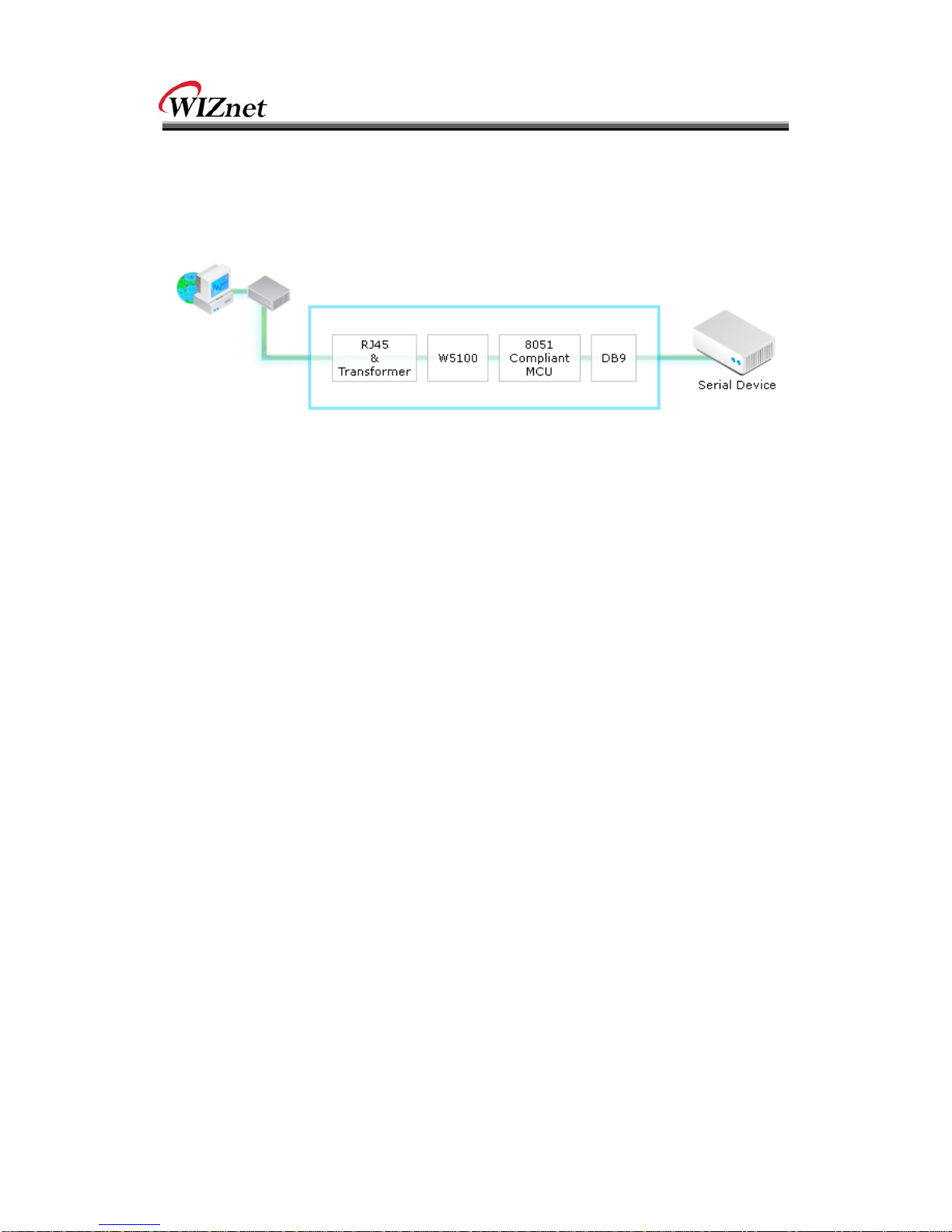
2.1. Block Diagram
Figure 1. Block Diagram
WIZ1000 is a protocol converter that transmits the data sent by serial equipment to Ethernet
and converts back the TCP/IP data received through the network into serial data to transmit
back to the equipment. When the data is received from serial port, it is sent to W5100 by
MCU. If any data is transmitted from Ethernet, it is received to the internal buffer of W5100,
and sent to the serial port by MCU. MCU in the module controls the data according to the
configuration value that user defined.
Downloaded from Elcodis.com electronic components distributor
Este manual sirve para los siguientes modelos
1
Tabla de contenidos
Otros manuales de Servidor de Wiznet


