
wingtra WingtraOne Manual de usuario


1.1
1.2
2.1
2.2
2.3
2.4
2.5
2.6
3.1
3.2
3.3
3.4
4.1
4.2
4.3
5.1
TableofContents
Introduction
QuickStartGuide
WingtraOne
PackageContent
SensorSonyQX1
Safety
BatteryCharging
InteractwithWingtraOne
MaintenanceandUpdateProcess
FlightPreparation
WingtraPilotOverview
Settings
FlightPlanning
PreflightChecklist
Flying
FlightModes
Interactions&AssistedMode
Failsafes
Postprocessing
Geotagging
Contact
2

6.1Contactus
3

WingtraOneUserManual-Release1.3
Congratulationsandawarmthankyou!forbeingaWingtraCustomer!Wehopeyougetthe
bestoutofyournewaerialdatacollectiontool.
Togetstarted,makeyourselffamiliarwiththesupportandfeedbacksetup,andhavealook
atourquickstartguide.
SupportandFeedbackSetup
WewantyoutogetthebestexperiencepossiblewithyourWingtraOne!Wingtrawillsupport
youdependingonyourneeds.Thisknowledgebaseshouldalwaysbeyourfirstpointof
contactandwehopethatmostquestionsareansweredherein.
AdhocSupport
Ifyouareonthefieldandnotabletotake-offduetotechnicalreasons,pleasecheckthe
TipsandTrickssectionbelowfirst.Ifyourissuesarestillnotsolved,youcanchatwithus
throughyourpersonalSkypeGroup,whereaWingtraemployeewillrespondimmediately
duringworkinghours(8am-6pm,CET).
GeneralSupportandFeedback
Introduction
4

Forallquestionsthatarenottime-critical,andcan'tbeansweredbytheknowledgebase,
pleasewriteanemailtooursupportteamunder[email protected]m.Wewouldbevery
happytogetyourfeedbackaboutourproduct,pleaseusethesameemailaddressfor
feedback.
EmergencySituations
Pleasecontactusdirectlyincaseofanemergencysituation(crash,injury,physicaldamage,
...).Youcanreachusunder
+41796331001(JulianSurber)
+41767241738(MaximilianBoosfeld)
+41446325776(Office)
TipsandTricks
Tip1:SearchthisKnowledgeBaseforHelp
Mostofyourquestionsareprobablyansweredinoneofthechaptersinthisknowledge
base.Pleasetrydifferentsearchtermsifyoucan'tfindyouranswer.
Tip2:GothroughtheQuickStartGuide
Reassessthequickstartguide.Itdescribesallstepsthatneedtobeperformedbefore,
duringandafterflightandlinkstomoredetailedexplanationinthedifferentchapters.
Tip3:RepowertheWingtraOne
Cornercasescanleadtoanunexpectedsituationthatpreventsthedronefromtakingoff.In
caseyoucan'tsolveyourissuewithtips1and2,repowertheWingtraOneandtryagain.
Introduction
5

WingtraOneQuickStartGuide
Thefollowing10easystepsguideyoutocollecthigh-endaerialimagerywithyour
WingtraOne.
CheckbeforeyouleavetheOffice
1CheckFlightConditions
SeealsothegeneralsafetyguidelineswithlinksforSwitzerland.
2OfficeChecklist
QuickStartGuide
6

Seealso:
LoadingOfflineMaps
ChargingManualforFlightBatteries,RCandTablet
ContentofPilotBox
SetupyourFlightontheField
3HardwareSetup
Arrivingatthefield,assembletheWingtraOnebyattachingthemiddlestandandpowering
thedrone.StartWingtraPilotonthetabletandconnectthetelemetrytothetablet.Switchon
theremotecontrol.
QuickStartGuide
7
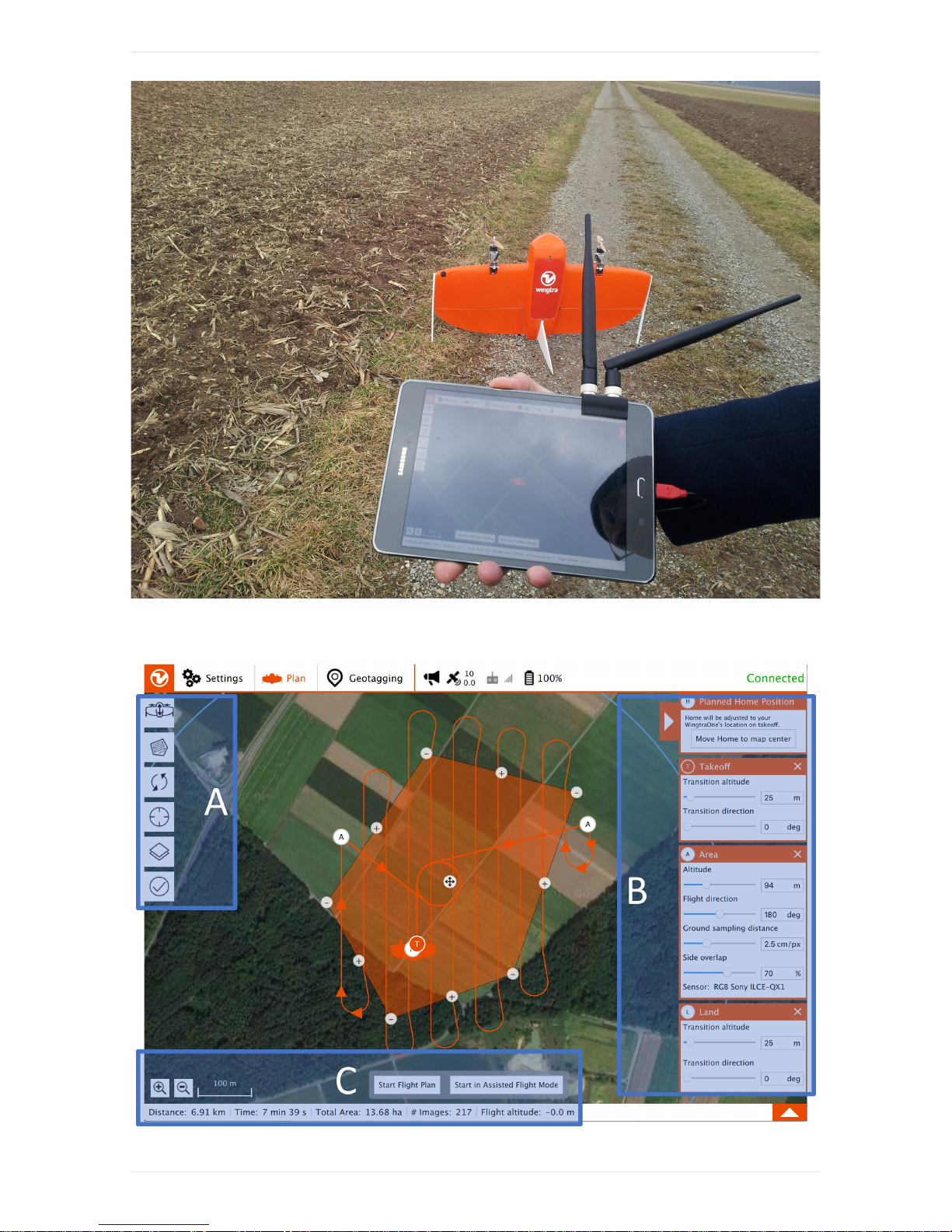
4PlanyourFlight
QuickStartGuide
8

A:FlightPlanning
B:AdjustFlightSettings(Home/Takeoff/Area(s)/Landing)
C:FlightSummary
Planaflightin3easysteps.Formoredetails,seetheflightplanningchapter.
STEP1SetTakeoff/Landingpoint:
Addthetakeoff/landingpointbyclickingontheitemontheleftside(A)andtothedesired
locationinthemap.Adjust"transitionaltitude"and"transitiondirection"ontherightside(B).
TheWingtraOnewilltakeoff,risetoyour"transitionaltitude"abovethetakeoff/landingpoint,
transitionintoforwardflight,flytothedrawnloitercircle,loiteruptotheareaaltitudeand
startdatacollection.Afterfinishingdatacollection,itwillflybacktotheloitercircleatthe
altitudeofthelastarea,loiterdowntothe"transitionaltitude",flybacktothetakeoff/landing
point,transitionabovethetakeoff/landingpointandland.
STEP2AddArea(s):
Youcanaddoneorseveralareasthatyouwanttomapbyclickingontheareaitemonthe
leftside(A).Chooseyourdesiredgroundsamplingdistance(or,alternatively,yourdesired
altitude)ontherightside(B)andadjusttheflightdirectionandsideoverlapifneeded.Move
thecorners(minussigns)andaddadditionalcornersuntilyoudrawtheareathatyouwant
tomap.
STEP3ReviewtheFlightPlan:
Makeathoroughterrainreview-makesuretheWingtraOnewillnotcollidewithany
obstacle.Furthermore,checkthatyourflightdoesnotviolatelawsortheWingtraOne
market-entryrestrictions.
5(Optional)AdjustCameraSettings
Youcanadjustthecamerasettingsfromthetablet.Turnonthecamerawithinthe
WingtraOnebyclickingontheOn/Offbutton,openSony'sPlayMemoriesapponthetablet,
andadjustthesettings.Thecamerawillkeepthesettingsyouadjustandwon'tresettothe
defaultsonthenextflight,formoredetailsseethecamerachapter.Welltesteddefault
settingsare:
QuickStartGuide
9

camera
mode
shutter
speed
aperture,
f-number
ISO
setting
image
quality
shutterpriority 1/2000s auto 1000 fine
6GothroughPreflightChecks
GothroughthepreflightchecklistwithinWingtraPilotbeforeyoucanstarttheflight.Ifanyof
thepreflightchecksfails(e.g.sensorfailure),therespectivepreflightcheckturnsredand
startingtheflightisnotpossible.Foradetaileddescriptionaboutallpreflightchecksand
troubleshootingadvice,seethepreflightchecklistsection.
TheWingtraOnetakesaseriesoftestpicturesduringpreflightproceduretoensurethe
cameraisworking.Waitfortheaudio-feedback"testpicturesaretaken"beforetaking
off.
Fly&CollectImages
7StarttheFlight
Makesurethatnopeoplearecloserthan5meterstotheWingtraOne.Takeoffbyclicking
onto"StartFlightPlan"andmovingthesliderslowlylefttoright.
RepowertheWingtraOnealwaysbetweenflights.Donottakeoffagainafterlanding
withoutdepoweringandrepoweringthedrone.
8FlightObservation
QuickStartGuide
10
Otros manuales para WingtraOne
3
Tabla de contenidos


