Whistler WS1040 Manual de usuario

DIGITAL TRUNKING
OWNER’S MANUAL
WS1040
Handheld Radio Scanner

2
Introduction................................................... 4
What is Object Oriented Scanning? ......................... 4
Package Contents..................................................... 5
Scanning Legally....................................................... 5
Features .................................................................... 6
Setup ............................................................. 7
Antenna .................................................................... 7
Batteries.................................................................... 9
External Power.........................................................11
Belt Clip ...................................................................11
Headphones and Speakers......................................12
Understanding the Keypad......................................13
Turning on the Scanner............................................15
Setting the Battery Type ..........................................15
Understanding the Display Icons.............................16
Programming............................................... 17
Programming Cables ...............................................17
RadioReference.com ................................... 18
Scanner Cloning.......................................................19
Manual Programming ..............................................20
Text Entry .................................................................21
Quick Text ...............................................................22
Scanning...................................................... 23
Objects and Scan Lists.............................................23
Monitoring ...............................................................25
Scanning ..................................................................27
Priority Scan .............................................................29
Favorites Scan List ...................................................30
Object Lockout ........................................................31
Multi-Site Mode (Motorola and P25) .......................33
Home Repeater AutoMove (LTR) .............................34
Searching..................................................... 35
TABLE OF CONTENTS

3
Limit Search Object (LMIT)....................................... 37
Service Search Object (SRVC).................................. 39
Spectrum Sweeper Object (SWPR) .......................... 41
Weather Features ........................................ 43
SAME Standby......................................................... 43
Configuring ................................................. 46
Using V-Scanner Storage ......................................... 49
Initializing Global Settings ....................................... 51
Initializing to Factory Defaults.................................. 52
Configuration Shortcuts........................................... 53
Manual Programming Guide ....................... 54
Conventional Objects (CONV)................................. 55
Trunking System (TSYS) Object ............................... 57
Talkgroup (TGRP) Object ......................................... 59
Duplicating Objects................................................. 61
No Scan List ............................................................. 61
Deleting Objects...................................................... 62
Memory Usage......................................................... 62
Hit Counter ............................................................. 63
Specifications ............................................. 64
Frequency Coverage ............................................... 67
Maintenance................................................ 68
Birdie Frequencies ................................................... 68
PC Interface ................................................ 69
FCC Statement ........................................................ 71
Limited Warranty...................................................... 72
TABLE OF CONTENTS

4
Limit Search Object (LMIT)....................................... 37
Service Search Object (SRVC).................................. 39
Spectrum Sweeper Object (SWPR) .......................... 41
Weather Features ........................................ 43
SAME Standby......................................................... 43
Configuring ................................................. 46
Using V-Scanner Storage ......................................... 49
Initializing Global Settings ....................................... 51
Initializing to Factory Defaults.................................. 52
Configuration Shortcuts........................................... 53
Manual Programming Guide ....................... 54
Conventional Objects (CONV)................................. 55
Trunking System (TSYS) Object ............................... 57
Talkgroup (TGRP) Object ......................................... 59
Duplicating Objects................................................. 61
No Scan List ............................................................. 61
Deleting Objects...................................................... 62
Memory Usage......................................................... 62
Hit Counter ............................................................. 63
Specifications ............................................. 64
Frequency Coverage ............................................... 67
Maintenance................................................ 68
Birdie Frequencies ................................................... 68
PC Interface ................................................ 69
FCC Statement ........................................................ 71
Limited Warranty...................................................... 72
INTRODUCTION
WELCOME
Thank you for choosing a Whistler product. We are
dedicated to providing products that represent both
quality and value. Please read the user manual carefully
before using this product. If you have additional
questions, please visit the FAQ page on our website at
www.whistlergroup.com or call toll free 800-531-0004,
8am to 5pm CT, Monday through Friday to speak to a
Customer Service Representative.
Introduction
Scanning technology has changed dramatically over
the years. The WS1040 scanner with Object Oriented
User Interface is designed to help hobbyist build a
collection of channels to scan:
• Start small and expand
• Organize channels and talkgroups
• Remove unwanted channels and talkgroups
What is Object Oriented Scanning?
Programming scanning receivers can be challenging,
but object-oriented programming simplifies the
process by using common conventions for scanning
concepts that have common characteristics.
A Scannable Object is any defined item that can be
scanned or monitored, including:
• Conventional, non-trunked radio frequencies
• Talkgroups used on a trunked radio system
• Radio services
• Defined searches
Because scannable objects are defined by the same
basic elements, the Object Oriented User Interface
(OOUI) is designed to simplify scanning by managing
all scannable objects similarly. When you learn how to
program one type of object, you can program other
types of scannable objects as well.

5
Package Contents
• Scanner
• Antenna
• Belt Clip
• AC Adapter
• PC/IF Cable
• Alkaline Battery Holder
• Rechargeable Battery Holder
• User's Guide
• Quick Start Guide
Scanning Legally
Your scanner covers frequencies used by many
different groups including police and fire
departments, ambulance services, government
agencies, private companies, amateur radio services,
military operations, pager services, and wireline
(telephone and telegraph) service providers. It is legal
to listen to almost every transmission your scanner
can receive. However, there are some transmissions
you should never intentionally listen to.
These include:
• Telephone conversations (cellular, cordless, or other
means of private telephone signal transmission)
• Paging transmissions
• Any intentionally decoded scrambled or encrypted
transmissions
According to the Electronic Communications Privacy
Act (ECPA), you are subject to fines and possible
imprisonment for intentionally listening to, using, or
divulging the contents of such a transmission unless
you have the consent of a party to the communication
(unless such activity is otherwise illegal). This scanner
has been designed to prevent reception of illegal
transmissions. This is done to comply with the legal
requirement that scanners be manufactured so as to not
be easily modifiable to pick up those transmissions.
SCANNING LEGALLY

6
Do not open your scanner’s case to make any
modifications that could allow it to pick up transmissions
that are illegal to monitor. Doing so could subject you
to legal penalties. We encourage responsible, legal
scanner use. In some areas, mobile use of this scanner
is unlawful or requires a permit. Check the laws in your
area. It is also illegal in many areas to interfere with the
duties of public safety officials by traveling to the scene
of an incident without authorization.
Features
• Intuitive Object Oriented User Interface
• Context Sensitive Help
• Scan List
• V-Scanner Technology - Save complete backup
radio configurations, up to 21 versions.
• SKYWARN™ Storm Spotter Function
• SAME and All Hazards Weather Alerting
• Multi-System Trunking
• Exclusive Automatic Adaptive Digital Tracking -
Adapts to multipath or fading for P25 digital systems
• Exclusive Digital AGC
• LTR Home Repeater AutoMove
• Subaudible Squelch Decoder
• Spectrum Sweeper – Advanced feature for finding
active frequencies.
• Zeromatic – Enhances the scanner’s ability to lock
on to the actual center frequency of a search hit
instead of an adjacent frequency.
• P25 NAC Functionality
• Alert LED and Audible alarms
• High Speed USB PC Interface
• Real-time Signal Strength Indicator
• Upgradeable CPU and DSP Firmware
FEATURES

7
Setup
Antenna
Your scanner's antenna connects easily, or you can use a
variety of antennas, such as an external mobile antenna or
outdoor base station antenna.
To connect an external antenna, follow the installation
instructions supplied with the antenna. Always use 50-ohm
coaxial cable, such as RG-58 or RG-8 low-loss dielectric
coaxial cable. You may also need a BNC adapter.
To connect the included antenna:
1. Align the slots around the antenna’s connector
with the tabs on the antenna jack.
2. Press the antenna down over the jack and turn the
antenna’s base clockwise until it locks into place.
INSTALLATION OF ANTENNA

8
WARNING: Use extreme caution when installing or
removing an outdoor antenna. If the antenna starts to
fall, let it go! It could contact overhead power lines. If
the antenna touches a power line, touching the antenna,
mast, cable, or guy wires can cause electrocution and
death. Call the power company to remove the antenna.
DO NOT attempt to do so yourself.
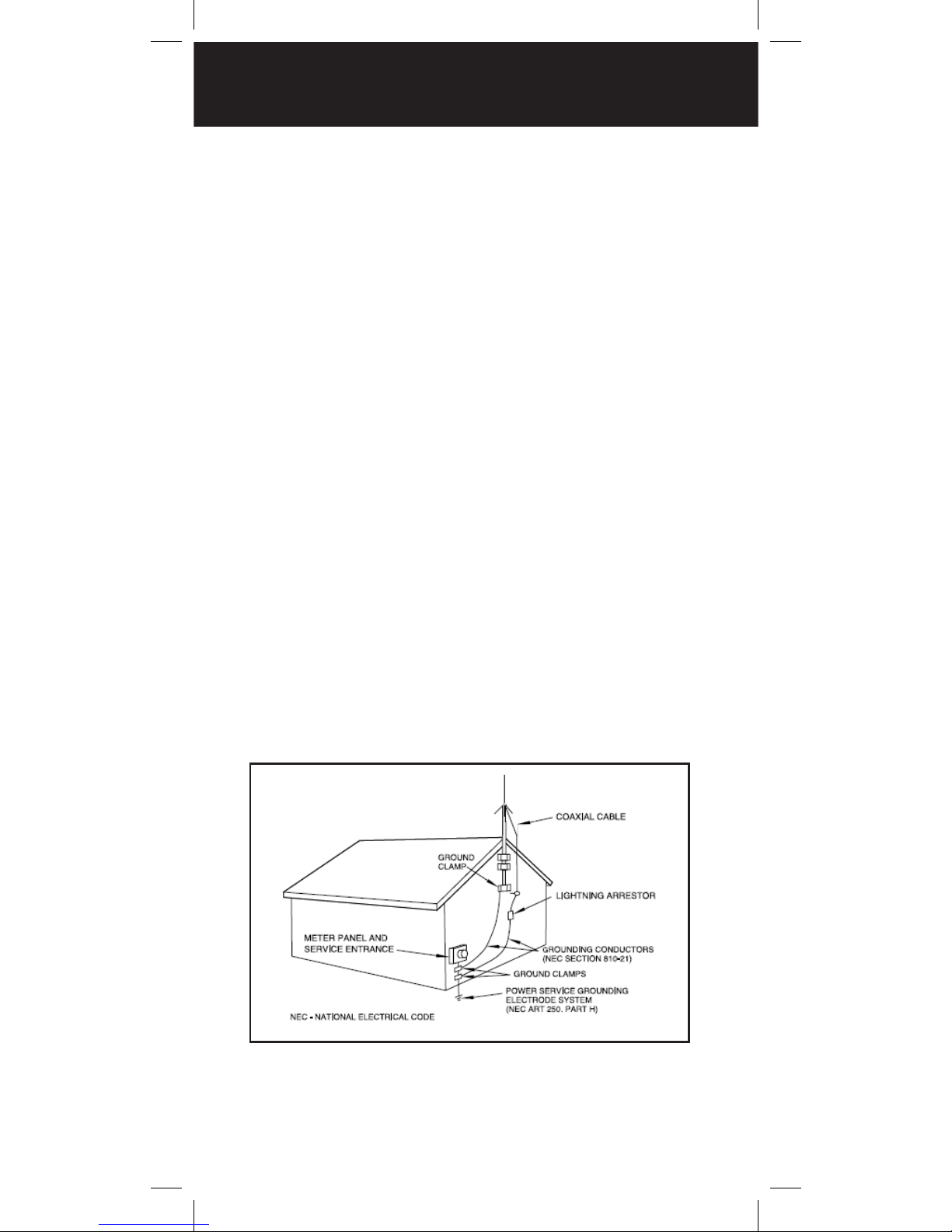
WARNING: Outdoor antennas must be properly
grounded to prevent static buildup and lightning
damage. Article 810 of the National Electrical Code,
ANSI/NFPA 70, provides information about proper
grounding of the antenna mast, connection of coaxial
cable to an lightning arrestor, size of grounding
conductors, location of the lightning arrestor and
connection of grounding conductors to grounding
electrodes.
Additionally, disconnect your radio from the outdoor
antenna during electrical storm activity to prevent
damage. The diagram below provides an example of a
proper antenna grounding system.
INSTALLATION OF ANTENNA

9
Batteries
Two battery holders are included with your WS1040,
a black battery holder for non-rechargeable alkaline
batteries and a yellow battery holder for rechargeable
NiMH or NiCAD batteries.
1. Slide open the battery compartment cover.
2. Place 4 AA batteries into the correct battery holder
matching polarity symbols (+ / –):
• Black – Alkaline (non-rechargeable)
• Yellow – Rechargeable Ni-MH or Ni-Cd
3. Place the battery holder into the battery
compartment.The battery holder fits only one way.
Do not force it.
4. Replace the cover.
Warning: Never install non-rechargeable batteries
in the yellow rechargeable battery holder. Non-
rechargeable batteries can get hot or explode if you
try to recharge them.
Recycle Rechargeable Batteries
Recycle your old rechargeable batteries at one of the
many collection sites in the U.S. and Canada. To find
the site nearest you, visit www.call2recycle.org or call
toll-free 1-877-2-RECYCLE.
Battery Notes:
• Always dispose of old batteries promptly and
properly. Do not bury or burn them.
Rechargeable
Battery Holder
Alkaline Battery
Holder
BATTERIES

10
• Use only fresh batteries of the required size and
recommended type. Do not mix old and new
batteries, different types (alkaline or rechargeable),
or rechargeable batteries of different capacities.
Doing so can damage the batteries, causing
chemical leaks, fire, or explosions.
• Do not overcharge batteries. Overcharging
shortens battery life.
• When the internal battery charge circuit is active,
the battery icon briefly flashes approximately once
every second.
• The battery charge indicator does not provide
positive indication that the batteries are actually
being charged. Batteries will only charge in the
yellow battery holder.
• Rechargeable batteries last longer and deliver more
power if you let them fully discharge once a month.
To do this, use the scanner until the battery icon
flashes.
• The battery icon appears when battery power is
low. As a second warning, the battery icon flashes
and the scanner beeps every 30 seconds.
• Remove old or weak batteries. If you will not use
the scanner with batteries for a month, remove the
batteries. Batteries can leak chemicals that destroy
electronic circuits.
BATTERIES
Tabla de contenidos
Otros manuales de Escáner de Whistler