
Well mPBX-100 Manual de usuario

mPBX-100
User Manual
Version 2.12.0.93

mPBX-100 User Manual
www.yeastar.com Page 2
Table o Contents
1. Introduction ............................................................................................ 4
1.1 Features ............................................................................................ 4
1.2 Hardware Speci ications ....................................................................... 5
1.2.1 Exterior Appearance ...................................................................... 5
2. System set up ......................................................................................... 6
2.1 Connection Drawing ............................................................................ 6
2.2 Connecting Ethernet Line ..................................................................... 6
2.3 Supplying Power ................................................................................. 6
3. Managing MPBX ....................................................................................... 8
3.1 Administrator Login ............................................................................. 8
3.2 Status Monitor .................................................................................... 9
3.2.1 Line Status ................................................................................... 9
3.3 Basic ............................................................................................... 10
3.3.1 Extension ................................................................................... 10
3.3.2 Trunk ........................................................................................ 17
3.3.3 Outbound Routes ........................................................................ 29
3.3.4 Auto Provision ............................................................................ 31
3.4 Inbound Call Control ......................................................................... 33
3.4.1 IVR ........................................................................................... 33
3.4.2 Queues ...................................................................................... 35
3.4.3 Custom Prompts ......................................................................... 39
3.4.4 Ring Groups ............................................................................... 39
3.4.5 Inbound Routes .......................................................................... 41
3.4.6 Blacklist ..................................................................................... 46
3.5 Internal Settings ............................................................................... 48
3.5.1 Options ...................................................................................... 48
3.5.2 Business Hours ........................................................................... 49
3.5.3 Feature Codes ............................................................................ 50
3.5.4 SIP Settings ............................................................................... 53
3.5.5 IAX Settings ............................................................................... 57
3.5.6 Voicemail Settings ....................................................................... 59
3.5.7 DISA ......................................................................................... 60
3.5.8 Con erencing .............................................................................. 62
3.5.9 Paging Groups ............................................................................ 62
3.5.10 PIN User .................................................................................. 64
3.5.11 Speed Dial Settings ................................................................... 65
3.5.12 Music on Hold Prompts ............................................................... 66
3.6 Network Settings .............................................................................. 66
3.6.1 LAN Settings .............................................................................. 66
3.6.2 WAN Settings ............................................................................. 68

mPBX-100 User Manual
www.yeastar.com Page 3
3.6.3 Firewall ...................................................................................... 69
3.6.4 DHCP Server .............................................................................. 72
3.6.5 VLAN Settings ............................................................................. 72
3.6.6 DDNS Settings ............................................................................ 74
3.7 System Settings ............................................................................... 75
3.7.1 External Storage ......................................................................... 75
3.7.2 Password Settings ....................................................................... 76
3.7.3 Date and Time ............................................................................ 76
3.7.4 Backup and Restore..................................................................... 77
3.7.5 Reset and Reboot ........................................................................ 78
3.7.6 Firmware Update......................................................................... 78
3.8 Reports ........................................................................................... 79
3.8.1 Call Logs .................................................................................... 79
3.8.2 System In o ............................................................................... 80
4. Access MRI ........................................................................................... 82
5. Use MPBX 87
5.1 Make outbound call ........................................................................... 87
5.1.1 Sample Routing via PSTN Trunk .................................................... 88
5.1.2 Sample Routing via VoIP Trunk ..................................................... 89
5.2 Incoming call ................................................................................... 91
5.2.1 Sample Routing to an IVR ............................................................ 91
APPENDIX A FAQ ....................................................................................... 94
APPENDIX B How to Con igure Autobackup ................................................... 95
APPENDIX C How to Con igure NAT setting ................................................... 97
APPENDIX D How to Use Auto Provision ....................................................... 99
APPENDIX E How do I con igure distinctive ring tones .................................. 102

mPBX-100 User Manual
www.yeastar.com Page 4
1. Introduction
MPBX —An IP-PBX for Small Businesses/Home Office
MPBX is a standalone embedded hybrid PBX or small businesses and remote
branch o ices o larger organizations (1-100 users per site). MPBX also o ers a
hybrid solution (a combination o VoIP applications using legacy telecom
equipment) alternative or enterprises who are not yet ready to migrate to a
complete VoIP solution.
Applications
1.1 Features
● Auto-provision ● Firewalls
● Blind Trans er ● Follow me
● BLF Support ● Interactive Voice Response (IVR)
● Blacklist ● Intercom / Zone Intercom
● Call Detail Records(CDR) ● Music On Hold
● Call Forward ● Music On Trans er
● Call Parking ● Paging / Zone Paging
● Call Recording ● PIN Users
● Call Pickup ● Queue
● Call Routing ● QOS
● Call Trans er ● Ring Group
● Call Waiting ● Route by Caller ID
● Caller ID ● Skype Integration (Skype Connect)
● Con erence ● Three-way Calling
● De ine O ice Time ● T.38
● Direct Inward System Access(DISA) ● Voicemail
● DIDs ● VLAN
● Distinctive Ringtone ● WAN
● Do Not Disturb(DND) ● PPPoE
ote: the eatures with asterisk (*) will be supported in next version.

mPBX-100 User Manual
www.yeastar.com Page 5
1.2 Hardware Specifications
1.2.1 Exterior Appearance
Front Side
Figure 1-1 MPBX Front Panel Picture
No. Identi ying
① Green LED: Indicates correct power is being supplied to the unit
① Green LED: Indicates the MPBX is ully unctional.
① Green LED: Indicates stable WAN Port connection
① Green LED: Indicates stable LAN Port connection
① Red LED: Indicates presence o an FXO/GSM port.
Orange LED: Indicates presence o a BRI port.
Green LED: Indicates presence o an FXS port.
LED Blinking- Red blinking: No connection between FXO port and
PSTN
LED Alternating - Red and Green (slow blink): FXO port is receiving
an incoming call.
LED Alternating - Red and Green ( ast blink): FXO port is in use
LED Dual - Green and Red (slow blink): FXS port is ringing
LED Dual - Green and Red ( ast blink): FXS port is in use
①② ③④ ⑤

mPBX-100 User Manual
www.yeastar.com Page 6
2. System set up
2.1 Connection Drawing
Figure 2-1
2.2 Connecting Ethernet Line
MPBX provides two 10/100M Ethernet ports with RJ45 inter ace and LED
indicator. Plug Ethernet line into MPBX’s Ethernet port, and then connect
the other end o the Ethernet line with a hub, switch, router, LAN or WAN.
Once connected, check the status o the LED indicator. A yellow LED
indicates the port is in the connection process, and a green LED indicates the
port is properly connected.
2.3 Supplying Power
MPBX utilizes the high-per ormance switch power supply, which supplies the
required power or the unit.
PST
PST
ormal
IP
601
602
603
604
FXS LA
IP
Soft
Route
GSM

mPBX-100 User Manual
www.yeastar.com Page 7
AC Input: 100~240V
DC Output: 12V, 5A
Please ollow the steps below to connect the MPBX unit to a power outlet:
1. Connect the small end o the power cable to the power input port on the
MPBX back panel, and plug the other end o the cable into a 100VAC
power outlet.
2. Check the Power LED on the ront panel. A solid green LED indicates that
power is being supplied correctly.
mPBX-100 User Manual
www.yeastar.com Page 8
3. Managing MPBX
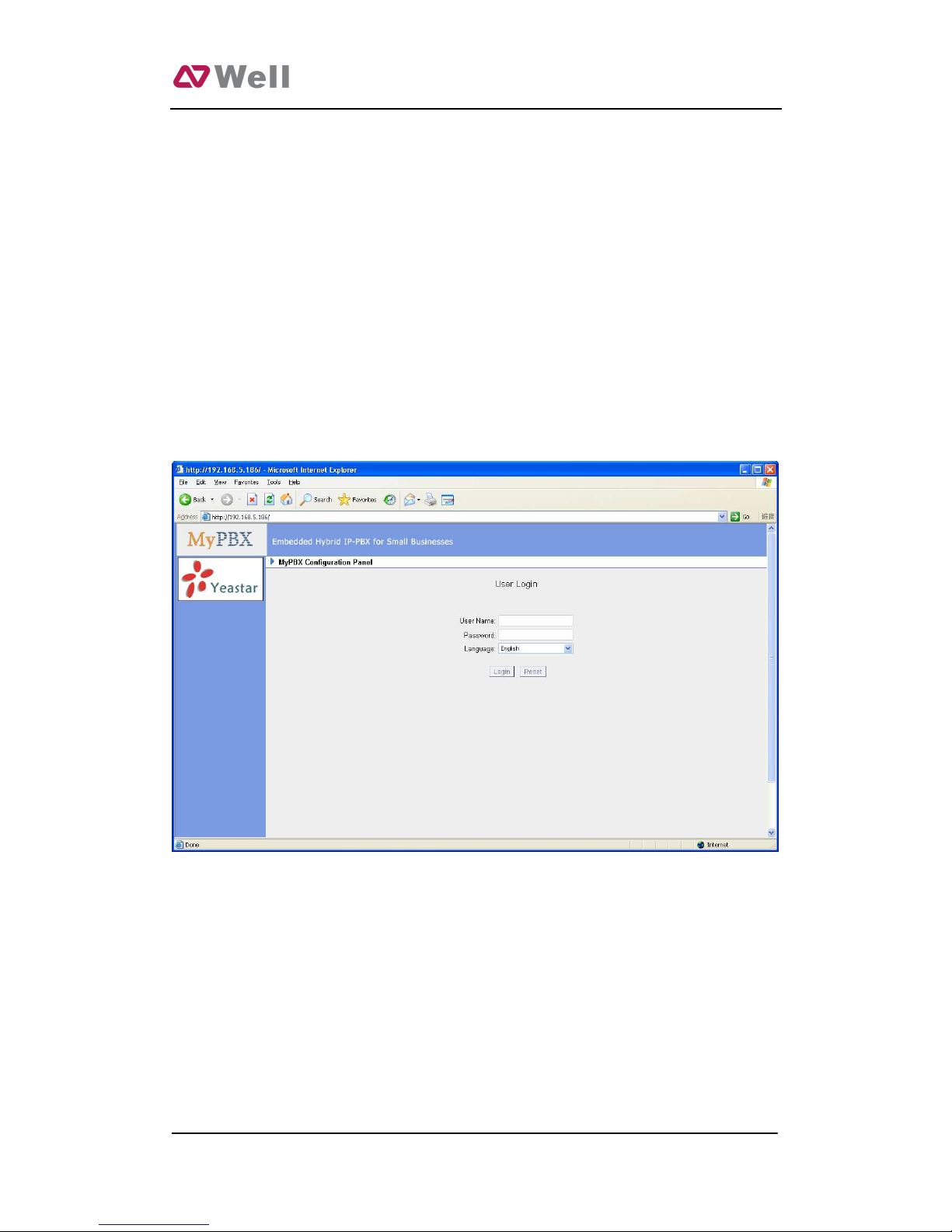
3.1 Administrator Login
From your web browser, input the IP address o the MPBX server.
I this is the irst time you are con iguring MPBX, please use the de ault
settings below:
IP Address: http://192.168.5.150
Username: admin
Password: password
Figure 3-1

mPBX-100 User Manual
www.yeastar.com Page 9
3.2 Status Monitor
3.2.1 Line Status
Figure 3-2
MPBX Status Description:
Extensions:
1) : Extension is unregistered
2) : Extension is idle
3): Extension is ringing
4): Extension is busy in a call
Trunks:
VOIP Trunk:
Status
Unregistered: Trunk registration ailed.
Registered: Succeed registration, trunk is ready or use.
Request Send: Registering.
Waiting: Waiting or authentication.

mPBX-100 User Manual
www.yeastar.com Page 10
FXO Trunk:
Status
Idle: The port is idle.
Busy: The port is in use.
Disconnected: The port hasn’t connected the PSTN line.
More detail message, please re er to the LED identi ying o ront panel.
GSM Trunk:
Status
Idle: The port is idle.
Busy: The port is in use.
Signal
: No signal.
: Poor.
: Average.
: Good.
: Excellent.
BRI Trunk:
Status
Ok: The ports connect correctly.
Error: The port is error.
Disconnected: The port hasn’t connected the PSTN line.
Service Provider:
Status
Registered: Succeed registration, trunk is ready or use.
Failed: Trunk registration ailed.
3.3 Basic
3.3.1 Extension
Extension has two types: Analog extensions (FXS) and VOIP extensions (SIP
extension or IAX extension).
Otros manuales para mPBX-100
1
Tabla de contenidos
Otros manuales de Centralita privada de Well


Manuales populares de Centralita privada de otras marcas

Allo.com
Allo.com Nano 2 Manual de usuario

ZYCOD
ZYCOD ZX50 Manual de usuario

Panasonic
Panasonic KX-TDA100BX Manual de usuario

LV switch
LV switch IPPBX800 Manual de instrucciones

Edge-Core
Edge-Core VST3305 Manual de usuario

Panasonic
Panasonic KX-T7625 - Digital Proprietary Speakerphone 24... Manual de usuario

Rauland-Borg
Rauland-Borg Telecenter IV Manual de usuario

Grandstream Networks
Grandstream Networks UCM6208 Manual de usuario

ATCOM
ATCOM IPPBX IP02 Manual de usuario

Panasonic
Panasonic KX-TVS50 - 2 Port Voicemail System Manual de usuario

bintec elmeg
bintec elmeg elmeg hybird 600 Manual de usuario

Panasonic
Panasonic KX-NS300 Manual de usuario


