
WebGate i-Rec B104 Manual de usuario

i-Rec B104
Installation Guide
(v 1.4)

2 2003. 06. 30 (v 1.4) WEBGATE Inc.
FCC Compliance Statement
Caution: Any changes or modifications in construction of this device which are not expressly
approved by the party responsible for compliance could void the user's authority to operate the
equipment.
NOTE: This equipment has been tested and found to comply with the limits for a Class B
digital device, pursuant to part 15 of the FCC Rules. These limits are designed to provide
reasonable protection against harmful interference in a residential installation. This equipment
generate, uses and can radiate radio frequency energy and, if not installed and used in
accordance with the instructions, may cause harmful interference to radio communications.
However, there is no guarantee that interference will not occur in a particular installation. If this
equipment does cause harmful interference to radio or television reception, which can be
determined by turning the equipment off and on, the user is encouraged to try to correct the
interference by one or more of the following measures:
- Reorient or relocate the receiving antenna.
- Increase the separation between the equipment and receiver.
- Connect the equipment into an outlet on a circuit different from that to which the receiver is
connected.
- Consult the dealer or an experienced radio/TV technician for help.
CAUTION
Danger of explosion if battery is incorrectly replaced.
Replace only with the same or equivalent type.
Dispose of used batteries properly with regards to environmental considerations.

WEBGATE Inc. 2003. 06. 30 (v 1.4) 3
Important Notice
1. When i-Rec B104 is in operation, do not place heavy monitors or other items on top of unit.
Do not vertically stack more than four i-Rec B104s.
2. i-Rec B104 is not weatherproof. Therefore consider environmental specifications that are
included in the manual. In case of outdoor use, equip weatherproof case to protect i-Rec
B104 from water, moisture, or severe temperature variations (higher or lower than
specifications). Clean i-Rec B104 by gently wiping outside shell with a clean, dry cloth.
3. Be sure to use the DC adapter that is provided with the unit. Connecting i-Rec B104 directly
to an AC current may cause electrical damage to i-Rec B104.
4. Be cautious of handling i-Rec B104. Physical shocks may harm the product.
5. i-Rec B104 is made with a metal case. When installing the camera, be sure it is attached
securely to avoid any injuries. Be careful to locate the camera where children cannot reach
it.
6. If i-Rec B104 does not operate properly, please contact your WebGate distributor for after
sales service. In all cases, you are prohibited to disassemble the product. If so, WebGate is
not responsible for any malfunction and will void service warranty.
7. Security surveillance laws may differ for each country and from region to region. Therefore,
please contact the local authorities first to avoid any surveillance law violations and use for
authorized purposes only.

i-Rec B104 Contents
4 2003. 06. 30 (v 1.4) WEBGATE Inc.
Contents
Introduction............................................................................................................................... 6
1. Key Features.................................................................................................................... 6
2. Supplied Accessories ....................................................................................................... 7
3. Product Views and Description ........................................................................................ 9
Installing & Connecting.......................................................................................................... 10
4. Installing i-Rec B104 ...................................................................................................... 10
4.1. Connecting cameras to i-Rec B104......................................................................... 10
4.2. Connecting i-Rec B104 to Network ..........................................................................11
4.2.1. Connecting i-Rec B104 to PC directly ...............................................................11
4.2.2. Connecting i-Rec B104 to Local Network......................................................... 12
5. Setting i-Rec B104 & Getting an Image.......................................................................... 13
5.1. Installing CamViewer II .......................................................................................... 13
5.1.1. Installation of Software..................................................................................... 13
5.1.2. Uninstalling ...................................................................................................... 14
5.2. Connecting to i-Rec B104 ....................................................................................... 15
5.3. Setting IP address................................................................................................... 16
5.4. Setting Camera Input Channel................................................................................ 17
5.5 Checking Images of i-Rec B104.............................................................................. 18
6. Installing HDD ................................................................................................................ 20
6.1. Usable HDD............................................................................................................ 20
6.2. HDD Installation Procedure..................................................................................... 20
7. Recording & Playback.................................................................................................... 24
7.1 Setting HDD ............................................................................................................ 24
7.2. Setting Time................................................................................................................ 25
7.3. Setting Recording Schedule ....................................................................................... 26
7.4. Playback ..................................................................................................................... 28
8. Input / Output ................................................................................................................. 30
8.1. Connecting Serial Port................................................................................................ 31
8.1.1. Specifications of Serial Port ............................................................................. 31
8.1.2. Serial Port View ............................................................................................... 31
8.1.3. Connecting & setting RS-232 port.................................................................... 31
8.1.4. Connecting & setting RS-485 port.................................................................... 32
8.1.5. Connecting & setting RS-422 port.................................................................... 33

Contents i-Rec B104
WEBGATE Inc. 2003. 06. 30 (v 1.4) 5
8.2. Connecting Alarm Output ........................................................................................ 35
8.2.1. Specifications of Alarm Output ......................................................................... 35
8.2.2. Alarm output port view ..................................................................................... 35
8.2.3. Connecting & Setting ....................................................................................... 35
8.3. Connecting Sensor Input......................................................................................... 37
8.3.1. Specifications of Sensor Input.......................................................................... 37
8.3.2. Sensor Input Port View .................................................................................... 37
8.3.3. Connecting & Setting ....................................................................................... 37
8.3.4. Connecting sensors for 1.0 or below main version PCB of i-Rec B104............ 38
8.4. Connecting Impedance Setup Switch for Video Input ............................................. 39
8.5. Video Input.............................................................................................................. 39
APPENDIX .............................................................................................................................. 40
#1. Frequently Asked Question (FAQ) .............................................................................. 41
#1.1. About i-Rec B104’s Feature................................................................................. 41
#1.2. About i-Rec B104 Installing ................................................................................. 43
#2. Utilizing IP Addresses on Local Network..................................................................... 46
#2.1. Introduction.......................................................................................................... 46
#2.2. IP Construction and Network class...................................................................... 46
#2.3. C-class Network .................................................................................................. 47
#3. Setting the fixed IP address on PC............................................................................. 50
#4. CRS Help ................................................................................................................... 52
#4.1. When using ADSL ............................................................................................... 52
#4.2. When resetting local network from ADSL ............................................................ 55
#4.3. When using Cable modem .................................................................................. 58
#5. Upgrading i-Rec B104 Firmware ................................................................................ 59
#5.1. Connecting i-Rec B104 to PC.............................................................................. 59
#5.2. Upgrade firmware with upgrading program.......................................................... 59
#6. Using CD-ROM........................................................................................................... 61
#7. Specifications ............................................................................................................. 62

i-Rec B104 Introduction
6 2003. 06. 30 (v 1.4) WEBGATE Inc.
Introduction
1. Key Features
i-Rec B104 is a 4-channel box style Network DVR. It is an all-in-one system with a Web server
of embedded Linux, a networking device, and a HDD (Removable). i-Rec B104 only needs
designated power supply and network connection in order to operate.
Monitoring through Network
RS 232 / RS 485 / RS422 port support for PTZ control
Embedded Linux OS for excellent stability and less downtime
Wavelet compression (30%~300% greater efficiency than JPEG) for higher refresh rate and
crisper images
4 channels video input support
4 alarms output support
S/W motion detection
Dynamic IP (DHCP, Floating IP) support (xDSL and Cable modem)
Introduction i-Rec B104
WEBGATE Inc. 2003. 06. 30 (v 1.4) 7
2. Supplied Accessories
Unpack and check all items.
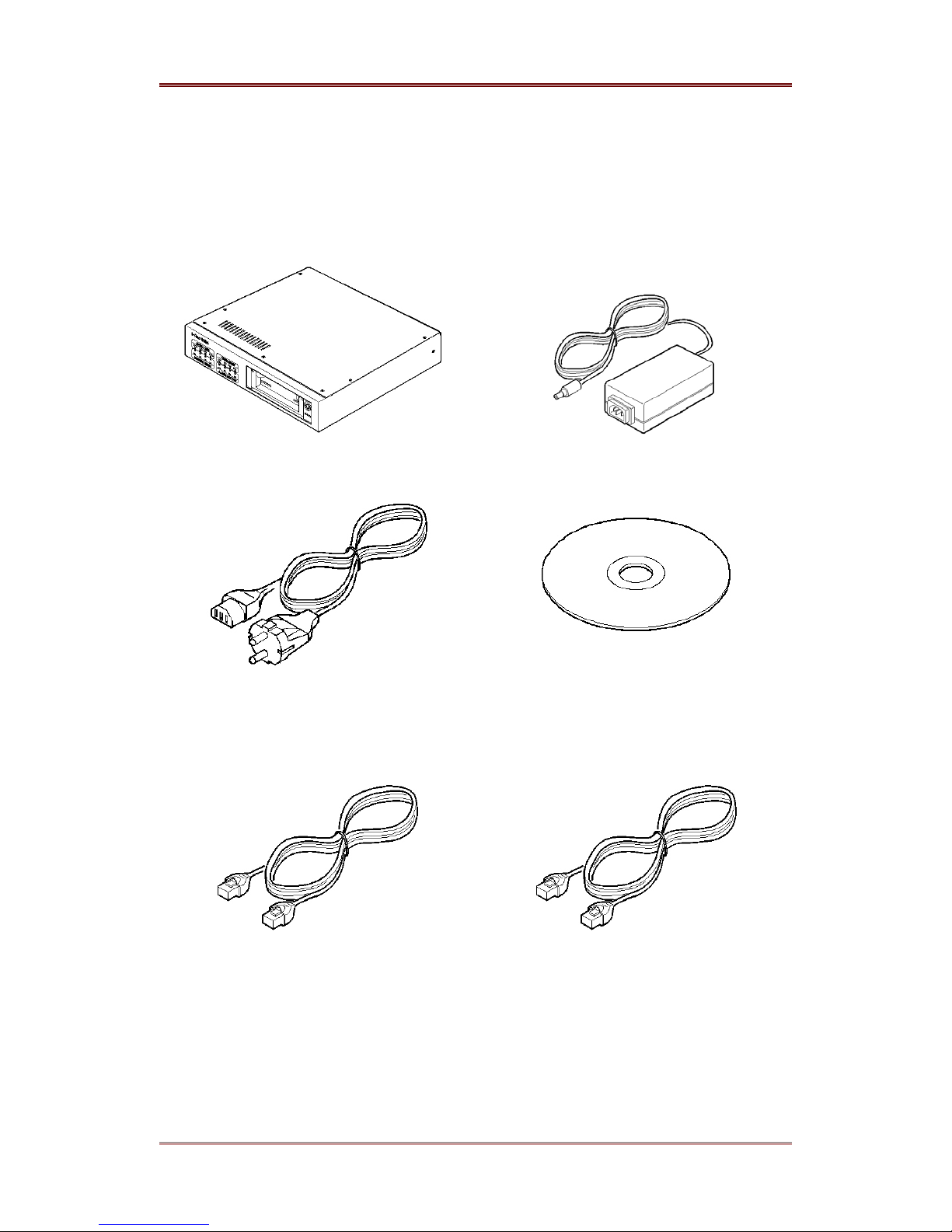
1. i-Rec B104 (1)
2. DC POWER SUPPLY (1)
(110V ~ 220V)
3. AC POWER CORD (1)
4. CD-ROM (INCLUDING CAMVIEWER
AND OPERATING INSTRUCTIONS) (1)
5. ETHERNET CABLE (1, RED)
(UTP CATEGORY 5 CROSS CABLE)
6. ETHERNET CABLE (1, IVORY)
(UTP CATEGORY 5 DIRECT CABLE)
i-Rec B104 Introduction
8 2003. 06. 30 (v 1.4) WEBGATE Inc.
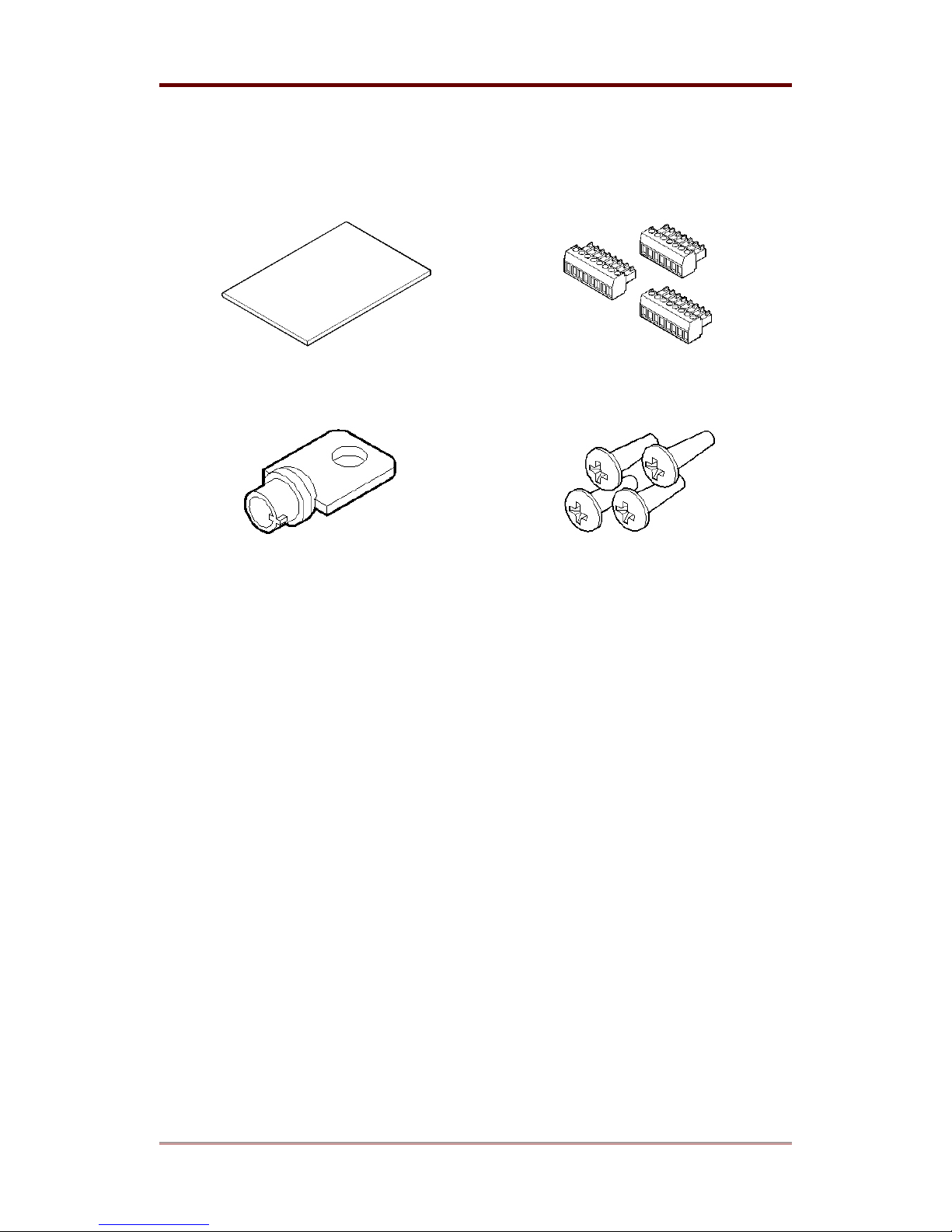
7. INSTALLATION GUIDE (1)
8. TERMINAL BLOCK (3)
(8PIN x 2, 7PIN x 1)
9. HDD MOBILE RACK KEY (1)
10. SCREW (4)
Introduction i-Rec B104
WEBGATE Inc. 2003. 06. 30 (v 1.4) 9
3. Product Views and Description
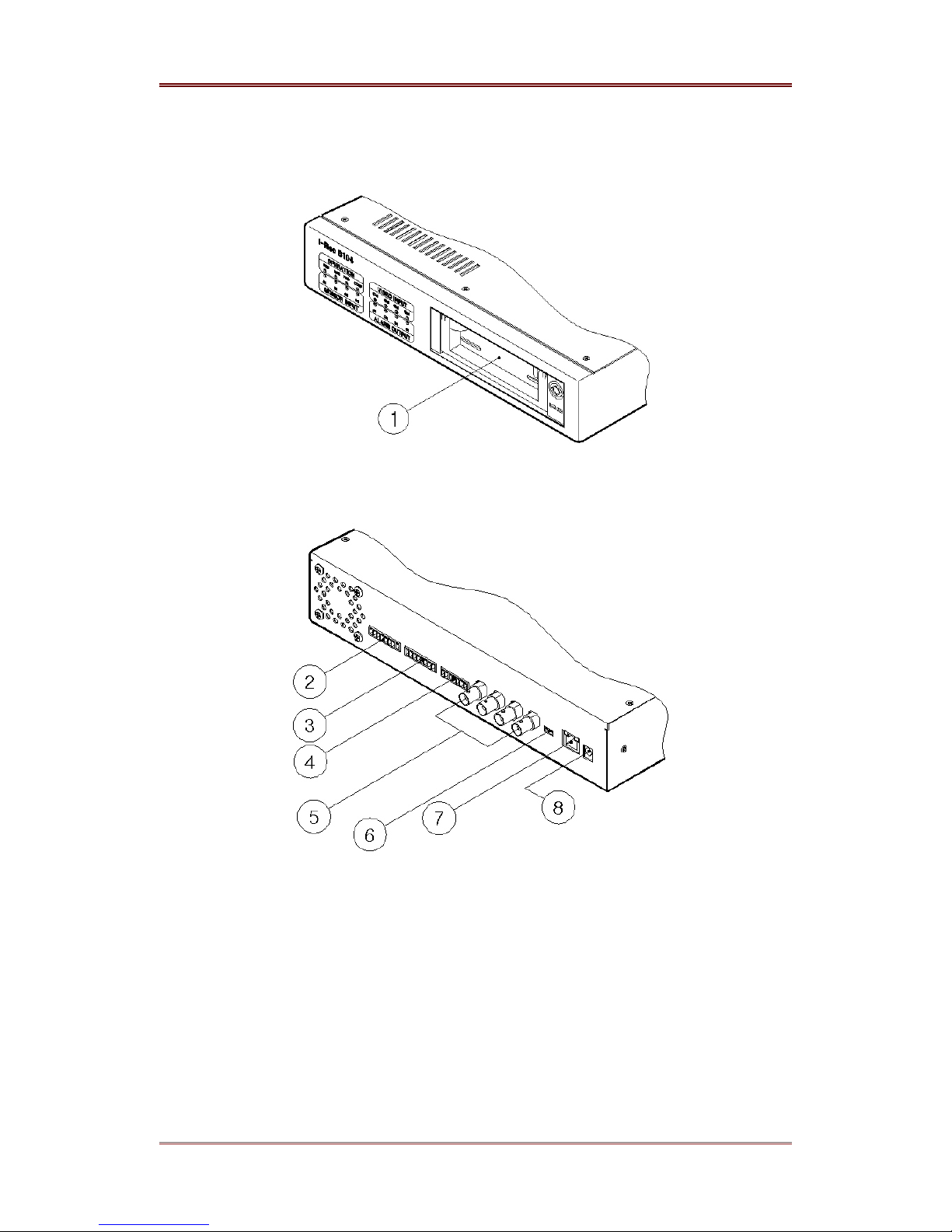
(1) HDD mobile rack
(2) Alarm output
(3) Sensor input
(4) Serial port
(5) Video input
(6) Impedance control switch
(7) Ethernet
(8) DC power
i-Rec B104 Installing & Connecting
10 2003. 06. 30 (v 1.4) WEBGATE Inc.
Installing & Connecting
4. Installing i-Rec B104
This user’s guide describes the most two common network conditions for installing B-104:
(1) i-Rec B104 and administrator’s PC uses fixed or private IP address.
(2) Computers and B104 are connected directly or to local network.
4.1. Connecting cameras to i-Rec B104
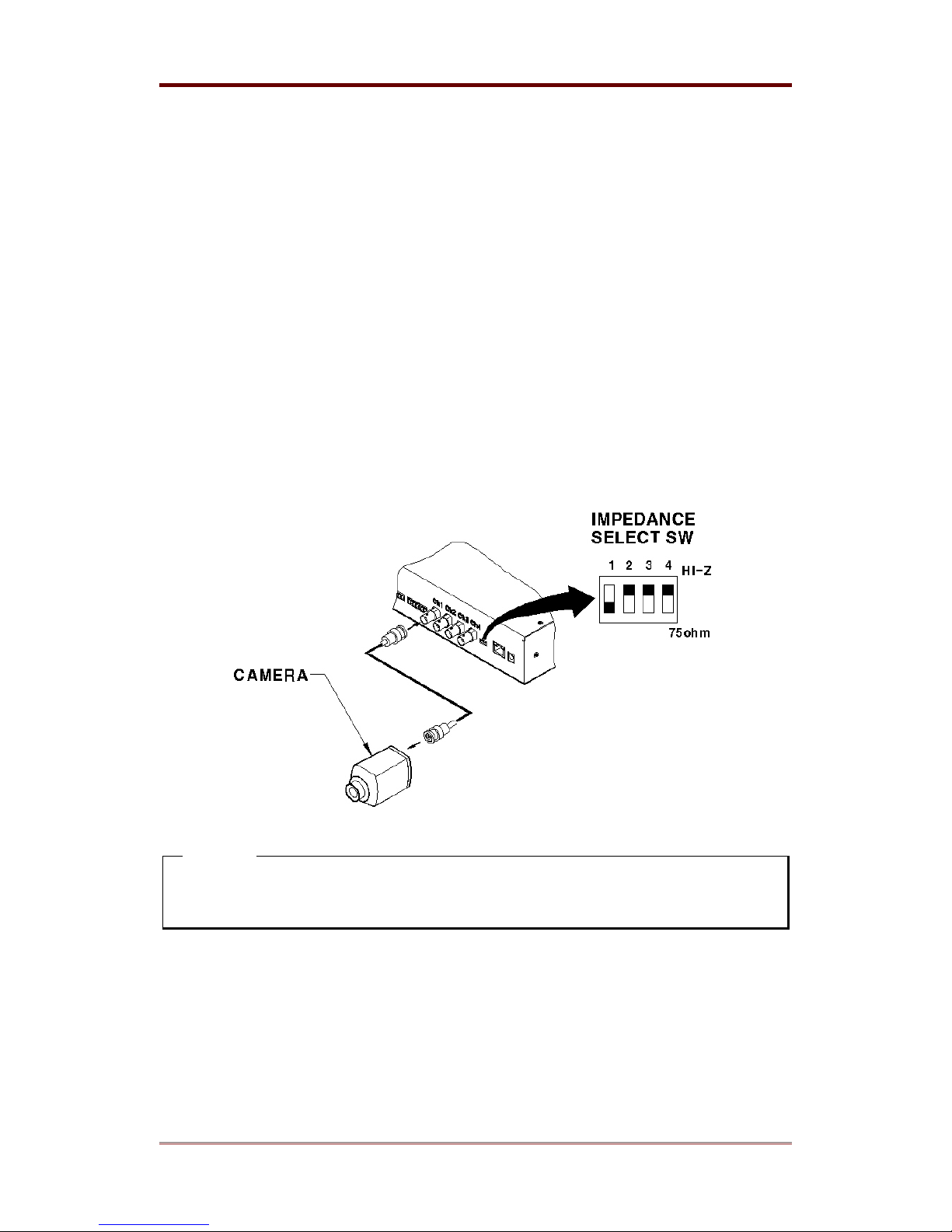
(1) Connect i-Rec B104 to camera(s) with BNC Cable.
(2) Set impedance control switch of the connected channel. Set impedance by moving switch
<Note>
For more exact settings, please refer to “Impedance setup switch for video Input” of “Input /
Output” in User’s Guide.
Tabla de contenidos
Manuales populares de Equipo de grabación de otras marcas


Strymon
Strymon NIGHTSKY Manual de usuario

Mitsubishi Electric
Mitsubishi Electric 16CH DIGITAL RECORDER DX-TL5000U Manual de usuario

Tews Technologies
Tews Technologies TPMC465 Manual de usuario

Honeywell
Honeywell Excel 50 Manual de usuario

SeaLevel
SeaLevel COMM+8.LPCI Manual de usuario

Arturia
Arturia AUDIOFUSE STUDIO Manual de usuario


