
Watthour Engineering WE-20 Manual de usuario

.
.
.
.
. Watthour Engineering Co., Inc.
333 Corsspark Dr.
Pearl, MS 39042
(601) 933-0900
.
.
.
.
.
..........
Watthour Engineering Co., Inc.
WE-20 Remote Control
Installation Instructions
•Software Installation on the WE-20 – page 2
•Software Installation on a laptop – page 5
•Hardware Installation on a laptop – page 9
•How to Use – page 11

.
.
.
.
.
.
.
.
.
.
2
Software Installation on a WE-20
1. Download from the Weco ftp site the installation file using the following link:
www.watthour.net\download\WE20XP\RemoteControl_WE20.exe Please note
that the link is case sensitive and between Control and WE20 there is an
underscore ‘_’. You may download this file either directly to the WE20’s hard
drive or to a jump drive.
2. On the WE20, browse to the location of the download and double click to start
the installation.
3. You may see a warning message asking if you want to run this application,
click the Run button.

.
.
.
.
.
.
.
.
.
.
3
4. When you see this screen, click the Next button.

.
.
.
.
.
.
.
.
.
.
4
5. When the installation is finished you should see the following screen. You
may ignore the comment about rebooting as that is not required. Just click the
Finish button.
6. Click OK on the following screen and you do NOT have to reboot.
7. You have completed the software installation on the WE-20.

.
.
.
.
.
.
.
.
.
.
5
Software Installation on a laptop
1. Download from the Weco ftp site the installation file using the
following link:
www.watthour.net\download\WE20XP\RemoteControl_Laptop.exe
Please note that the link is case sensitive and between Control and
Laptop there is an underscore ‘_’. You may download this file
directly to your laptop.
2. Browse to the location of the downloaded file and double click to
start the installation.
3. You may see the following screen. If so, then click the Run button.

.
.
.
.
.
.
.
.
.
.
6
4. When you see the following screen, just click Next.
.
.
.
.
.
.
.
.
.
.
7
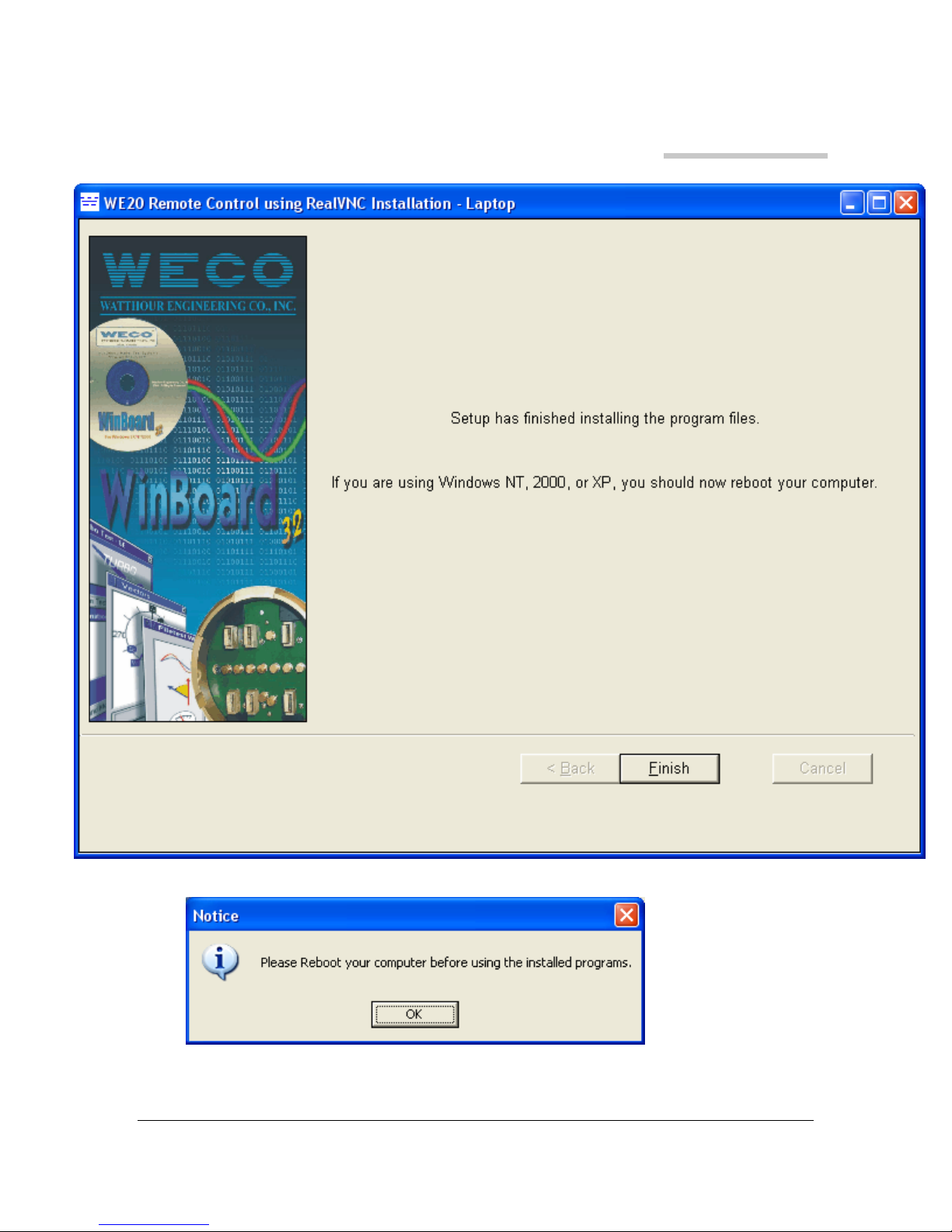
5. When the next screen appears, just click the Finish button.
6. You may ignore this next screen and just click OK. A reboot is NOT required.

.
.
.
.
.
.
.
.
.
.
8
7. If your meter programming software that is installed on your laptop is NOT
configured to use com1, then do the following steps:
a) Right mouse click on the newly installed desktop icon WE20vnc.
b) Select Properties from the pop-up menu.
c) On the Target Line, change the com1 at the end of the line to the comport
number that your meter programming software is configured to use.
d) Click the OK button.
8. You have completed the software installation for your laptop.

.
.
.
.
.
.
.
.
.
.
9
Hardware Installation on a laptop
1. To prevent IP address conflicts with your companies IP addressing it is required
that you install a USB to Ethernet adapter to your laptop. We have used the
TRENDnet TU2-ET100 available through Weco or directly from RadioShack.
2. Install the USB to Ethernet adapter and software per the manufacture’s
instructions.
3. After the USB to Ethernet adapter’s software is installed, connect the USB to
Ethernet adapter to your laptop.
4. Click on Windows Start button, and select Settings | Network Connections |
{your new USB to Ethernet adapter}.
5. From this screen select the Internet Protocol (TCP/IP) and then the properties
button.

.
.
.
.
.
.
.
.
.
.
10
6. Click the radio button to Use the following IP address and enter 169.254.1.1
[You may actually use any value between 1 and 254 for each of the 1’s, it
really does not matter]. The subnet mask will default to 255.255.0.0 and
accept the default. The Default Gateway should remain blank.
7. Click OK to accept and close.
8. Click OK on the properties screen to accept and close.
Tabla de contenidos


