
volkano Serene Series Manual de usuario


2
THE HIGHLIGHTS
• Volkano Active Tech Serene Series Fitness Watch
• USB Charging Dock with Cable
• Instruction Manual
PACKAGE CONTENTS
• Water and Dust Resistant
• Hypo-Allergenic Strap
• IPS Single Point Color Touch Screen
• Heart Rate Monitor
• IP67 Water Resistant
• Multi-Sport Monitoring
• Pedometer and Calorie Usage
• Missed Call Notification
• Message Notification
• Metal Alloy Casing
• Up to 3 Days Battery Life
• Fully compatible with iOS and Android
• Volkano Active App

3
• Heart Rate Monitor: Built-in
• GPS Monitor: Built-in
• Pedometer: Built-in
• Alarm Clock: Yes
• Notification: Yes via smartphone
• IP Rating: IP67 – (Dust tight. Watertight against the effects of
immersion in water up to 1.5 meters for up to
30 minutes).
• App: Volkano Active
• Screen Resolution: 240 x 240
• Screen Size: 1.3"
• Bluetooth
Version: 4.2
Operating Distance: 10 m
• Battery Capacity: 155 mAh
• Battery Type: Li-Polymer
• Standby Time: 10 Days
• Battery Life: 5 Days
• Charge Time: 3 Hours
SPECIFICATIONS
4
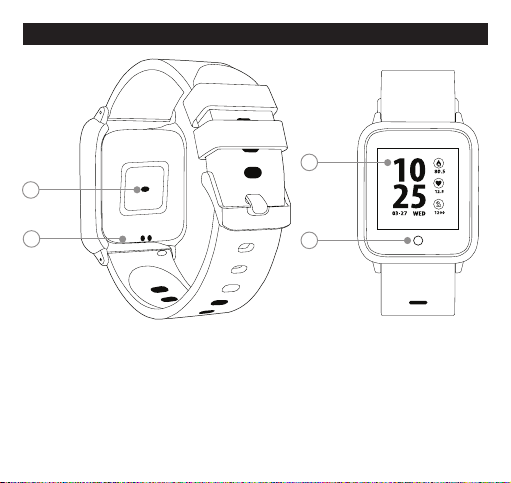
DESCRIPTION OF PARTS
1. Heart Rate Sensor
2. Charging Pogo Pins
3. Screen
4. Virtual Key
2
3
1
4

INSTRUCTIONS FOR USE
CHARGING DIAGRAM
SWITCHING THE DEVICE ON OR OFF
5
INSTALLING THE VOLKANO ACTIVE APP
To download the Volkano Active App, please direct your
browser to the following website: volkano.co.za/active-app
or scan the QR code from your phone.
2
3
1
CHARGING
Please connect the metal pins (2)
of the USB Charging Adaptor with the Charging
Pogo Pins (1) on the back of the watch until
the charging icon appears on the screen,
then close the charging adaptor, making sure the
watch is firmly in place.
To remove the watch from charge, press the clip
release button (3) on the USB Charging Adaptor.
Long press the Virtual Key to turn off your watch when the off option is selected from
the more menu.

CONNECTING THE WATCH TO A MOBILE PHONE
1. Enable Bluetooth on your smartphone.
2. Pair your smartphone with the watch (see locating the Bluetooth Menu for more
details).
3. Open the Volkano Active App on your smartphone and set your profile from the
Settings Menu in the My Profile tab.
4. Tap connect on the fitness watch in the Settings Menu.
5. Select “VK-5072” from the list of devices.
6. A success prompt will appear on-screen. Tap next to navigate to the app’s
dashboard.
1. Open the Volkano Active App on your smartphone.
2. Tap disconnect fitness watch in the app’s settings.
iPhone
a) On your device, go to Settings.
b) Select Bluetooth. If Bluetooth is not on, turn it on.
c) Open the Volkano Active App. Go to Settings, click connect on the fitness watch.
You will see different options.
d) Choose “VK-5072” and click connect.
6
UNBIND FROM MOBILE PHONE
LOCATING THE BLUETOOTH MENU

CONNECTING WITH PAIRED DEVICES
When the Volkano Active Tech Serene Series Fitness Watch is turned on, it will
automatically connect with the last paired Bluetooth device that is on and within
range. If the Volkano Active Tech Serene Series Fitness Watch does not connect
automatically, open the Volkano Active Tech App, and connect again.
CONTROLS
• You can raise your hand or press the Virtual Key to illuminate the screen.
• Long press the Virtual Key to switch the Main Menu interface.
• Long press the Virtual Key to confirm.
• Long press the Virtual Key to switch on the watch from its powered-off state.
7
Android™ Phones
a) On your device, go to the Settings Menu.
b) Select Bluetooth (on older Android devices Bluetooth is found in the Wireless &
Networks Menu). If Bluetooth is not on, turn it on.
c) Open the Volkano Active App. Go to Settings, click connect the fitness watch.
You will see different options.
d) Choose “VK-5072” and click connect.
HOW TO USE
• Turn on: Long press the Virtual Key for 3 seconds.
• Confirm: Long press the Virtual Key.
• Enter Main Menu Selection: Long press the Virtual Key.
• Exit Main Menu Selection: Long press the Virtual Key

8
FUNCTIONS
WATCH FACE
If you want to change the watch face of your
fitness watch press the virtual key for 3
seconds, tap briefly to switch between different
watch faces and long press the virtual key to
choose the one you want.
PEDOMETER
The watch will record your daily activity
automatically. Long Press the Virtual Key to
access the details page where you can check
your steps taken, calories and distance data.
After synchronizing with the Volkano Active
App, you can check your steps taken, calories
and distance data on your smartphone.

9
MULTI-SPORT
Press and hold the Virtual Key when in sport
mode to enter the multi-sport function. The
fitness watch has four comprehensive sport
modes: walking, running, climbing, and
cycling. You can choose which mode you
want, and the fitness watch will record the
motion data.
When you want to complete the sport, press
the virtual key to stop and save your exercise
data.
After synchronizing with the Volkano Active
App, you can check your sports records.
HEART RATE
Long press the Virtual Key to monitor your
heart rate once it is selected and long press to
exit the heart rate monitor. After it syncs with
the Volkano Active App, you can check your
heart rate data on your smartphone.

10
The Volkano Active Tech Serene will monitor
your sleep automatically. When the sleep mode is
stopped, the Volkano ActiveTech Serene will show
your sleep report with the times of total sleep,
light sleep and deep sleep. After synchronizing
with the Volkano
Active App, you can check a more detailed sleep
report.
Long press the Virtual Key to check unread
notifications such as incoming calls, SMS, QQ,
WeChat, WhatsApp, Facebook, and Twitter
message notifications.
SLEEP MONITOR
MESSAGE
After synchronizing with the Volkano Active App,
the watch will show the weather forecast. You
can manually set the city required or set up an
automatic city in the app.
WEATHER
Este manual sirve para los siguientes modelos
2
Tabla de contenidos
Otros manuales de Mirar de volkano


