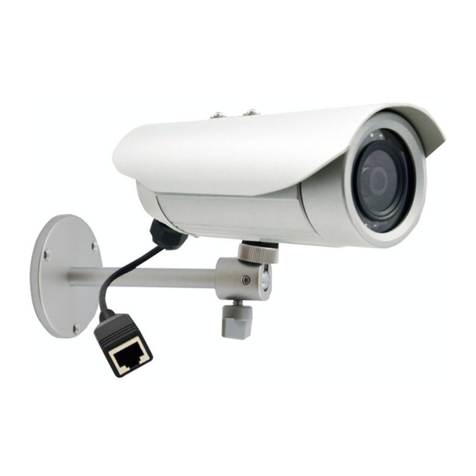
Vivotek AE-211 Manual de usuario

IP Surveillance
User’s Manual
AE-211/AE-232/AE-233
Rev. 1.0
Camera Enclosure

2
Specications
I
Model Number AE-211/AE-232/AE-233
Power Input 90~240VAC (+/-10%)
Rating Current 3.5 A
Heater Control 18 +/-3°C (ON) / 28 +/-3°C (OFF)
Blower Control 35 +/-3°C (ON) / 25 +/-3°C (OFF)
Environmental Operation Temp. -20°C ~ +50°C
Protection Level IP68
Temper Glass thickness 4mm
Mounting Bracket Fully-cable Management
Construction Die-cast Aluminum Alloy
Coating Ivory Powder & Stove Finish
Dimensions 425 (L) x 160 (W) x 165 (H) mm
Camera Space 275 (L) x 90 (W) x 100 (H) mm
Net Weight 5230 g
CAUTION:
TO REDUCE RISK OF FIRE OR ELECTRIC SHOCK, DO NOT REMOVE COVER.
NO USER SERVICEABLE PARTS INSIDE.
REFER SERVICING TO QUALIFIED SERVICE PERSONNEL.
UNPACKING:
Unpack carefully. Electronic components can be damaged if improperly handled or
dropped. If an item appears damaged in shipment, place it properly in its carton and
notify the shipper.
IMPORTANT!
1. Read and follow Instructions: All operating and user instructions should be read and
followed before the unit is to be operated.
2. Electrical Connections: Only a qualied electrician is allowed to make electrical
connections.

3
English
Mounting Conguration & Dimensions
II
82.80mm
69.00mm
94.95mm
Swivel Positions and
Directions
Bracket Base Dimensions
BR-13 Full-cable Management
Bracket
160mm
68.5mm
83.2mm
425mm
165mm
Component Description
III
Camera Mounting
Platform Cable Conduits
Bushing Power Supply
Unit
Ground Wire
Blower
Terminal Block
Assembly
Thermal Control
Board
Heater
Shield
Heater

4
Wiring Diagram
IV
Shown below is the wiring diagram for the window demister. A spare 6-way terminal block
is provided at the rear of the chassis for additional camera and lens connections.
H1, Heater
STAT.1 TURN OFF at 28 C
TURN ON at 18 C
B2, Blower
STAT.2 TURN OFF at 25 C
TURN ON at 35 C
O
O
O
O
12VDC X4
3.5A or 5A
24VAC or
80~260VAC Input
H.1
or
B.2
PCB.1 CHASSIS EARTH
COVER EARTH
FTB. 1 FS. 1
TB. 1
TB.2
STAT.2
STAT.1
SPARE
PSU
TB.1 6 way terminal block
TB.2 3 way terminal block
FTB.1 Fused terminal block
STAT.1 18°C Thermostat
STAT.2 35°C Thermostat
H.1 Heater
PSU Power Supply Unit
P.C.B.1 Thermal control
circuit board
FS.1 3 Amp. Fuse
1. Pins 1, 2, 3, and 4 are DC 12V output for motor lens, siren, or speaker connecitons. If
they are not connected, remove cables from the connectors.
2. Pins 5 and 6 are DC 12V output for camera.
DC Output of PSU Connectors
H1. Heater
STAT.1 TURN OFF at 28°C
TURN ON at 18°C
B2. Blower
STAT.2 TURN OFF at 25°C
TURN ON at 35°C
Lines for
heater & blower
Pins 5 & 6
DC for camera
Pins 1 & 2
12V Output
Pins 3 & 4
12V Output
CHASSIS EARTH
COVER EARTH

5
English
Installation Suggestions
V
If you plan to install this camera enclosure into a tropical, sea coastal, or an environment
where salt water or corrosive industrial waste water/moist are present, please seal each
stainless steel screws and ttings with a silicon grease compounds. This will help prevent
electrolysis to occur and extend the life span of the camera and housing.
IMPORTANT!
1. Disconnect devices: A readily accessible disconnect device in the building installation
wiring should be incorporated.
2. Electrical Connection: Only a qualied electrician is allowed to make electrical
connections.
Features
Model Name
Heater:
On at 18OC
Off at 28OC
Blower
On at 35OC
Off at 25OC
PSU
(Power Supply Unit)
12VDC/24VAC 12VDC 080 324
080/F -• • -
080/HF • • • -
324/HF • • -•
1. 080: [90~240VAC input (+/-10%), 4x12VDC output, 3.5A]
2. 324 (24VAC input, 4x12VDC output, 3.5A)
Below are AC power connections to the FTB. 1 connector.
AC Power Connection
AC 24V Input AC 24V Input
Ground
Green Line

6
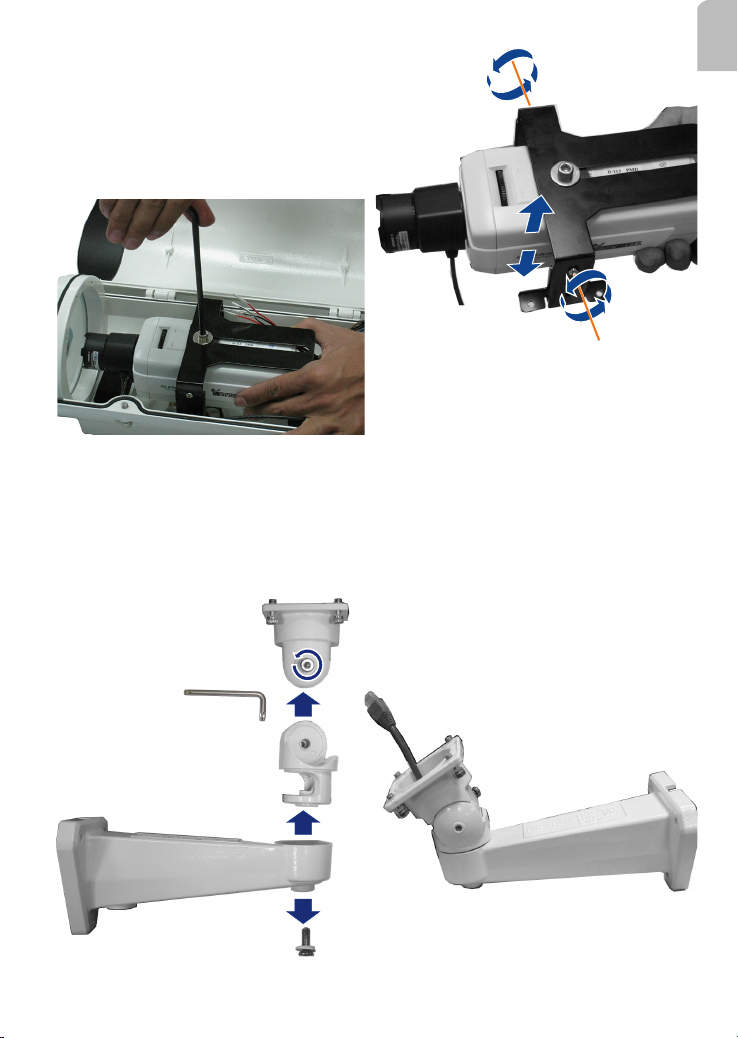
2. Remove the camera bracket by
loosening 4 screws using a mid-size
Phillips screwdriver. Loosen the socket
screw on top of the bracket to remove
the rectangular support.
3. Place the rubber insulation pad
on top of the camera with its opening
aligned with the screw hole.
Rectangular Support
Camera Installation
VI
1. Loosen the socket screws
using the included L-type hex key
wrench, and open the cover.
7
English
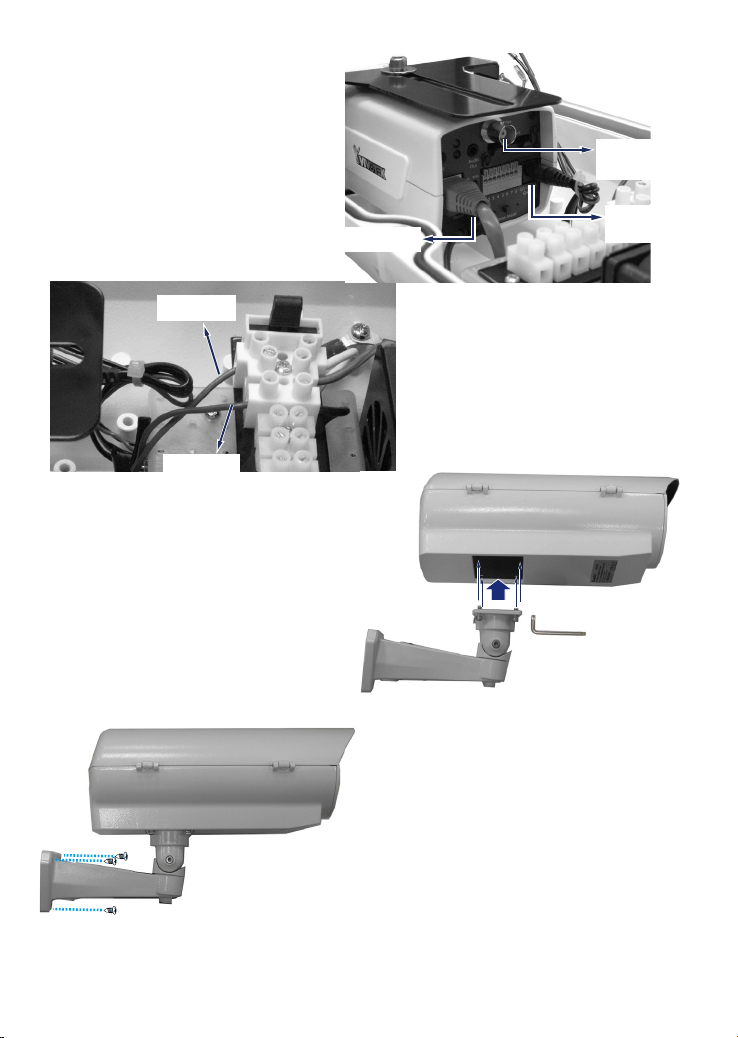
4. Mount the bracket on top of camera
in a reversed orientation to gain more
space for the lens module to zoom in/
out. You may change the camera's
vertical position by adjusting the screws
on the sides of bracket.
5. When done, place the camera into
the housing, secure the bracket to the
bottom of housing, and tighten the
socket screw.
6. Route your AC input, DI/DO, and
Ethernet cables through the BR-13
bracket, and then the rubber bushing at
the bottom of the housing.
In order to pass cables through, you
may need to disassemble the BR-13
bracket. Use the included L-type wrench
to loosen the screws and pass cables
through the bracket.
When done, re-assemble the bracket
and its swivel parts.
8
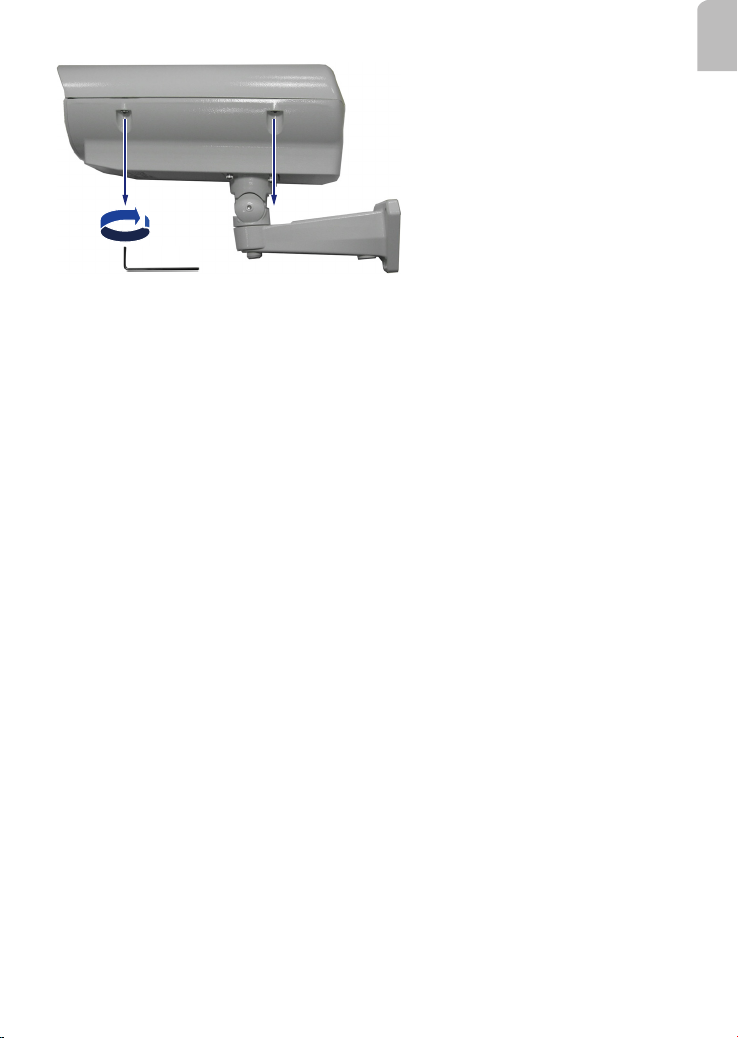
8. Connect 24V AC lines to the FTB.
1 connectors.
AC Input
AC Input
7. Connect the Ethernet cable and the
12V DC connector to your camera. You
may use the BNC connector for initial
image adjustment.
BNC Connector
RJ-45 Ethernet
12V AC Input
9. Secure the housing to the bracket
using the supplied socket screws. Pan and
tilt the housing to aim at the monitored
area.
10. Mount the bracket to a desired
position using the included mounting
screws.
BNC
Connector
12V DC
Input
RJ-45 Ethernet
AC Input
AC Input
9
English
11. After you adjust the camera's zoom
and focus, close and secure the cover by
tightening the socket screws using the
L-type wrench.

10
規格
I
型號 AE-211/AE-232/AE-233
電源輸入 90~240VAC (+/-10%)
額定電流 3.5 A
加熱器控制 18 +/-3°C (開) / 28 +/-3°C (關)
吹風機控制 35 +/-3°C (開) / 25 +/-3°C (關)
環境操作溫度 -20°C ~ +50°C
保護層級 IP68
強化玻璃厚度 4mm
安裝支架 完整纜線管理
構造 鑄模鋁合金
塗料 象牙粉及烤漆
尺寸 425 (L) x 160 (W) x 165 (H) mm
攝影機尺寸 275 (L) x 90 (W) x 100 (H) mm
淨重 5230 g
重要事項!
1. 請閱讀並遵照指示:在操作機體之前,請先閱讀並遵照所有操作及使用指示說明。
2. 連接電線:僅可由合格電力技師執行電線連接工作。
注意:
為降低火災或觸電的風險,請勿移除護蓋。用戶不得進行內部零件的維修工作。
請洽詢合格的技術服務人員以進行維護。
拆封:
請小心拆封。若不當處理或掉落,電子元件可能會受損。若出貨包裝內的物品可能受
損,請妥善放置在其紙箱內,並通知出貨商。
Este manual sirve para los siguientes modelos
2
Tabla de contenidos
Idiomas: