
Vivo Zeppa Manual de usuario

Vivo Zeppa
User Guide
Hotel Technology International Limited
1st Floor • 239 Kensington High Street
London • W8 6SA • United Kingdom
Telephone: +44(0) 203 405 1200 • Fax +44(0) 203 411 6610
Vivo Zeppa Corded Telephone User Guide
Page 2 of 8
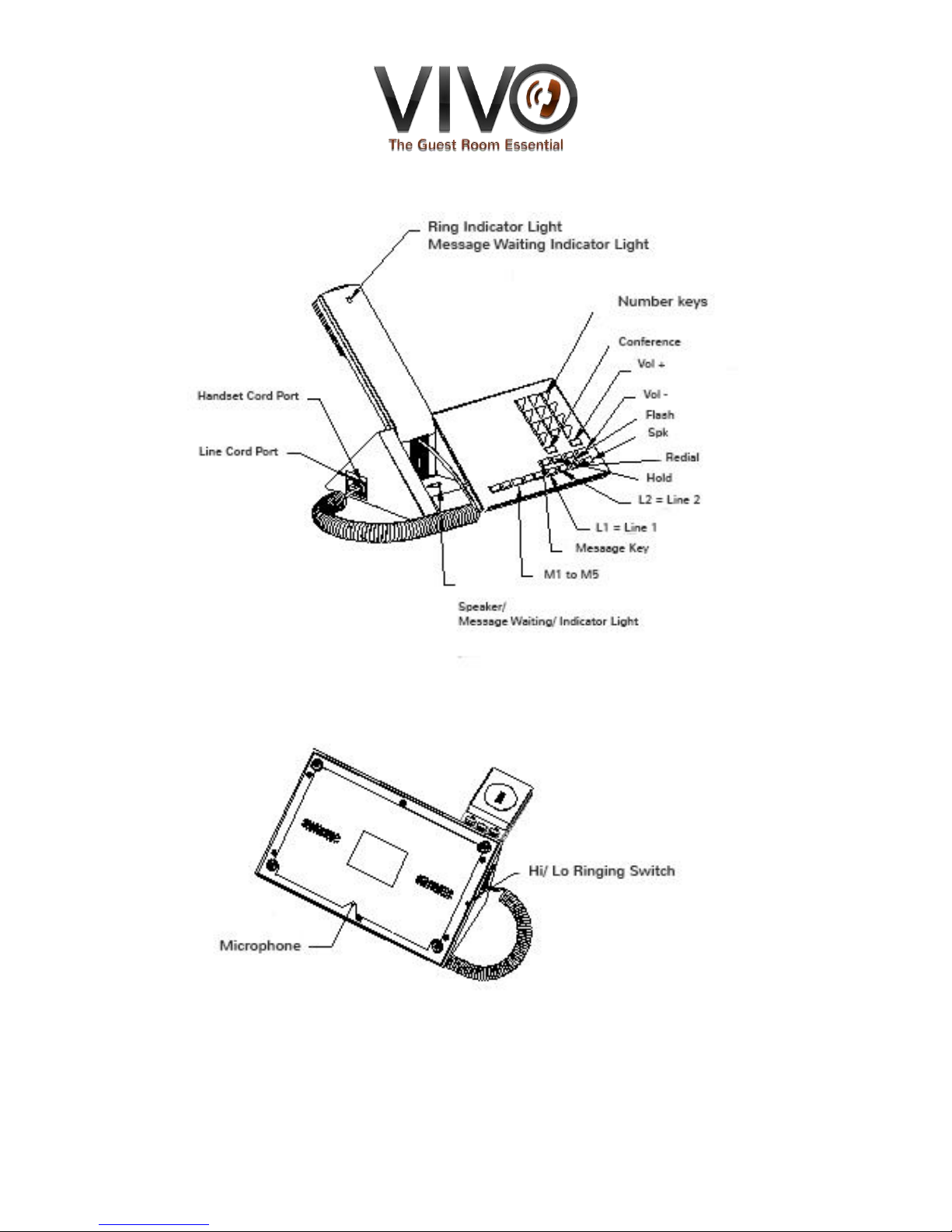
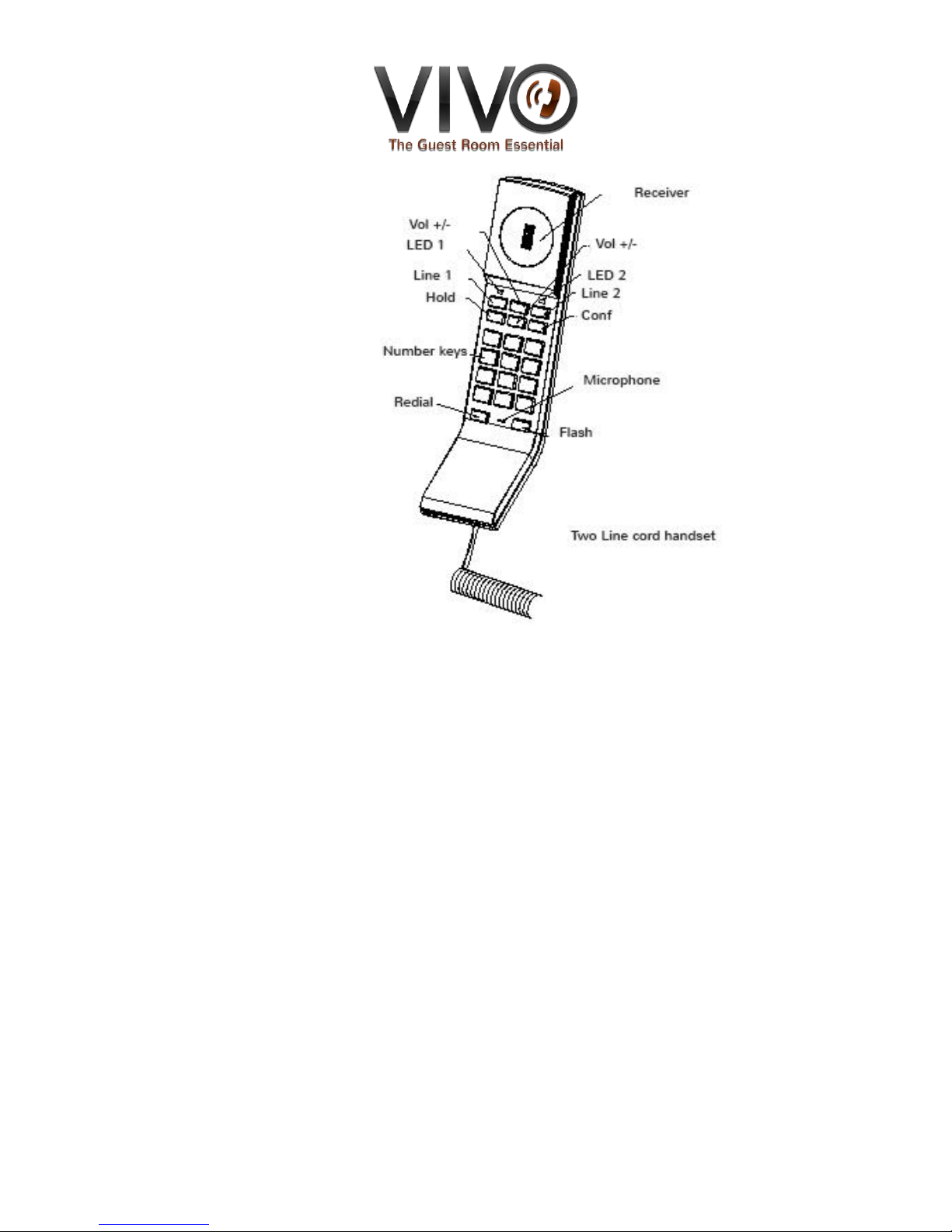
FUNCTION KEY DIAGRAM
Vivo Zeppa Corded Telephone User Guide
Page 3 of 8
Safety Instructions
1. Please read all the instructions in this manual before using this product.
2. Observe all the instructions marked on the product.
3. Install this product on a stable surface to avoid anyone from stepping over the telephone line.
4. Do not fix the AC power supply cord to building surfaces with metal fittings.
5. This product should be operated only from the type of power source indicated on the product.
If you are not sure of the type of power supply to your building, consult your local power
company.
6. Do not use this product near water, or when your hands are wet. If the product comes into
contact with any liquids, disconnect the power supply immediately and contact the supplier.
7. To prevent fire or electrical shock hazard, do not expose this product to rain or moisture.
8. Before cleaning the product, disconnect it from the telephone jack and power source.

Vivo Zeppa Corded Telephone User Guide
Page 4 of 8
9. Use a soft, damp cloth to clean the product. Do not use liquid cleaner, aerosol cleaners or
abrasive powder to clean this product.
10. As there maybe electric shock from lightning, avoid using or installing this product during
thunderstorms.
11. If the product is not operating normally or if it is damaged, do not open the cabinet or try to
repair it by yourself. This will expose you to dangerous electrical shock or other risks. Please
contact the supplier.
12. Do not use any metallic objects to connect the charging terminals on the Base Station as this
may cause fire due to overloading the power source.
13. Do not charge the battery by any devices other than that provided by this product.
14. Never use ordinary (non-rechargeable) batteries. Only use approved batteries of the same
type (rechargeable), otherwise battery damage can result.
15. Dispose of the damaged battery properly.
16. Do not touch the insulated telephone wires or terminals unless the telephone line and power
source has been disconnected.
Do not overload wall outlets and extension cords as this can lead to electrical shock.
Medical equipment can be affected by the handset.
INSTALLATION BEFORE USE
Connect the handset, handset cord and stand as above figure. Insert the line cord to telephone
and junction box, then route the line cord along the channel on the base of the telephone.

Vivo Zeppa Corded Telephone User Guide
Page 5 of 8
INSTRUCTION
Note: if you have one line please use line 1. Line 2 and CONFER key is not available at the moment
TWO LINES INSTRUCTION
ANSWER A CALL
Lift handset or press the HANDSFREE to receive an incoming call. The indicator light will let you
know whether the call is coming from line1 or line 2.
AT OFF-HOOK MODE
Lift the handset or press HANDSFREE to get LINE1 through. Whenever you select LINE1 or LINE2,
you will be connected to the corresponding line and enter into HANDSFREE mode.
CONVERTING LINE1 & LINE2 , THREE PARTY CONFERENCE CALLS
A When you are on LINE1, by pressing LINE2, you will disconnect LINE1 and get LINE2 through.
B When you are on LINE1, pressing HOLD key and LINE2, you will put LINE1 on hold and get the
LINE2 through. By pressing the HOLD key again, you can hold two lines at once. When two lines
are on hold, press CONFER to enter into a 3 way conference call.
HANDSET & HANDSFREE CONVERSION
HANDSFREE: whichever line you are using LINE1 or LINE2, to convert HANDSFREE just pick up the
handset.
Handset: whichever line you are using LINE1 or LINE2, to convert handset to HANDSFREE just press
the HANDSFREE button.
HANG-UP
When LINE1 is in use, press LINE1, this will end the call on LINE1 and the call on LINE2 will remain
on hold.
When LINE2 is in use, press LINE2, this will end the call on LINE2 and LINE1 will remain on hold.
When you are on using the handset, placing the handset back on the cradle will
disconnect the line you are using, whilst keeping the other line on hold at the same
time.

Vivo Zeppa Corded Telephone User Guide
Page 6 of 8
HOLD
Whichever line you are using LINE1 or LINE2, when you press the HOLD key, music will be played
on the line you are using.
RELEASE HOLD
A If LINE1 is on hold and LINE2 is not in use, press LINE1, it will take LINE1 off hold and resume
to conversation mode
B If LINE2 is on hold and LINE1 is not in use, press LINE2, it will take LINE2 off hold and resume
to conversation mode.
C When two lines are on hold, pressing LINE1, will take LINE1 off hold and resume the call.
When you press LINE1 or LINE2, you will connect to the corresponding and the other line will
remain on hold. To get three party conferencing, just press the CONF key.
STORING A NUMBER INTO MEMORY KEYS
1)Memory key Settings: At on-hook mode, press “Flash+ phone number +#+ hold Mn for 3
seconds until the indicator light blinks, which means the corresponding number has saved
successfully. Mn=M1 to M5, along with * is the memory key setting, without * is the “Push to
Talk” memory key setting.
2)Dial out memory key: pick up the handset and press the memory key you want
Dial out” Push to Talk” key: press the Mn key you want.
MESSAGE RETRIEVAL
1)Save a number: at on-hook mode, press “Flash + phone number + # + press message retrieval
key for 4 seconds until the message indication light is blinks to show the number has been saved.
2) Message retrieval: The message indication light will blink remind you there is a new message,
press Message key to retrieve it directly. If you want to review the old message, access Line1 or
Line2 and press Message key.

Vivo Zeppa Corded Telephone User Guide
Page 7 of 8
MEMORY KEY CLONE
Prepare the main telephone and set the memory numbers in advance;
Use a cord to connect the main-phone and sub-phone; insert the cord into handset cord jack on
the main-phone and sub-phone.
Hold the Handsfree key on the main-phone and then plug into the power until the indicator light
blinks, then release, the light will go out once this is successful.
SINGLE LINE INSTRUCTION
1)“ON/OFF” ON/OFF key
Press ON/OFF key to get the line through and in use light lights up. Repress ON/OFF key to
disconnect the line.
2)”MUTE” MUTE
To mute a call press the MUTE button only, a light will blink to remind you that you are in mute
mode. During this time the caller on mute will not be able to hear you. Press the mute key again to
resume conversation.
3)“SOS” / EMERGENCY KEY
Save a number: at on-hook mode, press “Flash + phone number + # + hold Mn key for 4 seconds
until the indicator light blinks, which means that the corresponding number has been successfully
saved.
Dial SOS key: press SOS key to dial the number out directly.

Vivo Zeppa Corded Telephone User Guide
Page 8 of 8
WARRANTY
The warranty for this product does not cover, or may be voided by the following:
1. Any damage resulting from abuse or misuse (i.e. liquid spills, abuse, or customer’s
modification (warranty label broken) of the telephone.
2. Any damage caused by failure to follow operating or installation instructions provided with
the telephone.
3. Any damage resulting from improper connection of the telephone to other equipment.
4. The telephone is used in a harsh or corrosive environment.
5. Cords, connectors and replaceable batteries.
6. Force majeure.
7. Damages in transit.
8. Any damage resulting from unauthorized modification or repair of the telephone.
Product Support
If you need technical assistance with this product, please contact Hotel Technology International
Limited via one of the following methods:
Website: www.hotel-tech.com
Phone: +44 (0) 203 405 1200
Fax: +44 (0) 203 411 6610
Hotel Technology International Limited
1st Floor • 239 Kensington High Street
London W8 6SA • United Kingdom
Tel: +44 (0) 203 405 1200 • Fax: +44 (0) 203 411 6610
Tabla de contenidos
Otros manuales de Teléfono de Vivo


