
Vividia F8 Manual de usuario
User Manual
Vividia® F8 Inspection DVR Flashlight
Features
⚫Video & audio recording
⚫Video size: HD 1280x720 , VGA 640x480 pixels
⚫1.5” TFT LCD resolution 480x240
⚫MRemory :support Micro SDHC ( class 6 or above )
⚫Battery : Li-ion rechargeable battery (3.7 V / 4400 mAh)
⚫High Power LEDx3 PCS
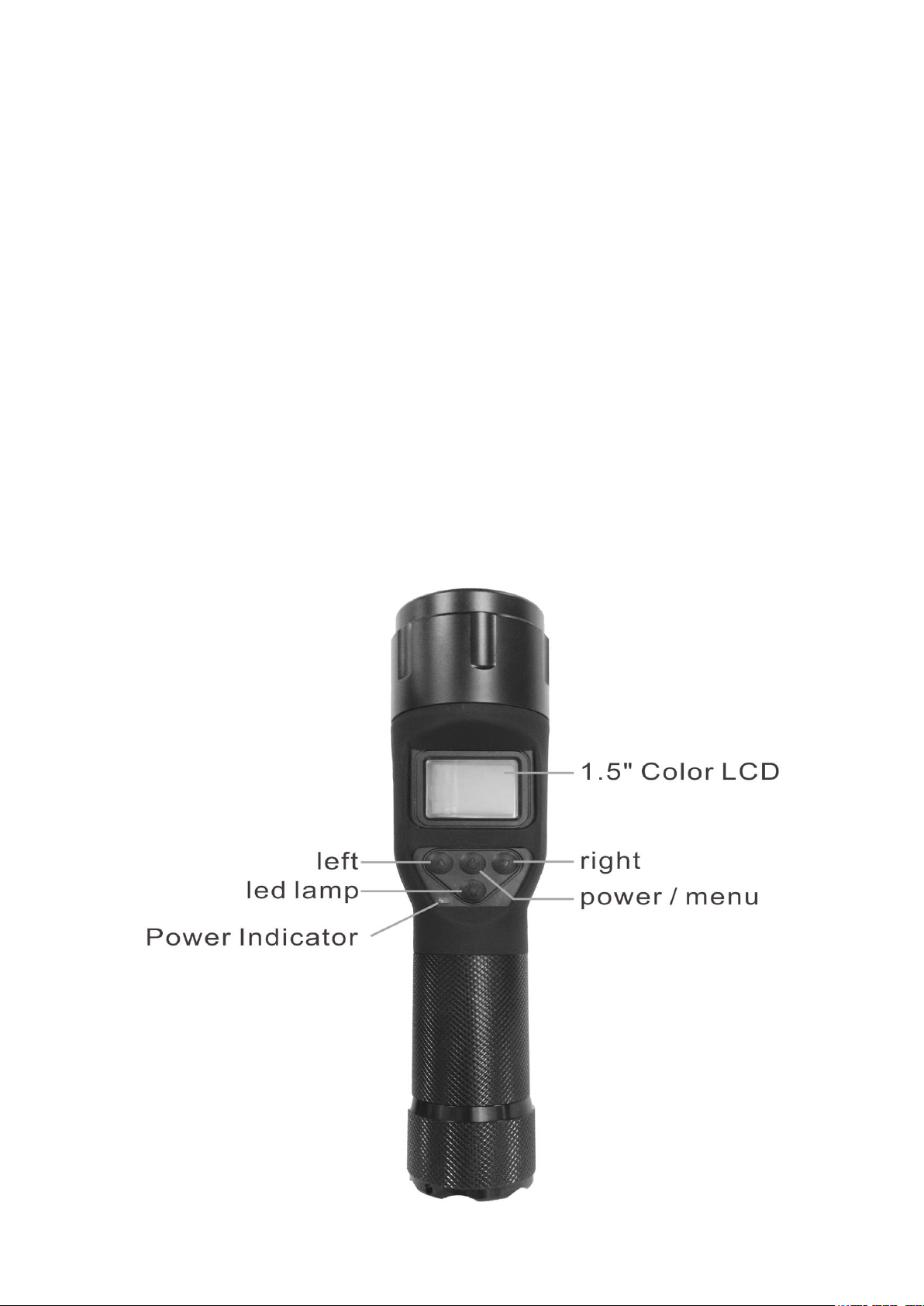
Outlooks & Keys Function

Operation:
Inserting battery & micro SD card (class 6 or above)
Before using you ‘should better make sure that there is a battery in the battery room, if there are no
battery ,and you need to put one in ,please keep the positive electrode on the up side . .Install battery and
battery cover, then you can start to use the light.
Before using the camera or a video function micro SD card must be inserted into the card slot
Note: card must be inserted with contacts upwards.
1. Transferring files to a computer
Connect USB cable between the unit output and computer
Switch on the unit, computer will the detect unit as removable disk
Files can now be copied over to computer as required

2. Battery Charging
Before charging ensure the unit is switched off. It cannot be operated whilst being charged.
Charging from AC adapter or computer USB port.
Connect one end of the USB lead to PC and the other end to the devices mini USB port , During
charging the Power indicator will illuminate red,
When charging is complete the power indictor will go out, this can take up longer than 8 hours.
Special remind :When the battery is take out ,there are approx 10 minutes for you to put another
back ,otherwise the setting of date and time will disappear, and you must set them ,again.
POWER/MENU:When the power is off,press the button can turn on it,when the power is on press the
button more than two second will turn it off。And when it’s on,press 0.5 second , the
menu will appear,if you press again ,menu will disappear.。
LEFT:(1)When the power is on,press the button can take a picture,press one second can do digital
zoom 1X-4X.。
(2)When the menu appear,press the button 0.5 second can turn the direction UP.
RIGHT:(1)When the power is on press the button will start recording,press again will stop recording。
(2)When the menu appear,press the button 0.5 second can turn the direction DOWN.。
(3) When the menu appear,press one second will confirm the menu option。
LED LAMP:This button is only for LED,press the button will change the state of light, there are five
kinds of light, the order is Dim→Medium→Strong →Flash →SOS
Life of full charged battery
Status Life time (LED alone) (LED & LCD screen on)
________________________________________________________________________
Dim (10%) 500 min (around) 400 min (around)
Medium (30%) 250 min (around) 210 min (around)
Strong (100%) 200 min (around) 180 min (around)
Flash over 15 hours over 10 hours
SOS over 20 hours over 13 hours
* Press and hold LED LAMP for 2 seconds to turn off the light directly
* When using light only, Green LED would flash for 5 seconds and then the light would be turn off
directly if battery is low
Switching On/Off
Camera & Video Operation
BEFORE USING THE UNIT FOR THE FIRST TIME:

Ensure the time and date have been set
Ensure the micro SD card is inserted
Press the Power button to switch the device on.
The camera image will appear on the screen and the Power indicator will illuminate green
To switch the device off , press the ON/OFF button 2 seconds
Inserting micro SD card
Before using the camera or video function an micro SD card must be inserted into the card slot
Press the Left button to take a picture,
press 1 second to change zoom ratio
Press the Right button to take a video
Menu Options The menu options are accessed by pressing the POWER/MEUN button
To change tag press LEFT key 1 secondTo move up/down the menu press LEFT/RIGHT keys
To enter function press RIGHT key 1 second

Playback Mode
To enter Playback Mode the latest stored
picture or video will be displayed.
Video Playback →
Image Playback →
Use the navigation keys to select playback (video file will auto play)
Press OK key to stop video playback
Looping Video
To setting looping video On / Off

Underwater Mode
To setting underwater mode On / Off
Setup
To enter setup menu
Setup →Resolution → Select video & image resolution HD / VGA
Setup →Microphone →Select microphone on /off

Setup →Data →Set Date/Time
Use the navigation keys LEFT/RIGHT to edit the time and date (YY/MM/DD, MM/DD/YY, DD/MM/YY)
Setup →Language
Language Selection
Allows the language to be set for the menu functions.
Use the navigation keys LIFT/RIGHT to select from the languages available
Setup →Default Setting

Select “OK” camera will reset to default setting
Setup →Format
Select “OK”format all data on the micro SD card; Select “Cancel”exit without formatting
Specification
. High Power LED x 3 PCS flashlight supports lighting & recording in dark area
.Built in 480*240, 1.5” TFT LCD
.AV recorder & camera , Waterproof (IP67)
.Supports Media Card : Micro SDHC class 6 or above (supported up to 32 GB)
.Powered by embedded rechargeable battery (included)
.1/4” CMOS HD (1280*720) image sensor
Focusing Range : 80 cm to infinity
.Image resolution : 5M(2592*1944), 3M(2048*1536), 1M (1280*720), VGA (640*480)
.Movie size : 1280*720 (HD), 640*480 (VGA),Frame Rate:30 fps
.Power Led lighting luminous flux over 1000 luminous
.Operating Temperature: 0℃(0%) to 50℃(RH60%)
. Storage Temperature: -10℃(0%) to 55℃(RH90%)
.USB cable: for data transmission and battery charge (included)
.Overall Dimension: Ø55 x 225 mm
Special remind : After using in the sea, please rinse with water and then dried, it
can lengthen the service life.
Vividia Technologies
3110 Wade Hampton Blvd. #18
Taylors, SC 29650
www.oasisscientific.com
Tabla de contenidos


