VigorPool CAPTAIN 1200 Manual de usuario

色彩: PANTIONE 326C
80% 黑度
PANTIONE 877C

USER MANUAL
CAPTAIN 1200

CONGRATULATIONS!
Thank you for purchasing your new VIGORPOOL product. VIGORPOOL strives to
create innovative clean energy products with unique designs and excellent perfor-
mance. VIGORPOOL always try best to make products simple and easy to use.
WARNING
This user manual contains instructions for safety, operation and maintenance. It's
essential to read the entire user manual carefully before setup and use. Failure to
read and follow instructions and warnings in this document may damage the
product and personal property and cause serious injury.
This document and all other collateral documents are subject to change at the sole
discretion of VIGORPOOL INC. For any updates, please visit vigorpool.com.
DISCLAIMER

1
CONTENT
3.2 Details of Captain 1200 3
3.3 LCD Screen 3
3.4 Multiple Recharging Methods 4
3.1 Using Captain 1200 3
3.5 Connect Two Captain 1200 6
3.6 Use of APP 6
3.7 Notes on Boost 6
3.8 Safety Guidelines 7
3.9 How to Store or Use 7
8
5. Frequently Asked Questions
7
4. Troubleshooting
2
1. What’s in the Box
2
2. Product Specifications
3
3. Start Guides for Users

1. What’s in the Box
2. Product Specifications
VIGORPOOL CAPTAIN 1200 User ManualCar Charger to
Anderson Cable
AC Cable
2
Overcharge Protection, Over Discharge Protection, Overload
Protection, Short Circuit Protection, Over Current Protection,
High Temperature Protection, Low Temperature Protection
Lifecycle:
LiFePO₄
Capacity:
Model:
25.6V 50Ah 1280Wh
VP21
BATTERY INFO
Cell Chemistry:
3500 cycles to 80%+ capacity
Management System:
OUTPUT
USB-A Output (×2): 5V⎓3A, 9V⎓2A, 12V⎓1.5A, 18W Max per port, Total 36W
230V~50Hz 5.22A, Total 1200W (Surge 2400W)AC Output (×2):
5V/9V/12V/15V⎓3A, 20V⎓5A 100W Max per port, Total 200WUSB-C Output (×2):
12V⎓10A, 120W Max
Car Output:
(2 x DC5521 Output + Car Output: Total 120W)
12V⎓3A 36W Max per port, Total 72W
DC5521 Output (×2):
10W MaxWireless Output:
230V~50Hz, 1200WAC Parallel Inter face (Being Connected):
INPUT
230V~50Hz 5.5A
12-56V⎓12A Max, 400W Max
AC Input:
Anderson Input:
Weight:
GENERAL
About 33.07lbs(About 15Kg)
15.98 x 9.4x 11.57 in (40.6 x 23.9 x 29.4 cm)Dimensions:
FCC, UL, CE, UKCA, PSE, MIC, RoHSCertification:
24 MonthsWarranty:
400W Solar Panel, 200W Solar Panel, 100W Solar PanelOptional Accessory:
YesAPP Control:
32-104°F(0-40°C)Charging Temperature:
14-104°F(-10-40°C)Discharge Temperature:

3. Start Guides for Users
3.1 Using Captain 1200
1. Long press the power button to trun on or turn off the LCD screen.
2. If your phone fails to connect with the device, please long press the IoT reset button.
3. With the power button turned on, short press the USB button/ DC button/ AC button to use those ports; short press again to turn
them off.
4. Turn on the device, short press the light button to turn on the lights. There are four modes of light: reading, strong, SOS, and
flashing.
Please note: For power saving, the VIGORPOOL CAPTAIN 1200 AC output will be turned off automatically after 12 hours if power
usage remains under 20W. DC & USB output will be turned off automatically after 12 hours if power usage remains under 5W.
3.2 Details of Captain 1200
AC Input
AC Output
Parallel Port
Light
Wireless Output
LCD Screen
DC5521 Output
Car Charge Port Output
Anderson Port Input
Overcurrent Protection
USB-A Output
USB-C Output
Protective Earth
Power Switch
DC Button
IoT Reset Button
USB
Button Light
Button
AC Button
3.3 LCD Screen
Input area Anderson Port
AC Input
Power Display
Wi-Fi
Fan Ouput area
Min Min
Hz
%
Ports Usage status
3

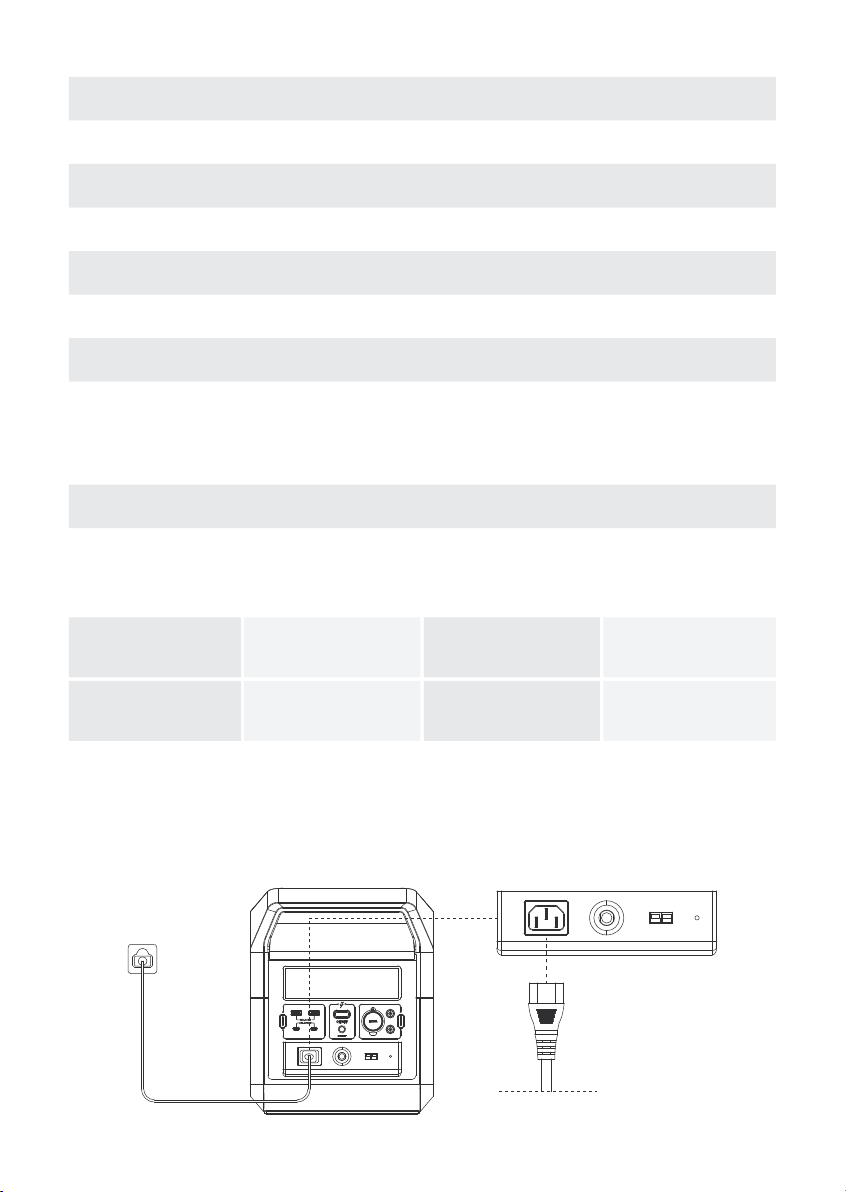
3.4 Multiple Recharging Methods
Wall Charging Solar Panels Car Charging
About 14 Hours
Electric Generator
About 2 Hours About 5.5 Hours About 2 Hours
WALL CHARGING:
The CAPTAIN 1200 uses fast charging technology with a maximum input power of 800W; it can be charged up to 80% in 1.5
hours and fully charged in 2 hours. In addition, you can select fast charging 800W, slow charging 400W(silent charging), or
custom charging through the App. Default input power is 800W.
ICON CONTENTS ICON TYPE
Input Status Indicates that the CAPTAIN 1200 is charging. There is a display of the remaining
charge time and a display of the current power input.
Output Status
Power Display Shows the current battery capacity.
Anderson Port
AC Input Indicates that the wall charger is being used to charge the CAPTAIN 1200.
Fan Run
Wi-Fi
1. Click the IOT button to start the IOT function, and the WIFI icon will be on.
2. Press and hold the IOT button for 3-4 seconds until the WIFI icon disappears and then release,
the WIFI icon will flash, and the device will enter the network configuration state. At this time, use
the VIGORPOOL APP to search for the device, click to connect to the server. If the icon is always
on, that means the WIFI connection is successful, otherwise the icon will flash.
3. Click the IOT button again to turn off the IOT function and the WIFI icon disappears.
Ports Usage status
Indicates that the CAPTAIN 1200 is powering/charging a device. There is a display
of the remaining discharge time and the current power output.
Indicates that the CAPTAIN 1200 is being charged with a solar panel or a car.
Indicates that the CAPTAIN 1200 current temperature is too high and needs to
cool down. At this time, there will be some fan rotation sound.
Indicates the usage status of each port.
AC Cable
4

CAR CHARGING:
The CAPTAIN 1200 can be charged with a car. It supports 12V car charging and takes about 14 hours to fully charge. Charge
using the car charger after you’ve started the car to avoid failure to start due to insufficient car battery. In addition, please make
sure that the Car Charging Input Port and the Car Charging Cable are in good condition. VIGORPOOL takes no responsibility for
any losses or damages caused by failure to follow instructions.
Anderson Cable
Solar Panel
SOLAR PANEL CHARGING:
Users can choose VIGORPOOL 400W solar panel, 200W solar panel or 100W solar panel to charge the CAPTAIN 1200. The DC
input voltage range is 12V-56V, the maximum current is 12A, and the maximum charging power is 400W. In full sunlight, the
CAPTAIN 1200 can be charged with two 200W solar panels, which will take about 5.5 hours to complete a full charge.
Please note: Parallel solar panel
cable needs to purchase additional.
Anderson Cable
5

3.5 Connect Two Captain 1200
Connect the parallel port of the CAPTAIN 1200 through the parallel cable
and turn the AC button on until the parallel graph on the LCD is lit, indicating
a successful parallel connection. AC output power provides up to 2400W
continuous output, using a capacity of up to 2560Wh. Users can use the AC
port on either product. Please avoid using load devices that exceed the
rated power of 2400W.
Please note: The parallel cable needs to purchase additional.
ELECTRIC GENERATOR CHARGING:
The CAPTAIN 1200 can be charged in about 2 hours using a traditional generator.
AC Cable
ELECTRIC GENERATOR
3.7 Notes on Boost
Traditional power stations will shut off if their continuous power output rate is exceeded. However, the CAPTAIN 1200 AC inverter
boost function can boost the power output from 1200W to 1800W without overload protection power failure. The device can
drive most resistive load under 1800W.
When using the Boost feature, please keep the following in mind:
(1) Pay special attention to the charging state.
(2) When using an appliance that requires between 1200W-1800W, only use that one appliance. Trying to run multiple AC devices
while using the boost feature could result in voltage fluctuations that could damage appliances over time.
(3) If the 1200W-1800W appliance you are attempting to power with the CAPTAIN 1200 exceeds the unit’s surge voltage limit of
2400W when starting the appliance, you may not be able to power that appliance.
3.6 Use of APP
You can view energy forecasting, state monitoring and estimation, and anomaly detection via the VIGORPOOL App. For more
details, please download it on the App Store or Google Play and check our official website to get the connect steps:
https://VIGORPOOL.com/pages/VIGORPOOL-app
6

3.8 Safety Guidelines
1. DO NOT immerse the product in water or get it wet.
2. DO NOT put the product near heat sources, such as a fire or heater, while using or storing.
3. DO NOT pierce the product casing with a nail or other sharp object, use a hammer to break it open, or step on it.
4. DO NOT let the product make contact with corrosive objects.
5. DO NOT attempt to disassemble this product in any way.
6. DO NOT forcibly lock the fan during use or place the product in an unventilated or dusty area.
7. DO NOT clean the product with water directly. Instead, use a dry cloth to gently clean it.
8. DO NOT replace any components of the product without any official VIGORPOOL permissions.
9. Please contact the official VIGORPOOL channels to get more information if you want to replace any components.
10. DO NOT dispose of the battery directly in a battery recycling box. You should contact a professional recycling company for
further processing.
11. DO NOT put the product in an area where children or pets can reach.
Uninterruptible Power Supply(UPS)
This product supports an uninterruptible power supply (UPS) function. The unit's battery will be bypassed while fully charged and
connected to the grid via AC charging cable. In other words, anything you plug into the AC ports will pull directly from the grid rather
than the battery. In a power outage, this product can automatically switch to the battery-powered mode within 10ms.
Note: This function does not support 0ms switching. Therefore, it is not recommended to be used a s a UPS for highly sensitive
equipment, such as data servers and workstations without confirming compatibility or proper testing before use. It is also recommend-
ed to only use the UPS function for one device at a time to avoid overload protection. VIGORPOOL assumes no responsibility and is
therefore not liable for data loss or damage caused by the use of this product in setups that it was not intended for and the disregard
of this recommendation
3.9 How to Store or Use
1. For long-term storage (more than 3 months), the battery needs to be maintained at 50% of the rated capacity (recharged once
every 3 months), stored in a dry and cool place and kept away from fire, heat sources, and corrosive substances.
2. To extend the life of the product, it's better to recharge the product before the power drops 15%.
3. The operating temperature of the VIGORPOOL power station is -10-40°C (14-104°F), and the storing temperature is -10-35°C
(14-95°F).
4. Troubleshooting
Icon Indicator Problem Solution Error code
Turn off the USB output and remove the a
bnormal load. After 10 seconds, the power
station should function as usual.
Icons Flash together
E001
USB Output
Overload Protection
or Short Circuit
7
Otros manuales para CAPTAIN 1200
1
Tabla de contenidos
Otros manuales de Fuente de alimentación de VigorPool