
ViewSonic WMK-005 Manual de usuario

ViewSonic by Premier Mounts
INSTALLATION MANUAL
WMK-005 UNIVERSAL PROJECTOR MOUNT
Premier Mounts
3130 E. Miraloma Avenue
Anaheim, CA 92806
Phone: (800) 368-9700 Fax: (800) 832-4888
mounts@mounts.com www.mounts.com
IN-WMK005.R3

PBL-110 Projector Mount
Page - 2 - Installation Manual

WMK-005
Installation Manual Page 3
Table of Contents
WARNING STATEMENTS ............................................................................................................................- 4 -
PARTS LIST .................................................................................................................................................- 5 -
INSTALLATION TOOLS ...............................................................................................................................- 5 -
FEATURES...................................................................................................................................................- 7 -
PROJECTOR PREPARATION........................................................................................................................- 8 -
BRACKET INSTALLATION.........................................................................................................................- 10 -
LEVELING THE MOUNTING BRACKET.....................................................................................................- 11 -
SECURING THE UPPER ASSEMBLY CEILING PLATE ...............................................................................- 12 -
LOW PROFILE INSTALLATION .................................................................................................................- 13 -
SECURING THE PROJECTOR TO THE UPPER ASSEMBLY .......................................................................- 15 -
FINAL ADJUSTMENTS ..............................................................................................................................- 16 -
PLASTIC CAP INSTALLATION...................................................................................................................- 17 -
TROUBLESHOOTING PROCEDURES .........................................................................................................- 18 -
TECHNICAL SPECIFICATIONS ..................................................................................................................- 19 -
WARRANTY...............................................................................................................................................- 20 -
CONTACT PREMIER MOUNTS ..................................................................................................................- 20 -
NOTES.......................................................................................................................................................- 20 -
WMK-005
Page - 4 - Installation Manual
Warning Statements
WARNING: PREMIER MOUNTS DOES NOT WARRANT AGAINST DAMAGE CAUSED BY THE USE OF ANY
PREMIER MOUNTS PRODUCT FOR PURPOSES OTHER THAN THOSE FOR WHICH IT WAS
DESUIGNED OR DAMAGE CAUSED BY UNAUTHORIZED ATTACHMENTS OR MODIFICATIONS,
AND IS NOT RESPONSIBLE FOR ANY DAMAGES, CLAIMS, DEMANDS, SUITS ACTIONS OR
CAUSES OF ACTION OF WHATEVER KIND RESULTING FROM, ARISING OUT OF OR IN ANY
MANNER RELATING TO ANY SUCH USE, ATTACHMENTS OR MODIFICATIONS.
WARNING: THE CEILING STRUCTURE MUST BE CAPABLE OF SUPPORTING AT LEAST FIVE (5) TIMES
THE WEIGHT OF THE PROJECTOR. IF NOT, THE CEILING MUST BE REINFORCED. PROPER
INSTALLATION PROCEDURE BY A QUALIFIED SERVICE TECHNICIAN, AS OUTLINED IN THE
INSTALLATION INSTRUCTIONS, MUST BE ADHERED TO. FAILURE TO DO SO COULD RESULT
IN SERIOUS PERSONAL INJURY, OR EVEN DEATH.
WARNING: SAFETY MEASURES MUST BE PRACTICED AT ALL TIMES DURING THE INSTALLATION OF
THIS PRODUCT. USE PROPER SAFETY GEAR AND TOOLS FOR THE INSTALLATION
PROCEDURE TO PREVENT PERSONAL INJURY.
WARNING: PRIOR TO THE INSTALLATION OF THIS PRODUCT, THE INSTALLATION INSTRUCTIONS
SHOULD BE READ AND COMPLETELY UNDERSTOOD. THE INSTALLATION INSTRUCTIONS
MUST BE READ TO PREVENT PERSONAL INJURY AND PROPERTY DAMAGE. KEEP THESE
INSTALLATION INSTRUCTIONS IN AN EASILY ACCESSIBLE LOCATION FOR FUTURE
REFERENCE.
Indicates that the power plug is to be
disconnected from the power outlet.
Contact Premier Mounts with any questions.
Safety precautions must be taken at all times.
Warning and Caution statements.
A secure structure must support the weight, or load, of the projector. When mounting to a ceiling that contains
wooden studs, dead center of the wooden stud must be confirmed prior to installation.
Do not install on a structure that is prone to vibration, movement or chance of impact. Failure to do so could result in
damage to the projector and/or damage to the mounting surface.
Do not install near heater, fireplace, direct sunlight, air conditioning or any other source of direct heat energy. Failure
to do so may result in damage to the projector and could increase the risk of fire.
At least two qualified people should perform the installation procedure. Injury and/or damage can result from dropping
or mishandling the projector.
Recommended mounting surfaces: wooden studs and solid-flat concrete. If the mount is to be installed on any surface
other than wooden studs, use suitable hardware (which is commercially available).

WMK-005
Installation Manual Page 5
Parts List
NOTE: This mount is shipped with all proper installation hardware and components. Make sure that none
of these parts are missing and/or damaged before beginning installation. If there are parts missing
and/or damaged, please stop the installation and contact Premier Mounts (800-368-9700).
Mounting
Bracket (Qty 1)
#14 Wood Screws
(Qty 3)
M3 Flat Washers
(Qty 3)
M5 x 12mm Hex
Head Screws
(Qty 4)
M4 X 12mm Hex
Head Screws
(Qty 4)
Plastic Barrel
Caps (Qty 4)
M6 X 12mm Hex
Head Screws
(Qty 4)
M3 x 16mm
Phillips Head
Screws (Qty 3)
M2.5 x 14mm
Phillips Pan
Head Screws
(Qty 3)
Installation Tools
Phillips Head Screw Driver Portable Drill
Soft Material/ Blanket Pencil
¼” Drill Bit Level (Supplied)
Tape Measure Wrench with ½” Drive Socket
Stud Finder (Commercially Available) Ladder
M5 Allen Wrench (Supplied)

WMK-005
Page 6 Installation Manual
A Single Wooden Stud
Mounts
B Solid Structure
Mounting Points
C Ceiling Plate
D Allen Wrench
E Height Adjustment
Screws
F Tension Knobs
G Safety Knob
H Security Screws
I Leveling Screws
J Universal Mounting
bracket
K Leg Assembly
L Projector (not included)
M Tri-Lock Opening
NOTE: The four (two-piece)
leg assemblies can be used as
single leg or any
combination of single and
dual legs together as shown
in Options 1 and 2. The
number of legs may vary
depending on the number of
mounting points found on
the bottom of the projector.
D
D
M
H
J
L
L
J
A
B
K
G
E
C
M
I
H
F
Option 2
Option 1
Single Leg
Combination
Leg

WMK-005
Installation Manual Page 7
Features
Congratulations on your recent purchase of your WMK-005 universal projector ceiling/ wall mount kit. This
unit is designed for projectors weighing 25lbs. (13kg) or less. The mount is easy to install and is loaded with
additional installation features built into the mount. These features allow you to optimize the projector’s
position to the screen for the best projector performance and picture quality.
•Adjustable height – 9” to 12.5” suspension channel to lower the projector height (this extension can be
removed for low-profile mounting of only 2.5”)
•0°- 45°angled ceiling compensation
•Can be mounted to the ceiling or to a wall
•Tilt/Roll up to ±20°
•Rotates 360°
•Positive locking in any set position
•Quick release system for easy projector mounting and removal
•Cables can be routed inside the extension channel
•Upper ceiling plate allows for single wooden stud installation and cable insertion through the ceiling plate
for a cleaner appearance

WMK-005
Page 8 Installation Manual
Projector Preparation
CAUTION: THE PROJECTOR IS FRAGILE; HANDLE WITH CARE AT ALL TIMES.
NOTE: Review the projector manufacturers’ operation manual and refer to the ceiling mount installation
section. Important information concerning the installation dimensions (i.e. distance from the
screen to the lens of the projector, top of the lens placement to the top screen, etc.) will be found
in this section. Adherence to these instructions will simplify the installation and enhance the
quality of the final screen image.
1. Carefully invert the projector and place it on a smooth, flat surface.
2. Identify the number of mounting points and screw thread size. Most projectors have either three or
four mounting points and are M4, M5 or M6 in thread size (Figure 1).
Figure 1. Projector Preparation
Mounting
Points
B
lanket/
Soft Cloth
Inverted
Projector
Flat
Surface

WMK-005
Installation Manual Page 9
3. Separate the upper assembly from the projector mounting bracket by slightly loosening the two
tension knurl knobs to create free play between the bracket tri-lock assembly and the upper section
tri-lock assembly points (Figure 2A and Figure 2B).
4. Loosen the security screw knurl knob far enough to allow the two parts to be rotated 180° apart and
separate (Figure 2C).
Figure 2. Mount Preparation
A B
C
Tension
Knobs
Upper
Assembly
Safety
Knob
Tri-Lock
Opening
Rotate 180°
To unlock
WMK-005
Page 10 Installation Manual
Bracket Installation
NOTE: The two-piece mounting barrels are designed to allow for the positioning of each leg around
projector air vents located on the base of the projector. Where applicable, each leg mount may
be shortened by removing the locking screw. This will allow for a better bracket fit, overall.
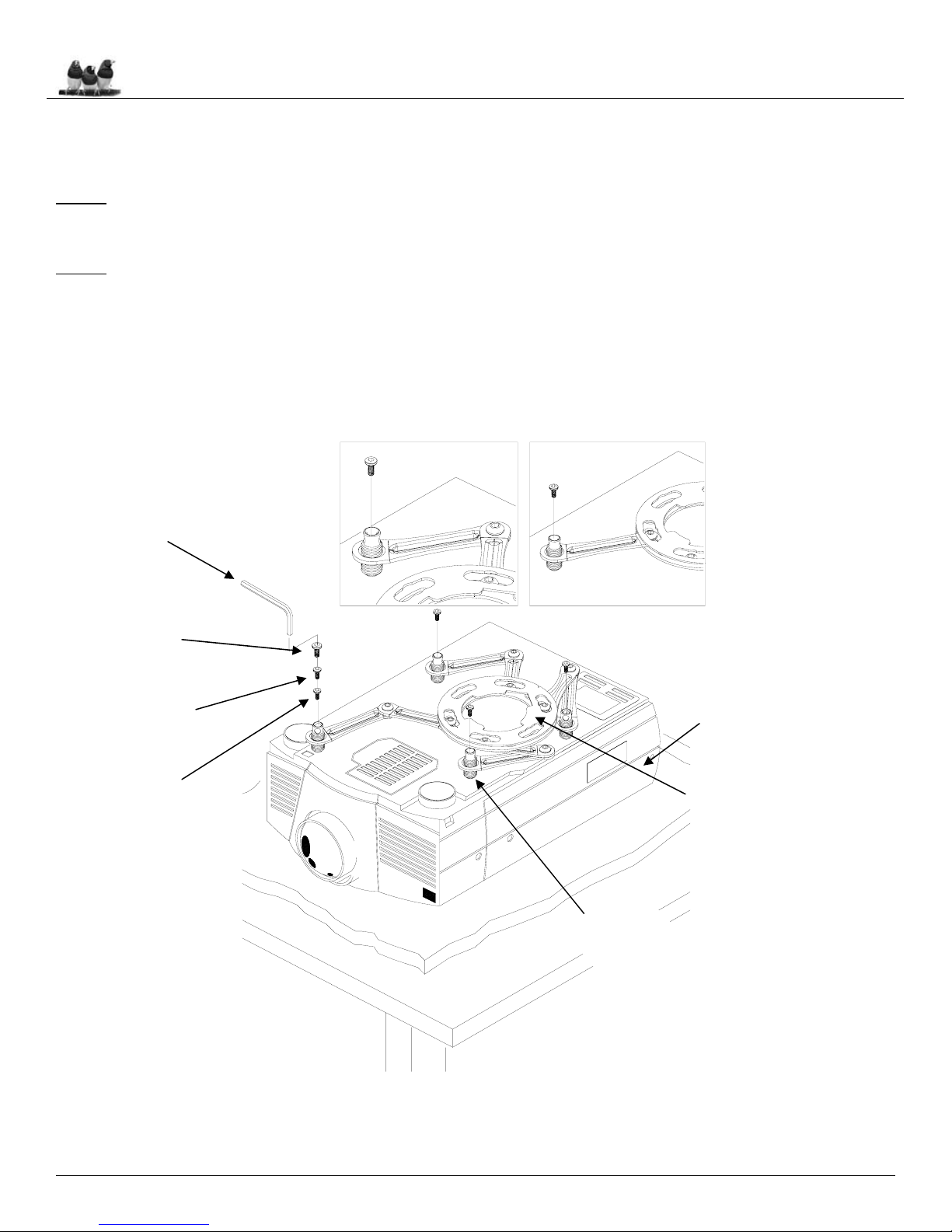
NOTE: For easier installation, the mounting legs should be first mounted to the projector. Each leg
should then be adjusted so that they can mount to the Universal Mount (Figure 3).
1. Locate the mounting points on the bottom of the projector and use the appropriate number of
mounting legs.
2. Select the mounting hardware that the projector requires and loosely install the universal mount on
the projector.
Figure 3. Bracket Installation
Two Piece Leg
B
One Piece Leg
C
Inverted
Projector
Leveling
Barrels
M5 Allen
Wrench
M6 x 12mm
Hex Head
Screw
M5 x 12mm
Hex Head
Screws
M4 x 12mm
Hex Head
Screws Universal Mount
Tabla de contenidos
Otros manuales de Accesorios para proyectores de ViewSonic

ViewSonic
ViewSonic myViewBoard Direct Manual de usuario

ViewSonic
ViewSonic ViewBoard VB-WPS-001 Manual de usuario

ViewSonic
ViewSonic PJ-CART-001 Manual de usuario

ViewSonic
ViewSonic myViewBoard Box Manual de usuario

ViewSonic
ViewSonic PJ-vTouch-10S Manual de usuario

ViewSonic
ViewSonic AutoProject Key WPG-400 Manual de usuario

ViewSonic
ViewSonic PJ-PEN-003 Manual de usuario


