Viatek Deluxe TouchPlay Manual de usuario

TOUCHPLAY
INDUCTION SPEAKER WITH CLOCK
DELUXE
INSTRUCTION MANUAL

The Deluxe TouchPlay Induction Speaker with Digital Alarm Clock magically amplies the sound from
smartphones and other devices. There’s no conguration needed! Simply place your device on top of the
TouchPlay speaker to amplify your music!
The TouchPlay Deluxe is powered by a built-in 1200 mAh rechargeable lithium battery, which can be charged
with the included USB cable. Simply plug one end of the USB cable into the USB Power port, and the other
end into a USB outlet. TouchPlay Deluxe will be fully charged for up to 6 hours of play after 3 hours of
charging. The battery will last much longer if the speaker is off and only the Clock Display is on. For best
performance and to improve battery life, it is recommended that the TouchPlay Deluxe only be charged as
needed. Avoid leaving plugged in when fully charged.
If desired, you may use the included ⅛" Audio Jack to connect your device directly to the TouchPlay Deluxe
speaker, bypassing the induction feature and the need to place your device on top of it.
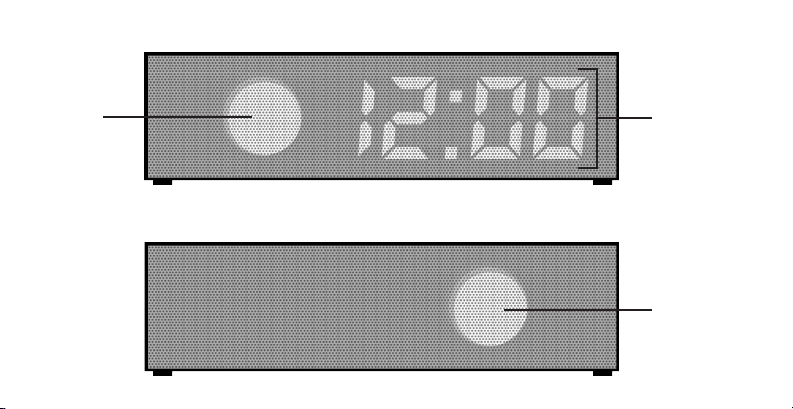
Side 1 Side 2
LED Indicator
Blue: Battery Power,
speaker on
Red: USB power,
speaker off
Purple: USB power,
speaker on
Up Button Down ButtonPower/Select USB Power ⅛" Audio Jack

Front
Back
Speaker
Speaker
Clock Display

Using the Induction Speaker
Remove other speakers or headphones from the audio jack of your phone or other music device
so that the sound will play through the device’s internal speaker. The device must have an internal
speaker for TouchPlay Deluxe to amplify sound. Press the Power/Select button to turn TouchPlay
Deluxe speaker on.
Begin playing music on your device and place it on top of the TouchPlay Deluxe. Be sure the
volume on your device is loud enough for the induction speaker to pick up the sound consistently.
Your music should be amplied by the induction speaker. If the music is not amplied, turn your
device around on the top of the TouchPlay Deluxe. Some devices require different positions than
others in order to work with the induction speaker. You may need to ip your device over if turning
does not amplify the sound. Consult your device's manual for the location of the internal speaker if
necessary. Cases on devices may need to be removed for proper surface contact.
Use your device’s volume control to control the volume of the TouchPlay Deluxe speaker. Turning
your device's volume down too low may prevent the induction speaker from consistently picking
up sound and/or result in sound interference (popping sound).
You may hear an occasional popping sound from the induction speaker. This usually happens
during the transition between one track to another on your device or when you rst begin playing

sound through the induction speaker. This is normal and occurs when the induction speaker picks
up on a new sound to be amplied or when an amplied sound turns off.
Unplug the TouchPlay Deluxe from any USB power source while using the induction speaker
for the best sound quality. Sound interference can occur while the speaker charges if it
remains turned on. To prevent this, charge with the unit's power turned off.
To turn off, hold down Power/Select for 4 seconds. If plugged in, the LED Indicator will turn from
purple to red. If running on battery power, the LED indicator will turn from blue to off. Turning the
speaker off will also hide the clock display.
To turn the speaker and display back on, press Power/Select once. If running on battery power, the
LED indicator will turn from off to blue. If plugged in, the LED Indicator will turn from red to purple.
If the TouchPlay Deluxe speaker is operating on battery power, the LED Indicator is blue. If the
speaker is left on for ve minutes without being used, the speaker and LED Indicator light will
automatically turn off. The clock display will stay on. Press Power/Select once to turn the speaker
back on. To charge with the clock display on, allow the speaker to automatically power off while
unplugged, then plug into a USB power source. If the TouchPlay Deluxe is plugged into a power
source with the speaker still on, it will not automatically turn off and interference may be heard.

Using the Alarm Clock
1. Press the Power/Select button once to turn on the display. This also turns on the speaker.
2. Press Power/Select twice to activate clock adjustment mode. Do not press the button too
quickly or it will not be registered as two separate presses. Clock adjustment mode turns off
automatically after being left alone for one minute.
3. In clock adjustment mode, the selected value (hour, minute, on/off) will ash. Use the Up Button
or Down Button to adjust the value. Use Power/Select button to navigate between selections.
The select option moves in the following order:
1. Time: hour, minute
2. Alarm Time: hour, minute
3. Alarm Activation: on/off
4. Exits clock adjustment mode

4. After setting Alarm Activation, press Power/Select to exit clock adjustment mode.
5. To turn off the clock display and induction speaker, hold Power/Select down for four seconds.
The alarm will still sound if the display has been turned off. Once the alarm has sounded, both
the clock display and the induction speaker will turn on.
Note: There is no way to manually turn the speaker off without also turning the clock display off.
However, while running on battery power the induction speaker turns off automatically if it is not used
for ve minutes, leaving the clock display on but conserving battery power. At this point, if you plug the
TouchPlay Deluxe in, the speaker will remain off while the clock display remains on.
6. When the alarm sounds, pressing any button turns the alert off: Power/Select, Up Button or
Down Button (there is no snooze feature).
7. The alarm will sound for 1 minute if no button is pressed, then will automatically turn off.
8. There is no AM/PM on the clock. Therefore, the alarm will sound twice a day if the Alarm
Activation is set to "ON". See step 3 to learn how to deactivate the alarm.

Read Instructions
Before Operating MADE IN
CHINA
© 2013 VIATEK CONSUMER PRODUCTS GROUP, INC. All specifications and prices are subject to change without notice. All rights reserved.
For Canada customer service call 423.402.9010 or visit us online at viatekproducts.com
For customer service call 888.7.VIATEK or visit us online at viatekproducts.com
Pour le service a la clientele appelez le 888.7.VIATEK ou visitez viatekproducts.com
Para servicio al consumidor llame al 888.7.VIATEK o visite viatekproducts.com
Protect your product for 1 year beyond our standard warranty with the Viatek No Question Protection
Plan. With the Extended Warranty there are no return shipping charges, product will be replaced or
reimbursed with no deductible & your product is protected 100% from any mechanical or electrical
failures caused by power surges or manufacturer’s defects. Order online at viatekproducts.com today.
PATENT PENDING
REV-Model No.
DO NOT DISPOSE OF BATTERIES IN FIRE. ALWAYS DISPOSE OF BATTERIES PER STATE & LOCAL GUIDELINES
TP02 10/14/13
Always unplug prior to cleaning or performing any type of service.
Any attempt to open the unit will void the warranty.
To clean the exterior of the unit, use a dry, soft cloth.
NEVER handle the unit with wet hands or submerge in liquids.
Tabla de contenidos
Manuales populares de Reloj de otras marcas
Silicon Laboratories
Silicon Laboratories SI5324 Manual de usuario

Heathkit
Heathkit GC-1005 Manual de usuario

Oregon Scientific
Oregon Scientific PRYSMA RMR221P Manual de usuario

Andrew O'Malley
Andrew O'Malley DOTKLOK Manual de usuario

ALGE-Timing
ALGE-Timing ASC3 Manual de usuario

Bodet
Bodet Profil 960 Manual de usuario