
Veho Renovo Series Manual de usuario

Table of Contents i
English
Read this first................................................. 1
Important safety instructions ......................................1
Disclaimer ...................................................... 2
Copyright ....................................................... 2
Notes about copyrighted materials .............................3
Disposal of this product..............................................3
Introduction ................................................... 5
Package contents ........................................................5
Parts of the scanner and their functions......................5
Front view...................................................................... 5
Rear view....................................................................... 6
Indicators ....................................................................7
Using the scanner .......................................... 8
Preparation..................................................................8
Making a scan.............................................................9
Connecting the scanner to a computer .......................11
System requirements (for computer) ............................. 11
Making connection ........................................................ 11
More information .......................................................13
Suitable and unsuitable types of originals..................... 13
Orientation of the original and scanned image.............. 14
Cropping on scanned images......................................... 14
Using the anti-curl sheath.............................................. 15
Supported memory card types ....................................... 15
File naming and storage rules........................................ 16
The Scan2PC Utility...................................... 17
Installing the Scan2PC Utility....................................17
Table of Contents

Table of Contentsii
English
System Requirements.................................................... 17
Performing Installation ................................................. 17
Using the Scan2PC Utility .........................................17
Care and maintenance .................................. 19
Cleaning the scanner ..................................................19
Cleaning the outer casing.............................................. 19
Cleaning the image sensor ............................................ 19
Calibrating the scanner...............................................20
Storing the scanner .....................................................21
Troubleshooting............................................. 22
Specifications ................................................. 24

Read this first 1
English
Read this first
Please read the following important safety instructions carefully
before using this scanner. Failure to observe these instructions may
result in personal injuries or damages to this scanner.
Important safety instructions
Do not place this scanner under direct sunlight or near heat
sources, such as in a closed car under sunlight or near a
stove. The outer casing of this scanner may become
deformed and the sophisticated sensors inside may become
damaged due to excessive heat.
Do not use this scanner near water, in the rain or allow any
liquid to get inside this product. Water and moisture may
cause short-circuit to the electronic components and lead
to malfunctions.
Do not use this scanner in dusty environments. Dust grains
may cover this scanner and scratch the original to be
scanned. Do not scan originals that are contaminated by
dusts or other particles.
Do not use this scanner near strong electromagnetic
sources, such as a microwave oven or television. The
electromagnetic interference may cause this scanner to
malfunction.
Do not attempt to disassemble or modify this scanner.
There are no user serviceable parts inside this scanner, and
unauthorized modifications will void your warranty.
Do not drop or apply shock/vibration to this scanner.
Strong impacts may damage the components inside.
Do not insert objects other than compatible memory cards
into the memory card slots of this scanner. The metal
contacts inside the slots can easily become damaged by
foreign objects.

Disclaimer2
English
Disclaimer
Veho Renovo makes no representations or warranties, either
expressed or implied, with respect to the contents of this
publication. Veho Renovo reserves the right to revise this
publication and to make changes from time to time in the contents
thereof without obligation to notify any person of such revision or
changes.
Copyright
Copyright by Veho Renovo. All rights reserved. No part of this
publication may be reproduced, transmitted, transcribed, stored in a
retrieval system or translated into any language or computer
language, in any form or by any means, electronic, mechanical,
magnetic, optical, chemical, manual or otherwise, without the prior
written permission of Veho Renovo. Brand names, product names
and trademarks used in this publication are the properties of their
respective owners.
Do not use an unknown power adapter other than the one
supplied with this scanner. Connecting this scanner to an
unknown power adapter is very dangerous and may lead to
fire or explosion.
Do not cut, bend, modify, place heavy objects or step on
the cable of the power adapter. Otherwise the external
insulation may be damaged and result in short-circuit or
fire.
The power socket and USB port on this scanner are
designed solely for connecting to the supplied power
adapter and optional USB cable. Do not insert any other
objects into these sockets.
If there are strange odors or heat emitting from this scanner
or any signs of malfunction, disconnect this scanner from
the power immediately and contact your dealer for
inspection or service.

Copyright 3
English
Notes about copyrighted materials
Avoid scanning and re-distributing copyrighted originals and
images or those of unknown sources. Doing so may violate your
local copyright laws and related regulations. Veho Renovo cannot
be made liable for the losses that may result from breaching the laws
described above.
Disposal of this product
To help protect the environment, dispose of this scanner properly
according to your local regulations regarding the disposal of waste
products.

Copyright4
English
<Memo>

Introduction 5
English
Introduction
Package contents
Check the sales package for the following items. If any item is
missing or damaged, contact your place of purchase immediately.
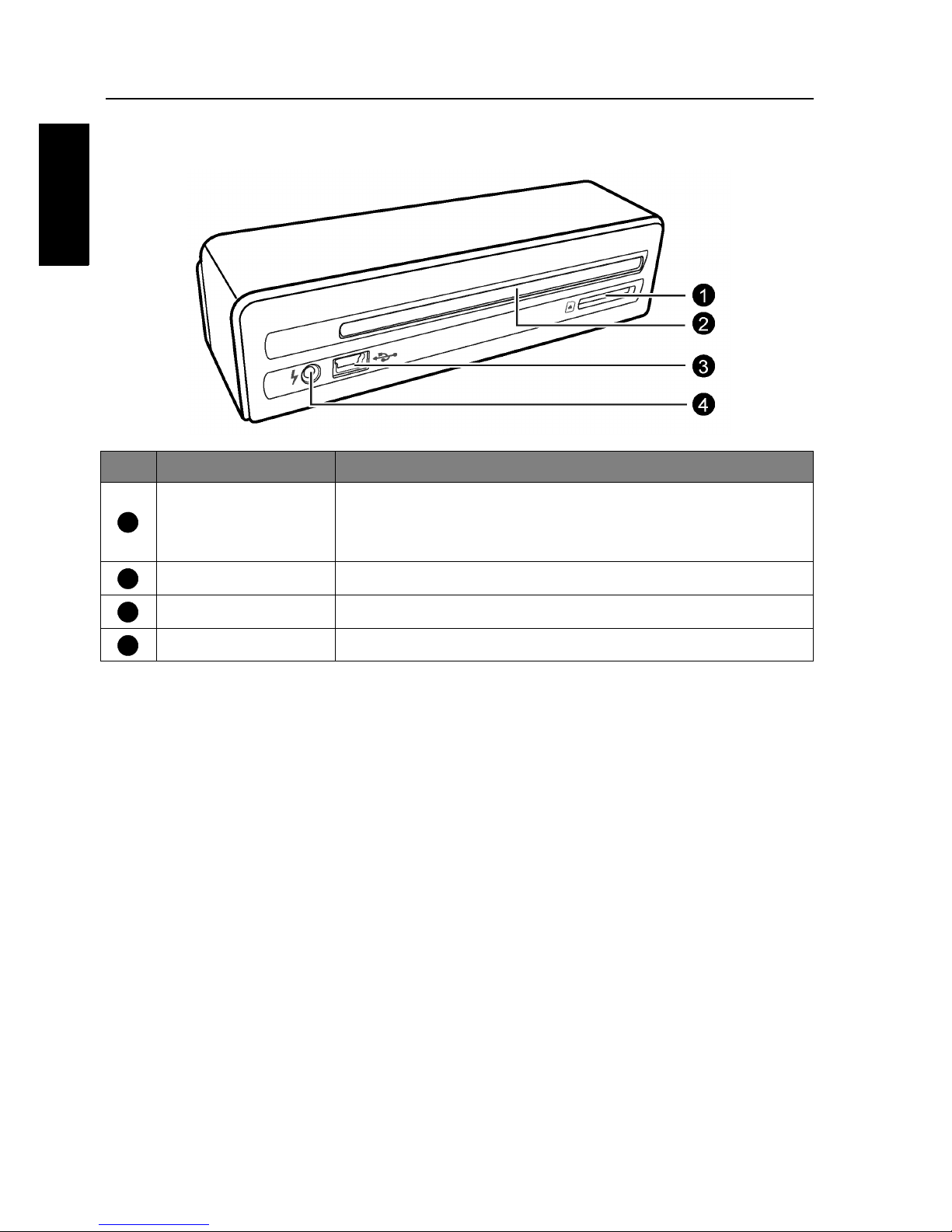
Parts of the scanner and their functions
• Photo scanner x 1 • Calibration card x 1 • Anti-curl sheath x 1
• Power adapter x 1 • User manual x 1
• USB cable x 1 (optional, depending on your region)
• Sensor cleaning swab x 1
No. Name Function/description
Status/card
indicator
Indicates the operating status of the scanner and
memory card. See "Indicators" on page 7.
Power button Press this button to turn the power on or off.
Power indicator Indicates the power status of the scanner. See
"Indicators" on page 7.
Paper guide Used to guide the original to ensure the alignment.
Feeding slot Insert an original into this slot to begin scanning.
Orientation
mark Indicates the correct original orientation.
Front view
1
2
3
4
5
6
Introduction6
English
Rear view
No. Name Function/description
SD/xD/MMC/
MS card slot
Accepts the following types of memory cards:
SD, xD, MMC and MS. See "Supported memory
card types" on page 15 for details.
Output slot The scanned original comes out from this slot.
Mini USB socket For connecting to a computer via a USB cable.
Power socket For connecting to the supplied power adapter.
1
2
3
4
Introduction 7
English
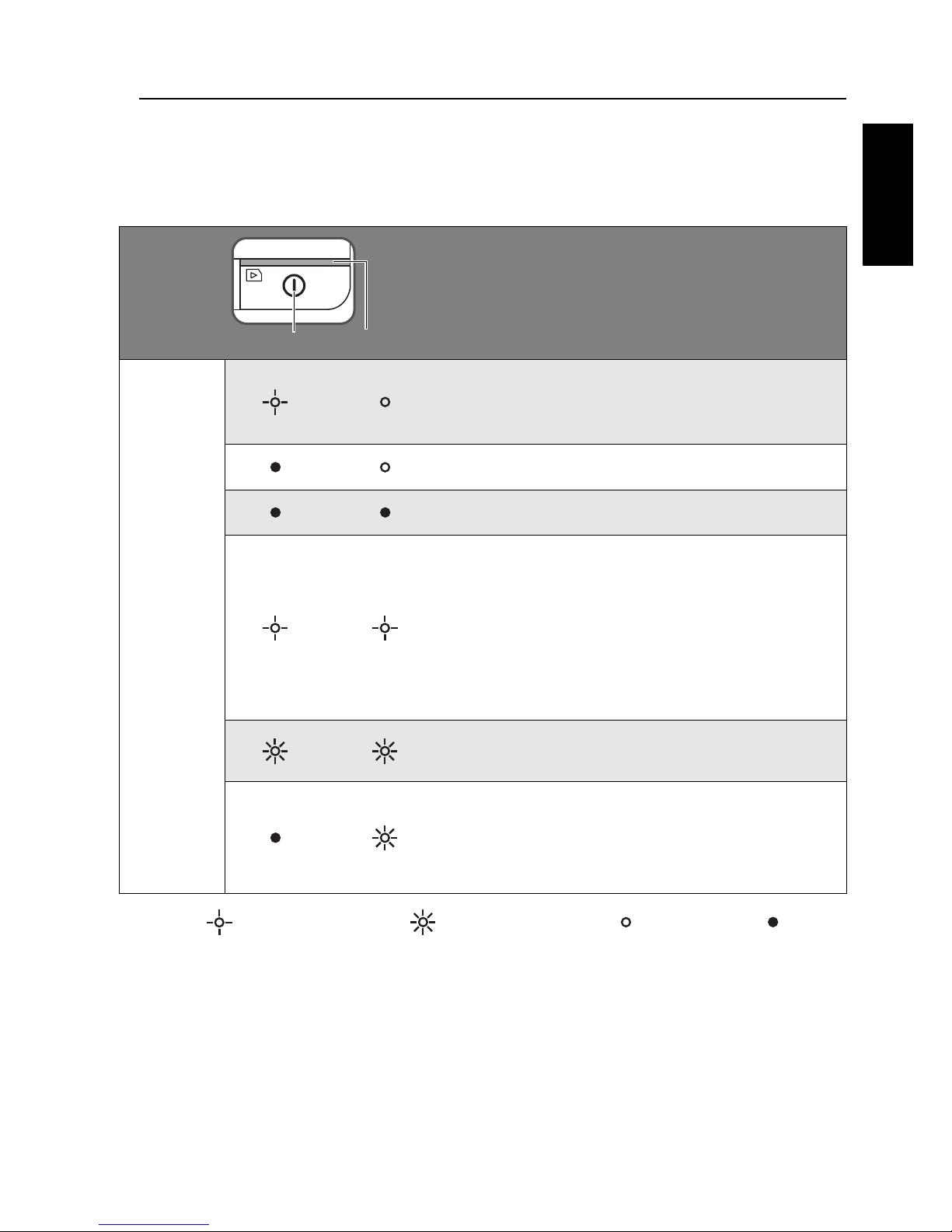
Indicators
Please see below for the lighting patterns of the indicators and the
meanings they represent.
: Blinking slowly; : Blinking rapidly; : Steadily on; : Off
Lighting
patterns
and their
functional
meanings
Scanning current original. Please wait
until the process is complete before
scanning another original.
The scanner is ready for use.
The scanner power is off.
• Initializing system and memory card.
Please wait until the initialization
process is complete before using the
scanner.
• Busy storing image file. Please wait
until the process is complete before
scanning another original.
Paper jam. Please refer to page 22 to
remove the paper jam.
No memory card, card full (free space
below 1MB), card error or SD card
locked. Please use another card, unlock
the card or remove some files on the card.
Power Status/card

Using the scanner8
English
Using the scanner
Preparation
1. Peel off the tape that secures the guide
lever.
NOTE: This step is only required
when you use the scanner for the first
time.
2. Connect the plug on the power adapter
cable to the power socket on the scanner.
3. Plug the power adapter into a power outlet.
NOTE: The type of power plug and
socket illustrated may differ from that
of your region.
4. Insert an unlocked (writable) memory card
into the memory card slot.
NOTE:
• Be sure to insert a memory card before
scanning.
• The scanner only accepts memory cards
in FAT16 or FAT32 format. NTFS and
other file formats are not supported.
Tabla de contenidos
Otros manuales de Escáner de Veho


