
VDarts H3 Manual de usuario

VDarts / H3 / H4 / H4L
安裝使用說明書
Installation and User Manual
取付説明書
www.vdarts.net
H4L
H4
H3

English ................ 02-11
繁體中文 ................ 13-24
日本語 ................... 25-34
1

● Dartboard
● Soft Tip Darts
● Soft Dart Tips
● Installation and User Manual
● Tape Measure
● Throw Line Marker
Package Content
Package Content
02
03
Product
Specifications
04-05
Precautions
06
Dartboard
Installation
07-09
User Guide
10
General Rules
of Darts
Frequently
Asked Questions
11
Member Card
Instructions
and FAQ
12
Catalogue
2

Dartboard Models
Product Specifications
VDarts H3/H4/H4L Global Online Dartboard
Brand: VDarts
Model: VDarts H3
Type : Soft-tip Dartboard
Category : Home Online Dartboard
Size : 50.5 X 54 X 4.3 cm
Net Weight : 3 kg
Release Year : 2020
Main Material : ABS Plastic
Target Surface : 15.5 inches
Power Supply : 100-240V
Noise Reduction : Yes
Confirm Button
Dartboard Switch
Connector Jack
Brand: VDarts
Model: VDarts H4
Type : Soft-tip Dartboard
Category : Home Online Dartboard
Size : 50.5 X 54 X 4.3 cm
Net Weight : 3 kg
Release Year : 2020
Main Material : ABS Plastic
Target Surface : 15.5 inches
Power Supply : 100-240V
Noise Reduction : Yes
Confirm Button
Brand: VDarts
Model: VDarts H4L
Type : Soft-tip Dartboard
Category : Home Online Dartboard
Size : 50.5 X 54 X 6.5cm
Net Weight : 4.2kg
Release Year : 2020
Main Material : ABS Plastic
Target surface : 15.5 inches
Power Supply : 100-240V
Noise Reduction : Yes
Confirm Button
3

Please follow all instructions carefully. If any unusual activity is observed
with the product, please turn off power immediately, unplug power
cord, and contact us or your reseller.
Warning
Precautions
VDarts H3/H4/H4L Global Online Dartboard
-Dropping the product or allowing it to get wet can cause damages. Electric
shock may occur when in contact with liquids.
Safety Precautions
-Make sure the plug is completely inserted into the outlet to prevent electric
shock.
-Precautions to avoid electric shock or short circuit:
-Do not bend, stretch, damage, or hang heavy objects on the power cord.
-Do not use AC connector if broken. Replace immediately to prevent electric
shock or short circuit.
-Make sure your hands are dry before handling the AC connector to prevent
electric shock or short circuit.
-Please make sure to use a 100-240V power supply, otherwise it may cause
fire, electric shock or injury.
-Switch off power and disconnect power supply when product is not in use.
Power Cord & Plug Precautions
-Using too much strength in throwing darts may lead to hand, wrist, and
shoulder injury or damaged product.
-Do not throw darts toward any person, animal, or object to prevent
injuries and property damages.
-Only throw darts toward the dartboard.
-Do not walk in between the dartboard and the player when a game is
ongoing.
Dart Throwing Precautions
-Product contains small parts. Please keep product away from children
under 3 years of age. Use with adult supervision only.
Choking Hazard
4

-Do not attempt to open, modify, or repair the product by yourself.
Doing so may cause malfunction, deformation, or other damages.
-Contact manufacturer or reseller immediately if unusual activity is
observed. Incorrect use of product may result in injuries or property
damages.
Prohibit Dismantling
Precautions
VDarts H3/H4/H4L Global Online Dartboard
-Make sure the wall is strong enough to hang the dartboard and
prevent falling or dropping of the product.
-Make sure the metal parts are fastened correctly when installing
the board. This should also be checked regularly.
-Use screws for hanging the board on wooden surfaces; and use
bolts when hanging on concrete walls.
Hanging the Dartboard
-Only use soft-tip darts not weighing over 20g. Do not use hard-tip or
steel-tip darts to avoid damages to the board.
-Maximum suggested weight of soft-tip darts is 20g.
Darts
-Do not hit or press the dartboard heavily. Doing so can cause the board to
fall, which in turn can cause serious damages.
Hitting the Board
-Prolonged use of the product may lead to hand or wrist fatigue. Avoid
excessive use and throwing.
-Consult the doctor before using the product if you have any existing hand
or wrist injury.
-Rest in between plays when playing long-term to avoid fatigue.
Health Caution
-This product is suitable for ages 16 and up. Adult supervision is required for
ages below 16.
Playing Age
-This product is made for indoor use only.
Where to Install
5

1. Only use screws for installation on wood surfaces.
2. Use bolts or studs if dartboard is to be installed on a concrete wall.
!
Installation Place Of Dartboard
Dartboard Installation
VDarts H3/H4/H4L Global Online Dartboard
Dartboard Installation
173CM
244CM
Dartboard
Throw Line
Height
keep the center of the dartboard
(bull)173cm above the floor
1.Prepare four screws
2.Fasten the screws by putting their parts into the holes
3.Make sure the distance is 173cm between the dartboard
centre and the floor.
4.Keep screw heads 5mm out of the wall.
5.Make sure the wooden screws are fastened properly by
shaking them lightly.
Distance
Set the throw line (point where darts are thrown)
244cm from the surface of the dartboard.
Wall
Dartboard
Nail Holes
6

VDartsAPP VDartsGame
Please use the QR code scanning software on
your phone to scan the QR code, or search
“VDartsGame”on Google Play or App Store
to download the APP.
User Guide
VDarts H3/H4/H4L Global Online Dartboard
Required Devices
Download & Installation
Electronic devices such as smartphones or
tablets with bluetooth connection and are
connected to the internet.
[Android Devices] Minimum Requirements
Processor: Quad-Core 1.2GHz
Memory: 2GB
Operating System: Android 4.4.2
Bluetooth: 4.0
Support OpenGL 2.0
[Apple Devices] Minimum Requirements
iPhone 5 or iPad 3 & newer devices iOS 8
& new system version
7

User Manual
VDarts H3/H4/H4L Global Online Dartboard
Bluetooth Pairing and Connection
02. Turn on Bluetooth on your phone/tablet (Settings ‒ Bluetooth)
03. Open VDartsGame, wait 5-10 seconds, will automatically link with
dartboard.
04. Register a VDarts member account and sign in.
05. After that, you can log in, select and start a game.
01. Turn on the dartboard. The Bluetooth indicator light will flash
which means the dartboard is in search mode.
8
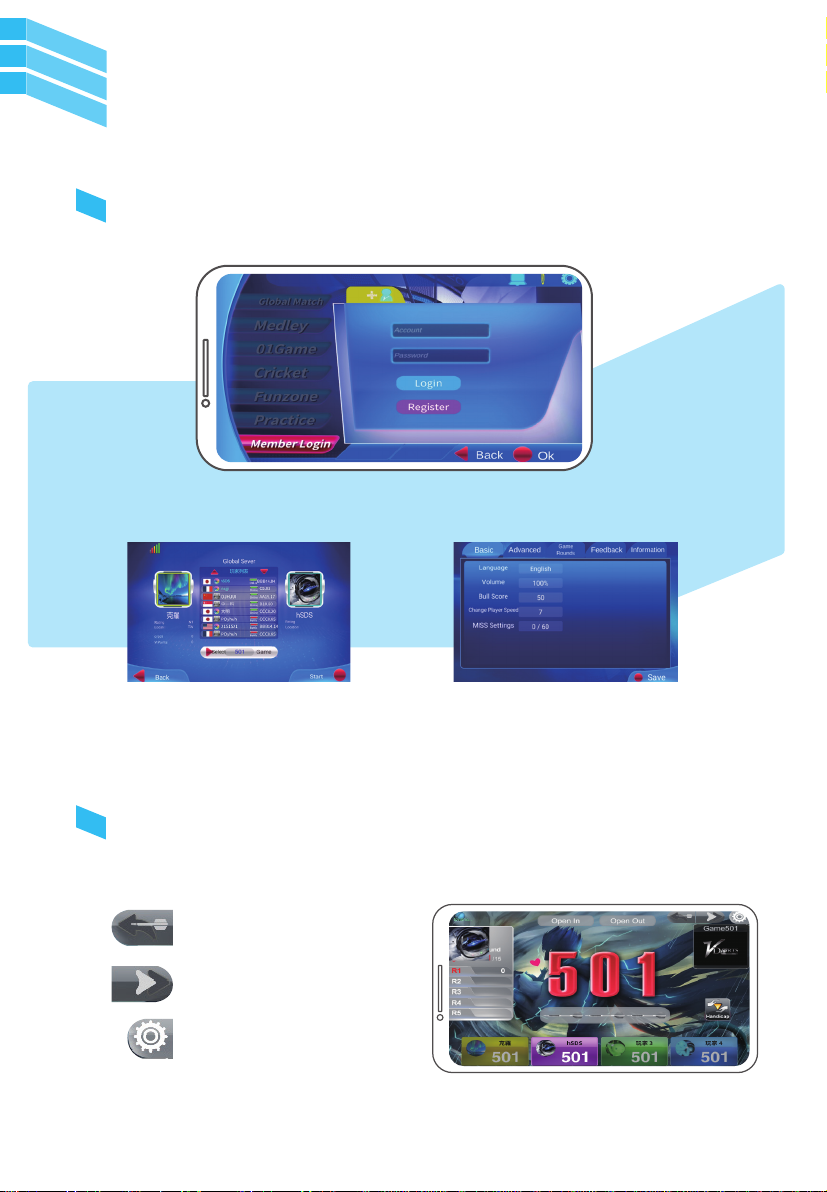
User Manual
VDarts H3/H4/H4L Global Online Dartboard
Game Interface
If you need any adjustments, click these
buttons:
Log In
Game SettingsOnline PK
Back
Next Turn/Switch Player
Exit
9
Este manual sirve para los siguientes modelos
2
Tabla de contenidos
Idiomas:


