
Value 19.99.3420 Manual de usuario

1 / 24
User Manual
19.99.3420 - IP Power Distribution Unit (PDU), 8-way
Table of Contents
1) Introduction .....................................................................................................................................2
2) Product Specifications.......................................................................................................................2
3) PDU Packaging..................................................................................................................................3
4) Product Diagram and Connections ....................................................................................................3
5) Functions..........................................................................................................................................4
Equipment Connection ............................................................................................................................4
IP Address ...............................................................................................................................................4
Voltage values .........................................................................................................................................4
Reset of the equipment ...........................................................................................................................4
6) Quick Installation Guide....................................................................................................................5
Web-Frontend Login ................................................................................................................................5
Power Port Control ..................................................................................................................................6
Threshold Value Settings .........................................................................................................................7
Username and Password Settings ............................................................................................................8
IP Address and DNS Settings ....................................................................................................................8

2 / 24
1) Introduction
The VALUE IP PDU offers an easy setup, as well as a user-friendly web-frontend, suitable for small and
medium businesses and their professional infrastructure. It’s designed and equipped with the latest
technology to distribute power to your connected devices and monitor them for maximum efficiency.
Product Features
Eight C13 ports with a total current of 16A
Current and voltage measurement (total input)
Built-in temperature and humidity sensor to monitor your used
infrastructure
Setting of the circuit delay time for On/Off function of each C13 port
to prevent the impact of power surge to the system
LED indicator for the power supply condition on each switch
LED digital display for the actual value of voltage and current
Built-in lightning protection circuit and resisting voltage surge circuit
for an effective and secured device protection
Equipped with Reset- and Function-Buttons in the front, as well as
a Fuse-Button on its back; the Function-Button offers four different
modes selected by different press cycles:
First long button press: The three left digits on the LED
display will show the actual temperature and the three right
digits will show humidity information in sequence.
Second long button press: The LED display will show the IP
address of the PDU.
Third long button press: The LED display will show the actual
voltage values (same as after starting the IP PDU).
Fourth long button press: after about 15 seconds, the
factory reset is activated. To complete the factory reset, you
need to disconnect the power supply from the PDU for a
moment. Attention: if you continue, your server/hardware
won’t get any power distribution, which will lead to an
outage of your system.
2) Product Specifications
Voltage input: 110-240V 50/60Hz
Voltage output: 110-240V 50/60Hz
Input socket type: 1x IEC320 C20
Output socket type: 8x IEC320 C13
Protection: 16A overload and lightning protection
Voltage measurement range: 90-264VAC resolution 1V
3 / 24
Current working range: 0-20A resolution 0.1A
Temperature measurement range: 0℃-50℃resolution 1℃
Humidity measurement range: 20%-90%RH resolution 1%RH
3) PDU Packaging
The standard PDU package contains a Power Distribution Unit with supporting hardware. The components
of the package are:
Power Distribution Unit
Power Cable, 3P.German Type (CEE 7/7) to C19
Rack Mount Brackets
User Manual / Quick Installation Guide
4) Product Diagram and Connections
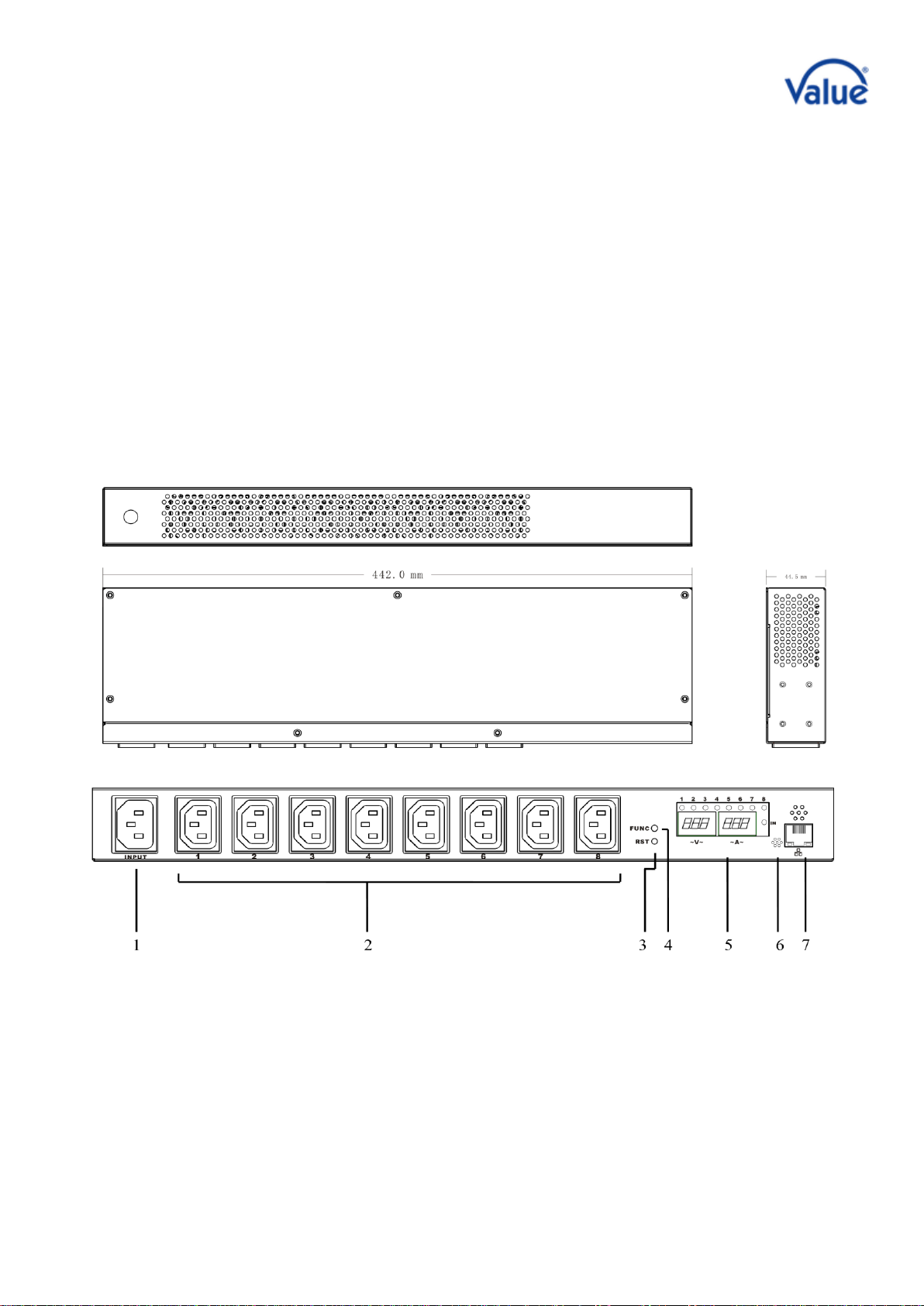
1. Power Input Socket IEC320 C20; Fuse
button on the back of the IP PDU
2. Output Socket IEC320 C13
3. RST (Reset) Key
4. Function Key
5. LED Panel: Display voltage, current,
temperature, humidity, etc.; Digits 1-8
with LED indicators above of the LED Panel,
referring to the output sockets and their
status (ON/OFF).
6. Temperature and humidity sensor
7. Network Port, Connect LAN or WAN

4 / 24
5) Functions
Equipment Connection
Connect the output plugs with up to eight devices through the C13 connections of the PDU and corresponding
power cables.
Connect the input socket of the PDU (C20) and an AC power supply socket with each other through the power
cable which is included in the scope of delivery. After that, the VALUE IP PDU will start from the first port to
the 8th port with an interval of 1 second (default, changeable), and supply power for the device/s.
The LED panel will show the actual supply voltage and total output current of 8 circuits; 8 LED indicator lights
show the status of the 8 output ports.
Temperature and humidity
The display will show temperature and humidity of the PDU with the built-in temperature and humidity
sensor after pressing the Function-Button (FUNC) for about three seconds. The left screen shows
temperature and the right screen shows humidity.
IP Address
The display will show the actual IP address after pressing the Function-Button (FUNC) for the second long
time you press the FUNC button. The default IP address is 192.168.0.10.
Voltage values
The PDU will show the actual voltage values (same as after starting the IP PDU) on the LED display after the
third long button press.
Reset of the equipment
As soon as the Reset-Button (RST) on the front panel is pressed, the PDU will reset.
5 / 24
6) Quick Installation Guide
Web-Frontend Login
Open browser on your PC in the network and type the IP http://192.168.0.10 (factory default) in the address
bar. After typing in the factory default user name and password (“admin”for both), the frontend leads you
to the general information screen as shown in the picture below.
PDU System Information
Click the "System"-Button on the left side of the
category bar, to indicate the PDU system
information.

6 / 24
Power Port Control
Click "Socket" in the category bar, to overview and access used ports as shown below.
Users can shut on/off each of the eight ports
individually in this interface, use the “Start all” /
“Shut off all” functions to steer every port at the
same time or even use custom methods.
Start all: click the drop-down box, choose “Start” and click the “Apply” button
Shut off all: click the drop-down box, choose “Shut off” and click the “Apply” button
Example for custom start and shut off: If the user needs to start the circuits 1, 2, 3 and 4, but
wants to shut off 5, 6, 7, 8, the first method is to click the drop-down box, choose “Start” and then
click the small boxes behind outlet1, outlet2, outlet3, outlet4 - press "Apply" afterwards. The
second method is to click the drop-down box, choose “Shut off” and then, click the small boxes
behind outlet5, outlet6, outlet7, outlet8 - press "Apply" afterwards.
Start and Shut-Off Time-Delay
Click “PDU” in the category bar, the interface shown below will pop up.
Users can start or shut off each port with an
individual delay. This is used due to the fact, that
power circuits could be overloaded otherwise or
because of technical reasons, when, in case of a
system reboot or after a power shortage, servers
are already started up, but firewalls, routers or
other basic network infrastructures are not. In the
picture on the left, custom settings are used –this
means that the eight circuits of the PDU will shut
on/off in different time sequences in the interval
of 0-2 seconds after being connected with power.
It is important to note, that when the user disconnects the input power of the PDU, the time-delay function
for shutting off is invalid. The time-delay function is only applicable to control the outputs through a network.
If your environment is often affected of power shortages, it is highly recommended to use a UPS for the PDU.

7 / 24
Threshold Value Settings
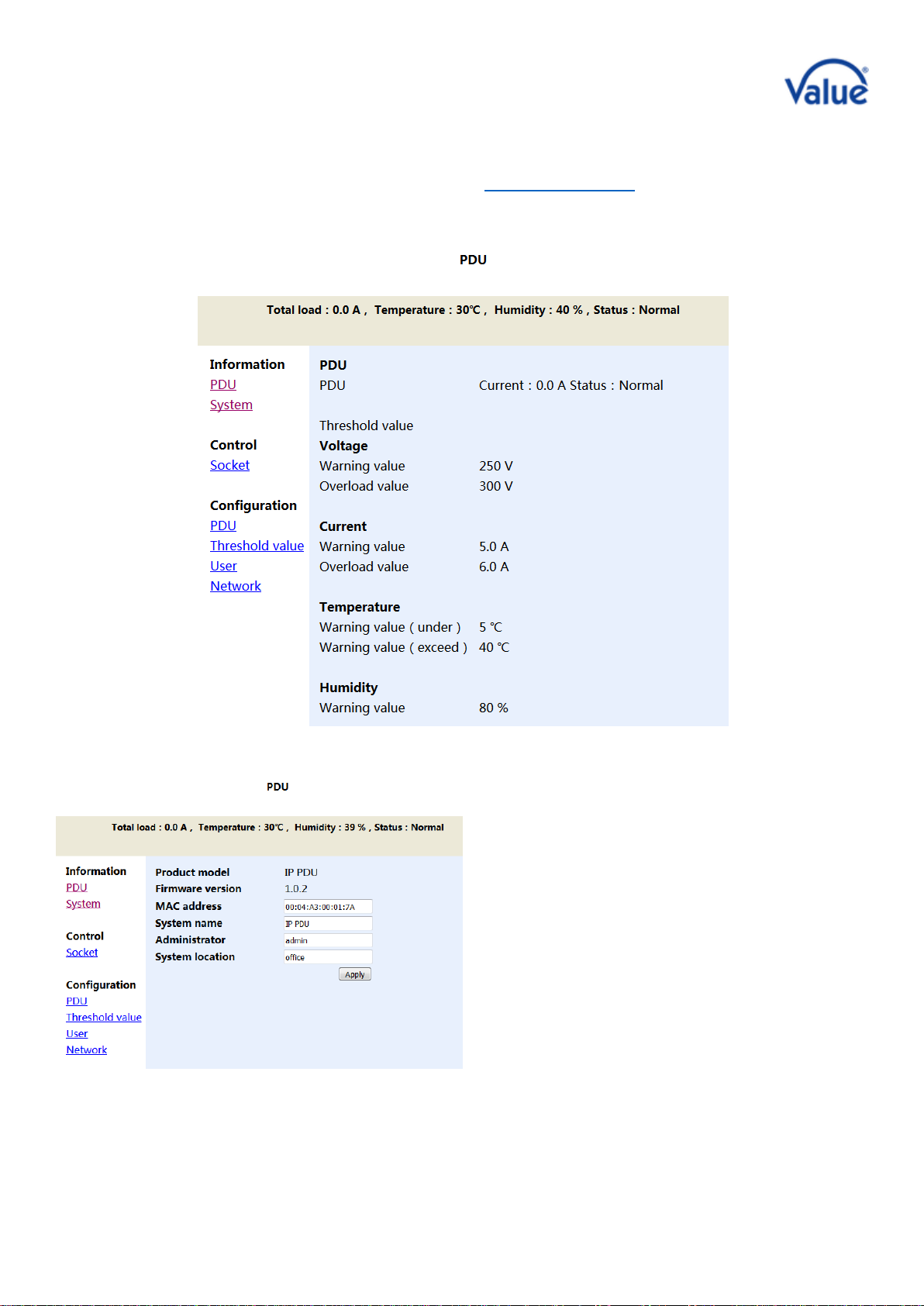
Click “Threshold value” in the category bar, to change to the threshold settings shown below.
The picture above are have the following settings:
Current warning value 5A: When the total current exceeds 5A, the buzzer sends out "beep, beep"
as an acoustical sound alarm.
Current overload value 6A: When the total current exceeds 6A, the PDU will cut off the power
supply of all output ports.
Warning voltage 250V: When the input voltage exceeds 250V, the buzzer sends out "beep, beep"
as an acoustical sound alarm.
Current overload value 300V: When the input voltage exceeds 300V, the PDU will cut off the
power supply of all output ports.
Temperature is under 5℃, or exceeds 40℃: When the built-in temperature and sensor is sensing,
that the environment temperature is under 5℃or exceeds 40℃, the buzzer sends out "beep,
beep" as an acoustical sound alarm
Humidity warning value 80%: When the built-in humidity sensor is sensing, that the environment
humidity is more than 80%, the buzzer sends out "beep, beep" as an acoustical sound alarm.

8 / 24
Username and Password Settings
Click “User” in the category bar, to display the interface as shown below.
The login user name and password can be
modified in this interface. After filling in the
original and new user name, password and
password confirmation respectively, click the
apply button and the new user name and
password will be used on from the next login.
IP Address and DNS Settings
Click Network in the category bar to access the network settings.
Host Name: The name showed in the LAN
IP Address: The actual LAN IP Address
Subnet Mask: The actual LAN Subnet Mask
Gateway: The actual Gateway
Enable DHCP: The superior router of the LAN will distribute network parameters automatically for the IP
PDU. DHCP may be enabled/disabled in the frontend
Primary & Secondary DNS IP: Refer to the supervisor router settings of actual LAN

9 / 24
Bedienungsanleitung
19.99.3420 - IP Steckdosenleiste (PDU), 8-fach
Inhaltsverzeichnis
1) Einleitung .......................................................................................................................................10
2) Produkt-Beschreibung.....................................................................................................................10
3) Verpackung der Steckdosenleiste....................................................................................................11
4) Produkt-Zeichnung und Anschlüsse ................................................................................................. 11
5) Funktionen .....................................................................................................................................12
Anbindung der Geräte..................................................................................................................... 12
IP-Adresse ......................................................................................................................................12
Spannungswerte .............................................................................................................................12
Reset der Dosenleiste ..................................................................................................................... 12
6) Schnellanleitung .............................................................................................................................13
Login zur Web-Oberfläche............................................................................................................... 13
Kontrolle der Ausgangsports ...........................................................................................................14
Setzen von Schwellwerten ..............................................................................................................15
Einstellung von Benutzername (Username) und Passwort ............................................................... 16
Einstellung der IP-Adresse und DNS Parameter ............................................................................... 16

10 / 24
1) Einleitung
Die VALUE IP Steckdosenleiste bietet eine einfache Einrichtung ebenso wie eine benutzerfreundliche Web-
Oberfläche, und sie ist geeignet für kleine und mittlere Unternehmen mit deren professioneller Infrastruktur.
Sie wurde entworfen und ausgestattet mit aktuellster Technologie um Strom auf Ihre angeschlossenen
Geräte zu verteilen und diese im Sinne maximaler Effizienz zu überwachen.
Produkteigenschaften
Acht C13 Ports mit einer Stromstärke von insgesamt 16A
Messung von Stromstärke und Spannung (Gesamt-Energie)
Eingebaute Temperatur- und Luftfeuchtesensoren zur Überwachung Ihrer Infrastruktur
Einstellung der Verzögerungsschaltung für die Ein-/Aus-Funktion jedes C13-Ports um Stromspitzen
am Gerät zu vermeiden
LED-Anzeige für die Stromversorgungs-Bedingungen an jedem Schalter
Digitales LED-Display zur Anzeige der aktuellen Stromstärke und Spannung
Eingebauter Blitzschutz-Schaltkreis und Spannungsspitzen-Schutzkreis für einen effektiven Schutz der
abgesicherten Geräte
Ausgestattet mit Reset- und Funktions-Knöpfen auf der Vorderseite ebenso wie mit einer
Schaltsicherung an der Rückseite; der Funktions-Knopf bietet die Einstellung von vier verschiedenen
Modi, ausgewählt durch verschiedene Druckabläufe:
Erster langer Knopfdruck: Die dreistellige LED-Anzeige links zeigt die aktuelle Temperatur und
die dreistellige LED-Anzeige rechts zeigt die Luftfeuchtigkeit.
Zweiter langer Knopfdruck: Die LED-Anzeige zeigt die IP-Adresse der Steckdosenleiste.
Dritter langer Knopfdruck: Die LED-Anzeige zeigt die aktuellen Spannungswerte (gleich wie
nach dem Einschalten der IP-Steckdosenleiste).
Vierter langer Knopfdruck: Nach etwa 15 Sekunden wird ein Factory Reset aktiviert. Zum
Abschließen dieses Factory Resets muss die IP-Steckdosenleiste für einen Moment vom
Stromnetz getrennt werden. Achtung: Wenn Sie fortfahren, bekommt die angeschlossene
Hardware keinen Strom mehr, was zu einem Ausfall Ihres Systems führen wird.
2) Produkt-Beschreibung
Eingangsspannung: 110-240V 50/60Hz
Ausgangsspannung: 110-240V 50/60Hz
Input socket type: 1x IEC320 C20
Output socket type: 8x IEC320 C13
Schutz: 16A vor Überlast und Blitzschutz
Spannungs-Messbereich: 90 - 264VAC, Auflösung 1V
Stromstärke-Arbeitsbereich: 0 - 20A, Auflösung 0,1A
Feuchtigkeits-Messbereich: 20% - 90%, Auflösung 1%
Temperatur-Messbereich: 0°C –50°C, Auflösung 1℃
Tabla de contenidos
Idiomas:


