Vacoss Cam IR Manual de usuario

EN 04-17
DE 18-31
CONTENTS

Regulatory Information
FCC compliance:
This equipment has been tested and found to comply with the limits for a Class B digital device, pursuant to
part 15 of the FCC Rules. These limits are designed to provide reasonable protection against harmful
interference in a residential installation. This equipment generates uses and can radiate radio frequency energy
and, if not installed and used in accordance with the instructions, may cause harmful interference to radio
communications. However, there is no guarantee that interference will not occur in a particular installation. If
this equipment does cause harmful interference to radio or television reception, which can be determined by
turning the equipment off and on, the user is encouraged to try to correct the interference by one or more of the
following measures:
- Reorient or relocate the receiving antenna.
- Increase the separation between the equipment and receiver.
-Connect the equipment into an outlet on a circuit different from that to which the receiver is connected.
-Consult the dealer or an experienced radio/TV technician for help
About This Manual
Legal Disclaimer
The Manual includes instructions for using and managing the product. Pictures, charts, images and all other
information hereinafter are for description and explanation only. The information contained in the Manual is
subject to change, without notice, due to firmware updates or other reasons. Please find the latest version in
the company website. Please use this user manual under the guidance of professionals.
REGARDING TO THE PRODUCT WITH INTERNET ACCESS, THE USE OF PRODUCT SHALL BE WHOLLY AT YOUR OWN RISKS. OUR
COMPANY SHALL NOT TAKE ANY RESPONSIBIUTES FOR ABNORMAL OPERATION, PRIVACY LEAKAGE OR OTHER DAMAGES
RESULTING FROM CYBER ATTACK, HACKER ATTACK, VIRUS INSPECTION, OR OTHER INTERNET SECURITY RISKS; HOWEVER,
OUR COMPANY WILL PROVIDE TIMELY TECHNICAL SUPPORT IF REQUIRED. SURVEILLANCE LAWS VARY BY JURISDICTION.
PLEASE CHECK ALL RELEVANT LAWS IN YOUR JURISDICTION BEFORE USING THIS PRODUCT IN ORDER TO ENSURE THAT
YOUR USE CONFORMS THE APPLICABLE LAW. OUR COMPANY SHALL NOT BE UABLE IN THE EVENT THAT THIS PRODUCT IS
USED WITH ILLEGITIMATE PURPOSES.
IN THE EVENT OF ANY CONFLICTS BETWEEN THIS MANUAL AND THE APPLICABLE LAW, THE LATER PREVAILS.
- 01 -

This product and - if applicable - the supplied accessories too are marked with "CE" and comply
therefore with the applicable harmonized European standards listed under the EMC Directive
2004/108/EC, the RoHS Directive 2011/65/EU and Amendment (EU)2015/863.
EU Conformity Statement
2012/19/EU (WEEE directive): Products marked with this symbol cannot be disposed of as unsorted
municipal waste in the European Union. For proper recycling, return this product to your local supplier
upon the purchase of equivalent new equipment, or dispose of it at designated collection points. For
more information see: www.recyclethis.info
2013/56/EU (battery directive): This product contains a battery that cannot be disposed of as unsorted
municipal waste in the European Union. See the product documentation for specific battery
information. The battery is marked with this symbol, which may include lettering to indicate cadmium
(Cd), lead (Pb), or mercury (Hg). For proper recycling, return the battery to your supplier or to a
designated collection point. For more information see: www.recyclethis.info
Changes or modifications not expressly approved by the party responsible for compliance could void the user's
authority to operate the equipment.
This device complies with Part 15 of the FCC Rules.
Operation is subject to the following two conditions:
(1) this device may not cause harmful interference, and (2) this device must accept any interference received,
including interference that may cause undesired operation.
RF Exposure Warning Statements:
This equipment complies with FCC radiation exposure limits set forth for an uncontrolled environment. This
equipment shall be installed and operated with minimum distance 20cm between the radiator & body.
- 02 -

Cautions
Make sure the power supply voltage is correct before using the camera.
Do not drop the camera or subject it to physical shock.
Do not touch senor modules with fingers. If cleaning is necessary, use clean cloth with a bit of ethanol and
wipe it gently. If the camera will not be used for an extended period, replace the lens cap to protect the
sensor from dirt.
Do not aim the camera at the sun or extra bright places. Blooming or smearing may occur otherwise (which
is not a malfunction), and affect the endurance of sensor at the same time.
The sensor may be burned out by a laser beam, so when any laser equipment is in using, make sure that the
surface of sensor will not be exposed to the laser beam.
Do not place the camera in extremely hot, cold or dusty, and do not expose it to high electromagnetic
radiation.
To avoid heat accumulation, good ventilation is required for operating environment.
The security camera supports outdoor and indoor use. Please make sure the camera power connector is
waterproof.
- 03 -

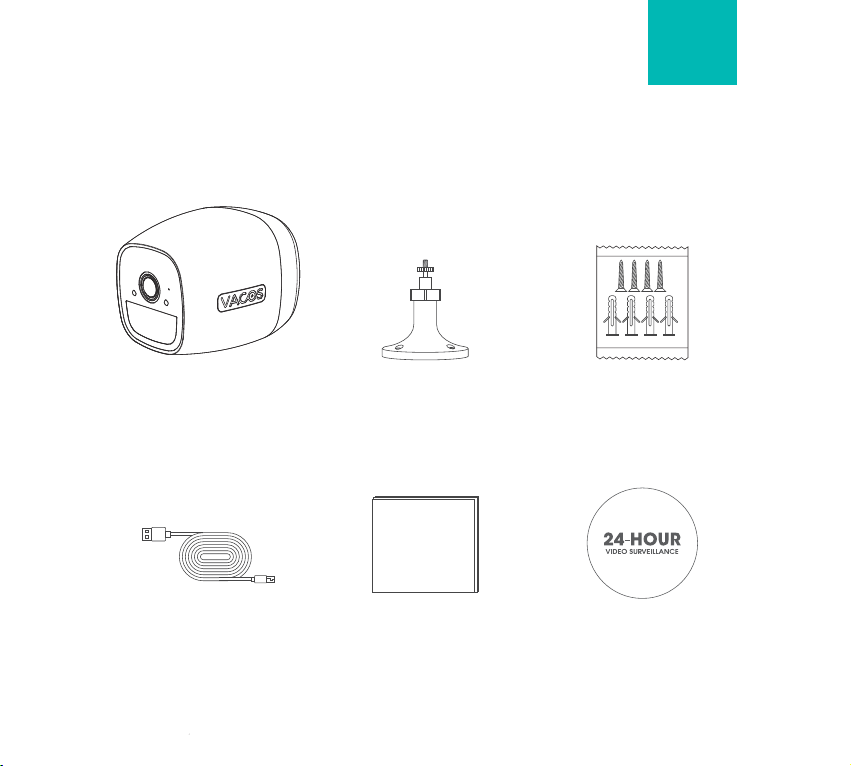
1x Vacos Cam IR 1x Outdoor Screw Bracket
What’s in the Box
User Manual
1x Screw Kit
1x Power Cable 1x User Manual 1x Surveillance Sign
EN
- 04 -

Product Introduction
IR Light (IR) or Supplement
Light (Vacos Cam)
Light Sensor
Indicator Light
Lens
Microphone
PIR Sensor
Speaker
USB Interface
- 05 -

Setup Button/Indicator Light
Reset Button
Indicator Light
Slightly Tap
Long Press
Slow Flashing Red Light
Wake up the Camera
Reset the Camera
Operation/Indicator Light Status Details
Fast Flashing Red Light
Solid Blue Light
Solid Red Light (Charging Port)
Solid Blue Light (Charing Port)
Ready for WiFi Connecting
WiFi Connecting
WiFi Is Connected
Camera in Charging
Camera Charging Completed
- 06 -
Reset Button
Charging Indicator
(Press for more than five seconds to reset
the device to factory settings.)

1. Charge the Camera with a power Adapter
The camera is built-in battery. Before operation. please use the USB power cord and DC5V power adapter (not
included) to fully charge your device.
There is an indicator light near the power port, Red means the camera is charging
Note: Please fully charge the camera when you use it at the first time.
- 07 -
Indicator Light

2. Preparation
2.1. Search for Vacos Smart in App Store or Google Play. Download and install it into your phones or tablets.
2.2. The camera only supports 2.4GHz Wi-Fi, Please don't connect it with 5GHz WIFI.
2.3. Your WiFi should be encrypted by WAP/WAP2, and make sure there are no special characters in the name
and the password of WiFi.
2.4. When connecting, please ensure that the wifi signal is smooth and stable. We recommend t within 3-5m
away from the router to ensure a successful connection.
Get it on
Available on the
Apple and the Apple logo are
trademarks of Apple lnc.
Google Play and the Google Play logo
are trademarks of Google lnc.
Vacos Smart
10:00
(2.4GHz Wi-Fi) Router
3-5 m (9-16 ft)
3-5 m (9-16 ft)
3-5 m (9-16 ft)
- 08 -
Tabla de contenidos
Idiomas: