
V7 HB600S Manual de usuario

USER GUIDE
HB600S
WIRELESS STEREO HEADSET
EN

OverviewIn the Box
HB600S Stereo Headset V7 Link Bluetooth Dongle Type-C Charging Cable
3.5mm Audio CableBoom Mic Storage Bag User Guide
Previous track
Play/Pause
Next track
Rotate to adjust volume
Type C charging port
Boom microphone
Boom mic mute switch
Rotate boom mic
Answer/End call/
Mute/Unmute
On/Off/Paring
Bluetooth
LED
Audio
Input
Internal mic
HB600S
02

3. Position the microphone to your preference.
How to Wear
1. Insert the detachable Boom Microphone
into the 2.5mm receptacle located on
the headset.
2. The boom microphone can move to
accommodate a user’s preference for
right side or left side wear.
Mic receptacle
03

Connecting to a PC
PC(w/V7’s Bluetooth Dongle)
The V7 USB dongle and headset are pre-paired and ready for use.
Plug in the USB dongle and power on the headset to enjoy voice and
audio performance range of up to 30 meters (100’) line-of sight. If using
the PC’s integrated Bluetooth, your range may be limited to 10 meters
(33’) and you may need to select ‘V7 HB600S’ for the audio playback
device in the operating system’s settings.
Operation
04
Slide the switch to the
CENTER position
Power On Power Off
Slide the switch to
the position
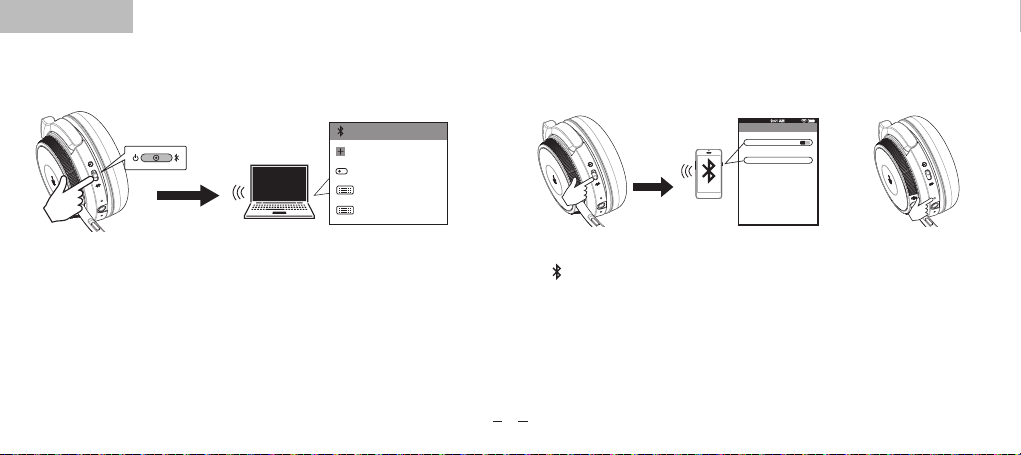
How to connect with the first Bluetooth device.
Slide the power switch to
the“ “ position and hold
until‘paring’ heard or the
paring LED ashes, then
select V7 HB600S.
The LED will ash blue to
indicate the headphone is
connected, and
‘connected’is heard.
V7 HB600S
Bluetooth
Bluetooth ON
Devices
Now discoverable
Paired
Activate "Bluetooth" in your
device‘s settings and select
”V7 HB600S”.
Connecting to the second Bluetooth device.
Connecting
Windows 10 PCs and Macs will
automatically recognize and
install drivers.
Slide the power switch
to the "CENTER" position.
The LED will ash red
and blue when ready
to connect.
05
Add bluetooth or other devices
bluetooth
Mouse/Keyboard/Pen
off
V7 link
Audio
V7 link

Calls with a Smartphone
Calls with a Smartphone Siri/Cortana/Assistance
Press 1 ×
Press 1 ×
Press 2 ×
10m
Answer
End Call
Decline
Press 2 ×
Charging the Headset
06
Plug the USB-C charging cable
into a computer’s USB port.
During charging the red LED will light. When fully charged, the LED will turn
o. The headset remains on during charging.
To power o, the headset’s power switch must be slid to the o position.
Plug the USB-C charging cable
into a USB wall charger.

Plug the optional charging stand into a powered USB port on your PC,
docking station or USB wall charger and then dock the headset. It takes
approximately 3 hours to fully charge the headset.
Muting the Boom Mic: Depress and hold the button for 2 seconds.
Muting the internal Mic: (When boom mic is not in use)
Depress and hold the call key 2 seconds.
Using the charging stand Other Operations
07

Product Specifications
Battery Status: After the headset is powered on, press the call button
briefly to hear the current battery status 100% -75%-50%-25%.
Clearing the paring: While the headset is powered on, press and hold
the previous and next track buttons simultaneously for 10 seconds. A
pink LED will light for 2 seconds and the headset will then enter paring
mode.
Bluetooth version: Bluetooth V5.0
Bluetooth Profile: A2DPv1.3.1; AVRCPv1.6; HFPv1.7;
HSPv1.2; SPP v1.2; DID v1.3; HID v1.1; PXP v1.0.1;
FMP v1.0; BAS v1.0
Working Frequency: 2.402GHz-2.480GHz
Frequency Response: 99±3dB
Receiving sensitivity: >-89dBm
Battery type: Lithium polymer
Mic type and sensitivity: Virtual Microphone -42±3dB
Headphone Driver Size: 30mm
Battery capacity: 410mAh
DC Input: 5V_500MA
FCC ID: 2AKI8-19BF18
Charging voltage: 5V/2A
Bluetooth working range: Up to 30m
Talk time: Up to 18 hours
Charging time: Approximately 3 hours
Standby time: Approximately 175 hours
Compatibility: Windows 10, mac OS, iOS and Android
08

WARNING
Headsets can deliver sounds at loud volumes and high-pitched tones. Avoid prolonged use of the headset at excessive sound pressure levels. Please
read the safety guidelines below prior to using this headset.
Safety information
Use of a headset will impair your ability to hear other sounds. Use caution while using your headset when you are engaging in any activity that requires
your full attention. This package contains small parts that may be hazardous to children and should be kept out of reach from children.
Do not attempt: To dismantle or service the product as this may cause a short circuits or other malfunction which could result in a fire or electric shock.
Avoid exposing your product to rain, moisture or other liquids to avoid damage to the product or injury to you. Keep all products, cords, and cables away
from operating machinery. Avoid use while operating a motor vehicle.
Built-in battery care: Please observe the following if the product contains a battery. Your product is powered by a
rechargeable battery.
The full performance of a new battery is achieved only after two or three complete charge and discharge cycles. The battery can be charged and discharged
hundreds of times but will eventually wear out.
Always try to keep the battery between 15°C and 25°C (59°F and 77°F). A product with a hot or cold battery may not work temporarily, even when the battery
is fully charged. Battery performance is particularly limited in temperatures well below freezing.
Battery warning!
CAUTION – The battery used in this product may present a risk of fire or chemical burn if mistreated. Do not attempt to open
the product or replace the battery. This will void the warranty.
09

There is no sound when listening to music
• Increase the volume on your headphones or the mobile device.
• Reestablish the Bluetooth wireless connection between the headphones and your mobile device.
• Check if the audio app has paused or stopped playback.
Headphones will not charge
• Confirm that the charging cable is operational or undamaged.
• Ensure that the USB charging cable is fully seated in the headphones and wall charger ports.
• Confirm that the USB port is outputting power. Some USB ports shut off when the PC is off.
Find support for the V7 HB600S at v7world.com
Troubleshooting & Support
Headphones will not power on:
• Be sure the headphones are fully charged.
My mobile device is unable to find the Bluetooth headphones
• Confirm the headphones are in pairing mode (blue/red indicator lights flashing).
• Remove “V7 HB600S” from your phone’s Bluetooth device list and try again.
• If the model still does not appear, restart the headset and phone, then try again.
After successfully pairing, the headphones disconnect
• Be sure the battery has adequate power and recharge.
• Headphones must be within 10m of most mobile devices.
• Connections may be affected by obstructions such as walls or other electronic devices. Try moving closer to the device you are connected to.
When answering a call, I cannot hear anything
• Ensure the mobile device is connected to the V7 HB600S headphones and not on phone’s speaker or other audio option.
• Increase the volume on your mobile device.
10
Otros manuales para HB600S
1
Tabla de contenidos
Idiomas:
Otros manuales de Auriculares de V7


