utouch UT-TVI65H Manual de usuario

Interactive Touch All-in-one
User Manual
Please read this manual very carefully before using,
And keep it properly for any further reference.
Take down the model number for reference.
Model No.:Series No.:____________________
All rights are reserved by our company. If there is any change, it is
subject to material product without any prior notice.

1
Safety warning:
For your safety, please read the notes below very carefully before using and keep
it properly for any reference.
Put the equipment in the well-ventilated environment.
Don’t put materials such as newspaper, table cloth and curtain above the air
hole of the equipment.
Don’t leave the equipment near the open fire such as the lighted candle.
Don’t spray on the equipment, such as leave bottle full of water far away
from the equipment.
To avoid the equipment to fall, please make sure the whole product is on the
stand or wall mount properly. Likewise, don’t put the equipment on the
unstable stand, cart and table.
While hanging the equipment on the wall mount, make sure to ask the
professionals to do this job.
TypeⅠequipments (with three core power cord and ground connection)
should be connected to the outlet with ground connection protection.
Power plug is the disconnect part; it should be easy to remove.
To type Ⅰ(with three core power cord and ground connection) and typeⅡ
multimedia equipment (with two core power cord and without ground
connection),while open the power supply, make sure the ground connection
protection to typeⅠis proper. In the multimedia system, the equipment
connected with communication network and the equipment to wired network
should meet the specific isolation requirement.

2
The terminal with is dangerous. While connecting this terminal to
outer lead, make sure to ask professionals to do this job. Or use existing
down-lead and flexible cord to finish the connection.
Don’t put the battery (battery pack or assembled battery) in the environment
such as sunshine and hot fire.
To protect the environment, collect the waste battery along with the local
recycling method.
If the equipment has replaceable lithium battery, please note:
It is in explosion hazard while not replacing the waste battery.
The waste battery can only be replaced with the same or equivalent
battery.
Warning:
To avoid damage to the product, make sure the equipment is tightly fixed on
the floor or the wall in strict accordance to the installation manual.
The finite network antenna connected with the equipment must be isolated
from the ground connection protection. Otherwise, it is in the risk of catching fire.

3
Contents
Safety warnings ----------------------------------------------------------------------------------------------------------01
Contents -------------------------------------------------------------------------------------------------------------------03
Product usage note ------------------------------------------------------------------------------------------------------04
The product functions and features -------------------------------------------------------------------------------------05
Installation -----------------------------------------------------------------------------------------------------------------07
Graphic appearance and connection instructions ---------------------------------------------------------------------08
Remote control description ---------------------------------------------------------------------------------------------10
Basic operations ------------------------------------------------------------------------------------------------------------11
Connections and settings --------------------------------------------------------------------------------------------------13
Menu operation -------------------------------------------------------------------------------------------------------------18
Touch screen software installation and use -----------------------------------------------------------------------------26
Computer specifications --------------------------------------------------------------------------------------------------29
Touch screen specifications------------------------------------------------------------------------------------------------30
Troubleshooting -------------------------------------------------------------------------------------------------------------30
Maintenance ------------------------------------------------------------------------------------------------------------------32

4
Products using important notes
(1)Important Notes of moving the all in one PC
Please make sure the unplug the plug from power
socket when moving the machine, and disconnect
antenna, audio/video cables, and any fixed cables
It requires 2 or more people to move the machine.
Please grasp the frames steadily as below when you
move the machine.
(5)Do not repair, modify or disassemble the product, please
wait for the maintenance technicians’ check and repair
(2)Don’t climb on the machine. It is very dangerous to
climb on the machine.
(6)When the malfunction occur, Smoking or emits an odor,
please turn off the machine and unplug the plug. Please
contact the maintenance technicians
When you are make sure the smoke and odor has
disappeared.
(3)While not in the use of the product, please turn off
the power and unplug the plug. Even if the machine is
in standby state, The All-in-one PC has not disconnect
with the power supply completely, so there will be
some electricity consumption
(7)If the product downfall or out frame damage, please turn
off the power immediately, and unplug the plug. Please
contact the maintenance technicians
(4)Please don’t touch the antenna, power line or other
connected power lines or power supply when there are
thunders or lightning
(8)Please unplug the power plug before cleaning
Please do not use solvent to clean the all in one PC such
as gasoline or thinner.
This kind of solvent will damaged outer frame of
damaged the surface.
If the rubber or vinyl products with all in one PC contact
for a long time, there may leave stains
Please use the soft cloth to clean the surface of all in one
PC when cleaning the surface.

5
The product functions and features
Touch function
Built-one touch function, touch operation can be carried out directly on the screen.
TV function
1. Multilingual menu.
2. Full-function infrared remote control.
3. Full-channel auto-tuning.
4. AV (video), YPBPR (component), PC (computer) and digital HDMI, USB interface.
5. Support SDTV and HDTV modes (480i / 480p, 576i / 576p, 720p, 1080i / 1080p).
6. Automatic standby after 10 minutes of no signal.
7. Two multimedia interfaces, with movies, music, pictures and text playback.
8. Auditory function alone.
9. Variety of sound and video effects modes.
10. Motion compensation function.
Computer monitor function
1. Provides a large screen display, high resolution and excellent color accuracy.
2. Provides a dynamic display area, automatic resizing, automatic centering, and perfect geometry.
3. Supports a variety of computer display formats, and has an adaptive display.
Multimedia features
1. Intelligent user interface, simple operation.
2.Picture browsing, music player, video player.
3.Support U disk, USB mobile hard disk, MP3, card readers and other USB storage devices.
The product features
1.This product is embedded Touch ultra high-speed infrared touch screen with anti-glare, writing sensitivity,
high stability, fast response, touch-free driving and other characteristics; supports multi-touch, enabling objects to
drag, zoom and rotation.
2. High-quality LCD screen, high brightness, high contrast, digital progressive display, color optimization
features, motion picture and still image quality improvement function, real restore perfect picture .

6
3.Video has a very clear 4K or 3D and other special effects.
4. Part of PC applies the modular design, all internal wiring; PC modules overall swap, easy maintenance.
5. Slim, stylish and lightweight.
6. Ultra-low standby power design, with automatic power saving feature.
7. Common port at front, signal access automatic switching.
8. Overall all-in-one designs, highly integrated, enabling a key switch and remote control switch product.
9. Extensions and compatibility, support windows \ Linux and other operating systems; scalable wireless
microphones, WIFI, Bluetooth, 3G and so on.
Main accessories
Above pictures for your reference only, please refer to actual product .

7
Installation

8
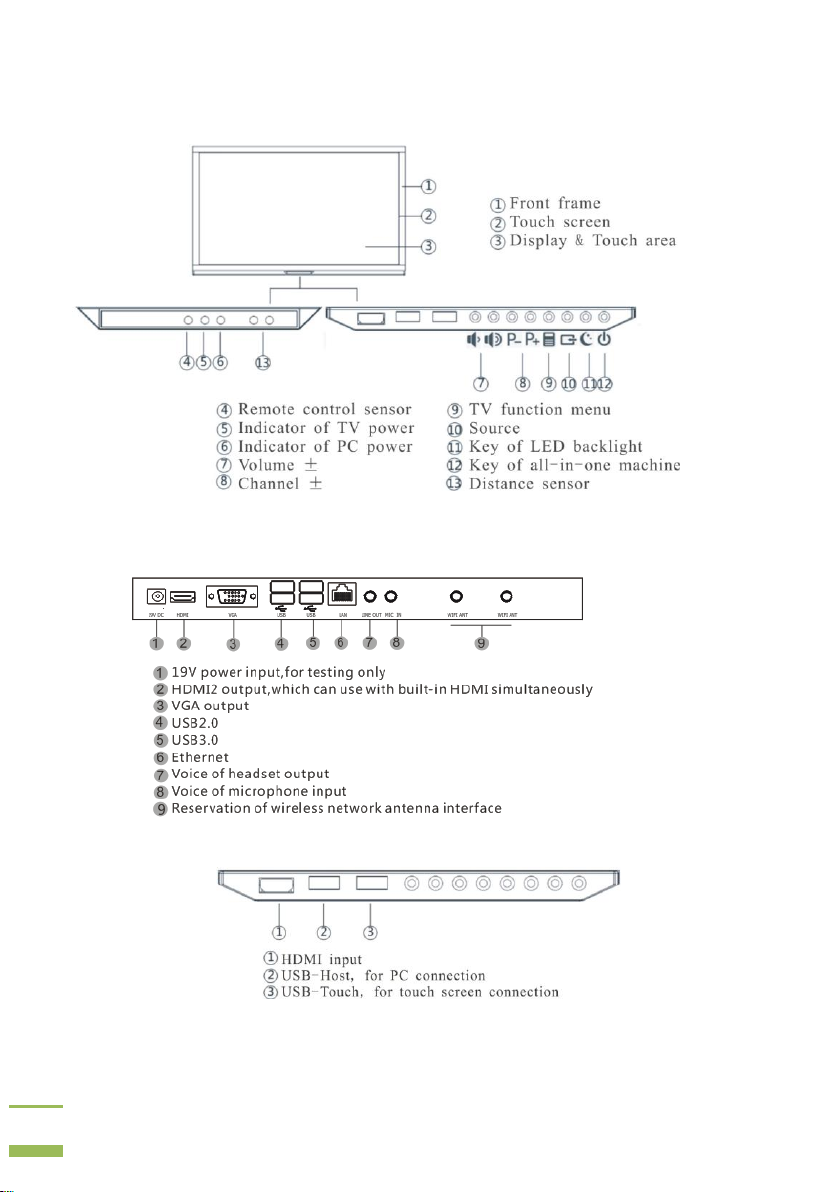
Graphic appearance and connection instructions
The indicator of PC will have no function, because some models are without PC built-in.
PC Interface
Interface on front frame
Please note the distinctions, because USB-Host and USB-Touch have same look and shape.

9
TV Interface
Tabla de contenidos