
usbLogic USB-MK-AUX Manual de usuario

Version 17.04.2012 DVB-MK-AUX
usbLOGiC USB-AV-Player
USB-MK-AUX
for BMW Professional navigation systems
without iDrive (MK2-MK4)
Product features
• USB-port for media up to 2 TB (2000GB)
• supports FAT32 and NTFS formatted media
• multi partition capable
• compatible with MP3, AVI, VOB, MOV, RMVB, JPG and many more
• last position memory
• integrated into and controllable by vehicle infotainment
• AV-input with IR-control channel
• control of after-market devices by OEM buttons, e.g. DVD-player, USB/iPod devices, …
• after-market rear-view camera input
• automatic switching to rear-view camera input
• rear-view camera power (+12V max 1A)
• rear-seat-entertainment AV-output
• optional remote control for full USB functions/rear-seat-entertainment
• power on remote out trigger signal (+12V max 1A) to switch on connected devices
• video-in-motion

Version 17.04.2012 DVB-MK-AUX
Seite1
Contents
1. Prior to Installation
1.1. Delivery contents
1.2. Check compatibility of vehicle and accessories
2. Connection schema
3. Installation
3.1. Interconnecting USB-box and harnesses
3.2. Connections to navigation computer
3.3. Connections to radio module
3.4. USB and optional IR-remote control set
3.5. Connecting peripheral devices
3.5.1. AV-source
3.5.2. Installing AV-source’s IR-sensor additionally
3.5.3. After-market rear-view camera
3.5.4. After-market rear-seat-entertainment
3.6. System settings/VI SETTINGS
3.6.1. Audio settings
3.6.2. Assigning device control for connected AV-source
3.6.3. Rear-view camera function
4. Operation
4.1. Activation of the video-in-motion function
4.2. Selecting the usbLOGiC as current AV-source
4.3. Switching to internal USB and AV-source
4.4. Picture settings
4.5. Button assignment table
5. Specifications
6. Connections (USB-box)
7. Technical support
Appendix A –Device control table
Appendix B –USB function manual
Version 17.04.2012 DVB-MK-AUX
Seite2
Legal Information
By law, watching moving pictures while driving is prohibited, the driver must not be
distracted. We do not accept any liability for material damage or personal injury resulting,
directly or indirectly, from installation or operation of this product. This product should only
be used while standing or to display fixed menus or rear-view-camera video when the
vehicle is moving, for example the MP3 menu for DVD upgrades.
Changes/updates of the vehicle’s software can cause malfunctions of the interface. We
offer free software-updates for our interfaces for one year after purchase. To receive a free
update, the interface must be sent in at own cost. Labor cost for and other expenses
involved with the software-updates will not be refunded.
1. Prior to installation
Read the manual prior to installation. Technical knowledge is necessary for installation. The
place of installation must be free of moisture and away from heat sources.
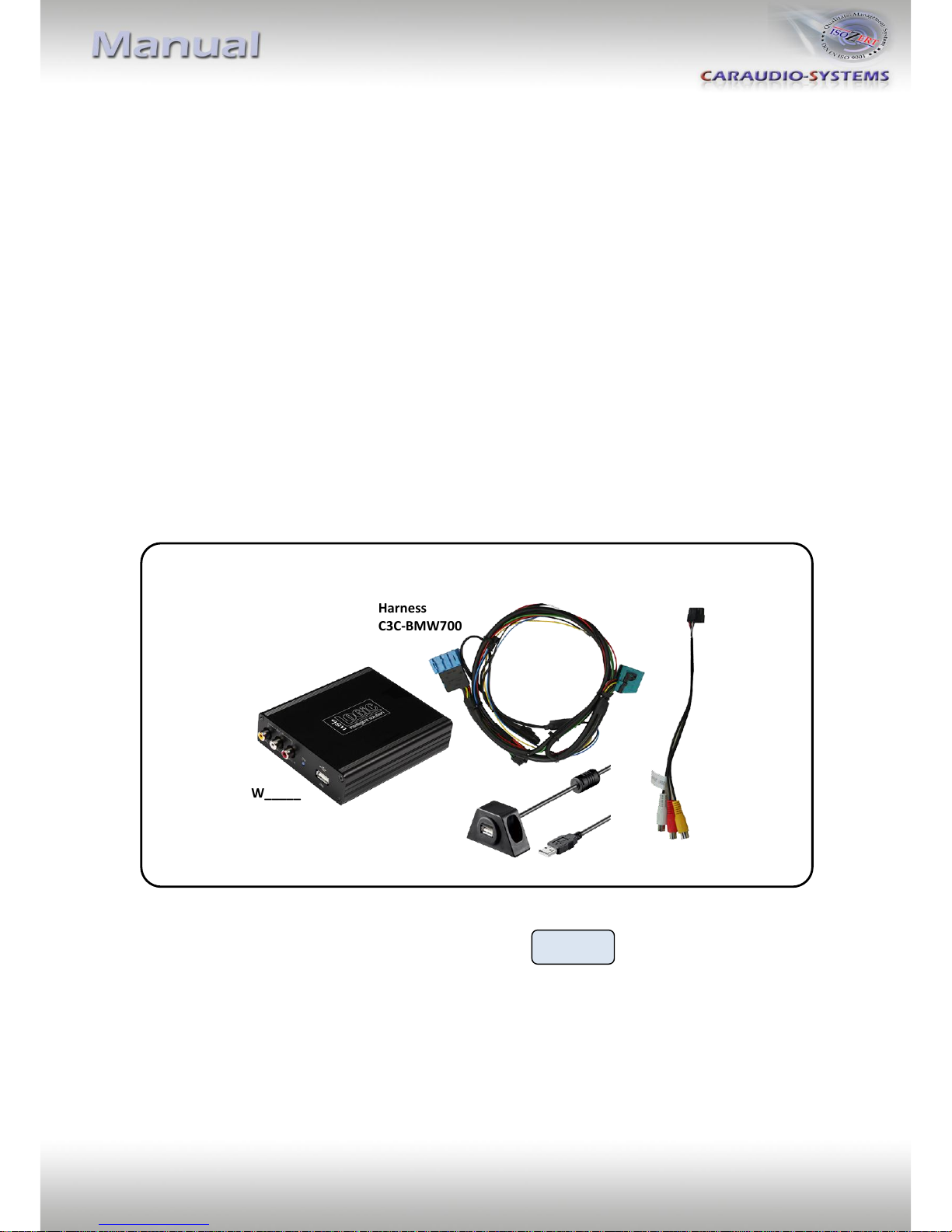
1.1. Delivery contents
If remote function for a peripheral device shall be used, additional an IR-
Remote cable and Y-adapter are needed, see chapter AV-source .
Take down the SW-version and HW-version of the interface boxes, and store this
manual for support purposes.
USB-box
USBC-M570
HW_____ SW_____
Harness
C3C-BMW700
Harness
C3C-AV
USB-installation socket USBC-EXT

Version 17.04.2012 DVB-MK-AUX
Seite3
1.2. Check compatibility of vehicle and accessories
Requirements
Vehicle 3series (E46), 5series (E39), 7series (E38), X5 (E53), X3 (E83), Z4
(E85/86), Mini R56 till approx 09/2006
with AUX-input at the radio module (from approx 10/2002)
Navigation Navigation system Professional without iDrive
(MK2-MK4)
Limitations
Factory-audio-AUX-input The factory audio-AUX-input is used for audio-insertion by the
dvbLOGiC. Alternative use of the AUX-input is only possible by
additional switch-box integration.
USB-port Only for media which work with power supply by ONE single USB
connector.
After-market rear-view Compatible with NTSC-cameras only.
camera
Version 17.04.2012 DVB-MK-AUX
Seite4
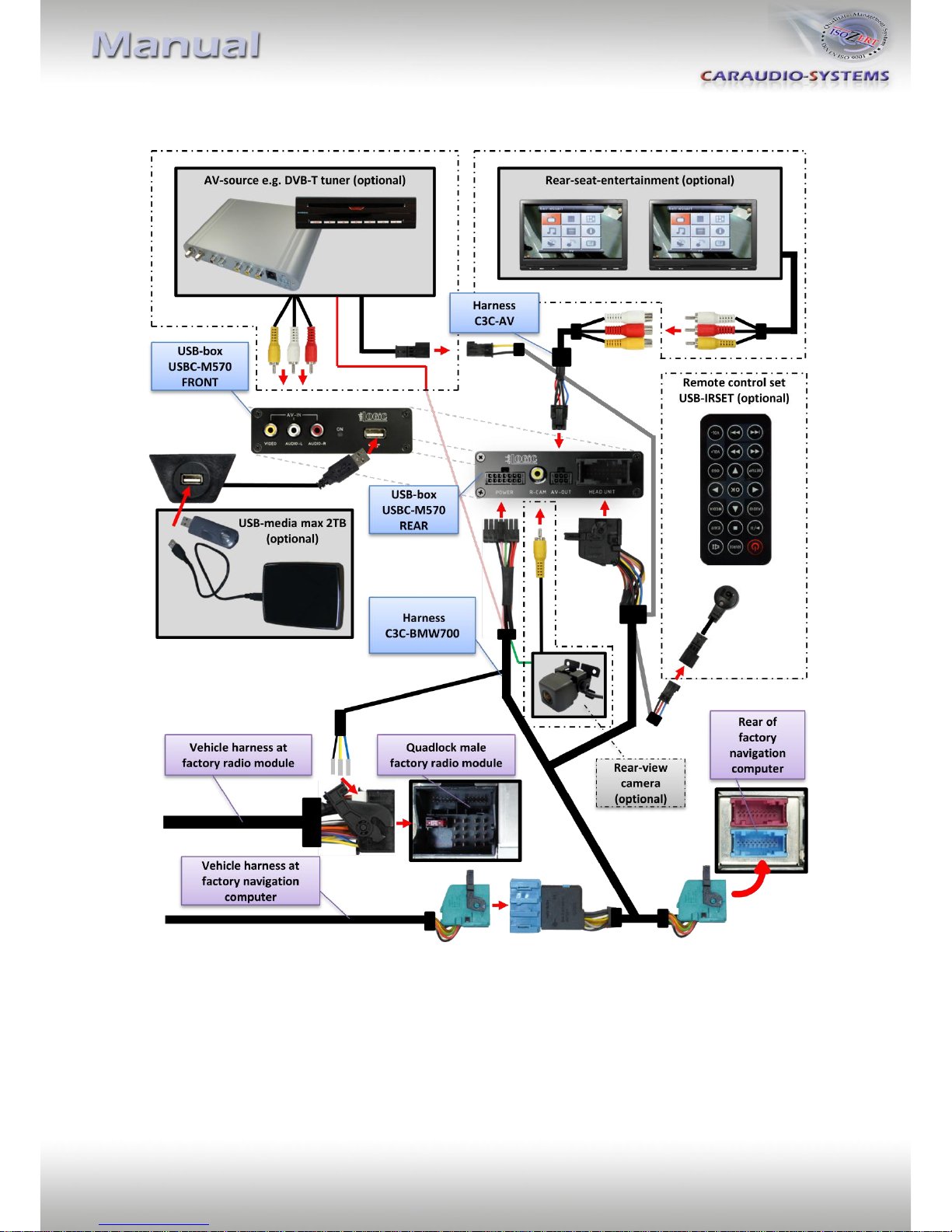
2. Connection schema
Version 17.04.2012 DVB-MK-AUX
Seite5
3. Installation
Switch off ignition and disconnect the vehicle’s battery! If according to factory rules
disconnecting the battery has to be avoided, it is usually sufficient to put the vehicle in
sleep-mode. In case the sleep-mode does not show success, disconnect the battery with a
resistor lead.
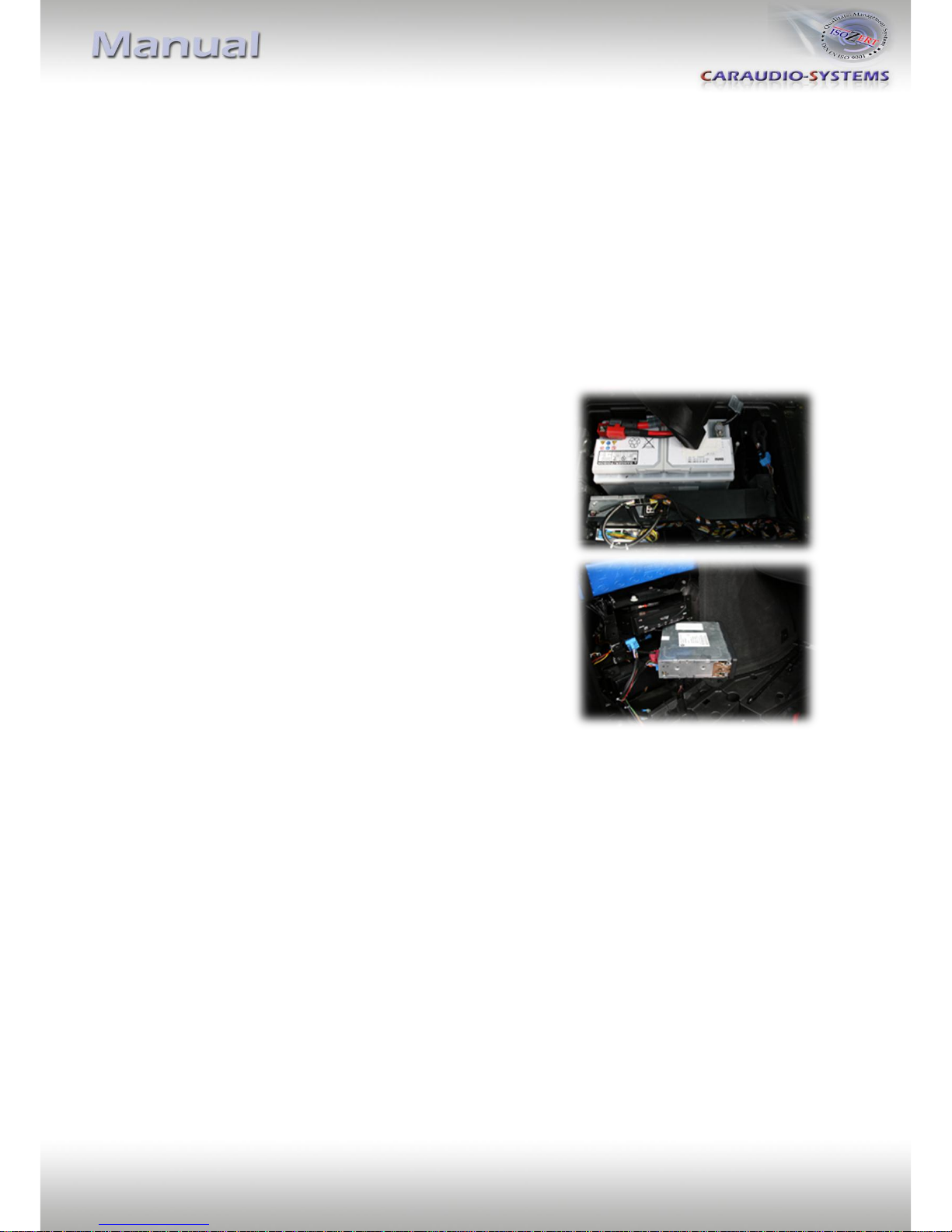
Place of installation is at the navigation computer and at the radio module.
The radio module and navigation computer are located at the rear end for the 3series (E46),
5series (E39) and 7series (E38) on the left hand side the radio module of the 7series is
located behind lining in the car wing).
The X5 (E53) radio module is located underneath the
boot lining, next to the battery.
The navigation computer is located on the left hand side
behind the boot lining.
Version 17.04.2012 DVB-MK-AUX
Seite6
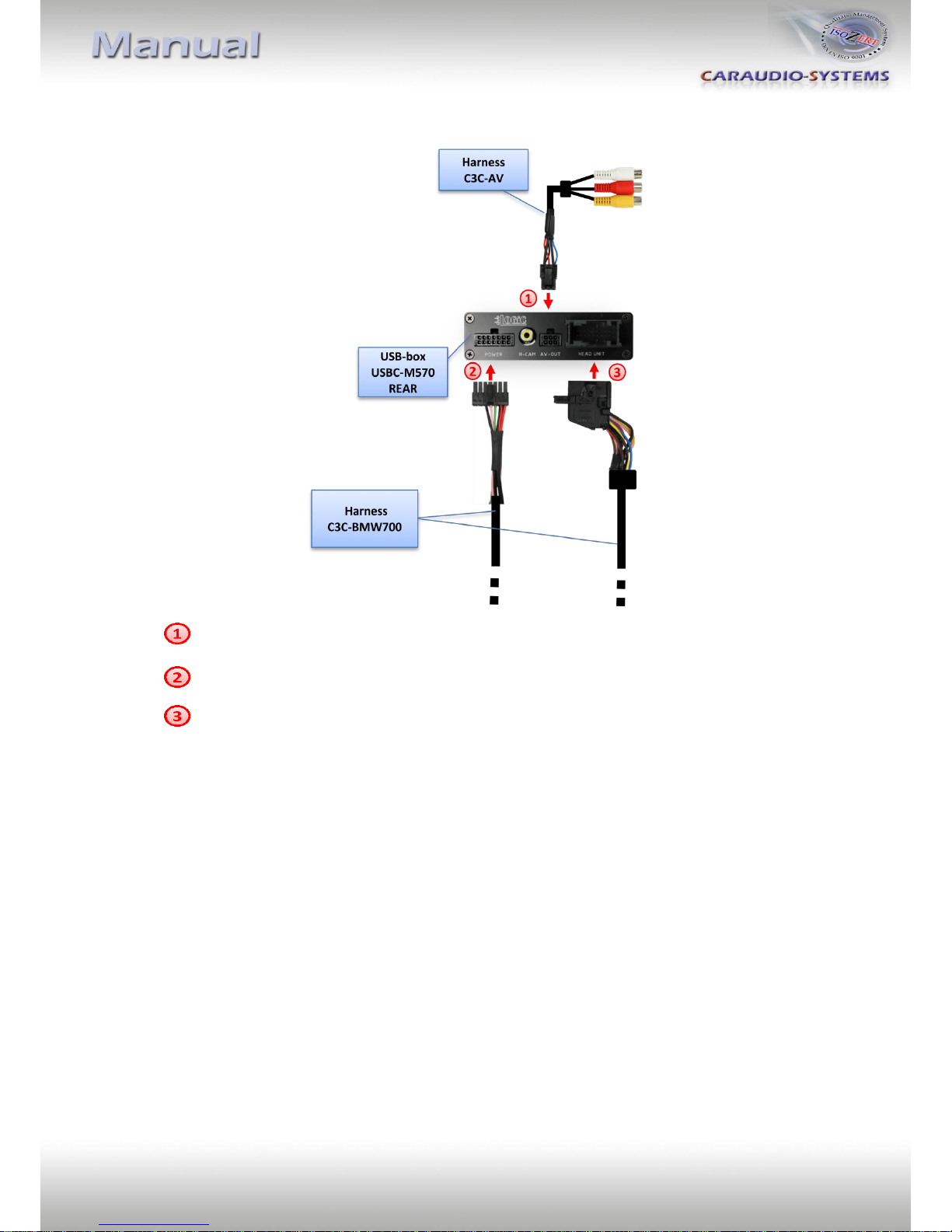
3.1. Interconnecting USB-box and harnesses
Plug harness C3C-AV into 6pin Molex of USB-box USBC-M570.
Plug harness C3C-BMW700 into 14pin of USB-box USBC-M570.
Plug female 18pin AMP connector of C3C-BMW700 into male 18pin AMP connector
of USB-box USBC-M570.
Version 17.04.2012 DVB-MK-AUX
Seite7
3.2. Connections to navigation computer
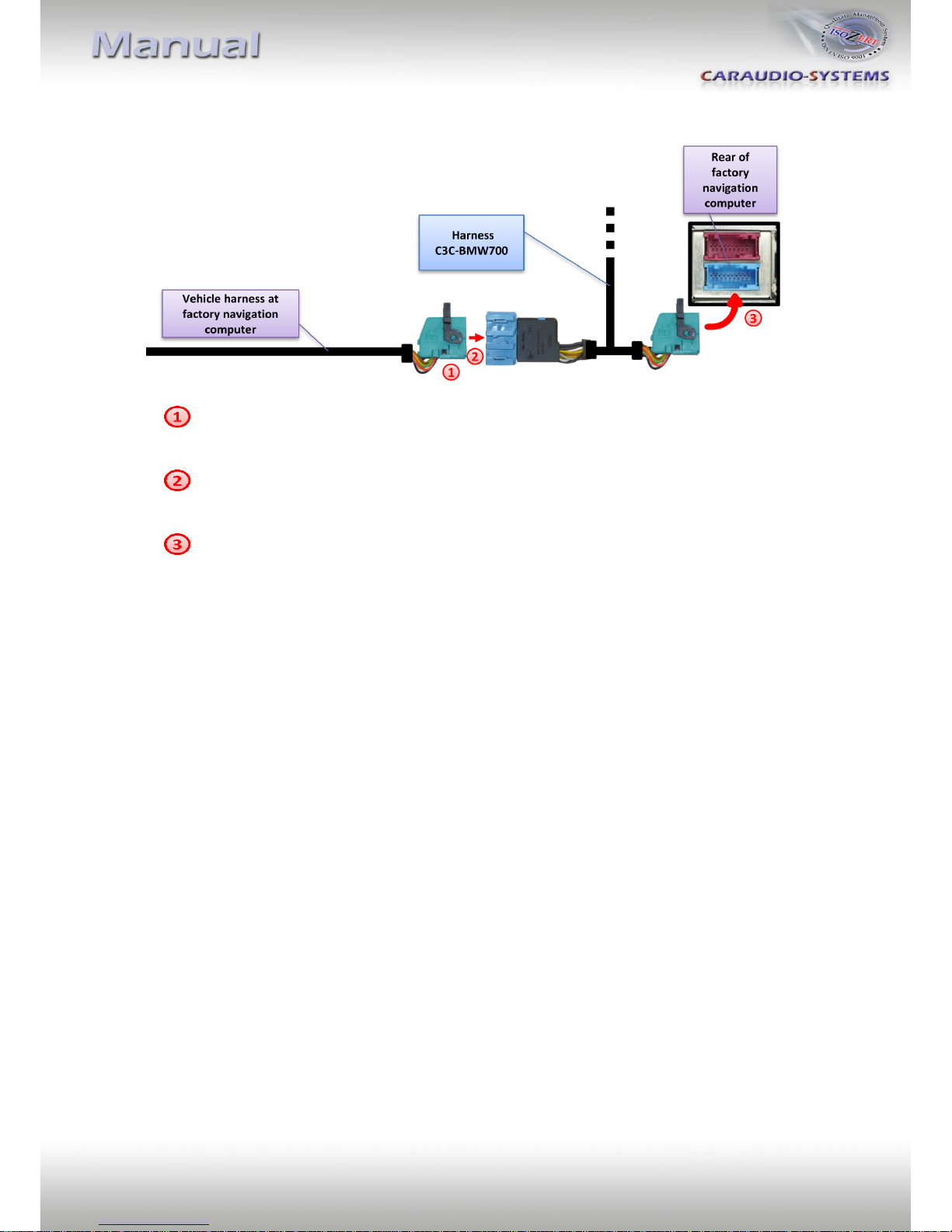
Disconnect blue female 18pin connector of vehicle harness from the back of the
navigation computer.
Plug blue male 18pin AMP connector of harness C3C-BMW700 into blue female 18pin
AMP connector of vehicle harness.
Plug blue female 18pin AMP connector of harness C3C-BMW700 into blue male 18pin
AMP connector of navigation computer.
Note: If there is a factory TV-tuner inside the car, you have to connect the harness
C3C-BMW700 to the TV-tuner and not to the navigation computer!
Version 17.04.2012 DVB-MK-AUX
Seite8
3.3. Connections to radio module
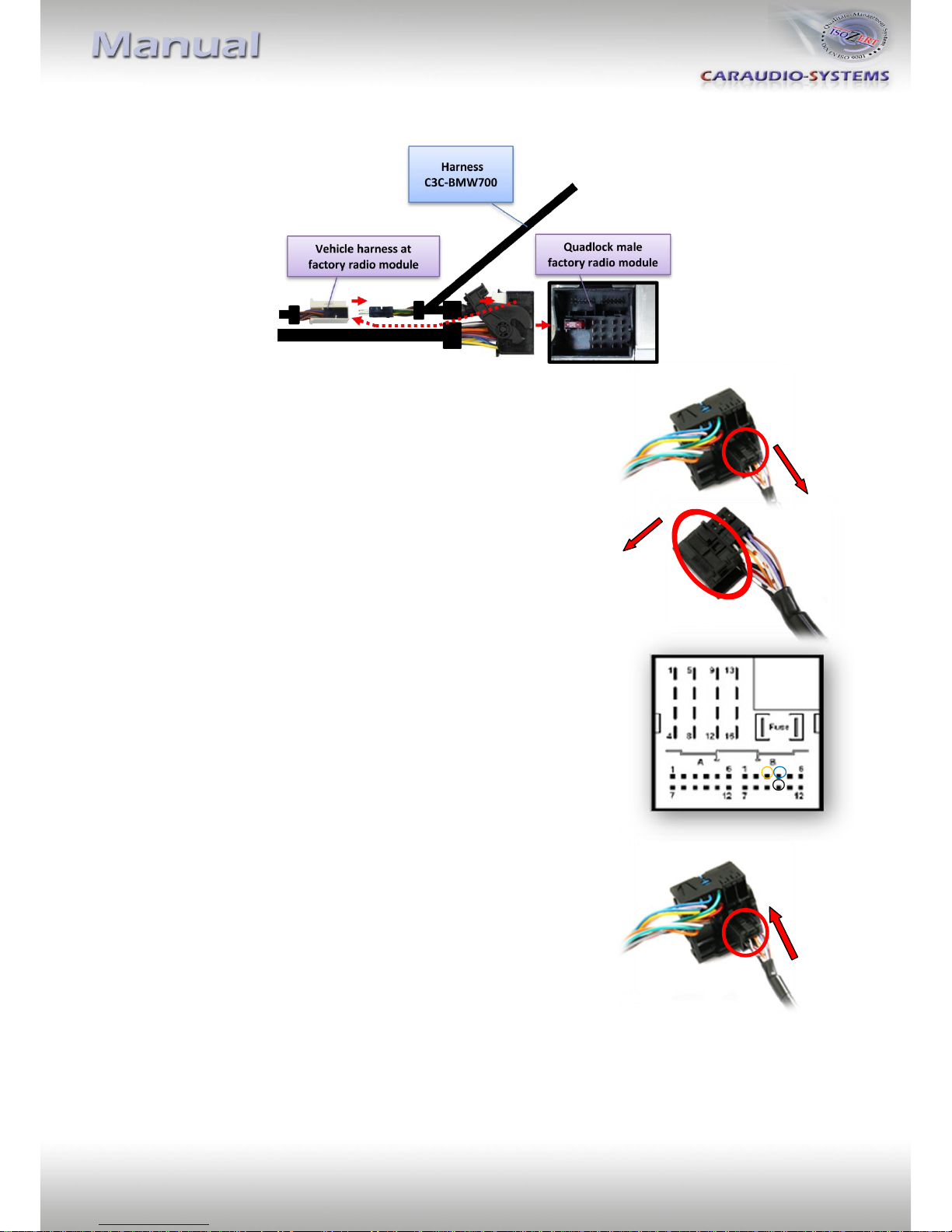
Loosen the female Quadlock connector to the radio module.
Loosen the black female 12pin connector from chamber B of the
female Quadlock connector.
Push the insert from female 12pin connector’s plastic cab
from the side.
Pin the audio cables of harness C3C-BMW700 to the
dissambled vehicle’s female 12pin connector:
Yellow cable Pin 3
Blue cable Pin 4
Black cable Pin 10
If the chambers of the female 12pin connector are occupied,
isolate and remove the existing pins.
Push the black plastic cap onto the female 12pin connector
and insert it into the female Quadlock connector. Reconnect
the female Quadlock connector to the radio module.
Vehicle female
12pin connector
Vehicle female
12pin connector
Vehicle female
12pin connector
Quadlock Steckplatz
Radiomodul
Version 17.04.2012 DVB-MK-AUX
Seite9
3.4. USB and optional IR-remote control set
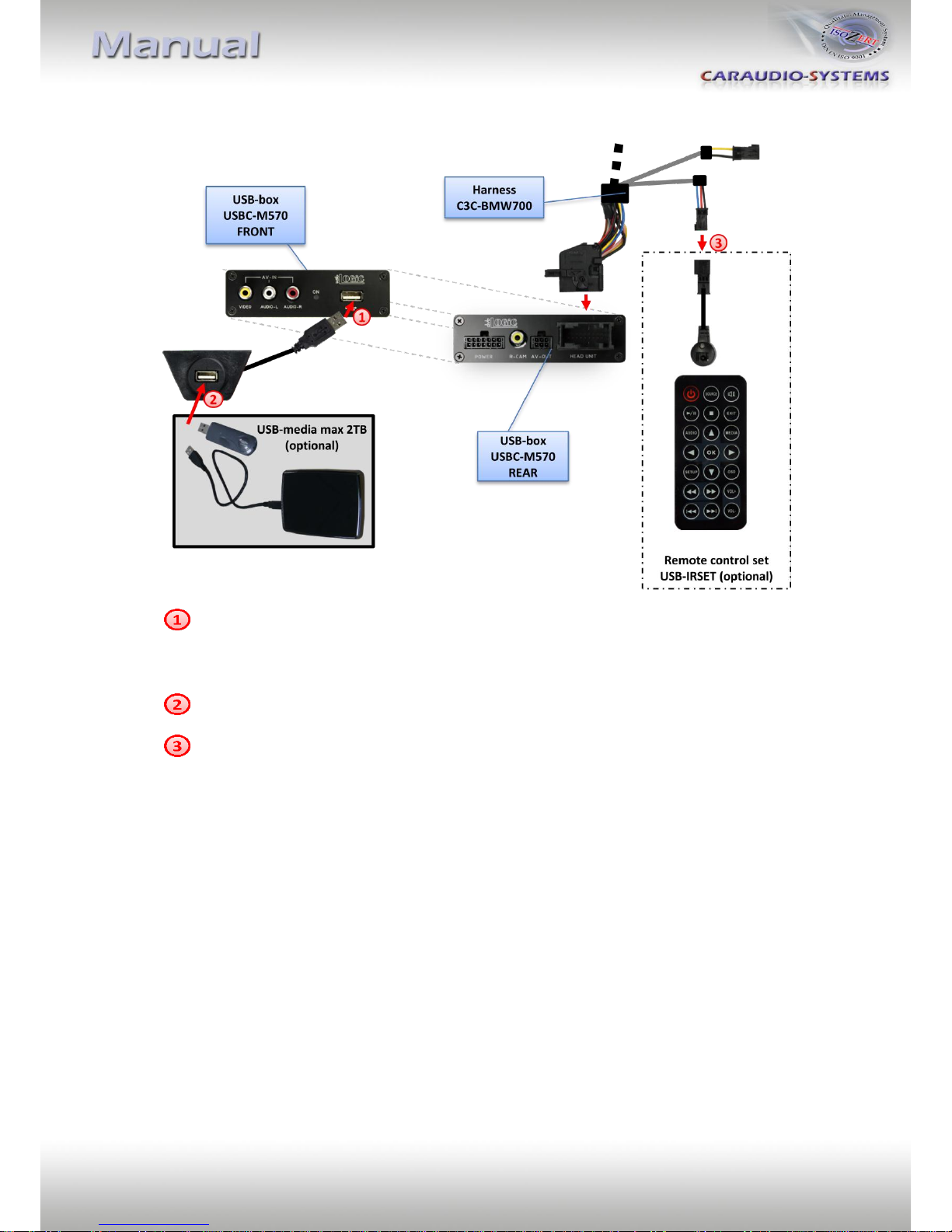
Connect USB-connector of USB-installation socket USBC-EXT to USB-socket of USB-
box USBC-M570 and install the USBC-EXT socket in a well accessible location, e.g. the
glove-box. Make sure there is enough space to load USB-media.
Installation socket for the connection of USB-media.
The USB-IRSET consists of the external C3C-SENSOR IR-sensor and the USBC-RC IR-
remote control and can be used to control the usbLOGiC’s internal USB functions
additionally to the control through the navigations buttons. Connect the C3C-
SENSOR to the female black/red/blue 3pin AMP connector of harness C3C-BMW700
and locate the sensor in an accessible place.
3.5. Connecting peripheral devices
It is possible to connect an after-market AV-source, after-market rear-view camera and rear-
seat-entertainment to the usbLOGiC.
Before final installation of the peripheral devices, we recommend to test-run the usbLOGiC
functions to detect incompatibility of vehicle, navigation, factory accessories or peripheral
devices as soon as possible.
Tabla de contenidos
Otros manuales de Sistema de vídeo para coche de usbLogic


