Ultrative GSP1000 Manual de usuario

SMS Printer
User Manual
V1.5
This manual contains lots of important information. Please read it
before use the equipment.

GPRSWireless Printer User Manual V1.1
2
Content
1. Summary .......................................................................................................................................3
2. Main technology standard.............................................................................................................3
3. Fittings ..........................................................................................................................................4
4. Operation.......................................................................................................................................4
4.1 Install SIM Card..................................................................................................................4
4.2 Install the Printer and paper ................................................................................................4
4.3 LCD Introduction................................................................................................................4
4.4 Key Board Introduction.......................................................................................................6
4.5 Number Key........................................................................................................................7
4.6 Input Method.......................................................................................................................7
5. Basic Operations ...........................................................................................................................8
5.1 On-Off the phone ................................................................................................................8
5.2 Answering the Call..............................................................................................................8
5.3 Making Calls.......................................................................................................................8
6 .Menu .............................................................................................................................................9
6.1 Phonebook...........................................................................................................................9
6.2 Calls ....................................................................................................................................9
6.3 Message (SMS)...................................................................................................................9
6.4 Diverts (System Dependent) .............................................................................................10
6.5 Clock .................................................................................................................................10
6.6 Audio.................................................................................................................................11
6.7 Settings..............................................................................................................................11
6.7.1 BizPhone Setting....................................................................................................11
6.7.2 User Settings ..........................................................................................................11
6.7.3 Phone Settings........................................................................................................12
6.7.4 Security ..................................................................................................................12
6.8 STK Menu (Knowledge card Function Menu) .................................................................12
6.9 Air Charge .........................................................................................错误!未定义书签。
6.10 SMS Order Operation .....................................................................................................12
6.11 SMS PRINTER MENU FUNCTION .............................................................................15
7 Appendix ......................................................................................................................................17
Appendix A: Safe note ............................................................................................................17
Appendix B: Notice ................................................................................................................17
Appendix C: Question and Solution .......................................................................................17

GPRSWireless Printer User Manual V1.1
3
1. Summary
The “GPRS Wireless Printer” device is a fixed wireless terminal for
telecommunication operators to develop fixed telephone services. It takes the
advantages of the wide coverage of mobile communication network and convenient
installation to meet the fast increasing requirement of users. The main functions are
“Mobile Top Up” and “SMS Printer”.
2. Main technology standard
NO. Items Technology standard
1 Access method GSM (Global System for Mobile communication)
2 GSM protocol ETSI GSM Phase 2+
3 Voice encoding FR、EFR
4
RF receiving frequency
GSM850 869-894MHz
E-GSM900 925-960MHz
DCS1800 1805-1880MHz
PCS1900 1930-1990MHz
5 Receive Sensitivity -104dbm
6
RF transmit frequency
GSM850 824-849MHz
E-GSM900 880-915MHz
DCS1800 1710-1785MHz
PCS1900 1850-1910MHz
7
Emission output power
GSM850 33 dBm ±2 dBm
E-GSM900 33 dBm ±2 dBm
DCS1800 30 dBm ±2 dBm
PCS1900 30 dBm ±2 dBm
8 Antenna Gain 2.5dbm
9 Work Temperature -15℃~55℃
10 Paper module thermal paper (57*50)
11 Printing resolution 8 dots/mm
12 Speed Maximum 60mm/sec.(480 dot line/sec.)
13 Effective printing area 48mm
14 Number of columns ANK 32 columns/line
15
Mechanic life
Pulse resistance:100 million pulses/dot(under our
standard conditions);
Abrasion resistance: paper traveling distance
50km(print ratio:25% or less)

GPRSWireless Printer User Manual V1.1
4
3. Fittings
Main Charge phone 1 set
Antenna 1 piece
Adapter 1 piece
UserManual 1volume
Thermal paper (57 * 50) 1 volume
4. Operation
4.1 Install SIM Card
Attention: Please switch off the power before install or uninstall SIM Card.
Take off the screw of the SIM card cover at the back of the unit.
Open the SIM card cover. Move the SIM card clamp according to the arrow.
Lift the SIM card clamp to insert the SIM card.
Press the SIM card clamp and move it to firm. Close the SIM card cover then
wring the screw.
4.2 Install the Printer and paper
Move power switch to the position of "OFF"
Open the paper cover.
Take out the paper walking roll.
Put the paper into the paper walking roll
Reinstall the paper walking roll at the original position
Roll the paper to the exact place, make the top of paper is the same level of
cut notch. Close the paper cover
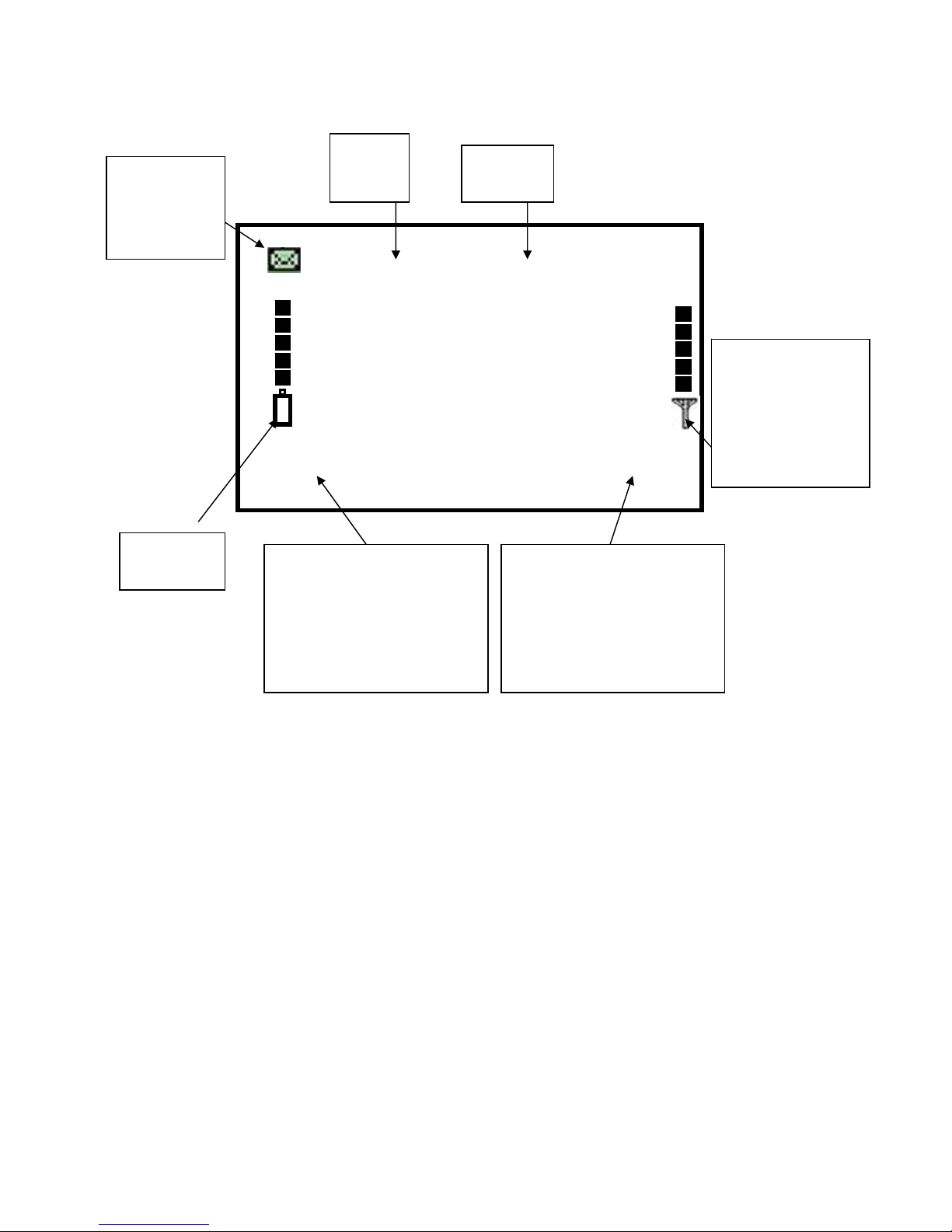
4.3 LCD Introduction
After installing, switch on the power, the phone startup. Then, it search GSM
network automatically. If successful, it enters into standby state.

GPRSWireless Printer User Manual V1.1
5
Sketch Map 1-1 LCD Introduction
ABC mobile
2009/08/29 20:27
Battery
Message
indicator
Date Time
The strength of
the wireless
signal
Phone BookMenu
Left Soft Function
Respond to Confirm
Key
Right Soft Function
Respond to Cancel Key

GPRSWireless Printer User Manual V1.1
6
4.4 Key Board Introduction
Key Description
Handfree Press this button instead of taking up handset.
F1 Hot key of STK Menu(Knowledge card Function Menu)
PRINT Print the current SMS or the charge information
FEED Let the paper walking and rolling out to some length for cutting
CONFIRM Run the left soft Menu ,in the submenu means confirm
CANCEL Run the right soft Menu ,in the submenu means cancel
0-9,*,# number keys
▲In menu operation state, press this key to select anterior item.
▼In menu operation state, press this key to select next item.
To move the cursor right.
To move the cursor left.
OK HOT key of some confirmed control (defined by software)
Default function is Inbox of SMS
C (Cancel) HOT key of some cancel control (defined by software)

GPRSWireless Printer User Manual V1.1
7
4.5 Number Key
There are 12 number keys. It can input digital, English capital letter, English lowercase. In input
state, it shows the inputted letter amount on the top right corner of the LCD screen. Press []
key to delete the last letter, or press [] key for 1-2 seconds to delete all the input
letters. There several input methods such as “ABC”、“abc”、“123”、“SE”.Press “#” to switch
input method
Letter
Key ABC SE abc 123
1 . , ? ! 1
2 A B C a b c a b c 2
3 D E F d e f d e f 3
4 G H I g h i g h i 4
5 J K L j k l j k l 5
6 M N O m n o m n o 6
7 P Q R S p q r s p q r s 7
8 T U V T u v t u v 8
9 W X Y Z W x y z w x y z 9
0 Spacebar 0
* ! " # $ % & ’()* + ,- .
/ : ; < = > ? @ [ \ ] ^ _ ` { | } ~ Space
*
#
4.6 Input Method
English input method (include Capital and Lowercase)
For example: If you want to input “Mary”, step as below:
Press “#” to enter into “ABC” input method. Then, press key of “6” to input “M”.
Press “#” to enter into “abc” input method.
Press key of “2” to input “a”.
Press key of “7” three times continuously. It will input “r”.
Press key of “9”three times continuously. It will input “y”.

GPRSWireless Printer User Manual V1.1
8
Digital input method:Press “#” to enter into “123” input method, press corresponding
key of digital.
English association input method
Input a letter, it appears the suitable English word for selecting. For example, press
“8” key for 3 times, it appears word “tutor”. Press “OK” to select this word.
5. Basic Operations
5.1 On-Off the phone
Switch On:After installing the phone, switch on the power, the phone startup. At first,
it displays the version number. Then, it search GSM network automatically. If
successful, it enters into standby state.
Switch Off:When you do not use the phone, please switch off.
5.2 Answering the Call
When the phone rings, LCD will display the incoming number. Press [HANDFREE]
key to answer the call. If the incoming number exists in the phone book, it displays its
name and grouping name.
Note: To display the incoming number requires supporting from the network.
5.3 Making Calls
Press the [HANDFREE] Key
Dial phone number, press [cancel] key to delete the last letter, or press [cancel] key
for 1-2 seconds to delete all the input letters.
The called number is sent automatically after programmed seconds. If you have not
press [confirm] Key, the called number will be sent after several seconds

GPRSWireless Printer User Manual V1.1
9
6 .Menu
In standby state, press [confirm] to enter into the main menu, and then press [▲]
or [▼] key to choose other menu ,press [confirm] to enter into the submenu,
press [Cancel] to exit.
6.1 Phonebook
In the main menu, press [▲] or [▼] key to find the “phonebook” menu ,and press
[confirm] to enter into the submenu.
In the phonebook menu, you can “View name” or “Add new name” or fix the
“Setting”.
6.2 Calls
All Calls
Display the records of last 100 calls。
Received Calls
Display the records of last 20 received calls.
Dialled Calls
Display the records of last 20 outgoing calls.
Missed Calls
Display the records of last 20 missed calls.
Call Info
Call timers: Check or clear the call timers.
Clear Logs: This function is cleared the call logs.
6.3 Message (SMS)
When the phone is in idle-state, press [OK] key, then press [▼] key to select
“Message” to enter into SMS menu.

GPRSWireless Printer User Manual V1.1
10
New Message
On selecting “New Message”, user can first edit message contents, then press
[confirm] and select “send” to enter the phone number. To send the message,
press [confirm]. If you select “Save”, it only saves the edited message.
Inbox
On selecting “Inbox”, user can read messages received by the phone.
OutBox
Read the message which is sent before.
Msg Settings
Msg Centre: Setting the short message center number.
Msg Period: Setting the period for saving the message.
Save Msg: Save the message.
VoiceEmail
On selecting “Voice Mail” to check if the user has any voice mail.
Print the Message
When reading the message, it will print the information of the Message if you
press the [Print] key.
6.4 Diverts (System Dependent)
On selecting “Diverts”, there are some items as follows:
Always: All calls are forwarded
When busy: forwards the incoming call when the phone is busy.
No Answer: forwards the incoming call when the phone does not answer.
Always: All calls are forwarded
Not Found: forwards the incoming call when the phone can’t connect
Cancel All: Cancel all the Forward call
6.5 Clock
Calculator: The tool of calculator;
Alarm:Setting the alarm clock time;
Set time:Setting the time;
Set Date: Setting the date.
Este manual sirve para los siguientes modelos
1
Tabla de contenidos