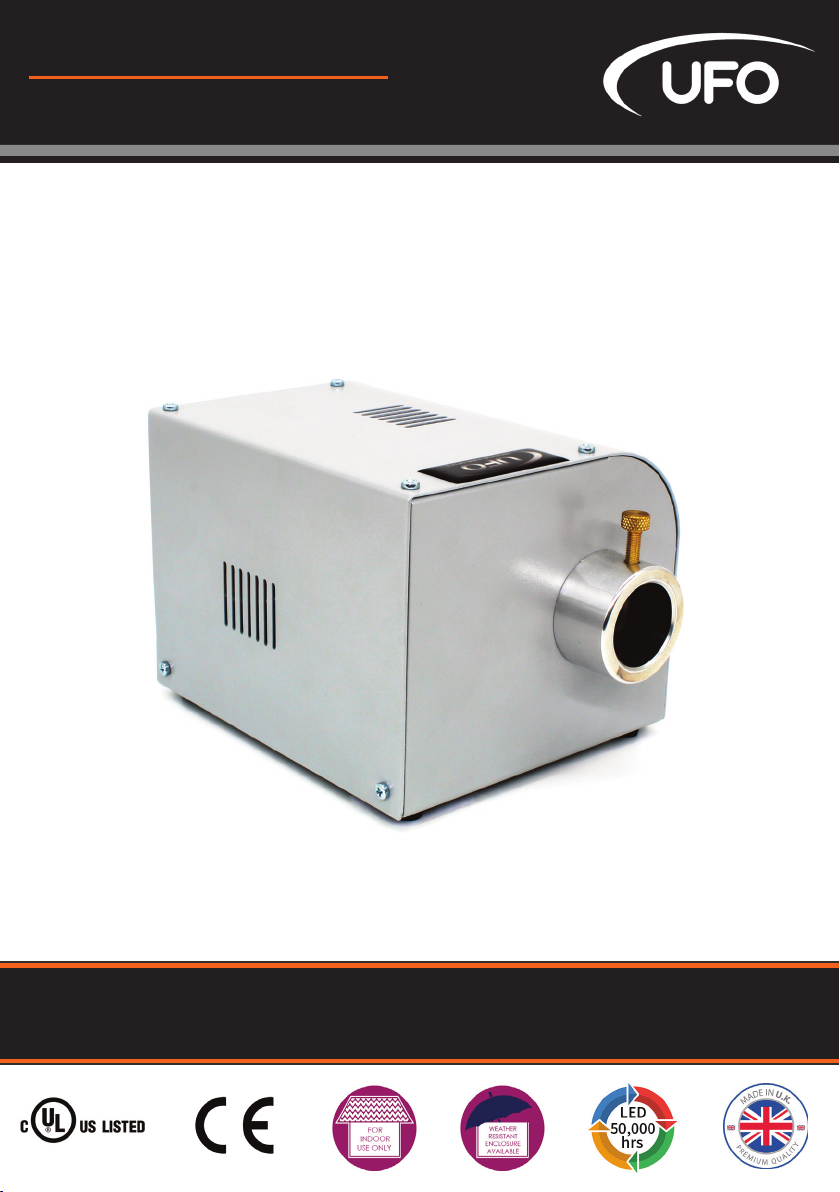
UFO Luna CM Hoja de especificaciones

PRODUCT USER GUIDE
Luna Decorative Illuminator
PLEASE READ THIS USER GUIDE BEFORE INSTALLING, OPERATING
OR PERFORMING MAINTENANCE ON THE ILLUMINATOR UNIT
E357731
Rev: C1

MODELS COVERED BY THIS USER GUIDE
UFO Luna CM / UFO Luna TM
UFO Luna MCM / UFO Luna MTM
UFO Luna CDMX / UFO Luna TDMX
UFO Luna C 0-10V / UFO Luna T 0-10V
IMPORTANT
This product must be installed in accordance with the applicable installation code, by a person
familiar with the construction and operation of the product, and the hazards involved.
These illuminators are not mains dimmable.
The LED array in this illuminator is not replaceable. When it reaches end of life the whole unit
must be replaced.
Type Y Attachment: If the external flexible cable or cord of this luminaire or associated
PSU/driver is damaged. It shall be exclusively replaced by the manufacturer or his service agent
or a similar qualified person to avoid a hazard.
Location: Do not locate this illuminator closer than 200mm from any flammable surface.
Clearance / Ventilation: It is imperative that a gap of 200mm is le around the unit. This is to
allow air to circulate and prevent overheating. The location must have free ventilation and must
not have an ambient temperature higher than that specified for the luminaire.
Mounting: This is a fixed luminaire. See mounting plate instruction on Page 3 for
fixing to surface.
Warning: Never look directly into the luminaire LED illuminator.
Warning: The luminaire should be positioned so that prolonged staring into the
luminaire at a distance closer than 0.33m is not expected
Thank you for purchasing this UFO illuminator.
To ensure that the illuminator is set up optimally and gives a long service life, please read this
user guide before installing, operating or performing any maintenance on the unit.
Please keep this user guide for future reference.
This illuminator is suitable for indoor use only unless it is situated in a weatherproof enclosure.
INTRODUCTION
LUNA USER GUIDE
2

ATTACH THE ILLUMINATOR TO ITS MOUNTING PLATE
Fit the metal mounting plate to the base of the illuminator before making electrical
connections.
Remove the mounting plate and the four M3 10mm screws from the box. Invert the illuminator
and remove the four screws securing the rubber feet.
Leaving the rubber feet in place, align the plate against the feet and secure the plate to the illu-
minator with the four M3 10mm screws using an M3 pozidrive screwdriver.
Do not overtighten. The illuminator can now be fixed securely to the mounting surface.
The illuminator is powered from a 24V DC PSU/Constant Voltage SELV LED driver.
The driver caters for UK/European/other mains supplies using the relevant power cord
supplied.
POWER SUPPLY REQUIREMENTS
There are 2 connections required – the fiber port and the mains supply cable. The fiber port
should be connected first. Connect and secure the fiber optic connector into the collar and
secure using the M5 locking screw.
Connect the PSU to the DC input jack socket on the illuminator, and connect the IEC plug to the
PSU. Plug the mains plug into the electrical supply socket. Switch on power the led Indicator
will illuminate and the illuminator is ready for use. If no light is produced consult the
TROUBLESHOOTING section of this user guide.
CONNECTION - LUNA CM, MCM, TM AND MTM MODELS ONLY
LUNA DMX / 0-10V LUNA MCM /MTM LUNA CM /TM
INSTALLATION
3
UFO LIGHTING

There are 3 connections required – the fiber port, the mains supply cable and the DMX control
cable. The fiber port should be connected first. Connect and secure the fiber optic connector
into the collar and secure using the M5 locking screw.
Connect the PSU to the DC input jack socket on the illuminator, and connect the IEC plug to the
PSU. Plug the mains plug into the electrical supply socket. Switch on power the led Indicator
will illuminate and the illuminator is ready for use. If no light is produced consult the
TROUBLESHOOTING section of this user guide.
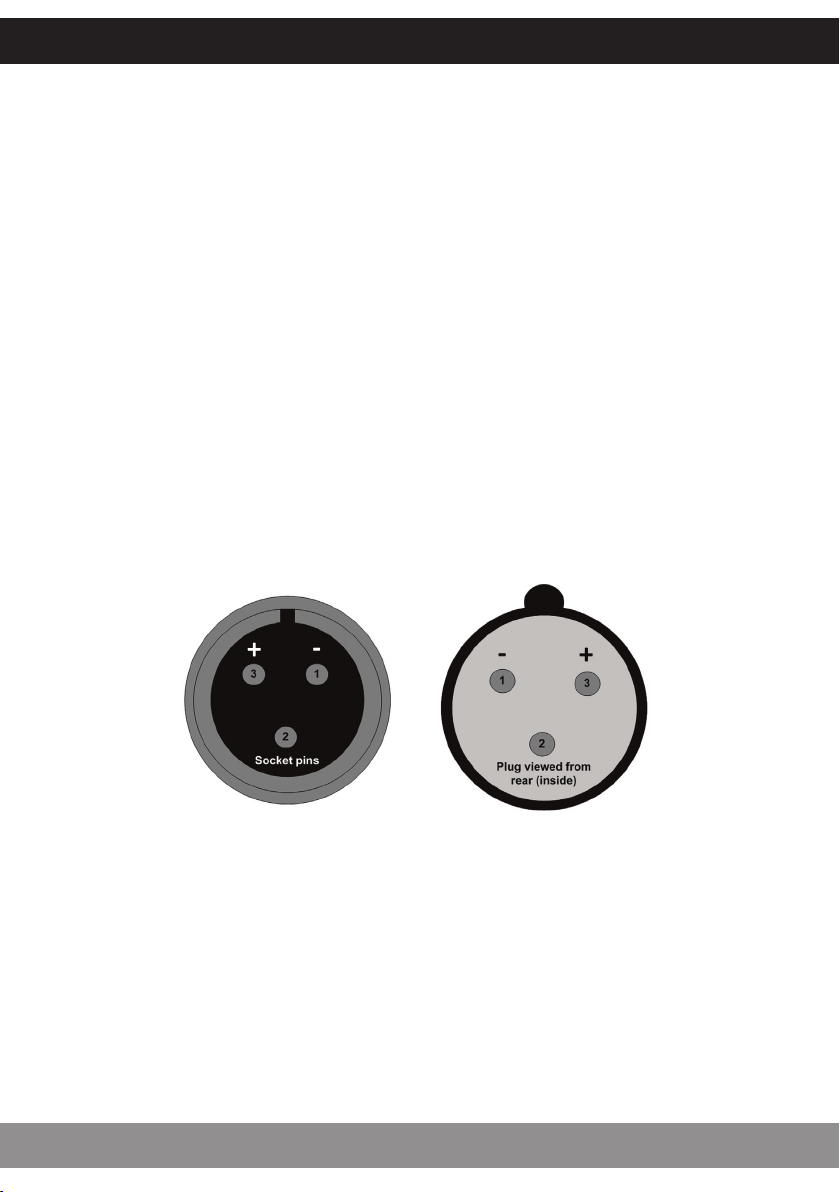
Connect the DMX control cables to the Mini-XLR sockets on the rear of the illuminator. The
recommended plug for these sockets is Multicomp SVP556-TA. The pin out details for the plugs
are shown below. Either socket may be used as DMX in or DMX out.
It is recommended that a 120ohm terminating resistor be connected across DMX+ and DMX- on
the last illuminator in the DMX universe or cable run.
CONNECTION - LUNA CDMX AND TDMX MODELS ONLY
Note: UFO can supply converters for these illuminators to allow them to be interfaced to
standard 3 pin XLR connectors or RJ45 connectors.
INSTALLATION
LUNA USER GUIDE
4

The 0-10V control type needed in the Luna illuminator is current source, not current sink. The
unit relies on the control unit to supply the 0-10V control voltage.
There are three connections required - the fiber port, the mains supply cable and the 0-10V
control cable. The fiber port should be connected first. Connect and secure the fiber optic
connector into the collar and secure using the M5 locking screw.
Connect the PSU to the DC input jack socket on the illuminator, and connect the IEC plug to the
PSU. Plug the mains plug into the electrical supply socket. Switch on power the led Indicator
will illuminate and the illuminator is ready for use. If no light is produced consult the
TROUBLESHOOTING section of this user guide.
THE LIGHT SOURCE WILL NOT ILLUMINATE UNLESS DIP SWITCH 10 IS ON AND A 0-10V
SIGNAL IS PRESENT
Connect up the 0-10V control cable to the mini XLR sockets on the rear of the illuminator. The
recommended plug for these sockets is the Multicomp SVP556-TA. The pin out details for these
plugs are shown below. Either socket may be used as 0-10V IN or 0-10V OUT
CONNECTION - LUNA C0-10VAND T0-10VMODELS ONLY
Note: UFO can supply converters for these illuminators to allow them to be interfaced to
standard 3 pin XLR connectors or RJ45 connectors.
INSTALLATION
5
UFO LIGHTING

USING THE ILLUMINATOR - LUNA CM, MCM, TM AND MTM MODELS ONLY
The Luna CM & Luna TM has either manual control of the dimming or manual control of the
speed of the decorative wheel motor.
For a Luna CM or TM with only manual control of the decorative wheel - the motor speed can be
adjusted using the control on the rear of the unit from approximately 0.6 rpm to 3.75 rpm.
For a LunaCM or TM with only manual control of the light output – the output can be adjusted
using the control on the rear of the unit from no light output to maximum light output. In this
mode, the speed of the decorative motor is fixed, but controlled by a wire link between 10V and
SPD screw terminals on the PCB (see image on following page). With the link in place the speed is
fixed at 3.75 rpm. With the link removed the speed is fixed at 0.6 rpm.
Model Descripon
UFO Luna CM Either manual dimming with fixed color wheel speed or fixed light
output with manual color wheel speed control*
UFO Luna TM Either manual dimming with fixed twinkle wheel speed or fixed light
output with manual twinkle wheel speed control*
UFO Luna MCM Manual dimming & manual color wheel speed control
UFO Luna MTM Manual dimming & manual twinkle wheel speed control
*Fixed wheel speed can be either 0.6 rpm or 3.75 rpm depending on link see text below
OPERATION
LUNA USER GUIDE
6

USING THE ILLUMINATOR - LUNA CDMX AND TDMX MODELS ONLY
To set the DMX address, switch o power to the illuminator and remove the top cover to access
the dip switch on the PCB as shown below. Set the address as detailed below and replace the
top cover. Connect up the illuminators with the PSU & remote DMX controller using the Mini XLR
sockets provided on the back of the illuminator - it doesn’t matter which socket is used.
SETTING THE DMX ADDRESS
Switch 10 must be switched
o for DMX operation. Set the
DMX address using switches
1 - 9.
DMX B
Start
Ch #
Dip
Switches
On
DMX B
Start
Ch #
Dip
Switches
On
1 1 11 1,2,4
2 2 12 3,4
3 1,2 13 1,3,4
4 3 14 2,3,4
5 1,3 15 1,2,3,4
6 2,3 16 5
7 1,2,3 : :
8 4 : :
9 1,4 : ;
10 2,4 511 1,2,3,4,5,
6,7,8,9
Model Descripon
UFO Luna CDMX DMX dimming and color wheel speed control
UFO Luna CDMXs DMX dimming and color wheel speed control with sensor on the wheel al
lowing individual color selecon
UFO Luna TDMX DMX dimming and connuous twinkle wheel speed control
OPERATION
7
UFO LIGHTING

LUNA CDMX COLOR WHEEL
Channel Funcon Value Descripon
1 Dimming 0255 From offat 0 to brightest at 255
2Color wheel
variable 059 0 Color 1 (white)
2Color wheel
variable 059 10 Color 2 (yellow)
2Color wheel
variable 059 20 Color 3 (green)
2Color wheel
variable 059 30 Color 4 (orange)
2Color wheel
variable 059 40 Color 5 (magenta)
2Color wheel
variable 059 50 Color 6 (blue)
2Color wheel
variable 059 59 Color 1 (white)
2Color wheel
snap 60129 60 Color 6 (blue)
2Color wheel
snap 60129 75 Color 5 (magenta)
2Color wheel
snap 60129 85 Color 4 (orange)
2Color wheel
snap 60129 95 Color 3 (green)
2Color wheel
snap 60129 105 Color 2 (yellow)
2Color wheel
snap 60129 115 Color 1 (white)
2Color wheel
speed clockwise 130189 Slow to fast rotaon clockwise (approx
0.3 rpm slowest to 7.5 rpm fastest)
2Color wheel
speed ctr clkwse 190255 Fast to slow rotaon counter clockwise
(approx 0.3 rpm slowest to 7.5 rpm fastest)
Channel Funcon Value Descripon
1 Dimming 0255 From offat 0 to brightest at 255
2 Color wheel 0255 From 0.6 rpm at 0 to 4 rpm at 255)
LUNA CDMX COLOR WHEEL WITH SENSOR
OPERATION
LUNA USER GUIDE
8

NOTES ON POWERING UP THE LUNA CDMX ILLUMINATOR
To revert a DMX only illuminator to normal manual operation of the wheel and the light output,
remove top cover to access the dip switch on the PCB. Set switches 1 to 9 o and switch 10 on, as
detailed below. You must also ensure that the wire links are fitted as detailed below.
REVERTING ADMX ILLUMINATOR TO MANUAL OPERATION MODE
1. If internal DIP switch 10 is OFF, the wheel will find its reference point and stop on color 1 (white).
2. If internal DIP switch 10 is ON, the wheel will find its reference point then rotate continuously
counter clockwise at 7.5 rpm. If internal DIP switch 10 is then switched OFF without powering down
the wheel will continue rotating until power is recycled. The wheel will then revert to the status
detailed in 1. above.
LUNA TDMX TWINKLE WHEEL
Dip switch 10 must be on
for manual operation
For manual operation to work there
must be wire links fitted to the screw
terminals on the PCB between 10V &
DM and 10V & SPD as detailed,
le.
Channel Funcon Value Descripon
1 Dimming 0255 From offat 0 to brightest at 255
2 Motor control 0255 From 0.6rpm at 0 to fastest at 255 (34 rpm)
OPERATION
9
UFO LIGHTING

USING THE ILLUMINATOR - LUNA 0-10VMODELS ONLY
0-10V Control is available to either control a color wheel (Luna C 0-10V) or control a twinkle wheel
(Luna T 0-10V).
The values table for 0-10V control is shown below:
Funcon Value Descripon
Color wheel 0V Color 1 (white)
Color wheel 0.4V Color 2 (yellow)
Color wheel 0.8V Color 3 (green)
Color wheel 1.2V Color 4 (orange)
Color wheel 1.6V Color 5 (magenta)
Color wheel 2V Color 6 (blue)
Color wheel 2.3V Color 1 (white)
Color wheel 2.6V Color 6 (blue)
Color wheel 3V Color 5 (magenta)
Color wheel 3.6V Color 4 (orange)
Color wheel 4V Color 3 (green)
Color wheel 4.4V Color 2 (yellow)
Color wheel 4.6V Color 1 (white)
Color wheel 5.4V to 9.2V Slow to fast clockwise
Color wheel 9.3V to 10V Fast counter clockwise
Twinkle Wheel 010V From 0.6 rpm to 3.75 rpm
OPERATION
LUNA USER GUIDE
10
Este manual sirve para los siguientes modelos
7
Tabla de contenidos
Manuales populares de Equipo de prueba de otras marcas

SMART
SMART KANAAD SBT XTREME 3G Series Manual de usuario

Agilent Technologies
Agilent Technologies BERT Serial Manual de usuario

Agilent Technologies
Agilent Technologies N3280A Manual de usuario

Vernier
Vernier Go Direct Voltage Manual de usuario

Lifeloc
Lifeloc R.A.D.A.R. Manual de usuario

Fluke
Fluke T5-600 Instrucciones de funcionamiento e instalación