UfiSpace S9600-64X Manual

S9600-64X
Open Aggregation Router
Hardware Installation Guide
R1.0

S9600-64X Hardware Installation Guide | i
Table of Contents
1 Overview.............................................................................................................................1
2 Preparation .........................................................................................................................2
Installation Tools ...................................................................................................................... 2
Installation Environment Requirements.................................................................................. 3
Preparation Check List ............................................................................................................. 4
3 Package Contents ................................................................................................................5
Accessory List ........................................................................................................................... 5
Component Physical Information ............................................................................................ 6
4 Identifying Your System.......................................................................................................7
S9600-64X Overview ................................................................................................................ 7
DC Version PSU Overview ........................................................................................................ 7
Fan Overview ........................................................................................................................... 8
Port Overview .......................................................................................................................... 9
5 Rack Mounting ..................................................................................................................10
6 Installing Fan Modules.......................................................................................................13
7 Installing Power Supply Units ............................................................................................14
8 Grounding the Router........................................................................................................16
9 Connecting Power .............................................................................................................18
DC Version.............................................................................................................................. 18
AC Version .............................................................................................................................. 20
10 Verifying System Operation ...............................................................................................22
Front Panel LED .................................................................................................................... 22
PSU FRU LED ........................................................................................................................ 23
Fan FRU LED ......................................................................................................................... 23
11 Initial System Setup...........................................................................................................24
12 Cable Connections.............................................................................................................25
Connecting the USB Extender Cable .................................................................................... 25
Connecting a Cable to the TOD Interface............................................................................25
Connecting the GNSS Interface ........................................................................................... 26
Connecting the 1PPS Interface ............................................................................................26

S9600-64X Hardware Installation Guide | ii
Connecting the 10MHz Interface ......................................................................................... 27
Connecting the Transceiver ................................................................................................. 27
13 Cautions and Regulatory Compliance Statements ..............................................................29
Cautions and Regulatory Compliances ................................................................................ 29
13.2 Installation Location Statement ..........................................................................................31

S9600-64X Hardware Installation Guide | 1
1Overview
The UfiSpace S9600-64X is a high-performance, versatile, open disaggregated aggregation
router. It is designed to address the changing needs of the next generation transport
network as Telecoms make the transition from legacy technologies towards 5G.
Providing 25GE and 100GE services ports, the S9600-64X platform can enable multiple
application architectures required for high traffic loading in a 5G mobile Ethernet network.
Due to its versatility, the S9600-64X can be positioned in different parts of the network to
perform aggregation, such as in the backhaul to aggregate BBU pooling or even as a
Broadband Network Gateway (BNG) within the central office.
With the hardware fully supporting IEEE 1588v2 and SyncE synchronization, 1+1
redundancy hot-swappable components, and a high port density design, the S9600-64X
delivers high system reliability, Ethernet switching performance and intelligence to the
network that helps reduce infrastructure and administrative costs.
This document describes the hardware installation process for S9600-64X.

S9600-64X Hardware Installation Guide | 2
2Preparation
Installation Tools
Phillips #2 Screw Driver
6-AWG wire for grounding
Crimping tool
Wire stripping tool
All illustrations within this document are for reference purposes only. Actual
objects may differ.
•PC with terminal emulation software. Refer to the "Initial System Setup" section for
details.
•Baud rate: 115200 bps
•Data bits: 8
•Parity: None
•Stop bits: 1
•Flow control: None

S9600-64X Hardware Installation Guide | 3
Installation Environment Requirements
•Power Reserve: The S9600-64X power supply is available with:
1. DC Version: 1+1 Redundant and hot swappable -48 voltage DC power supply field
replaceable unit or;
2. AC Version: 1+1 Redundant and hot swappable 200-240V AC power supply field replaceable
unit.
Figure 1.
To ensure the redundant feed power design functions properly, a field with dual power
circuit is recommend with a reserve of at least 1600 watts on each power circuit.
•Space Clearance: The S9600-64X width is 17.16 inches (43.6cm) and shipped with a rack mount
brackets suitable for 19 inch (48.3cm) wide racks. The depth of the S9600-64X chassis is 30
inches (762cm) without the field replaceable units (FRUs) and comes with adjustable mounting
rails suitable for rack depths of 22 inches (55.9cm) to 33 inches
(83.8cm). The handle for the fan units will extend outwards by 1.2 inch (2.9cm) and the handle
for the power supplies will extend outwards by 1.1 inches (2.7cm). Therefore, to accommodate
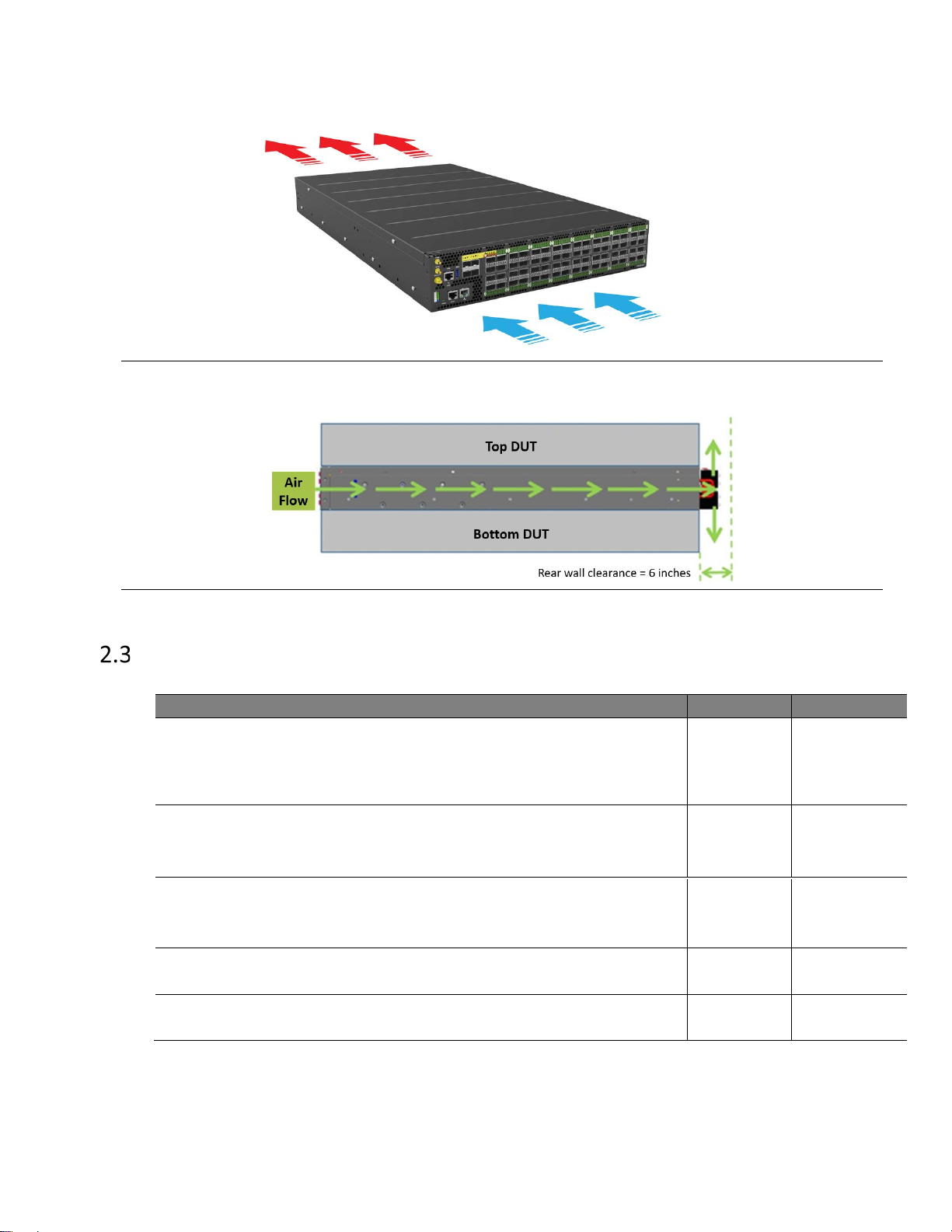
the fan and power supply handles, a minimum space clearance of 6 inches (15.2cm) is needed
at the back of the S9600-64X. A total minimum reserve depth of 36 inches (91.4cm) is required.

S9600-64X Hardware Installation Guide | 4
Figure 2.
Figure 3.
Preparation Check List
Task Check Date
Power voltage and electric current requirement
DC version: -40 to -72V DC, 50x2 ampere maximum or;
AC version: 200-240V, 10x2 ampere maximum
Installation spacing requirement
S9600-64X is 2RU (3.45”/8.8cm) in height, 19” (48.3cm) in
width, and minimum reserve depth of 36 inches (91.4cm)
Thermal requirement
S9600-64X working temperature is 0 to 45°C (32°F to 113°F),
airflow direction is front-to-back
Installation tools required
#2 Philips Screwdriver, 6-AWG wire stripper, and crimping tool
Accessories required
PC with USB ports and terminal emulation software
•
Cooling: The S9600-64X airflow direction is front-to-back. Make sure the equipment on
the same rack have the same airflow direction.

S9600-64X Hardware Installation Guide | 5
3Package Contents
Accessory List
Item Description Spec. & Dimensions Qty. Weight
1 Grounding Lug
DC Version:
1.54” x1.47” x0.49”
(# 6 AWG)
(39 x 37.5 x 12.5mm)
5 pcs 0.14lbs (63.6g)/1 pcs
AC Version:
1.54” x 1.47” x 0.49”
(# 6 AWG)
(39 x 37.5 x 12.5mm)
1 pcs 0.14lbs (63.6g)/1 pcs
2 Screw Kit (for
Grounding Lug)
2 x Screws M4*L8.0mm
4 x M4 Lock Washers
2 sets
(DC Only) 0.01lbs (2.6g)/1 set
3 Micro USB Cable 3.28’ (1m) 1 pcs 0.05lbs (24.4g)/1 pcs
4 RJ45 to DB9 Female
Cable 8’ (2.4m) 1 pcs 0.27lbs (123.9g)/1 pcs
5
6
Adjustable Mounting
Rail (for 4 post)
24.7”x 1.7” x 0.8”
(626.3 x 43.8 x 20.8mm)
(21”~35” rack depth)
2 pcs 6.78lbs(3.08kg)/2pcs
3.39lbs(1.54kg)/1pcs
Screw Kit
(for Rack Mount
Bracket)
2 x Screw M4.0*L5.5mm 2 sets 0.004lbs (1.9g)/1 set

S9600-64X Hardware Installation Guide | 6
Component Physical Information
Specification Item Description
Weight
Total package contents 56.2lbs (25.5kg)
Chassis without FRU 46.5lbs (21.1kg)
Power Supply Unit (PSU) DC PSU: 2.2lbs (1.0kg)
AC PSU: 2.6lbs (1.2kg)
Fan module 1.1lbs (498g)
Ground lug 0.146lbs (66.2g)
Adjustable rail slide 7lbs (3.2kg)
Micro USB cable 0.05lbs (24.4g)
RJ45 to DB9 female cable 0.27lbs (123.9g)
AC power cord (AC version only) 0.7lbs (318g)
Dimension
S9600-64X (W x D x H) 17.16” x 30” x 3.45”
(436 x 762 x 87.6mm)
PSU (W x D x H) 1.99” x 14.17” x 1.58” (50.5 x 360 x 40.2mm)
Fan (W x D x H) 3.15” x 4.8” x 3.15” (80 x 122 x 80mm)

S9600-64X Hardware Installation Guide | 7
4Identifying Your System
S9600-64X Overview
Figure 4.
PSU Overview
Power supply unit (PSU) with 1+1 Redundancy. Hot swappable, field replaceable unit (FRU).
AC Version:
Figure 5.
Tabla de contenidos
Otros manuales de Hardware de red de UfiSpace
Manuales populares de Hardware de red de otras marcas

Matrix Switch Corporation
Matrix Switch Corporation MSC-HD161DEL Manual de usuario

B&B Electronics
B&B Electronics ZXT9-IO-222R2 Manual de usuario

Yudor
Yudor YDS-16 Manual de usuario

D-Link
D-Link ShareCenter DNS-320L Manual de usuario

Samsung
Samsung ES1642dc Instrucciones de uso

Honeywell Home
Honeywell Home LTEM-PV Instrucciones de montaje