TYPHOON 20001 Manual de usuario

Instruction Manual
Typhoon 20001
BluetoothTM USB-Adapter
Art.Nr. 20001
HTTP://WWW.TYPHOONLINE.COM

Article Number: #20001
Version 1.0 Specifications and procedures subject to changes without prior notification
- 1 -.
DECLARATION OF CONFORMITY
We, the manufacturer / importer
Anubis Electronic GmbH
Am Langfeld 38
66130 Saarbrücken
Germany
Declare that the product
Kind of product: BluetoothTM USB Adapter
Type designation: TYPHOON 20001
Bluetooth (TM) USB-Adapter
Is herewith confirmed to comply with the
requirements set in the Council Directive on
the Approximation of the Laws of the
Member States relating to EN301 489-17,
EN301 489-1, EN61000-3-2, EN61000-3-3,
EN61000-4-4, EN61000-4-5, EN61000-4-6,
EN61000-4-11, EN60950

Article Number: #20001
Version 1.0 Specifications and procedures subject to changes without prior notification
- 2 -.
P
PR
RE
EF
FA
AC
CE
E
R
R&
&T
TT
TE
E
C
Co
om
mp
pl
li
ia
an
nc
ce
e
S
St
ta
at
te
em
me
en
nt
t
This equipment complies with all the requirements of the
DIRECTIVE 1999/5/EC OF THE EUROPEAN
PARLIAMENT AND THE COUNCIL OF 9 March 1999 on
radio equipment and telecommunication terminal equipment
and the mutual recognition of their conformity (R&TTE).
S
Sa
af
fe
et
ty
y
This equipment is designed with the utmost care for the
safety of those who install and use it. However, special
attention must be paid to the dangers of electric shock and
static electricity when working with electrical equipment. All
guidelines of this manual and of the computer manufacturer
must therefore be allowed at all times to ensure the safe use
of the equipment.
F
Fe
ed
de
er
ra
al
l
C
Co
om
mm
mu
un
ni
ic
ca
at
ti
io
on
ns
s
C
Co
om
mm
mi
is
ss
si
io
on
n
R
Ra
ad
di
io
o
(
(F
FC
CC
C)
)
S
St
ta
at
te
em
me
en
nt
t
This equipment has been tested and found to comply with
the limits for a Class B digital device, pursuant to Part 15 of
the FCC Rules. These limits are designed to provide
reasonable protection against harmful interference in a
residential installation. This equipment generates, uses, and
can radiate radio frequency energy and if not installed and
used in accordance with the instruction manual may cause
harmful interference to radio communications. However,
there is no guarantee that interference will not occur in a
particular installation. If this equipment does cause harmful
interference to radio or television reception, which can be
determined by turning the equipment off and on, the user is
encouraged to try to correct the interference by one or more
of the following measures:
− Reorient or relocate the receiving antenna.
− Increase the separation between the equipment
and receiver.

Article Number: #20001
Version 1.0 Specifications and procedures subject to changes without prior notification
- 3 -.
− Connect the equipment into an outlet on a circuit
different from that to which the receiver is
connected.
− Consult the dealer or an experienced radio TV
technician for help.

Article Number: #20001
Version 1.0 Specifications and procedures subject to changes without prior notification
- 1 -.
Table of Contents
Software Installation............................................. 1
Start Here............................................................ 1
For Windows 98(SE)/ME/2000/XP ..................... 1
Software Un-installation....................................... 5
Hardware installation........................................... 6
Precaution........................................................... 6
Getting Hooked Up ............................................. 7
Setup Diagnostics .................................................. 9
GERMAN ............................................................ 10
Software-Installation .......................................... 10
Beginnen Sie hier .............................................. 10
Für Windows 98(SE)/ME/2000/XP ................... 10
Software-deinstallation....................................... 15
Hardware-installation......................................... 16
Vorsicht............................................................. 16
Erste Verbindung .............................................. 17
Setup-Diagnose.................................................... 19
SPANISH ............................................................. 20
INSTALACIÓN DEL Software......................... 20
Inicio ................................................................. 20
Para Windows 98(SE)/ME/2000/XP ................. 20
desinstalación del Software ................................ 25
INSTALACIÓN DEL Hardware....................... 26
Precauciones..................................................... 26
Conectándose.................................................... 27
DIAGNÓSTICO DE CONFIGURACIÓN ....... 29

Article Number: #20001
Version 1.0 Specifications and procedures subject to changes without prior notification
- 2 -.
FRENCH.............................................................. 30
Installation DU Software (LOGICIEL) ............ 30
Commencez ici .................................................. 30
Pour Windows 98(SE)/ME/2000/XP ................. 30
Desinstallation du logiciel................................... 35
installation du Hardware (materiel).................. 36
Précaution......................................................... 36
Comment s’accrocher ....................................... 37
Diagnostiques de montage .................................. 39
DUTCH................................................................ 40
Software InstallatiE ............................................ 40
Start Hier .......................................................... 40
Voor Windows 98(SE)/ME/2000/XP ................. 40
Software DE-installatiE...................................... 44
Hardware installatiE........................................... 45
Voorzorg ........................................................... 45
Verbinden.......................................................... 46
Setup Diagnose .................................................... 48
PORTUGUESE ................................................... 49
INSTALAçãO DO SOFTWARE ....................... 49
Comece Aqui ..................................................... 49
Para Windows 98(SE)/ME/2000/XP ................. 49
DESINSTALAçãO DO SOFTWARE ......... 54
INSTALAçãO DO Hardware............................. 55
Precaução ......................................................... 55
Conectando-se................................................... 56
DIAGNÓSTICOS DE AJUSTES....................... 58

Article Number: #20001
Version 1.0 Specifications and procedures subject to changes without prior notification
- 3 -.
ITALIAN ............................................................. 59
Installazione di Software .................................... 59
Cominciate qui .................................................. 59
Per Windows 98(SE)/ME/2000/XP ................... 59
DISINSTALLAZIONE DEL Software ............. 64
installaZionE DEL Hardware............................ 65
Precauzione....................................................... 65
Conessione ........................................................ 66
stabilire Diagnostici............................................. 68

Article Number: #20001
Version 1.0 Specifications and procedures subject to changes without prior notification
- 1 -
SOFTWARE INSTALLATION
Note: The BTW Software (Version 1.2.2.6 or above)
should be installed well prior to the hardware
installation.
Start Here
Once the installation CD is inserted into the
computer’s CD-ROM drive, the Auto-Run function
will automatically guide you to start the software
installation. If the Auto-Run function is not working,
however, please open the installation CD to find the
“setup.exe” file and double-click the “setup” icon to
continue.
Note: Before you install an upgraded version of the
software, be sure to uninstall any previous version,
which already exists on your computer. For details
of un-installation procedures, refer to the later
section titled “Software Un-installation”.
For Windows 98(SE)/ME/2000/XP
1. On the Welcome screen, click the Next button.

Article Number: #20001
Version 1.0 Specifications and procedures subject to changes without prior notification
- 2 -
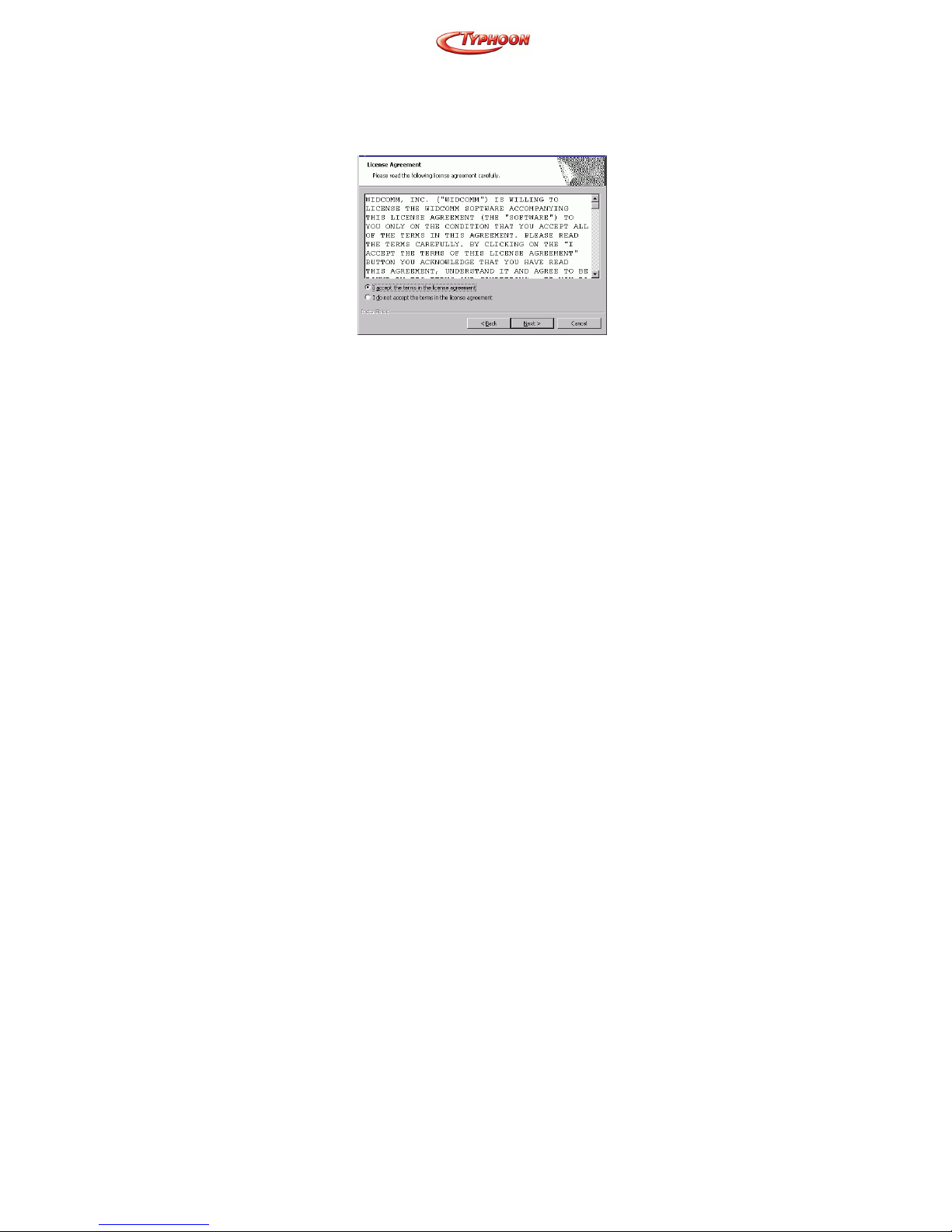
2. When the License Agreement screen is displayed,
read the License Agreement, then click the radio
button to the left of “I accept the terms in the
license agreement” and click the Next button.
3. On the Device Information screen, enter the
required information:
Device Name—other Bluetooth-enabled devices,
when inquiring about devices within radio range,
will see this user-configured device name.
The name can be changed after the installation
process through the BTW Configuration Panel.
Device Type—click the down arrow and
choose Desktop or Laptop from the drop-down
list. The device type can be changed after the
installation process through the BTW
Configuration Panel.
Click the Next button.

Article Number: #20001
Version 1.0 Specifications and procedures subject to changes without prior notification
- 3 -
4. On the Destination Folder screen, click the
Change button to browse to a new destination
folder for the BTW software. Otherwise, click the
Next button to accept the default folder.
5. The InstallShield Wizard is ready to install the
BTW software. If you need to review or change
any settings, click the Back button. Click the
Cancel button to exit the Wizard. Otherwise,
click the Install button
Tabla de contenidos
Otros manuales de Adaptador de TYPHOON