
TransTel Communications IP8100C Manual de usuario

www.transtel.co
USER MANUAL
Installation and Set Up
Model: IP8100C
Compact IP-PBX extensions
197 System

Notification
Notification is hereby given that Auto Telecom Company reserves the right to modify,
change, update or revise this document from time to time as required without the prior
obligation to notify any person, company or organization. Further, Auto Telecom
Company makes no warranty or representation, either express or implied, with respect
to merchantability, or fitness of its products for a particular purpose.
© 2017 Auto Telecom Company
This document or any parts thereof are not to be reproduced or transmitted in any
form or by any means, electronic or mechanical, including photocopying, recording,
or information storage and retrieval systems for any purpose whatsoever without the
express written permission of Auto Telecom Company.

Table of Contents
1. Description.........................................................................................................................2
2. System Programming.........................................................................................................3
2.1 Default IP .....................................................................................................................3
2.2 Default NO Password ...................................................................................................3
2.3 Default system .............................................................................................................3
2.4 Set system password....................................................................................................4
2.5 Into console programming ...........................................................................................4
2.6 Default setting of IP Trunk............................................................................................4
2.7 Default setting of IP extension .....................................................................................5
2.8 Trunk ringing assignment .............................................................................................5
2.9 Console Password ........................................................................................................5
3. System ...............................................................................................................................7
3.1 Technical password setting...........................................................................................7
3.2 Technical password ......................................................................................................7
3.3 PSTN LINE Information .................................................................................................7
3.4 IP-Trunk Information....................................................................................................8
3.5 IP-extension Information..............................................................................................8
3.6 Access Trunk ................................................................................................................9
3.7 Trunk Enable PR ...........................................................................................................9
4. Software update ..............................................................................................................10
4.1 software update 1......................................................................................................10
4.2 software update 2......................................................................................................10
5. Use a file to program VoIP................................................................................................11
5.1 File programming .......................................................................................................11
5.2 Modify Setting ...........................................................................................................11
5.3 Upload Configured File...............................................................................................12
5.4 System save and reboot .............................................................................................12
1. Description
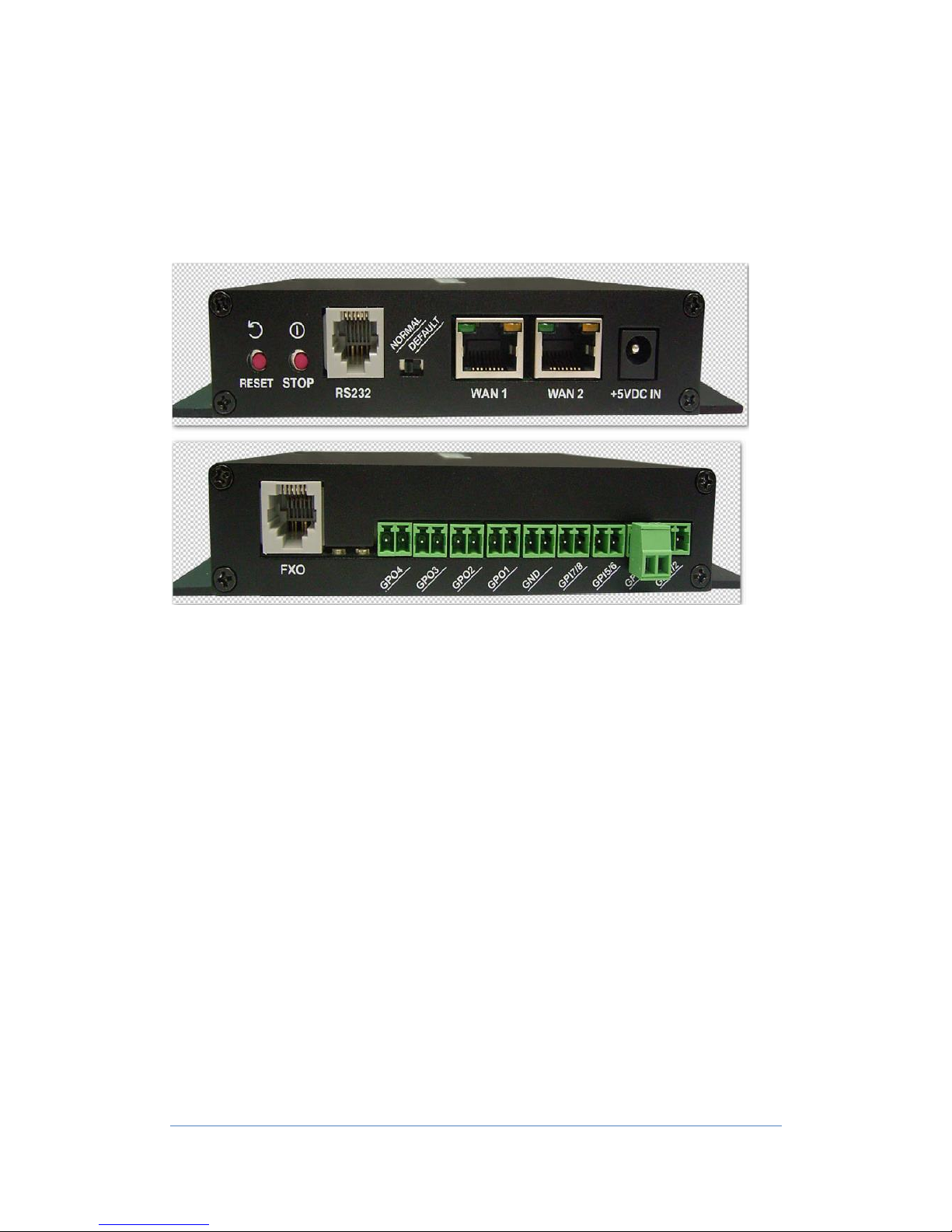
IP8100C is a small IP-PBX system; it can register up to 197 IP-Extension with two
IP-Trunks and one PSTN trunk. Easy to deploy and cost effective solution for
community intercom, home environments or small office application.
1. RESET: Reset button
2. STOP: Shutdown button. Pressing 2 seconds for safely power down.
3. RS232: RS232 port
4. Normal/Default: Normal Operation / Clear Flash Memory
5. WAN1: to set IP address on mode 15 (LAN1 10.10.10.xxx)
6. WAN2: to set IP address on mode 15 (LAN2 192.10.1.xxx)
7. +5CVD IN: Power for IP8100
8. FXO: FXO port
9. GPO1~GPO4: Dry connector for Relay1 ~ Relay4 (Normally Open
30VDC/1A) and refer setting on mode 06.
10. GPI1~GPI8: Sensors detection and refer setting on mode 06. GND with
GPI1~GPI8 are sensor connectors.

3
www.transtel.co
2. System Programming
Software version
G-IP81-WF11cB1 and ip-8100c-003 (update via WinSock File Transfer Protocol
WS_FTP)
2.1 Default IP
Default IP is 10.10.10.5
Power on and wait 40 seconds to start; Use Google Chrome to log onto the IP8100
setup page:
2.2 Default NO Password
Click “System Programming”, Default NO Password, click OK to proceed.
2.3 Default system
Please click SYSTEM tab, then click Mode: 25 System Data Base Reset; Ensure
pull down menu is showing 2: Reset All, then click SAVE button to auto configure
extension number, name and password in Numbering Plan and Port/Station
Number menu.
After configuration complete, click on ImmediateBackup to save setting.

4
www.transtel.co
2.4 Set system password
Click SYSTEM tab, then click PASSWORD (Mode: 13), see 1st row
PROGRAM/FTP to set system password, then SAVE (Example password: 1234)
If password lost, user can press hardware DEFAULT switch located on the
back of IP8100C body to reset system.
2.5 Into console programming
After enter the set up page by “no password”, click HOME, then SYSTEM
PROGRAMMING, then click OK without enter password to enter Console
Programming page to see simplified menu to set IP extension and IP Trunk
2.6 Default setting of IP Trunk
Default setting of IP Trunk Account as below:

5
www.transtel.co
Setting Example:
2.7 Default setting of IP extension
IP-Extension number, extension name and password can be changed in Port/Station
Number
2.8 Trunk ringing assignment
IP-Trunk and PSTN Trunk incoming call assignment setting
2.9 Console Password
Console password can be set in the Console Page under SYSTEM, then
PASSWORD

6
www.transtel.co

7
www.transtel.co
3. System
3.1 Technician password setting
Click SYSTEM tab, then click PASSWORD (Mode: 13), see 1st row
PROGRAM/FTP to set system password, then SAVE (Example password: 1234)
3.2 Technician password
When user enters password (example: 1234), complete program setting menu will
show on left column
3.3 PSTN LINE Information
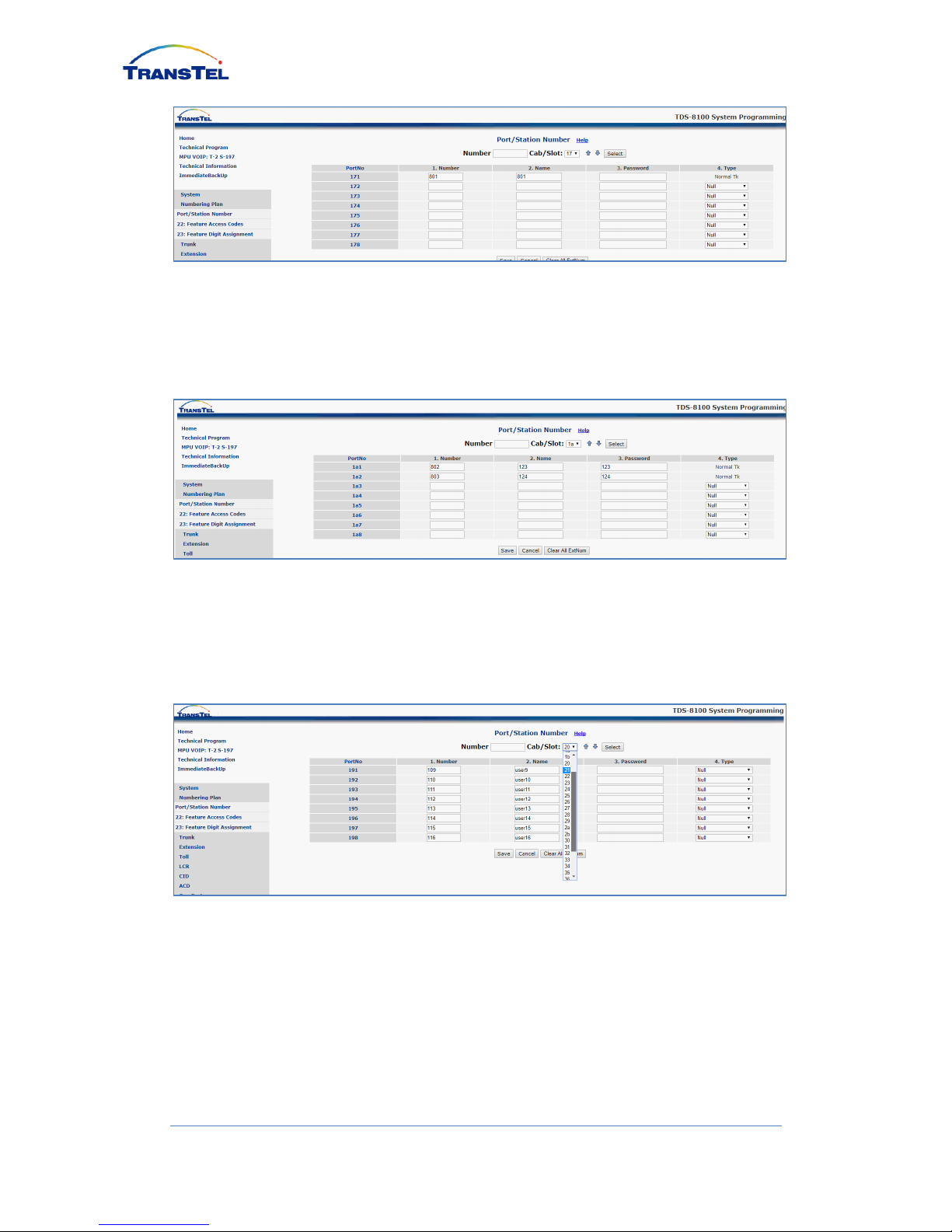
Click NUMBERING PLAN, then click PORT/STATION NUMBER (Mode: 21) to
see default Port Number 171 with Number 801 for PSTN line
8
www.transtel.co
3.4 IP-Trunk Information
Click NUMBERING PLAN, then click PORT/STATION NUMBER (Mode: 21)
select CAB/SLOT: 1a to see two default IP-Trunk 802 and 803 information
3.5 IP-extension Information
Click NUMBERING PLAN, then click PORT/STATION NUMBER (Mode: 21)
select CAB/SLOT to show remain 197 IP extensions slots information
Tabla de contenidos
Manuales populares de Centralita privada de otras marcas

Allo.com
Allo.com Nano 2 Manual de usuario

ZYCOD
ZYCOD ZX50 Manual de usuario

Panasonic
Panasonic KX-TDA100BX Manual de usuario

LV switch
LV switch IPPBX800 Manual de instrucciones

Edge-Core
Edge-Core VST3305 Manual de usuario

Panasonic
Panasonic KX-T7625 - Digital Proprietary Speakerphone 24... Manual de usuario

Rauland-Borg
Rauland-Borg Telecenter IV Manual de usuario

Grandstream Networks
Grandstream Networks UCM6208 Manual de usuario

ATCOM
ATCOM IPPBX IP02 Manual de usuario

Panasonic
Panasonic KX-TVS50 - 2 Port Voicemail System Manual de usuario

bintec elmeg
bintec elmeg elmeg hybird 600 Manual de usuario

Panasonic
Panasonic KX-NS300 Manual de usuario


