
Toworld TS400 Manual de usuario

Cloud Share Car DVR
Users’ Manual

Model No.:TS400
Safety Precautions
1. Do not operate this product while driving vehicles.
Please operate this product after parked vehicles.
2. Please don’t do authorized disassemble and modification of this
product. It may cause fire or damage of this product. Toworld is
not liable for any user’s private disassembly, modification and
recombination.
3. Please do not use any sharp objects like a hammer or nails to
knock on this product, it may cause malfunction or damage of
this product.
4. Please remove any foreign bodies and too many reflective films
to influence DVR recording clearance. It may cause video
distortion or image blur.
5. The video recording quality would be decreased while you are
driving through tunnel whenever it is bright day or dark night.
6. If a bad accident caused its damage or power dump, this product
can no longer be used as recorder.
7. Product Cleansing
Please gently clean it with soft cloth if there is any adhered
substance on the lens.
This product is non-waterproof, so please do not immerse it into

water.
8. Please do not remove TF card while it’s saving or reading data, or
it may cause the information in TF card be missed or damaged.
9. Please use genuine TF card,
Non-genuine TF card may cause data information missed or
damaged. Toworld is not be responsible for this. Please use TF card
CLASS6 or the upper version.
10. TF Card Installation and Remove
Please make sure the correct inserting direction of TF card. Wrong
inserting direction may cause the damage of TF card or this product.
11. Under weak GPS signal status, the position and velocity
information can’t be recorded normally, but normal video
recording will not be influenced.
12. Please do not install this product on the position may hamper
driving or block driver’s sight.
13. The heavy dust on cigarette lighter may cause overheating or fire
of this product, please do regular cleansings.
Package Contents
Check the product and accessories in the content:
1. Car DVR×1
2. Vehicle Power Adapter×1
3. Users’ Manual×1

4. Cable Holder×5
5. 3M Double Faced Adhesive Tape×1
6. Certificate×1
7. Sucker Cover×1
Introduction of structure
Sucker
Up
Holder Knob
Down
Menu
Front View
Lock/Confir
Speaker
Lens
Back View

ON/OFF
Mode
Right
Left
Top View
TF Card SlotReset
Bottom

TF Card Installation
Warning: Users Must Use C6 or Upper Version TF Card
Please do disk formatting for TF card before use
DC Charge Light
USB
HIMI
Charge Light
Record Light
GPS Light
Side View

Please pinch the tail of TF card by your fingers and press the tail of
the TF card at the breach of card slot and the TF card will be pop-up.
Sucker and DVR Installation
Stick the sucker on the right position of car windshield and install it
on the correct position on slot.
Rotating Angle Adjustment Holder
Rotate it Up and Down, Left and Right to get the best recording
position.
Loose the nut to rotate the holder up and down, adjust to the most
suitable angle (MAX 180 Degree), and then tight the nut.

Rotate left and right, you can rotate the angle of the DVR ( max 200
degree)
Use cable holder to fix the cable of vehicle power adaptor.
Straighten out the cable and hide it in an appropriate place.
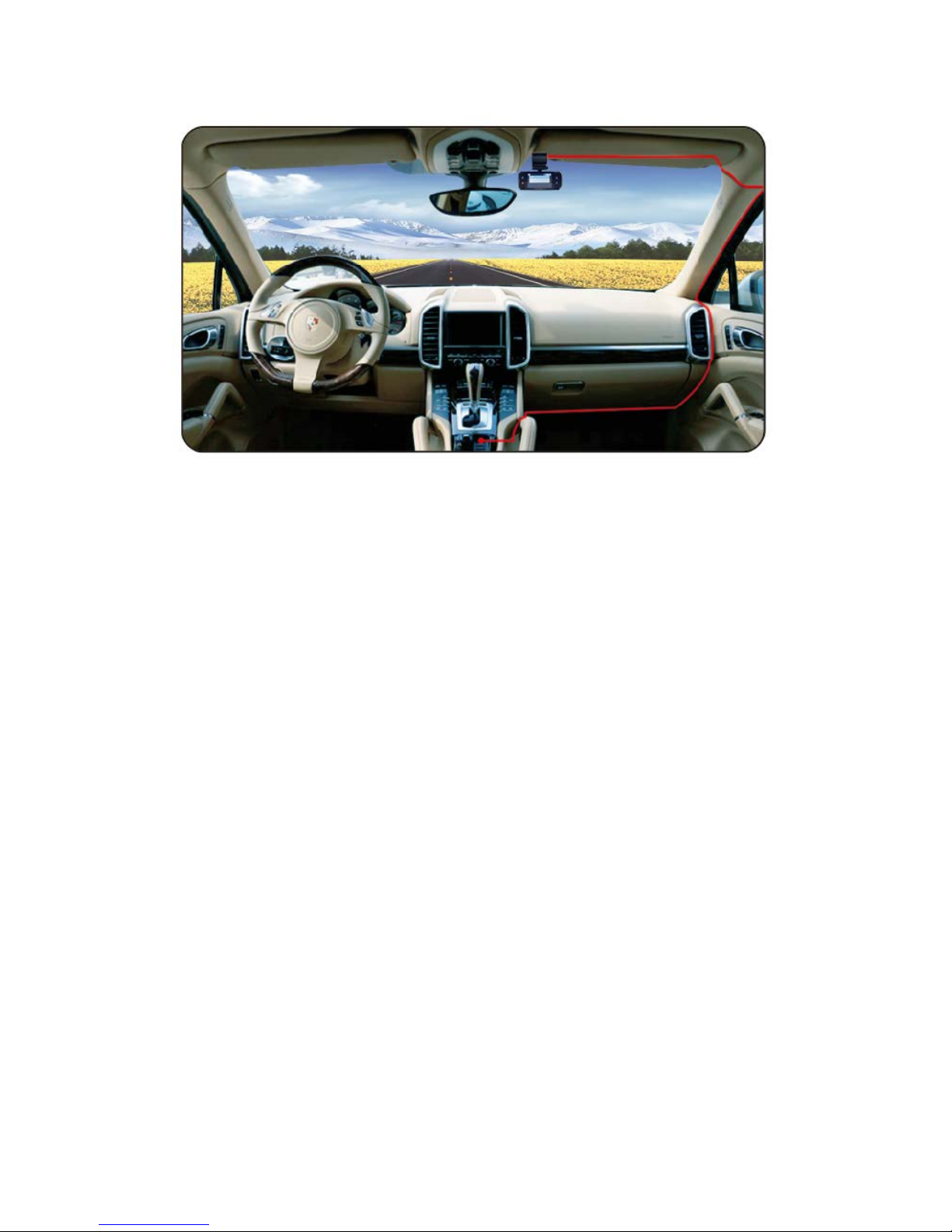
Operating Instructions
Menu (Back) key: It is used to choose the menu in the menu
interface.
It is used to set the parameter in the Recording Video/ Taking
Photos interface.
Press it again to exit the menu.
1- Click Lock (Confirmation) Key: Press this key you can lock the
profile with one-click, which make sure that the locked profile
cannot be deleted. In the menu choices this key is the confirm
key.
Mode Key: It is used to exchange Recording and Replay mode.
Up Key: Press it to open or close microphone in the Recording Video
interface.
Down Key: Press it to increase or decrease the EV value in the

Recording Video Interface/ Video Recording.
Left Key: Press it to close the screen, press it again to recover.
Choose the Video Recording setup, Taking Photos setup and Menu
in the left hand.
Right Key: Choose the Video Recording setup, Taking Photos setup
and Menu in the right hand.
Reset Hole Key: System reset key can be used to reset when the DVR
crash after abnormal operation.
On/ Off Key: Shortly press it switch on the DVR, long press for 3
seconds switch off the DVR (when the DVR is connected to external
power, the power should be 12V/24V vehicle power adapter).
When it is connected to vehicle power adapter, our product will
automatically start recording when the car starts. If the car stops,
our product will automatically close.
Only use the original vehicle power adapter which provided by our
company. Otherwise, we shall not be responsible for any damage to
the product if you use other vehicle power adapter.
Indicator Light
1. Charge Light: Under the USB charging condition, charge light
flashes. When the charge is completed, charge light is on.
2. Recording Light: When our product is recording, the light flashes,


