
Toner DCM4-700V Manual de usuario

DCM4-700V
HD Set-Top Box User Guide

1. DCM4-700V
1.1 Front Panel
1.2 Rear Panel
1.3 Remote Control
2. Installation
3. Getting Started With DCM4-700V
4. Main Menu
4.1 Main Menu
4.2 Program List
4.3 AV Settings/ Video Output
4.4 HD Output/ SD Output
4.5 Smart Card
4.6 Settings
4.7 Language/ Change PIN
4.8 Time Zone
4.9 System Reset
Table Of Contents
5. Important
Information
6. FCC
7. Troubleshooting

1.DCM4-700V
1.1 Front Panel
LED
LED Lights up green when power is on.
Lights up red when in Stand-By Mode

1.DCM4-700V
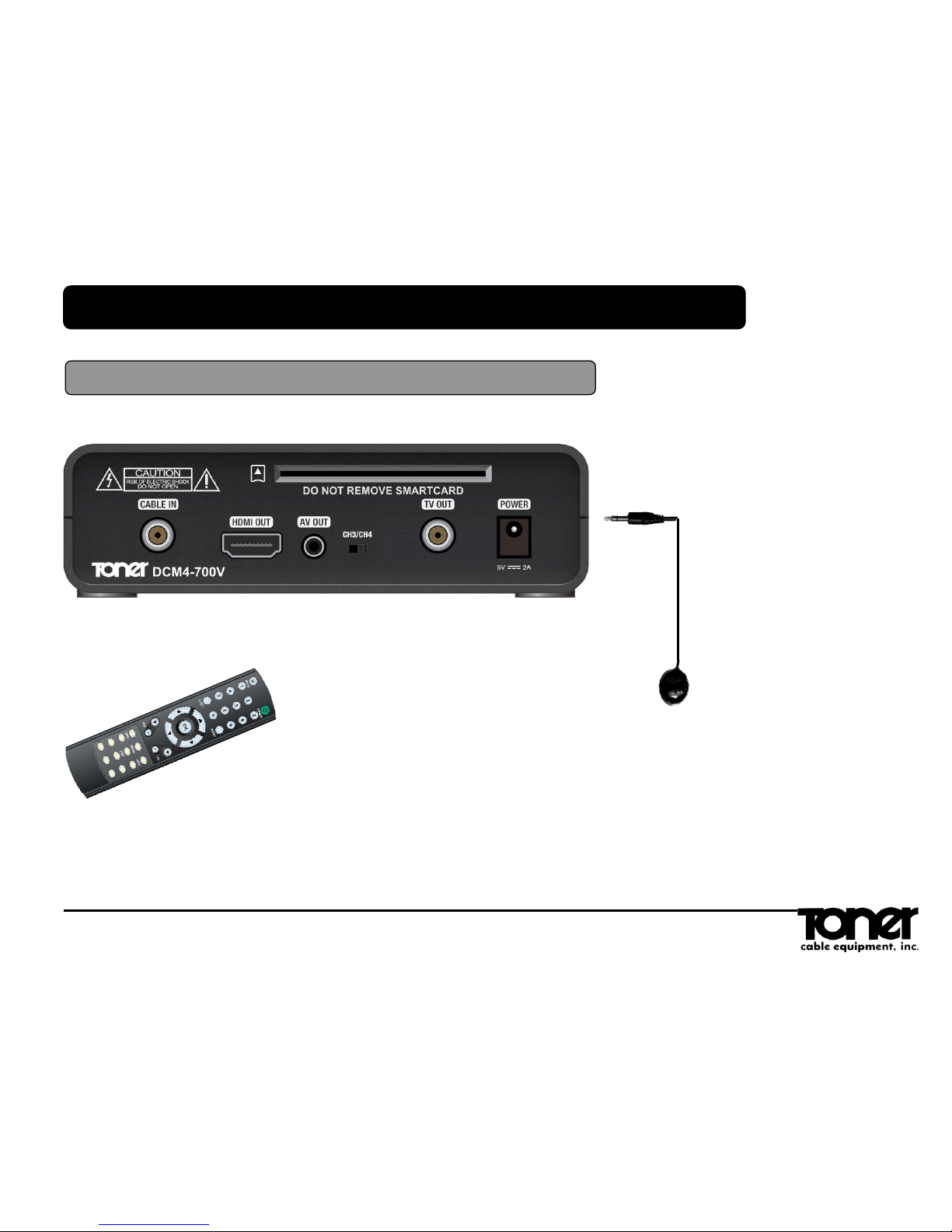
1.2 Rear Panel Smart Card Slot
Insert the smart card into the slot.
CABLE IN
Connect cable in and the
coaxial cable to the cable
wall outlet.
HDMI OUT
Connect the HDMI cable to the
‘HDMI OUT’ on DCM4-700V and
‘HDMI IN’ on you HDTV
AV OUT
(Mini-to-RCA Connectors)
Video (Yellow), Right Audio
(Red), and Left Audio (White)
connect to a TV, VCR.
CH3/CH4
Selects TV CH 3 or 4 as the
output channel to your TV when
the DCM4-700V is connected
using a coax cable from TV out
TV OUT
(Coax Cable) Connects the
DCM4-700V to a TV, VCR
using a coax cable
POWER
Connect only to supplied
adaptor and plug into 110
volt receptacle.
IR Extension Input
Located on the right side of
DCM4-700V. The IR extension
input and cable is only needed if
the DCM4-700V is out of direct
line of sight of the remote control

1.DCM4-700V
1.3 Remote Control
POWER Switches the DCM4-700V's power on or off (Stand-By mode)
MUTE Mutes the audio
0-9 Enters channel#. In Text Windows, Enters PIN-Code# and Various
Characters
LAST Switches between the current and last channel. In the Menu
System LAST returns to the previous screen.
VOLUME +/-Turn up and down the volume levels - Increase/Decrease Volume
CHANNEL +/-Press + to go up one channel, and press – to go down one
channel
INFO Displays various information about the current program (EPG)
ARROWS
(◀▲▶▼)Moves to highlight items in menu in respective direction
OK Confirms a selection
MENU Opens the MENU FEATURES screen of the MENU SYSTEM
EPG Displays ELECTRONIC PROGRAM GUIDE
EXIT Returns back to previous menu or channel
Audio But
ton, functi
on?
A
u
d
i
o

2.Installation
RCA Connection to TV
2.Installation
RCA/HDMI Connection to TV
HDMI
COAX
RCA
2.Installation
IR Remote Sensor Connection to TV
IR Remote Sensor
Connect the I/R remote sensor when the DCM4-700V set top is placed out of view (such as
behind your TV) so the remote will continue to operate.
Plug the I/R remote into the side of the DCM4-700V set top. Place the DCM4-700V set top
in the desired out of the way location. Fix the round end of the I/R remote in a location
where it can receive the signal from the remote control such as on the front edge of your TV.
(put on TV frame not the screen). Use the supplied hook and loop tape to mount the
sensor.
NOTE: The signal from the remote to the I/R sensor is an Infrared Light so they must be in line
of sight. Distance between the remote and I/R sensor should be between 2’ and 10’ for proper
operation.

Welcome Menu.
Press OK to Select
Language
Select your language by using arrow keys
3.Getting Started With DCM4-700V
Change Choose to Select The word Choose in incorrect
Change Choose to Select

Channel Scan.
Press OK to scan the channels.
Channel Scan in Progress
Automatically scanning for TV
programs
3.The First Action
Change Choose to Select

Main Menu.
Press Menu to Open Main Menu.
Use Arrow Keys to move up and down.
Press OK to select an item.
Press Menu again to exit Main Menu.
4.1 Main Menu
4.Main Menu
Change Choose to Select
Tabla de contenidos


