
Timekettle M3 Manual de usuario

www.timekettle.co [email protected]o @TimekettleTech
Communication is Connection
Timekettle M3 Translator Earbuds
Manual
+1(833) 491-1328
Contact Us
Support Languages: English / Español

65한국어
51Español
37Deutsch
25日本語
15
简体中文
77繁體中文
English 01

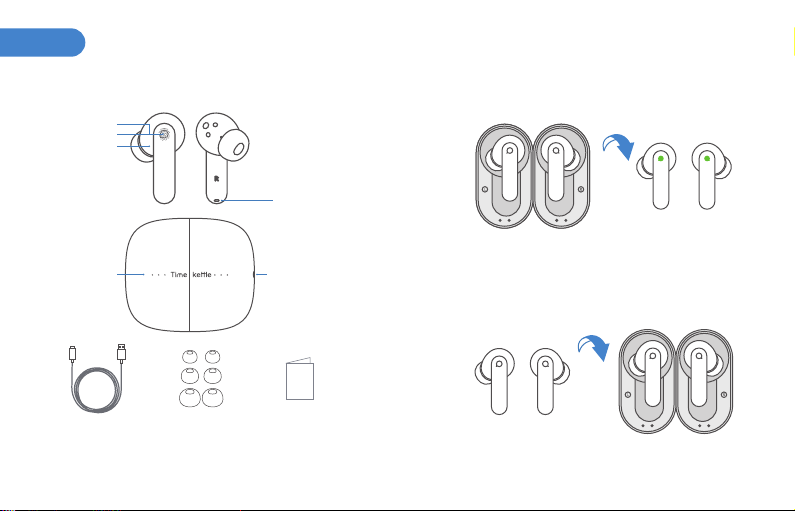
Package List
On/Off
Power On: taking out the earbuds from the charging case,
the indicator light flashes green once to indicate that the
earbuds are powered on.
Power off: the earbuds will power off automatically after
being placed in the charging case.
* How to wear: Choose the right size tip for your ears for the best fit and
seal.
English
Touch Control
Microphone
Status Indicator
Battery Indicator USB Type-C Charging Port
Noise Cancellation
Microphone
Type-C cable User ManualEartips (S, M, L)
01 02

Bluetooth Pairing
1. The earbuds will automatically enter Bluetooth pairing
mode once removed from the charging case, with the
status indicator continuously flashing white.
2. Select "Timekettle M3” on the Bluetooth list of the
phone to build the connection by accepting the pairing
request.
*If the Bluetooth is not paired within 5 minutes,the
earbuds will automatically power off.
①②
Reset
You may need to reset the earbuds if you experience
connection problems or functionality issues.
1. Put your earbuds in their charging case and wait for the
status indicator to turn in solid white.
2. Press the left and right earbuds three times separately
to access the reset mode, and the status indicator blinks
in alternating flashes of white and green three times to
indicate the completion of the reset.
3. Do not remove the earbuds from the charging case
during resetting.
4. If the reset is unsuccessful, it is recommended to try
again and make sure resets are done on both earbuds.
5. Resetting will erase the Bluetooth pairing history from
your device. To reconnect your earbuds to the device, first
Remove or Forget the earbuds from the device’s
Bluetooth memory.
Settings
Bluetooth
MY DEVICES
O DEVICES
Tim ekett le M3
XXXX
XXXXXX
03 04

Timekettle APP Download
Timekettle M3 only works with the Timekettle APP.Search
"timekettle"on Google Play /APP Store or scan the QR
code.
*Note: UI changes and new feature updates are subject to
change without notice, please refer to the latest version of
the APP.
Touch commands
*The earbuds indicator: the earbuds indicator light can be switched on
and off in the APP settings.
Music mode:
Phone Mode:
Activate voice
assistant
Press
Once
Press
Twice
Continuously
Press Three Times
Play Pause Previous song Switch to
transparency mode
/enable/disable
Noise Cancelling
Press and
Hold For 2s
ANC
Activate voice
assistant
Press
Once
Press
Twice
Play Pause Next song
ANC
Continuously
Press Three Times
Press and
Hold For 2s
Switch to
transparency mode
/enable/disable
Noise Cancelling
Answer a Call End a Call
Press
Twice
Refuse a Call
Long
Press
05 06

Charging
Charging the Earbuds
Power Display
The charging time for the case takes (from empty to fully
charged): 90 minutes
The charging time for the earbuds takes (from empty to
fully charged): 75 minutes
The earbuds' indicator lights up in solid white during
charging; When fully charged, the earbuds' indicator turns
off automatically.
Translation feature
1. Open the APP to complete registration and login and allow
all access permissions to ensure the translation feature works
properly.
2. On Product Selection page, select "Timekettle M3", then
enter the Bluetooth pairing page to complete the pairing.
3. Choose the corresponding translation mode for different
usage scenarios. For example, Touch Mode is recommended for
one-on-one conversations; Listen mode is recommended for
simply listening in meetings and classes; Speaker mode is
recommended for short conversations during travel with
strangers.
Full Battery Power (100%)
High Battery Power (66%~100%)
Medium Battery Power (33%~66%)
Low Battery Power (0%~33%)
07 08

Troubleshooting ●The phone is unable to find Bluetooth or the
Bluetooth pairing failed
1. Keep the earbuds as close to the phone as possible.
2. Avoid using the earbuds in RF interference
environments, such as next to wireless routers,
microwave ovens, and other such devices.
3. Place the earbuds back in the Charging Case, then
take them out to pair via Bluetooth again.
4. Reset both earbuds separately and pair them again
via Bluetooth.
5. If the earbuds are already connected to the phone,
Remove or Forget them from the device’s Bluetooth
memory and repeat steps 3 and 4.
●Unable to switch to music and wake up voice assistant
1. Check the permission setting of the music player and
phone.
2. It is recommended to use the phone's default media
player to avoid possible system compatibility issues.
* If problems persist during the use, please contact the store where you
purchased the product or the official customer service.
●Unable to use the APP translation feature properly
1.Make sure both earbuds are correctly connected to
the APP. Note: the translation feature cannot be used
with only one earbud connected.
2.Disconnect other Bluetooth devices connected to the
phone, such as a smartwatch using the phone's
microphone permission at the same time.
3.Close the app and reset the earbuds and reconnect
the phone via Bluetooth pairing.
●No sound in one or both earbuds
1. Check if both earbuds are out of battery.
2. Put the earbuds back in the charging case, then take
them out again.
3. Reset both earbuds separately and pair them again
via Bluetooth.
●Unable to charge the earbuds or no indicator when
charging
1.Unable to power on or charge the earbuds Check if
there is power in the charging case.
2.Check if the earbuds are correctly placed in the
charging case.
3. Make sure the charging cable and power adapter
meet the standard specifications.
09 10

Product Information
Product Name: Translator Earbuds
Model: M3
Power input: 5V⎓1A Bluetooth version: 5.2
Weight of Earbuds: 5g (one piece)
Weight of charging case (including earbuds): 60g
Charging case battery: 400mAh
Earbud battery: 50mAh (one piece)
Music playback time with Noise Cancellation On:
approximately 6 hours
Music playback time with Noise Cancellation off:
approximately 7 hours
Safety
Please read the following safety and warning information
before using M3.
1. Do not use unofficially recommended charging
methods to avoid fire, explosion, or other dangers.
2. Do not deliberately drop, burn, penetrate, squeeze, or
immerse in liquid to avoid product damages.
3. Do not expose to high temperatures or around heating
equipment such as microwaves or ovens.
4. Use the device within the range of 0℃ ~ 3 5℃ and store
within the range of -20℃ ~ 45℃. If the temperature is too
high or too low, it will cause the device to malfunction.
5. Timekettle is not responsible for quality issues, product
failures, and safety accidents caused by the use of
unofficially approved accessories.
Corporate Information
Manufacturer: this product is authorized for manufactur-
ing by Shenzhen Timekettle Technologies Co., Ltd.
Address: Room 612,Building 4, Minqi Science Park, Xili
Road, Shenzhen, Guangdong Province, China
All rights reserved by Shenzhen Timekettle Technologies
Co., Ltd.
Warranty regulations
1.If the product and accessories have any quality issues
within 1 year (unless otherwise states by local laws &
regulations) and 6 months respectively from the date of
purchase, you may be qualified for free repair service with
proof of purchase and warranty card.
2.What is NOT covered by the warranty:
a. Product is worn due to regular usage.
b. Failure to use in accordance with the instructions.
c. Damage caused by human or irresistible factors.
3.Repair costs will incur for damages caused by
man-made faults, beyond the warranty period, and
irresistible factors."
Contact US
TEL: +1(833) 491-1328 Support : English/Español
Official Website: www.timekettle.co
Customer Service: support@timekettle.co
11 12

FCC Warning IC STATEMENT
This device complies with Part 15 of the FCC Rules. Operation is
subject to the following two conditions:
(1) This device may not cause harmful interference, and (2) this
device must accept any interference received, including
interference that may cause undesired operation.
This device contains licence-exempt transmitter(s)/receiver(s) that
comply with Innovation, Science and Economic Development
Canada’s licence-exempt RSS(s). Operation is subject to the
following two conditions:
(1) This device may not cause interference.
(2) This device must accept any interference, including interference
that may cause undesired operation of the device.
Cet appareil contient des émetteurs / récepteurs exemptés de
licence conformes aux RSS (RSS) d'Innovation, Sciences et
Développement économique Canada. Le fonctionnement est
soumis aux deux conditions suivantes :
(1) Cet appareil ne doit pas causer d'interférences.
(2) Cet appareil doit accepter toutes les interférences, y compris
celles susceptibles de provoquer un fonctionnement indésirable
de l'appareil.
NOTE 1: This equipment has been tested and found to comply with
the limits for a Class B digital device, pursuant to part 15 of the FCC
Rules. These limits are designed to provide reasonable protection
against harmful interference in a residential installation. This
equipment generates, uses and can radiate radio frequency energy
and, if not installed and used in accordance with the instructions,
may cause harmful interference to radio communications.
However, there is no guarantee that interference will not occur in a
particular installation. If this equipment does cause harmful
interference to radio or television reception, which can be
determined by turning the equipment off and on, the user is
encouraged to try to correct the interference by one or more of the
following measures:
- Reorient or relocate the receiving antenna.
- Increase the separation between the equipment and receiver.
-Connect the equipment into an outlet on a circuit different from
that to which the receiver is connected.
-Consult the dealer or an experienced radio/TV technician for help.
NOTE 2: Any changes or modifications to this unit not expressly
approved by the party responsible for compliance could void the
user's authority to operate the equipment.
The device has been evaluated to meet general RF exposure
requirement.
13 14
产品清单
开机/关机
耳机开机:从充电盒取出耳机后,指示灯绿色闪烁一次,表示耳
机正常开机。
耳机关机:耳机放入充电盒后自动关机。
简体中文
触控区域
通话麦克风
状态指示灯
电量指示灯 Type-C充电口
降噪麦克风
Type-C数据线 说明书
*如何佩戴:为实现最佳贴合和密闭效果,请选择合适尺寸的耳塞。
耳塞(S、M、L)
15 16
Otros manuales para M3
1
Tabla de contenidos
Idiomas:
Otros manuales de Auriculares de Timekettle


