THOMSON RSAT 2 Guía de referencia

RSAT 2
Remote Control Panel
Customer‘s Manual
All manuals and user guides at all-guides.com
all-guides.com

BTS Media Solutions GmbH
Brunnenweg 9
D-64331 Weiterstadt, Germany
P.O. Box 1165
Tel: +49 (0) 6155-870-0
Fax: +49 (0) 6155-870-300
Web Sites
Internet: www.thomsonbroadcast.com
www.imagingsystems.de
Intranet: www.weiterstadt.thmulti.com
Information in this document is subject to change without notice.
This document and any updates and/or supplemental information, including any copies thereof, cannot be reproduced, neither
communicated to a third party, without written authorization from THOMSON multimedia Broadcast Solutions.
Please notify THOMSON multimedia Broadcast Solutions of any errors in this document. We also would appreciate any comments
you have to improve this manual.
BTS Media Solutions GmbH 2002. All rights reserved.
Copyrights
Published by
All product names mentioned in this manual are the trademarks of their respective owners.
Trademarks
All manuals and user guides at all-guides.com

Before reading the entire
manual, please check for any
supplements at the end
of the manual.
Item Rev Date Serial
No Pages
affected Volume/Contents Remarks
1 0 07.2000 100 All Customer‘s Manual First Issue
2 1 11.2001 chapter 6 Oberating Instructions Macros
Remote Panel RSAT 2
Revision Report
Documentation Order Number Customer’s Manual
RU 0065, 000 351 763 000
All manuals and user guides at all-guides.com

Remote Panel RSAT2 Contents
I
Operating Instructions - Rev. 1 / 11.2001
CONTENTS Page
Revision Report
1. General 1
1.1 Application examples 1
1.2 Control and display elements 1
2. Technical Data 3
3. Installation and Start-up 5
3.1 Safety Instructions 5
3.2 Mounting the Remote Control Panel RSAT2 6
3.3 Rack Mounting 8
3.4 Connecting to the DD35 control panel 10
3.5 Port re-configuration RS-422 / RS-232 11
4. Operation 13
4.1 How to start the Satellite Panel 13
4.2 How to learn a new function 14
4.3 What can be learned 15
4.4 Loading and saving setups 16
4.5 RSAT2 Makros and Control Panel M/E Delegation 19
5. Setup / Tests 22
6. Annex 24
6.2 Default Macros 25
All manuals and user guides at all-guides.com

Remote Panel RSAT2
Contents
II Operating Instructions - Rev. 1 / 11.2001
All manuals and user guides at all-guides.com

Remote Control Panel RSAT2 1. General
Operating Instructions - Rev. 1 / 11.2001 1
1. GENERAL
The remote control panel RSAT2 is used for copying button functions of the DD35
main operation panels for control of mixer functions from another workplace.
Connected to DD35 main panel via RS-422 cable which can be ordered optionally.
When the learn mode is applied single button functions also the built in Digipots and
the Fader can be trained with functions of the DD35 main panel –
Standard predefined settings for single M/E operation are also availlable.
1.1 APPLICATION EXAMPLES
Remote control on source selection, effects register recall, transitions, macros,
Shot-Box, Keyer adjust ...., specifically in conjunction with the use of an additional
sidepanel control PC.
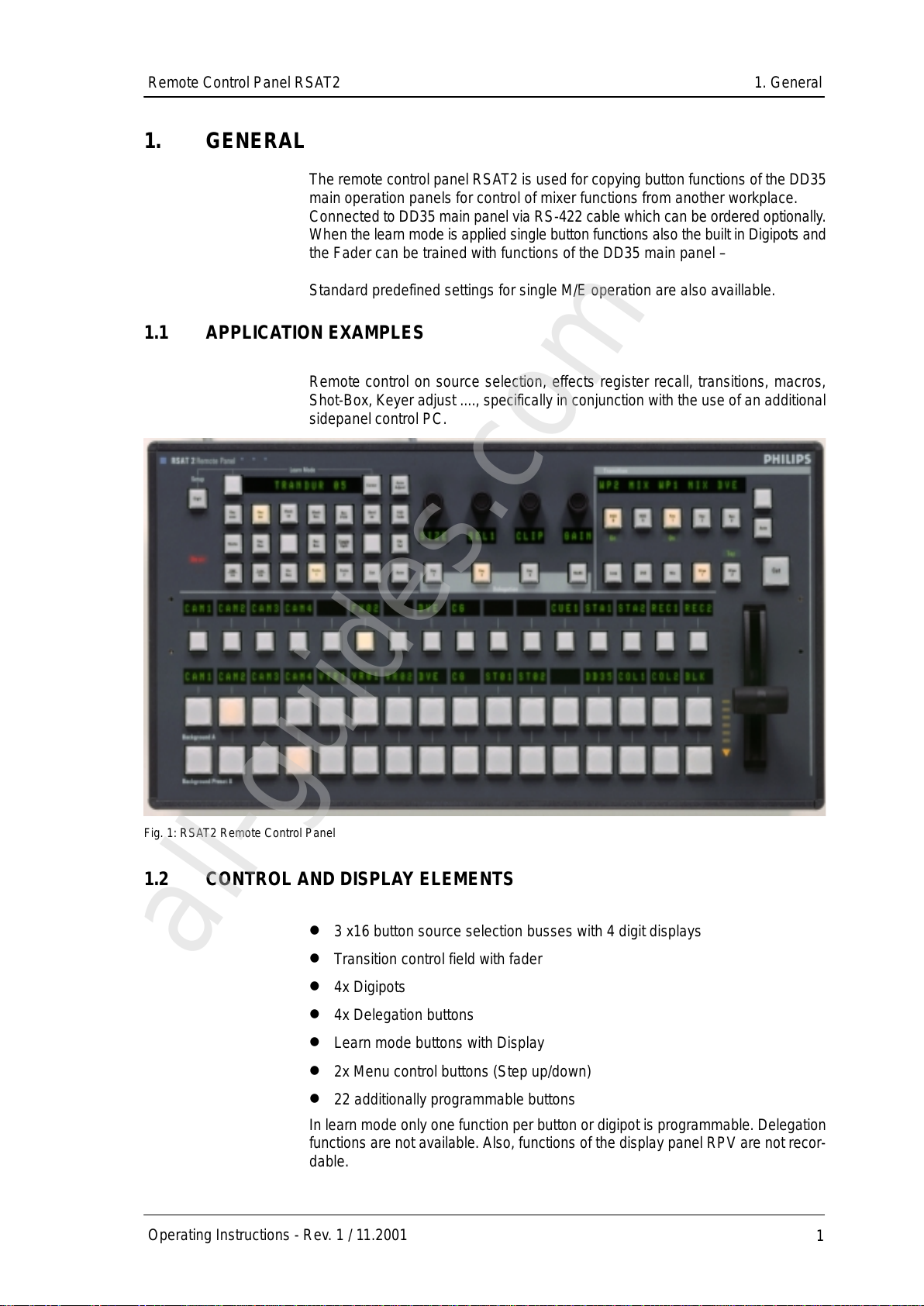
Fig. 1: RSAT2 Remote Control Panel
1.2 CONTROL AND DISPLAY ELEMENTS
3 x16 button source selection busses with 4 digit displays
Transition control field with fader
4x Digipots
4x Delegation buttons
Learn mode buttons with Display
2x Menu control buttons (Step up/down)
22 additionally programmable buttons
In learn mode only one function per button or digipot is programmable. Delegation
functions are not available. Also, functions of the display panel RPV are not recor-
dable.
All manuals and user guides at all-guides.com
all-guides.com

Remote Control Panel RSAT11. General
2Operating Instructions - Rev. 1 / 11.2001
The programmable memory of the RSAT2 is part of the DD35. Thus the program-
med function set for the RSAT2 buttons can be switched from application to appli-
cation. More complex button sequences can be achieved by programmed recall of
macro buttons of the DD35 main panel.
The standard unit is equipped with 1x reconfigurable 9 Pin D-Sub interface for con-
nection to a host processor. Without further options the factory configuration is a
RS-422/485 port for direct connection to DD35’s panel controller.
All manuals and user guides at all-guides.com

Remote Control Panel RSAT2 2. Technical Data
Operating Instructions - Rev. 1 / 11.2001 3
2. TECHNICAL DATA
Mechanics Width: 240 mm, Length: 464 mm, Depth: 115 mm
Weight: 5 kg
Desk cut out: 441 x 217 mm
Optional 19”Mounting frame
Voltage supply Line voltage: 100 V –240 V $10 %, autosense
Line current: 0.8 A
Line frequency: 50 Hz to 60 Hz
Wide AC range power supply block
Power consumption: < 50 W
Environmental Operating temperature: +0°C ... 40°C
requirements Storage/transport temp: –40°C ... 85°C
Humidity: v95%, DIN IEC 68-2-14
non-condensing
Electromagnetic EMA: EN 55103-1, EN 55 022, Class B,
compability ESD: EN 61000-4-2
EMI: EN 61000-4-3
Burst: EN 61000-4-4 , IEC 1000-4-4
RF immunity: EN 61000-4-6
Safety VDE 0805, EN 60 950
Interface RS-422/485 port for direct connection to the DD35 panel controller.
9pin D-sub, female. Port re-configurable for RS-232.
Communication is asynchron with 38.4 kbaud, 1 start, 8 data, no parity, 1 stop bit.-
A factory re-configuration is recommended for use of an RSAT2 with a PC.
Standard Accessories Accessory pack with tools fuses and button spare parts.
Options 19”Mounting frame für rack mounting.
Order no.: RC 2326, 000 351 762 600
All manuals and user guides at all-guides.com

Remote Control Panel RSAT22. Technical Data
4Operating Instructions - Rev. 1 / 11.2001
All manuals and user guides at all-guides.com

Remote Control Panel RSAT2 3. Installation and Startup
Operating Instructions - Rev. 1 / 11.2001 5
3. INSTALLATION AND STARTUP
3.1 SAFETY INSTRUCTIONS
Caution!
These instructions are for use by qualified personnel only. To reduce the risk
of electric shock, do not perform any installation other than that contained in
the Operating Instructions unless you are qualified to do so.
Refer all servicing to qualified service personnel.
Attention!
Electrostatic sensitive devices on the p. c. boards. Observe the following
precaution for handling:
Handling or mounting the RSAT2 unit call for special attention to personal
safety. Personnel should be connected to ground potential via a wristlet (e.g.
3M Wristlet Serial 2200).
Do not touch the p. c. boards during mounting.
Repair the p. c. boards only at static-safe work stations.
Use antistatical protective bags when carrying the p.c. boards.
All manuals and user guides at all-guides.com
Tabla de contenidos
Otros manuales de Panel de control de THOMSON