
ThinkGizmos TG801 Manual de usuario

INGENIOUS MACHINES REMOTE
CONTROL
PLEASE READ ALL INSTRUCTIONS CAREFULLY BEFORE USING YOUR INGENIOUS MACHINES.
KEEP THESE INSTRUCTIONS IN A SAFE PLACE FOR FUTURE REFERENCE.
User Manual
English p 1
Deutsch p 8
Francais p 15
Italiano p 22
Español p 29
This toy contains small parts that could be a
choking hazard. Small Children under 6 years
old should be closely supervised while playing
with this toy.

ENGLISH MANUAL - CONTENTS
1.
2. 2.1 Care & Maintenance............................................................................................ 4
2.2 Troubleshooting ................................................................................................. 4
MAINTENANCE & TROUBLESHOOTING
2
1.1 Safety Information ............................................................................................. 3
1.2 Battery Safety ..................................................................................................... 3
1.3 Battery Installation ............................................................................................ 3
IMPORTANT INFORMATION
3.1 The Remote Control ........................................................................................... 5
3.2 The Motor ............................................................................................................ 5
3.3 Connecting the Controller and Remote ........................................................... 6
3.4 FAQ ....................................................................................................................... 6
USAGE INSTRUCTIONS
3.
Warranty Information ............................................................................................. 7
WARRANTY
If you have any issues with your product or have
any questions, please contact us via email:
This is the quickest way to resolve any problems.
You will be surprised how fast we will get back to
you on email with a resolution.
All our products are covered by our manufacturer’s
warranty, details can be found on page 7.
For more of our brilliant products, search Amazon
for “ThinkGizmos”.
ThinkGizmos
“Small enough to care. Big enough to deliver”.

1. IMPORTANT INFORMATION
1.1 Safety Information
Thank you for purchasing the Ingenious Machines. Please read through this instruction
manual before use as it contains all the information you need about how to correctly enjoy
this product.
CAUTION
ELECTRONIC PRODUCT
Do not leave children aged 6 or below unattended with this toy. This product should be
used in accordance with this user manual in a safe way to avoid electric shock.
ADULT SUPERVISION REQUIRED
WARNING! Do not try to modify this product in any way as this may invalidate your
warranty.
WARNING! Contains small parts, child supervision is required at all times.
1) Use only brand new batteries of the correct size and power.
2) Do not mix old and new batteries, dierent types of batteries (zinc, alkaline or
rechargeable).
3) If using rechargeable batteries, ensure they are all the same capacity.
4) Do not try and charge non-rechargeable batteries.
5) Rechargeable batteries should be charged by an Adult or under Adult supervision. Stop
charging immediately if you notice any abnormal behaviour.
6) Do not throw batteries in the re.
7) Replace all batteries of the same type/brand at the same time.
8) The supply terminals are not to be short circuited.
9) Remove empty batteries from the product.
10) Batteries should be changed by an Adult.
11) If the Ingenious Machines Toy is going to be inactive for a long period of time, please
remove all batteries.
12) For your safety, please operate according to these instructions.
1.2 Battery Safety
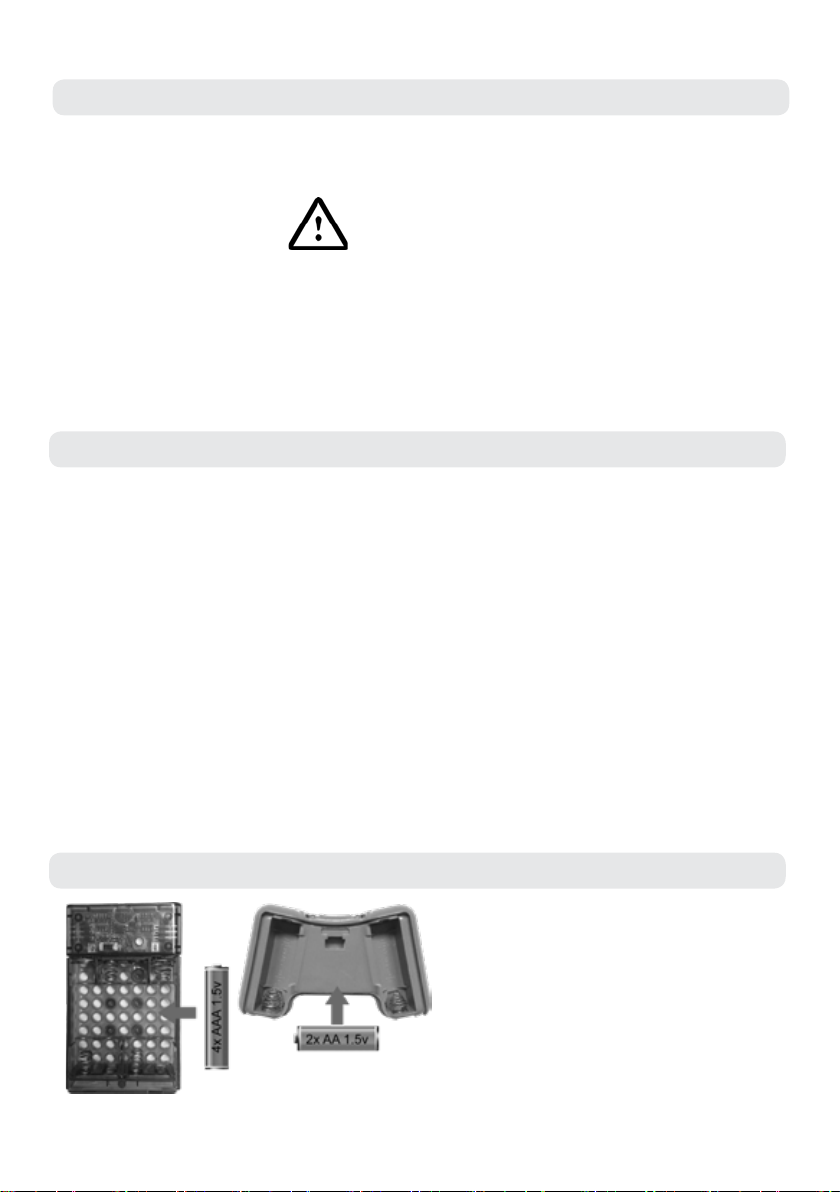
1.3 Battery Installation
●Ensure item is o, remove the battery
cover.
●Insert 4x AAA batteries (supplied) into
the battery compartment of the motor
and 2x AA Batteries (supplied) into the
remote observing the correct polarity as
indicated.
●Re-t the battery cover.
(Warning - Remove the batteries if the item is not going to be used for a long time.)
3

2. MAINTENANCE & TROUBLESHOOTING
2.1 Care & Maintenance
●Keep the Ingenious Machines clean by wiping it with a soft dry cloth.
●Keep away from exposure to direct sunlight for extended periods and keep away from
direct heat sources.
●Remove batteries when not in use for an extended time.
●Do not drop on a hard surface.
●Do not immerse in water.
2.2 Troubleshooting
●Turn the unit o.
●Remove the battery cover and take out batteries.
●Wait a minute for the power to dissipate.
●Replace batteries and secure the battery cover.
●Turn the unit on.
If you are having problems with your Ingenious Machines.
If this does not resolve your issue. Please contact ThinkGizmos via email:
and we will endeavor to resolve your problem as quickly as possible.
4

3.1 The Remote Control
3. USAGE INSTRUCTIONS
3.2 The Motor
1. Insert 4x AAA Batteries (Included).
2. Connect the right motor to the batteries.
3. Connect the left motor to the batteries.
4. Power On/O.
5. Indicator Light
Forward / Backwards
Left / Right
Select Button
Conrm Button
5

Once all batteries have been inserted follow the steps below to control your Ingenious
Machine.
1. Ensure the power switch on the motor is set to the “ON” position. The LED light on the
motor should ash quickly.
2. Press the F4 key on the Remote to select the Red or Green Channel. (The colour of the led
on the battery pack represents the two dierent channels which can be selected).
3. Press the F5 button to conrm the channel selection. The LED light on the battery pack
should now ash slowely showing it is connected.
4. Congratulations! Your Ingenious Machine is ready to go. Use the controller to command
your machine to move.
3.3 Connecting the Controller and Remote
Q: How do I use more than one Ingenious Machine at a time?
A: Up to 2 Ingenious Machines can be used at the same time in a location. When connecting
your Ingenious machines follow the connection instructions one machine at a time and
ensure the rst is set to the Green Colour Channel and the seconds is set to the Red Colour
Channel.
Q: Help when I press left my machine turns right, how do I reverse this?
A: If you nd your Ingenious Machine is turning in the opposite direction to the direction
pressed simply press the F5 Key which should switch the motor directions.
3.4 FAQ
6

WARRANTY
Warranty Information
Think Gizmos, Unit 19, Lawson Hunt Industrial Park,
Broadbridge Heath, West Sussex, RH12 3JR
Tel.: +44/(0)203 384 8304
What is Covered:
This warranty covers any defects in materials or workmanship, with the exceptions stated
below.
How Long Coverage Lasts:
This warranty runs for 1 Year from the date your Ingenious Machines are delivered.
What is not covered:
Any problem that is caused by abuse, misuse, or an act of God (such as a ood) are not
covered.
What We Will Do:
If the Product proves defective during the warranty period, we will provide you with the
instructions for the return, and we will take one of the following actions: (i) replace the
Product with a product that is the same or equivalent to the Product you purchased; (ii)
repair the Product; or (iii) refund to you the whole of or part of the purchase price of the
Product.
How To Get Service:
To obtain instructions on how to obtain service under this warranty, contact our customer
service by phone or email. You will nd the contact details of our customer service below.
Customer service may ask you questions to determine your eligibility under this warranty,
and if you are eligible you’ll be given instructions for returning the defective Product. If
we send you a replacement or repair your Product, we will pay the cost of delivering the
replacement or repaired Product to you.
Do not return the item to the original place of purchase, please contact Think
Gizmos direct.
7

INGENIOUS MACHINES REMOTE
CONTROL
BITTEL LESEN SIE SICH DIESE BEDIENUNGSANLEITUNG VOR DER VERWENDUNG IHRER IN-
GENIOUS MACHINES SORGFÄLTIG DURCH.
BEWAHREN SIE DIESE BEDIENUNGSANLEITUNG AN EINEM SICHEREN ORT AUF.
BEDIENUNGSANLEITUNG
English p 1
Deutsch p 8
Francais p 15
Italiano p 22
Español p 29
Dieses Spielzeug enthält Kleinteile , die eine Er-
stickungsgefahr sein könnte. Kleine Kinder unter
6 Jahren sollten engmaschig überwacht werden,
während sie mit diesem Spielzeug spielen.

DEUTSCHE ANLEITUNG - INHALT
1.
2. 2.1 Pege und Wartung........................................................................................... 11
2.2 Fehlerbehebung ................................................................................................ 11
WARTUNG UND FEHLERBEHEBUNG
1.1 Sicherheitsinformationen ............................................................................... 10
1.2 Wichtige Informationen zu den Batterien .................................................... 10
1.3 Batterieinstallation .......................................................................................... 10
WICHTIGE INFORMATIONEN
3.1 Die Fernbedienung ........................................................................................... 12
3.2 Der Motor .......................................................................................................... 12
3.3 Controller und Fernbedienung anschließen ................................................. 13
3.4 FAQ ..................................................................................................................... 13
GEBRAUCHSANWEISUNGEN
3.
Garantieinformationen ......................................................................................... 14
GARANTIE
Wenn Sie Probleme mit Ihrem Produkt oder Fragen
haben, senden Sie uns bitte eine E-Mail an:
Dies ist der schnellste Weg, Probleme zu lösen. Die
schnelle Antwort mit der Lösung Ihres Problems
per E-Mail wird Sie überraschen.
All unsere Produkte fallen unter unsere
Herstellergarantie, weitere Informationen nden
Sie auf Seite 14.
Für weitere fantastische Produkte suchen Sie auf
Amazon nach “ThinkGizmos”.
ThinkGizmos “Klein genug für einen persönlichen
Service, groß genug, diesen auch zu liefern”
9
1. WICHTIGE INFORMATIONEN
●Stellen Sie sicher, dass der Artikel
ausgeschaltet ist, und entfernen Sie die
Batterieabdeckung.
●Legen Sie 4x AAA-Batterien (mitgeliefert)
in das Batteriefach des Motors und 2x AA-
Batterien (mitgeliefert) in die Fernbedienung
ein. Beachten Sie dabei die richtige Polarität.
●Setzen Sie den Batteriefachdeckel wieder ein.
(Warnung - Entfernen Sie die Batterien, wenn der Artikel längere Zeit nicht verwendet wird.)
1.1 Sicherheitsinformationen
Wir gratulieren zum Kauf dieses Ingenious Machines. Bitte lesen Sie sich diese
Bedienungsanleitung vor der Verwendung durch, da sie alle Informationen enthält, die Sie
benötigen, um dieses Produkt ordnungsgemäß zu bedienen.
ACHTUNG
ELEKTRONISCHES PRODUKT
Verlasse Kinder nicht im Alter von 6 oder unter unbeaufsichtigt mit diesem Spielzeug. Dieses
Produkt sollte gemäß dieser Bedienungsanleitung sicher verwendet werden, um einen Stromschlag
zu vermeiden.
AUFSICHT VON ERWACHSENEN ERFORDERLICH
WARNUNG! Versuchen Sie nicht, dieses Produkt auf irgendeine Art und Weise zu modizieren, da
Ihre Garantie dadurch erlöschen kann.
WARNUNG! Enthält Kleinteile. Aufsicht von Erwachsenen ist immer erforderlich.
1) Verwenden Sie ausschließlich neue Batterien der richtigen Größe und Spezikation.
2) Verwenden Sie keine alten und neuen Batterien, verschiedene Arten von Batterien (Zink, Alkali
oder wiederauadbar) zusammen.
3) Wenn Sie wiederauadbare Batterien verwenden, stellen Sie sicher, dass sie dieselbe Kapazität
aufweisen.
4) Versuchen Sie nicht, nicht-wiederauadbare Batterien aufzuladen.
5) Wiederauadbare Batterien sollten von einem Erwachsenen oder unter Aufsicht von Erwachsenen
aufgeladen werden. Beenden Sie den Ladevorgang unverzüglich, wenn Sie Anomalitäten erkennen.
6) Werfen Sie Batterien nicht ins Feuer.
7) Tauschen Sie alle Batterien derselben Art/Marke gleichzeitig aus.
8) Die Einspeisklemmen dürfen nicht kurzgeschlossen werden.
9) Entfernen Sie leere Batterien aus dem Produkt.
10) Batterien sollten von einem Erwachsenen ausgewechselt werden.
11) Entfernen Sie alle Batterien, wenn der INGENIOUS MACHINES für längere Zeit nicht verwendet
wird.
12) Bedienen Sie den Roboter zu Ihrer eigenen Sicherheit gemäß dieser Anweisungen.
1.2 Wichtige Informationen zu den Batterien
1.3 Batterieinstallation
10
Tabla de contenidos
Idiomas:
Otros manuales de Mando a distancia de ThinkGizmos


