
TG-NET Cloud Box M-3 Manual de usuario

TG-NET Cloud Box M-3/M-5
User Manual

User Manual
i
Copyright notice
©Copyright 2016 TG-NET Botone Technology CO. Ltd.
Shenzhen TG-NET Botone Technology CO. Ltd. ( short for TG-NET) all right reserved,
and retain all rights to this manual and this declaration.
All content in this manual book shall not be reproduced, copied or used in other ways
without permission. Otherwise TG-NET will have the right to pursue legal responsibilities.
Disclaimer
The content of this manual is based on the existing information, due to product version
upgrades or other reasons, the content is likely to change. TG-NET reserves the right to
modify the contents of the manual without any notice or prompt.
This manual is only used as a guide, TG-NET has made every effort to ensure that the
content is accurate and reliable in the preparation of this manual. But there is no error or
omission in ensuring that the manual is complete. All the information in this manual does not
constitute any express or implied warranty.
Shenzhen TG-NET Botone Technology CO. Ltd.
Tel: +86-755-86963766
Fax: +86-755-86963733
Headquarter: 4F, Building E3, #1001, Zhongshanyuan Road, Nanshan Disctict
City: Shenzhen
Province: Guangdong

User Manual
ii
Contents
1 Notice Before Use ......................................................................................3
2Introduction.................................................................................................4
2.1 Characteristic ....................................................................................4
3Hardware Introduction And Device Connection.................................5
3.1 Hardware Introduction.........................................................................5
3.1.1 Interface...............................................................................5
3.1.2 LED Indicator Light................................................................5
3.2 Device Connection..............................................................................6
3.2.1 Connection Notes..................................................................6
3.2.2 Connection And Application....................................................6
4TCP/IP configuration..................................................................................7
5Login..............................................................................................................9
6WEB Page configuration ...........................................................................9
6.1 Intelligent Statistics............................................................................10
6.1.1 One Key Detection..............................................................10
6.1.2 Device Port Status............................................................... 11
6.1.3 Wireless Online Number ......................................................12
6.2 Function Pool....................................................................................12
6.2.1 Wireless Management.........................................................13
6.2.2 Certification Marketing.........................................................22
6.2.3 Switch Management............................................................25
6.3 Network Topology..............................................................................29
6.3.1 Topology Display.................................................................29
6.3.2 Topology Preservation And Reset.........................................30
6.4 Intranet Scan.....................................................................................30
6.5 System Management ........................................................................31
6.5.1 System Information .............................................................31
6.5.2 System Management...........................................................32

User Manual
3
1 Notes Before Use
Please don’t place device in the vicinity of flammable or conductive materials,
high temperature (such as direct sunlight) or humid environment, or PC
chassis, and check the surrounding appliances and other device is stable or
not.
Please check the cable has no aging phenomenon. To detect and confirm
the AC or DC input voltage value in the range of device allowable, and the
DC polarity is correct or not.
Please use the adapter that comes with the product (indicating the type with
the label)
Please place the device on the smooth plane, don't place items on the
equipment.
Device at work it’s easy to generate heat, should maintain proper space for
heat dissipation to avoid overheating damage. Please keep the slender hole
enclosure ventilation clean, Avoid items from the cooling mouth into the
interior of the device, otherwise it may cause device short-circuit and
damaged or fire. Do not put liquid spilled to the device surface.

User Manual
4
2 Introduction
TG-NET Cloud Box M-3/M-5 (short for M-3/M-5) is TG-NET newly launched a
comprehensive network products that set of wireless management, switch (POE
power management) management, intelligent statistic, network topology in one,
allows the user to easily configure network equipment, network maintenance, and
through wireless certification to achieve advertising marketing.
2.1 Characteristic
For hotels, restaurants, entertainment, business, campus, hospitals and other
places to carry out wireless coverage, typical networking solutions can achieve the
following goals:
Support AP and TG switch centralized management
Support for authenticated users management and control
Support for hybrid authentication, wireless terminal access authentication,
advertising push
Support AP information, AP state, user status information of the unified query
Support AP cross VLAN management
Support VLAN function based SSID features
Support bandwidth speed limit function based STA

User Manual
5
3 Hardware Introduction And Device Connection
3.1 Hardware Introduction
3.1.1 Interface
Interface
Description
LAN1/2/3/4
LAN interface. Can answer the hubs, switches, computers
and other support for local area network equipment.
WAN
WAN interface. Can use Ethernet cable connected to the
uplink network device
USB
USB interface. Can charge the battery for android mobile
phone,and connect USD mini fan.
Reset
Reset key. Long press 6-8 second to loosen again after
the device is powered, you can restore the device to
factory default state.
3.1.2 LED Indicator Light
Indicator light
Mode
Status
PWR
N/A
The power indicator light,red
light has been on when the
device is power on.
SYS
N/A
SYS light in the process of
device boot,and go out after
full boot.
LAN1~LAN4
100M
bps
Green light indicates that the
connection is established,
flashing indicates data
transmission.
WAN
100M
bps
Green light indicates that the
connection is established,
flashing indicates data
transmission.

User Manual
6
3.2 Device Connection
3.2.1 Connection Notes
Connection device with the computer, network hub or switch cable length can
not be greater than 100 meters
Please put the wireless device in the central area to maximize the wireless
coverage area
3.2.2 Connection and Application
Typical networking as shown above. Router connect down the core switch and
POE switch, M-3/M-5 side hang in switch,theAP through POE power supply,
terminal associated wireless to carry on the internet.
1 M-3/M-5 can centralized management switch and AP, configure and issued
them.
2 M-3/M-5 access will not have an impact on the cable terminal. Wireless
terminal access network,and open authentication on M-3/M-5 can achieve the
purpose of advertising marketing,at the same time can control the Internet
behavior of the wireless terminal.

User Manual
7
4 TCP/IP Configuration
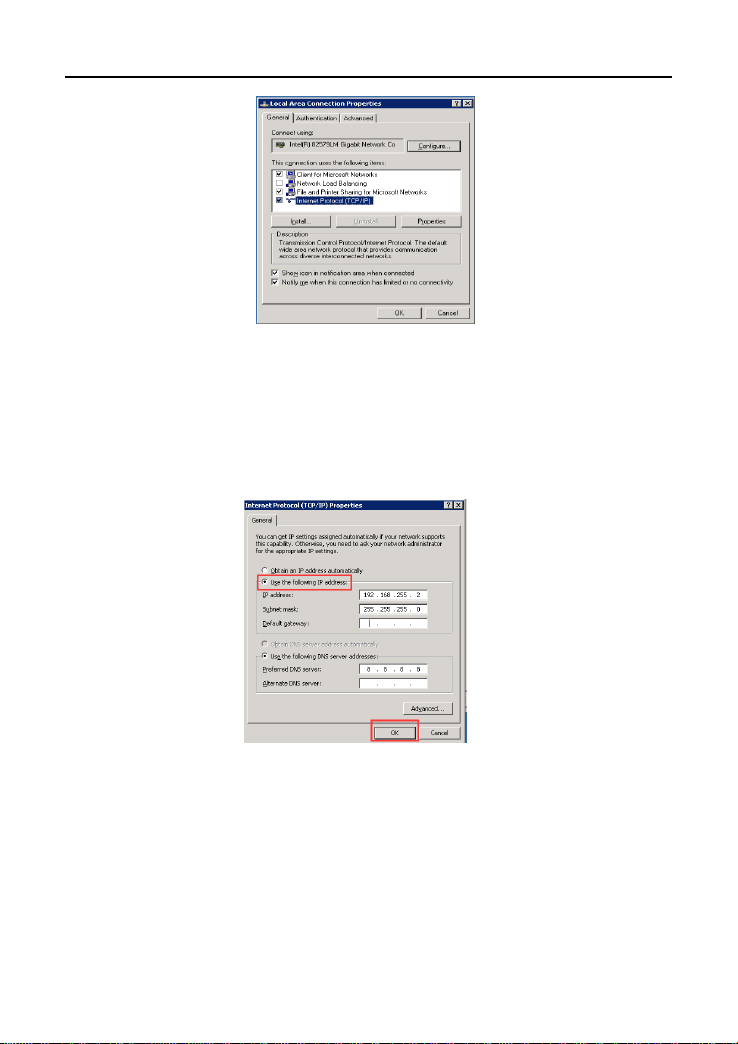
Take the Windows system as an example,describes the login TCP/IP need
M-3/M-5 configuration
1 Click on the bottom left corner of the start menu, enter 【The control
panel-network connection】, or right click on the network icon in the lower right
corner of the desktop, open the "network connection" window。
2 In the "network connection" window,right click the "local connection",then left
click to select the "properties" option.
3 In the pop-up window,double-click the left mouse button "Protocol Version
Internet 4(TCP/IPv4)".
User Manual
8
4 In the pop-up window,click the left mouse button the "use the following IP
address(S)",then enter your desired IP address in "IP address". IP address range
is "192.168.255.(2-253)". does not need to set the subnet mask,The bar will be
automatically generated after you enter the IP address. The remaining options bar
does not need to fill in. The left mouse button click the lower right corner of the "OK"
button.
M-3/M-5 default IP address is 192.168.255.254, User name and password is:
admin/admin.
Tips:
If the computer is equipped with multiple network cards ,network
connection items will display a number of "local connection" menu.

User Manual
9
5 Login
Open IE or another browser (IE9.0 or above, Firefox, Google and etc are
recommended). Enter http://192.168.255.254 in the address bar and press Enter.
Enter the username and password (admin/admin) on the page displayed.
Tips:
The default password is printed on the device box bottom label.
When you configuring the web page,please don’t cut off the power supply,
otherwise it may cause damage to the device.
6 WEB Page Configuration
After logging in to M-3/M-5,the first to see is the intelligent statistics page.
Este manual sirve para los siguientes modelos
1
Tabla de contenidos
Manuales populares de Hardware de red de otras marcas

Matrix Switch Corporation
Matrix Switch Corporation MSC-HD161DEL Manual de usuario

B&B Electronics
B&B Electronics ZXT9-IO-222R2 Manual de usuario

Yudor
Yudor YDS-16 Manual de usuario

D-Link
D-Link ShareCenter DNS-320L Manual de usuario

Samsung
Samsung ES1642dc Instrucciones de uso

Honeywell Home
Honeywell Home LTEM-PV Instrucciones de montaje


