
Texlabel SP1 Manual de usuario

User Guide
V. 20.0312
SP1 –SP3

2
Summary
OVERVIEW ......................................................................................................................................................... 3
PRINTER INSTALLATION..................................................................................................................................... 5
DRIVER INSTALLATION FOR WINDOWS USERS ................................................................................................. 5
DRIVER INSTALLATION FOR MAC USERS ........................................................................................................... 6
LOADING RIBBONS AND FOILS ........................................................................................................................ 11
USING THE SOFTWARE - GoLabel (only Windows).......................................................................................... 13
MAINTENANCE ................................................................................................................................................ 17
PARAMETERS FOR WHITE AND COLORED STICKERS....................................................................................... 19
PARAMETERS FOR TRANSPARENT STICKERS................................................................................................... 21
PARAMETERS FOR CARE LABELS ..................................................................................................................... 23
PARAMETERS FOR MAC USER ......................................................................................................................... 27
PRINCIPAL REQUIREMENTS FOR INTERNATIONAL CARE LABELS.................................................................... 36

3
OVERVIEW
Please keep the original packaging in case the printer must be returned.
Box Content:
SP1 –SP3 Label Printer
DVD Including software and printer driver for Windows.
Empty cylinder core for rewinding the foil
Foil spindle –Set of 2
USB Cable.
AC Adapter
Power adapter
Printer View:
1. Feed Button
2. Led Status
3. Led Power
4. Power Button
5. Cover Release Catches
6. Label Cutter
1. Calibration button
2. AC Power port
3. USB 2.0 port
4. Serial port
5. USB port
6. Ethernet port

4
1. Label guide plates
2. Label supply hub
3. Release catch for opening the label
supply hub
4. Label guide
5. Release catch for closing the
printer cover
6. Label sensor
7. Platen (Ribbon supply wheel)
8. Guide track
9. Platen lockers
10. Cover for foil rewind mechanism
11. Foil rewind holder
12. Print head
13. Foil supply holder
14. Paper press bar

5
PRINTER INSTALLATION
1. Plug jack to the AC adapter (1) and into the power connection socket (2)
2. Plug power cable (3) into the AC adapter (1)
3. Plug power cable (3) into a grounded socket
4. Connect printer to the computer to USB or Ethernet
5. Switch the printer on from the POWER button
6. The printer performs a system test, and then shows the system status with the LED status
NOTE: If the printer is connected correctly, the Power LED lights green after the system test.
DRIVER INSTALLATION FOR WINDOWS USERS
Installing the printer driver
Option 1.
Connect to the following link for instructions on how to download the Windows driver for
the printer
www.texlabel.eu/wp/download-it
Option 2.
Turn on the printer and wait for the green LED to light up
Run DVD as an administrator and follow the printer setup wizard
Installing Software
Note! When the printer is connected with the USB cable, the driver installation will be automatically done.
Insert the DVD in the computer.
Choose "Software" on the Welcome screen.
Press the icon "install software" to start the installation.

6
DRIVER INSTALLATION FOR MAC USERS
1. Connect to the following link and download the Mac driver for the printer.
https://www.godexintl.com/downloads?type=15246521193763638&locale=en
2. Install the .dmg file and after connect and turn on the printer
3. On your Mac go to: System Preferences –Printers & Scanner
4. Press “+”

7
5. Select “GODEX RT730i” for SP3 (or “GODEX RT700” for SP1) and for “Use”select “Other”
6. Go to: MacintoshHD
7. Library

8
8. Printers
9. PPDs
10. Contents

9
11. Resources
12. Select “godex-rt730i.ppd” (for SP3) and press OPEN, or select “godex-rt700.ppd” (for SP1)
13. Press Add
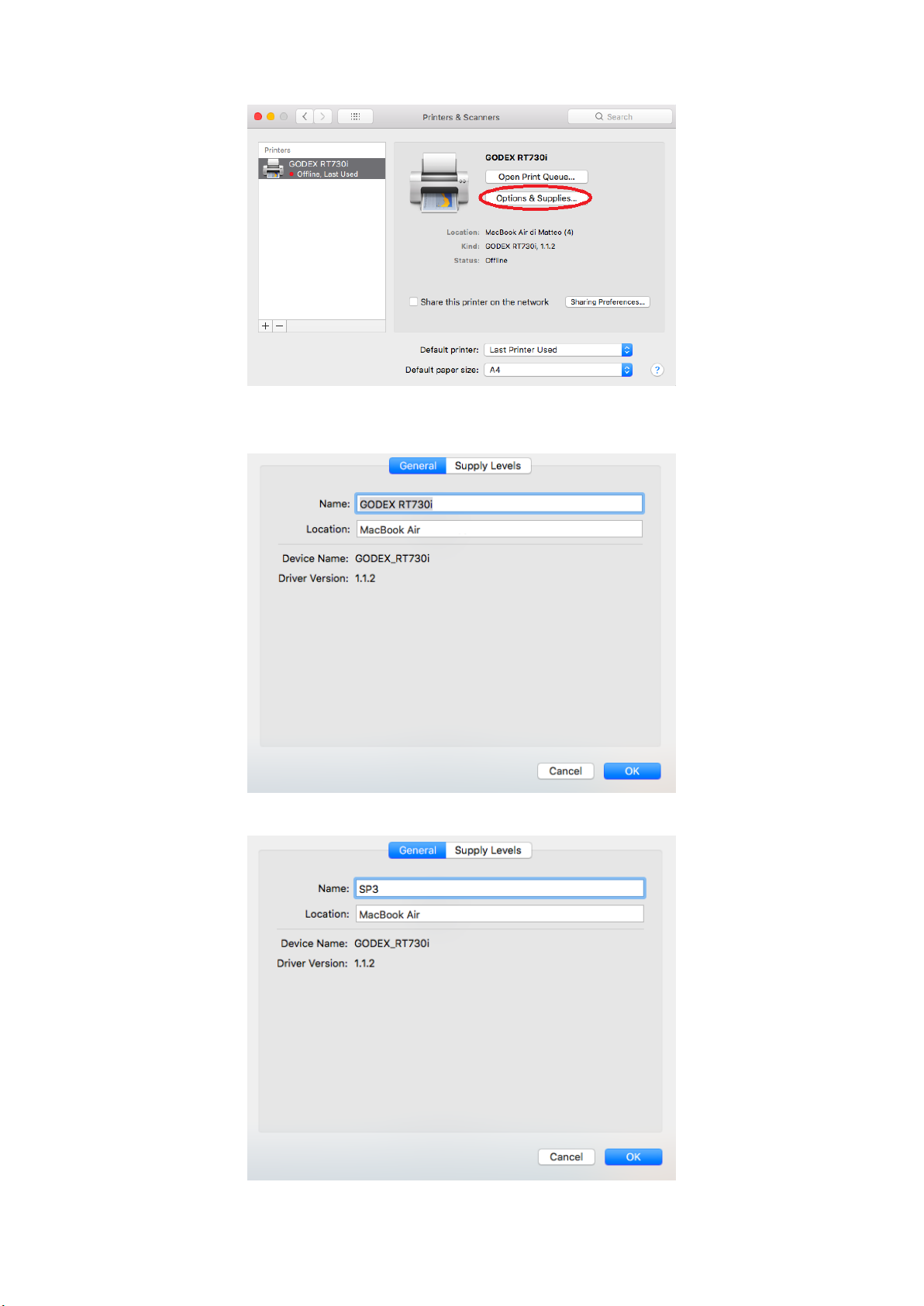
10
14. In “Printer & Scanner” press “Options & Supplies”
15. Rename “GODEX RT730i” to “SP3” (“GODEX RT700” to “SP1”)
Otros manuales para SP1
1
Este manual sirve para los siguientes modelos
1
Tabla de contenidos
Otros manuales de Impresora de Texlabel


