Tescom TC-5570PM Manual de usuario

TC-5570PM mmWave OTA Test System
User Manual
20200429

Copyright ©2020 TESCOM CO.,LTD. ALL RIGHTS RESERVED
Address | (10442) #927 Unitechvil 142, Ilsan-ro, Ilsandong-gu, Goyang-si, Gyeonggi-do
TEL | +82-31-920-6600
Website | en.tescom.co.kr

Table of Contents
iii
Table of Contents
Revision History
WARRANTY
Safety Considerations
Safety Symbols and Terms
PART 1. Getting Started
1. Product Overview
1.1 Introduction
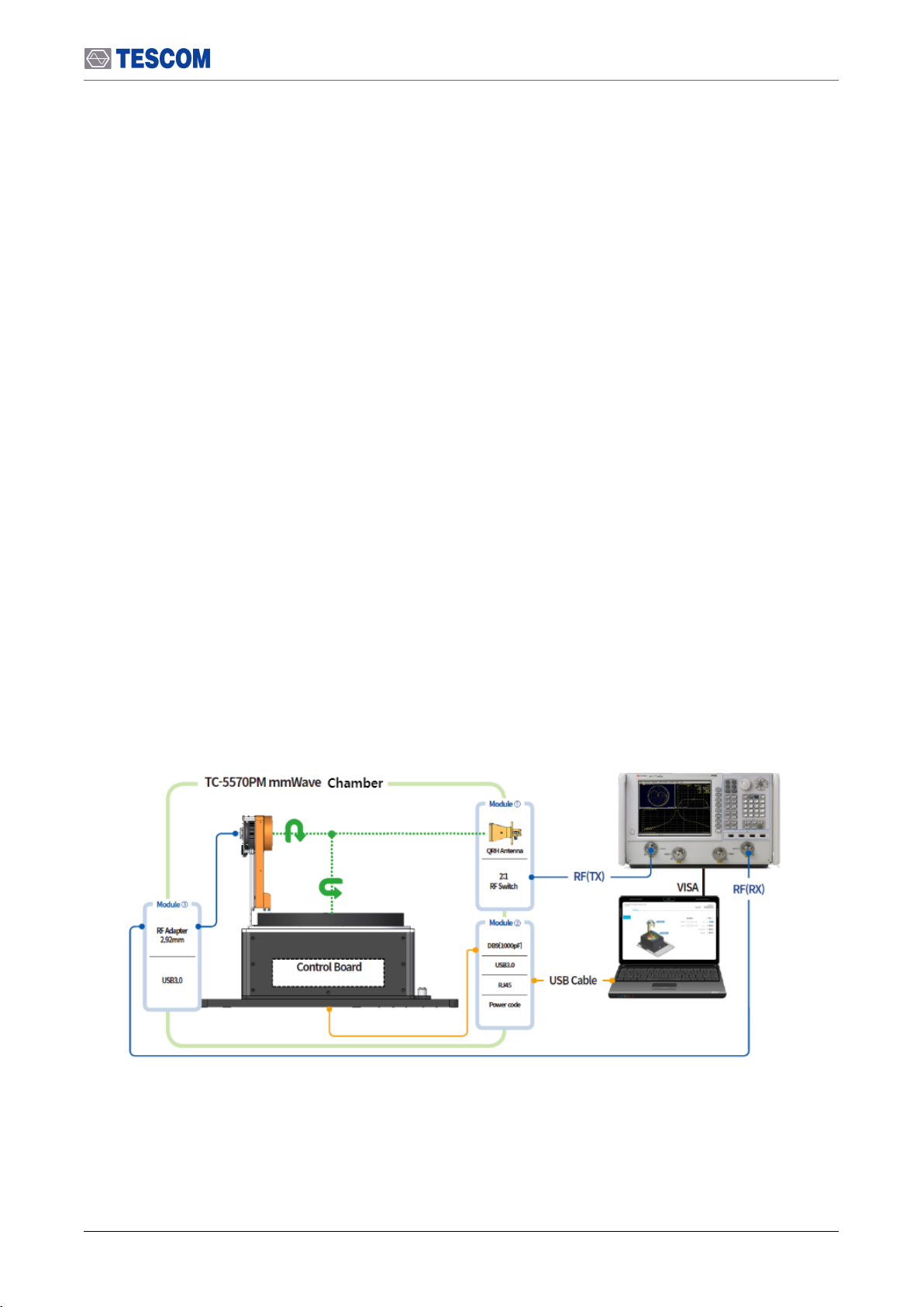
1.2 TC-5570PM Sample Configuration
1.3 Specifications
1.4 Exterior and Accessory Inspection
1.5 Operating Environment
1.6 TESCOM Sales and Service Office
PART 2. Putting into Operation
2. Setup and Operation
2.1 TC-5570PM Hardware Description
3. TC-5500A (3D Rotator)
3.1 3D Rotator Component Identification
3.2 Setting Up
4. Antenna Module
4.1 Test Antenna Module
4.2 Connecting RF Cables to Antenna Modules
4.3 Test Antenna Module Replacement
4.4 Calibration Antenna Fixture
5. Connecting 3D Rotator to PC
5.1 RS-232C Configuration
5.2 TC-5570PM Remote Program GUI
5.3 TC-5570PM Remote Command
. . . . . . . . . . . . . . . . . . . . . . . . . . . . . . . . . . . . . . . . . . . . . . . . . . . . . . . . . . . . . . . . iii
. . . . . . . . . . . . . . . . . . . . . . . . . . . . . . . . . . . . . . . . . . . . . . . . . . . . . . . . . . . . . . . . . . v
. . . . . . . . . . . . . . . . . . . . . . . . . . . . . . . . . . . . . . . . . . . . . . . . . . . . . . . . . . . . . . . . . . . . . vi
. . . . . . . . . . . . . . . . . . . . . . . . . . . . . . . . . . . . . . . . . . . . . . . . . . . . . . . . . . . . . vii
. . . . . . . . . . . . . . . . . . . . . . . . . . . . . . . . . . . . . . . . . . . . . . . . . . . . . . . . . . viii
. . . . . . . . . . . . . . . . . . . . . . . . . . . . . . . 1
. . . . . . . . . . . . . . . . . . . . . . . . . . . . . . . . . . . . . . . . . . . . . . . . . . . . . . . . . . . 2
. . . . . . . . . . . . . . . . . . . . . . . . . . . . . . . . . . . . . . . . . . . . . . . . . . . . . . . . . . . . . . . . . . . . . . 2
. . . . . . . . . . . . . . . . . . . . . . . . . . . . . . . . . . . . . . . . . . . . . . . . . . . . 3
. . . . . . . . . . . . . . . . . . . . . . . . . . . . . . . . . . . . . . . . . . . . . . . . . . . . . . . . . . . . . . . . . . . . . 5
. . . . . . . . . . . . . . . . . . . . . . . . . . . . . . . . . . . . . . . . . . . . . . . . . . . . . 7
. . . . . . . . . . . . . . . . . . . . . . . . . . . . . . . . . . . . . . . . . . . . . . . . . . . . . . . . . . . . . 7
. . . . . . . . . . . . . . . . . . . . . . . . . . . . . . . . . . . . . . . . . . . . . . . . . . . . . 8
. . . . . . . . . . . . . . . . . . . . . . . . . . 9
. . . . . . . . . . . . . . . . . . . . . . . . . . . . . . . . . . . . . . . . . . . . . . . . . . . . . . . . . 10
. . . . . . . . . . . . . . . . . . . . . . . . . . . . . . . . . . . . . . . . . . . . . . . . . . . . 10
. . . . . . . . . . . . . . . . . . . . . . . . . . . . . . . . . . . . . . . . . . . . . . . . . . . . . . . 19
. . . . . . . . . . . . . . . . . . . . . . . . . . . . . . . . . . . . . . . . . . . . . . . . . . 19
. . . . . . . . . . . . . . . . . . . . . . . . . . . . . . . . . . . . . . . . . . . . . . . . . . . . . . . . . . . . . . . . . . . . . . . 21
. . . . . . . . . . . . . . . . . . . . . . . . . . . . . . . . . . . . . . . . . . . . . . . . . . . . . . . . . . . . 26
. . . . . . . . . . . . . . . . . . . . . . . . . . . . . . . . . . . . . . . . . . . . . . . . . . . . . . . . . . . . . . 26
. . . . . . . . . . . . . . . . . . . . . . . . . . . . . . . . . . . . . . . . . . . . . 27
. . . . . . . . . . . . . . . . . . . . . . . . . . . . . . . . . . . . . . . . . . . . . . . . . . . 30
. . . . . . . . . . . . . . . . . . . . . . . . . . . . . . . . . . . . . . . . . . . . . . . . . . . . . . . . . 31
. . . . . . . . . . . . . . . . . . . . . . . . . . . . . . . . . . . . . . . . . . . . . . . . . . 32
. . . . . . . . . . . . . . . . . . . . . . . . . . . . . . . . . . . . . . . . . . . . . . . . . . . . . . . . . . . . . 32
. . . . . . . . . . . . . . . . . . . . . . . . . . . . . . . . . . . . . . . . . . . . . . . . . . . . 35
. . . . . . . . . . . . . . . . . . . . . . . . . . . . . . . . . . . . . . . . . . . . . . . . . . . . . . 36

iv
6. Calibration
6.1 Required Equipments
6.2 Calibration Procedure
PART 3. Maintenance
7. Maintenance
7.1 Maintaining Shielding Performance
7.2 Performance Test
. . . . . . . . . . . . . . . . . . . . . . . . . . . . . . . . . . . . . . . . . . . . . . . . . . . . . . . . . . . . . . . . . 42
. . . . . . . . . . . . . . . . . . . . . . . . . . . . . . . . . . . . . . . . . . . . . . . . . . . . . . . . . . . . . . 42
. . . . . . . . . . . . . . . . . . . . . . . . . . . . . . . . . . . . . . . . . . . . . . . . . . . . . . . . . . . . . . 45
. . . . . . . . . . . . . . . . . . . . . . . . . . . . . . . . . 57
. . . . . . . . . . . . . . . . . . . . . . . . . . . . . . . . . . . . . . . . . . . . . . . . . . . . . . . . . . . . . . . 58
. . . . . . . . . . . . . . . . . . . . . . . . . . . . . . . . . . . . . . . . . . . . . . . . . . . 58
. . . . . . . . . . . . . . . . . . . . . . . . . . . . . . . . . . . . . . . . . . . . . . . . . . . . . . . . . . . . . . . . . 59

Revision History
v
Revision History
Version Description Date
1.0 Initial Release 2019-02-21
1.1 First Revision 2020-04-28

WARRANTY
vi
TESCOM guarantees that this product will be free from defects in materials and workmanship for one
year from the date of shipment. During the warranty period, TESCOM will, at its discretion, either repair
or replace defective products.
For the warranty service, customer must notify TESCOM of the defect before the expiration of the
warranty period and make suitable arrangements for the performance of service. Customer shall be
responsible for packaging and shipping the defective product to TESCOM or to a service center
designated by TESCOM. Customer shall pay for shipping charges as well as any other charges incurred
outside of Korea. TESCOM shall pay shipping charge to return the product to the customer.
This warranty does not apply to Expendables and Accessories and any failure or damage caused by
improper use or unauthorized service. In such cases, TESCOM may refuse to offer any service under the
warranty.
LIMITATION OF WARRANTY
The foregoing warranty shall not apply to defects resulted from software (user interface) supplied by the
customer or any third party, unauthorized modification or misuse, accident or abnormal condition of
operation. Also, Tescom does NOT warrant certain parts which are considered expendable such as
gaskets, gas springs, handle assemblies, accessories, antennas, I/O interfaces, modules and fixtures.
TESCOM's responsibility to repair or replace defective products is the sole and exclusive remedy provided
to the customer for breach of this warranty. TESCOM will not be liable for any indirect, extraordinary,
incidental, or consequential damages, despite any advance notice of the possibility of such damages.

Safety Considerations
vii
Review the following safety precautions to avoid injury, damage to this product or any product
connected.
Do not disassemble any part unless listed replaceable in this manual
Do not operate in wet/damp conditions
To avoid injury or fire hazard, do not operate this product in wet or damp conditions.
Do not operate in explosive atmosphere
To avoid injury or fire hazard, do not operate this product in an explosive atmosphere.
Do not operate with suspected failures
If there is any damage to this product, have it inspected by qualified service personnel
Provide proper ventilation
To prevent product overheating, provide proper ventilation.
Install and operate in an appropriate environment
Refrain from using this equipment in a place subject to intense vibration, direct sunlight, or uneven
ground. Also, use it where the temperature is between 0 °C to 50 °C and relative humidity is less
than 85%.

Safety Symbols and Terms
viii
Various symbols are used in this manual and on the product itself to ensure correct usage, to prevent
danger to the user and others, and to prevent property damage. The meanings of these symbols are
described below. It is important that you read these descriptions thoroughly and fully understand its
context.
Safety Terms
WARNING: Identifies conditions or practices that could result in injury or loss of life.
CAUTION: Identifies conditions or practices that could result in damage to the product or other property.
Symbols: The following symbols may appear in this manual or on the product.
Symbol Meaning
Crush hazard
Moving part can cause serious injury. Must not operate Shield Box when
unauthorized person is in proximity.
Symbol Meaning
Indicates a potentially hazardous situation which,if not avoided, could result in
serious injury and/or equipment damage.
Indicates a potentially hazardous situation which, if not avoided, may result in a
minor or moderate injury and/or equipment damage. It may also be used to
alert against unsafe practices.
Indicates necessary information or useful information for operation and
maintenance.

PART 1. Getting Started
1

1. Product Overview
Introduction
2
1.1 Introduction
TC-5570PM is a '5G & mmWave' OTA chamber designed to allow OTA (over the air) testing under the
far-field conditions even in a small space.
It provides an environment for performance testing of mmWave antennas by applying an optimized
absorber for '5G and mmWave OTA' tests.
But for the large radiator antennas, it may be difficult to meet Far-Field test conditions. (antenna size
within 51 mm at 28 GHz, 42 mm at 40 GHz).
2 laser pointers are installed orthographically in the TC-5570PM system, so DUT can be easily
positioned and set on a test zone. Moreover, for measuring convenience, LED light can be supported
and an angle-adjustable camera module is installed inside the chamber for a user can check the 3D
rotator status on a PC.
TC-5570PM System offers various antenna module options. Please check Table 1-1 Optional Test
Antenna Module for details.
Tabla de contenidos
Otros manuales de Equipo de prueba de Tescom

Tescom
Tescom TC-5915AP Manual de usuario

Tescom
Tescom TC-5922BP Manual de usuario

Tescom
Tescom TC-3000C Manual de usuario

Tescom
Tescom ACT6000 Manual de usuario

Tescom
Tescom TC-3000C Manual de usuario

Tescom
Tescom MTP200B Manual de usuario

Tescom
Tescom TC-5062C Manual de usuario

Tescom
Tescom TC-5972DP Manual de usuario
Manuales populares de Equipo de prueba de otras marcas

SMART
SMART KANAAD SBT XTREME 3G Series Manual de usuario

Agilent Technologies
Agilent Technologies BERT Serial Manual de usuario

Agilent Technologies
Agilent Technologies N3280A Manual de usuario

Vernier
Vernier Go Direct Voltage Manual de usuario

Lifeloc
Lifeloc R.A.D.A.R. Manual de usuario

Fluke
Fluke T5-600 Instrucciones de funcionamiento e instalación