
Terasic de10-nano Manual de usuario

1
Self-Balancing Robot_Getting_Started_Guide www.terasic.com.cn
Contents
Chapter 1 Introduction ......................................................................................................2
Chapter 2 Package Contents ..............................................................................................3
Chapter 3 Components and Functions ...............................................................................4
Chapter 4 Switches and LEDs Status Elements..................................................................6
4.1 MSEL[4:0] Setting ...............................................................................................................6
4.2 SW0 and SW1 on DE10-Nano Board..............................................................................7
4.3 Motor Driver Board LEDs..................................................................................................8
4.4 LEDs on DE10-Nano Board ..............................................................................................8
Chapter 5 Basic Operations .............................................................................................10
5.1 Connect Power Port........................................................................................................... 10
5.2 Power on the Robot........................................................................................................... 11
5.3 Keep a Balanced State ...................................................................................................... 11
5.4 Attitude Control ................................................................................................................. 12
Chapter 6 Advanced Features Demonstration..................................................................13
6.1 Object Following and Obstacle Avoidance.................................................................. 13
6.2 Smartphone APP Control ................................................................................................. 14
6.3 IR Remote Control ............................................................................................................ 22
Chapter 7 Charging the battery .......................................................................................23

2
Self-Balancing Robot_Getting_Started_Guide www.terasic.com.cn
Self-Balancing Robot_Getting_Started_Guide
Chapter 1 Introduction
Based on the Terasic DE10-Nano SoC board platform, designed and manufactured
independently by Terasic, the Self-Balancing Robot is a Multi-functional kit. It can
implement advanced features like object following, obstacle avoidance and so on. It can
also be remote controlled by an Android Smartphone’s APP and IR remote control. This
guide describes in detail how users can make the robot work.

3
Self-Balancing Robot_Getting_Started_Guide www.terasic.com.cn
Chapter 2 Package Contents
Figure 2-1 shows the package contents of the Self-Balancing Robot kit.
Figure 2-1 Self-Balancing Robot package
Self-Balancing Robot kit package contents:
① Self-Balancing Robot
② Lithium Battery ③ Lithium Battery Charger④ IR Remote Control
⑤ Mini USB Cable
⑥ Micro USB Cable
⑦ Quick Start Guide
4
Self-Balancing Robot_Getting_Started_Guide www.terasic.com.cn
Chapter 3 Components and Functions
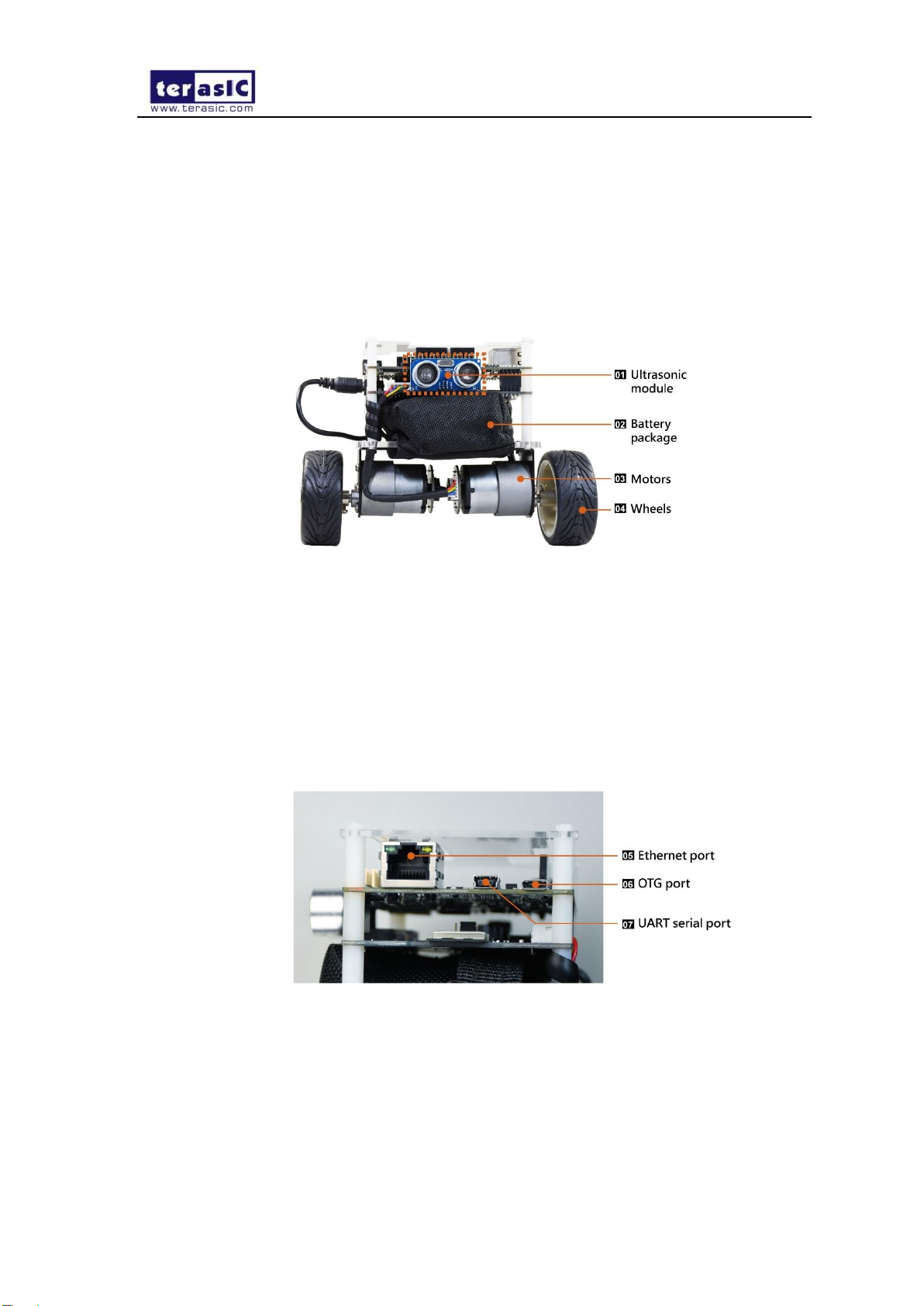
This chapter will describe the robot’s components and the functions of the components,
such as the ultrasonic module, motors, wheels and driving board power interface. Figure
3-1, Figure 3-2, Figure 3-3 and Figure 3-4 show all the components and specify their
functions.
Figure 3-1 Self-Balancing Robot components
⑴ Ultrasonic module:implements obstacle avoidance
⑵ Battery package:helps to protect the batteries, and avoid bumping and damaging the
battery.
⑶ Motors:drive the Self-Balancing robot wheels
⑷ Wheels:implements the Self-Balancing robot’s movement
Figure 3-2 Self-Balancing robot components
⑸ Ethernet port:implements connecting to the ethernet when users develop their own
designs on the DE10-Nano
⑹ OTG port:implements Host or Device mode when users develop their own design on
the DE10-Nano

5
Self-Balancing Robot_Getting_Started_Guide www.terasic.com.cn
⑺ UART serial port:implement the communication between the board and PC when
users develop their own design on the DE10-Nano
Figure 3-3 Self-Balancing robot components
⑻ DE10-Nano Development Board power supply jack:5V power supply port
⑼ HDMI TX port:users can connect the Displayer to HDMI interface when they make
image processing designs
⑽ USB Blaster II port:users can download their own programs to the board through the
connector
⑾ Motor driver board power jack:connects to the battery power supply port and provides
power for the Self-Balancing robot
⑿ Main power Switch:power on or power off the Self-Balancing robot
⒀ Battery power output plug:connect to motor driver board power port

6
Self-Balancing Robot_Getting_Started_Guide www.terasic.com.cn
Figure 3-4 Self-Balancing robot components
⒁ Battery charging jack:connects the charger to charge the battery
⒂ Battery:the Self-Balancing robot’s power source
Chapter 4 Switches and LEDs Status Elements
4.1 MSEL[4:0] Setting
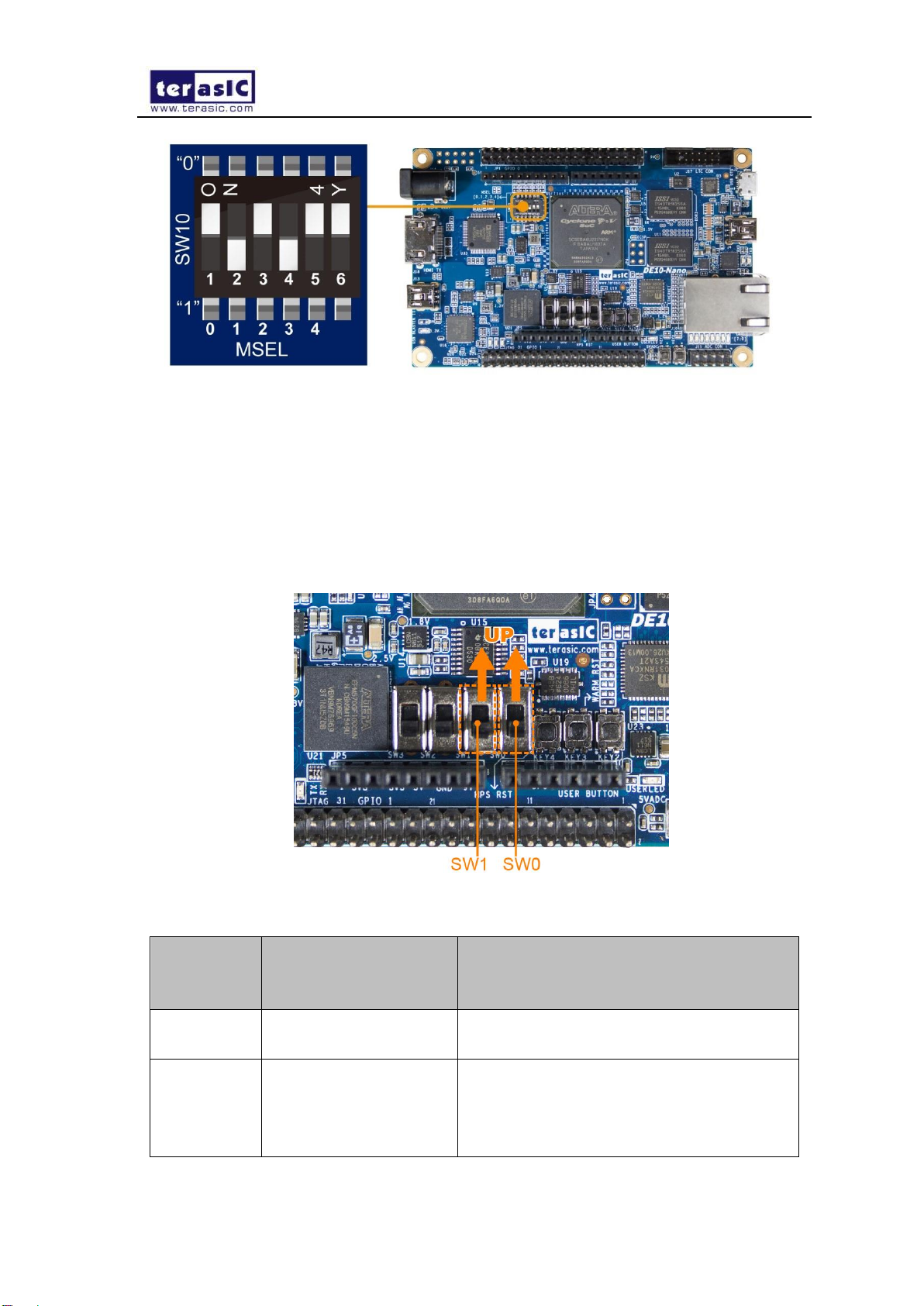
There are two version designs for the Self-Balancing Robot, the Nios II version and the
ARM version. The main difference is the FPGA configuration method. With the Nios II
version design (Micro SD card not included), users need to set MSEL[4:0] on the DE10-
Nano board to “10010”, as shown in Figure 4-1, the FPGA is configured from EPCS128.
With the ARM version design (Micro SD card provided), users need to set MSEL[4:0] on
the DE10-Nano board to “01010”, as shown in Figure 4-2, FPGA is configured from the
HPS software.
Figure 4-1 Set MSEL[4:0] to 10010
7
Self-Balancing Robot_Getting_Started_Guide www.terasic.com.cn
Figure 4-2 Set MSEL[4:0] to 01010
4.2 SW0 and SW1 on DE10-Nano Board
Figure 4-3 shows the SW0 and SW1 on the DE10-Nano board, Table 4-1 describes the
corresponding modes and functions when SW0 and SW1 are set to different positions.
Figure 4-3 SW0 and SW1 on DE10-Nano board
Table 4-1 SW0 and SW1 purpose
SW0 &
SW1
position
Robot mode and
function
Description
00
Default mode
(Bluetooth & IR mode)
The robot can be controlled by smartphone
APP and IR remote control
10
Default mode &
Obstacle Avoidance
The robot can be controlled by a
smartphone’s APP and IR remote control,
it implements the obstacle avoidance
function

8
Self-Balancing Robot_Getting_Started_Guide www.terasic.com.cn
Note: 0-Switch is on Down position;1-Switch is on Up position.
4.3 Motor Driver Board LEDs
Figure 4-4 shows the LED1 and LED2 on the motor driver board, Table 4-2 describes the
functions of LED1 and LED2.
Figure 4-4 LED1 and LED2 on motor driver board
Table 4-2 Motor driver board LEDs functions
LED name
Description
LED1
Indicates the power supply status to motor driver
board
LED2
Indicates the motor driver board provides 5V power
to the DE10-Nano board
4.4 LEDs on DE10-Nano Board
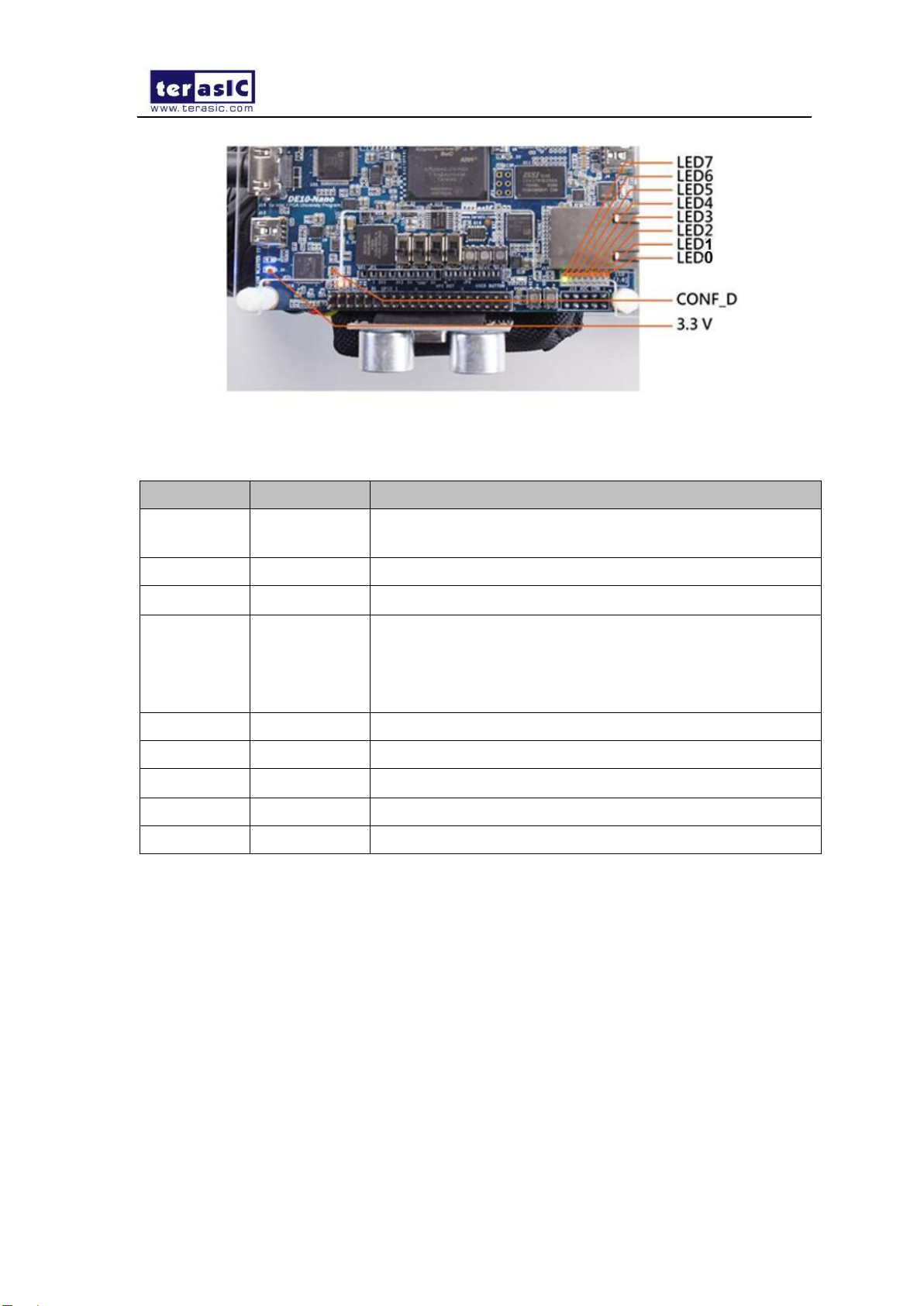
Figure 4-5 shows the 3.3V power LED, CONF_D LED and other LEDS on the DE10-Nano
board, Table 4-3 describes the LEDs functions.
01
Object following and
obstacle avoidance
The robot implements the object following
and obstacle avoidance
11
Debug mode
Only supports ARM version robot, the
control program will stop running, users
need to reboot the robot or run the program
again to control the robot. Normally it is
used to debug the robot.
9
Self-Balancing Robot_Getting_Started_Guide www.terasic.com.cn
Figure 4-5 Indicator LEDs on DE10-Nano board
Table 4-3 Indicator LEDs on the DE10-Nano board
LED name
LED status
Description
3.3V power
LED
Light On
Power the DE10-Nano board with 3.3V from the GPIO
interface
CONF_D
Light On
DE10-Nano board Configuration done
LED7
Light On
Robot is keeping balanced status
LED6~5
0--Light On
1--Light off
00--robot is in default mode (Bluetooth & IR control)
01--robot is in default mode and implements obstacle
avoidance function
10--robot implements object following function
LED4
Light On
Battery power supply voltage is lower than 10V
LED3
Light On
Robot is turning right
LED2
Light On
Robot is turning left
LED1
Light On
Robot is moving backward
LED0
Light On
Robot is moving forward
Note: When LED3~0 are all lit indicates the robot is in DEMO mode.

10
Self-Balancing Robot_Getting_Started_Guide www.terasic.com.cn
Chapter 5 Basic Operations
This chapter illustrates the basic operations on how to start the robot when users receive it.
5.1 Connect Power Port
Remove the red protective cap from the output plug of the battery power, as shown
in Figure 5-1.
Figure 5-1 Remove the protective cap
Insert the output plug of battery power into the input port of the motor driver board, as
shown in Figure 5-2.
Otros manuales para de10-nano
4
Tabla de contenidos


