
Tektronix 2 Series Manual de usuario

2 Series MSO Battery Pack Instructions
Battery pack information
The battery pack allows you to perform measurements without relying on AC power. All 2 Series MSO instruments support the installation
of the battery pack.
You can operate the instrument continuously for approximately three hours with one battery and six hours with two batteries in the battery
pack. The instrument turns off automatically when the batteries run out of power. An on-screen icon and battery status menu indicates the
remaining battery power.
Parts list
Item Part Number Description
1 2-BP 2 Series MSO Battery Pack with two battery slots; ordered separate from instrument purchase.
2-BATPK 2 Series MSO Battery Pack with two battery slots; option ordered with instrument purchase.
2 TEKBAT-XX Battery; lithium-ion, rechargeable, SMBUS, recessed terminals, UL, safety controlled
3 211-1722-XX Pack of 4 screws, M4X.7X12MM
4 174-7369-XX Ground cable, safety controlled
Recommended installation tools
Use a screwdriver handle with No. 2 Phillips screw tip or a No. 2 Phillips screwdriver to install the battery pack onto your instrument.
Copyright © Tektronix
tek.com
*P071376700*
071-3767-00

Important safety information
This manual contains information and warnings that must be followed by the user for safe operation and to keep the product in a safe
condition.
To safely perform service on this product, see the Service safety summary that follows the General safety summary.
General safety summary
Use the product only as specified. Review the following safety precautions to avoid injury and prevent damage to this product or any
products connected to it. Carefully read all instructions. Retain these instructions for future reference.
This product shall be used in accordance with local and national codes.
For correct and safe operation of the product, it is essential that you follow generally accepted safety procedures in addition to the safety
precautions specified in this manual.
The product is designed to be used by trained personnel only.
Only qualified personnel who are aware of the hazards involved should remove the cover for repair, maintenance, or adjustment.
Before use, always check the product with a known source to be sure it is operating correctly.
While using this product, you may need to access other parts of a larger system. Read the safety sections of the other component manuals
for warnings and cautions related to operating the system.
When incorporating this equipment into a system, the safety of that system is the responsibility of the assembler of the system.
To avoid fire or personal injury
Do not operate without covers.
Do not operate this product with covers or panels removed, or with the case open. Hazardous voltage exposure is possible.
Avoid exposed circuitry.
Do not touch exposed connections and components when power is present.
Do not operate with suspected failures.
If you suspect that there is damage to this product, have it inspected by qualified service personnel.
Disable the product if it is damaged. Do not use the product if it is damaged or operates incorrectly. If in doubt about safety of the product,
turn it off and disconnect the power cord. Clearly mark the product to prevent its further operation.
Before use, inspect voltage probes, test leads, and accessories for mechanical damage and replace when damaged. Do not use probes or
test leads if they are damaged, if there is exposed metal, or if a wear indicator shows.
Examine the exterior of the product before you use it. Look for cracks or missing pieces.
Use only specified replacement parts.
Replace batteries properly
Replace batteries only with the specified type and rating.
Recharge batteries for the recommended charge cycle only.
Wear eye protection.
Wear eye protection if exposure to high-intensity rays or laser radiation exists.
Important safety information
2

Do not operate in wet/damp conditions.
Be aware that condensation may occur if a unit is moved from a cold to a warm environment.
Do not operate in an explosive atmosphere.
Keep product surfaces clean and dry.
Remove the input signals before you clean the product.
Provide proper ventilation.
Refer to the installation instructions in the manual for details on installing the product so it has proper ventilation.
Slots and openings are provided for ventilation and should never be covered or otherwise obstructed. Do not push objects into any of the
openings.
Provide a safe working environment
Always place the product in a location convenient for viewing the display and indicators.
Avoid improper or prolonged use of keyboards, pointers, and button pads. Improper or prolonged keyboard or pointer use may result in
serious injury.
Be sure your work area meets applicable ergonomic standards. Consult with an ergonomics professional to avoid stress injuries.
Use only the Tektronix rackmount hardware specified for this product.
Service safety summary
The Service safety summary section contains additional information required to safely perform service on the product. Only qualified
personnel should perform service procedures. Read this Service safety summary and the General safety summary before performing any
service procedures.
To avoid electric shock.
Do not touch exposed connections.
Do not service alone.
Do not perform internal service or adjustments of this product unless another person capable of rendering first aid and resuscitation is
present.
Disconnect power.
To avoid electric shock, switch off the product power and disconnect the power cord from the mains power before removing any covers or
panels, or opening the case for servicing.
Use care when servicing with power on.
Dangerous voltages or currents may exist in this product. Disconnect power, remove battery (if applicable), and disconnect test leads
before removing protective panels, soldering, or replacing components.
Verify safety after repair.
Always recheck ground continuity and mains dielectric strength after performing a repair.
Terms in this manual
These terms may appear in this manual:
WARNING: Warning statements identify conditions or practices that could result in injury or loss of life.
Important safety information
3
CAUTION: Caution statements identify conditions or practices that could result in damage to this product or other property.
Terms on the product
These terms may appear on the product:
• DANGER indicates an injury hazard immediately accessible as you read the marking.
• WARNING indicates an injury hazard not immediately accessible as you read the marking.
• CAUTION indicates a hazard to property including the product.
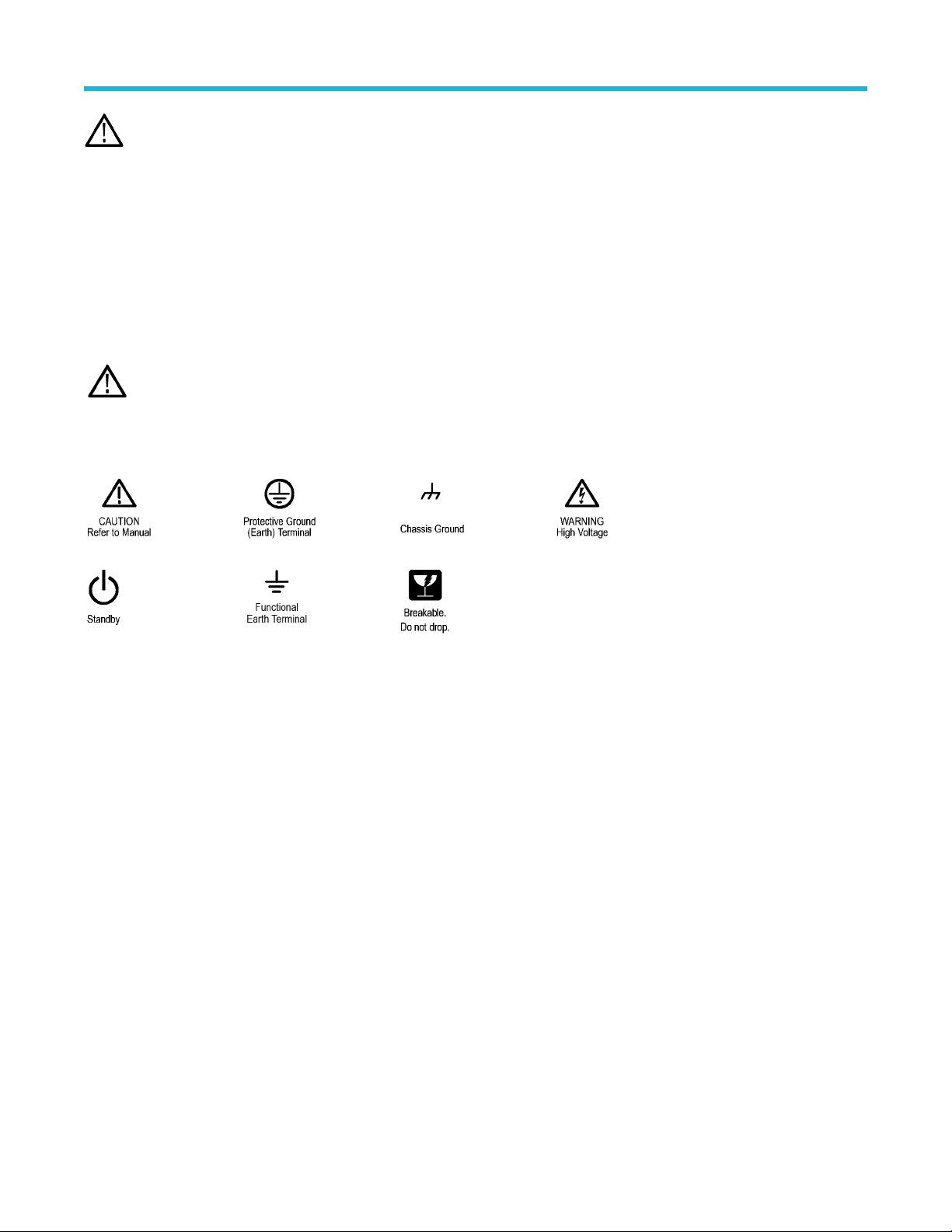
Symbols on the product
When this symbol is marked on the product, be sure to consult the manual to find out the nature of the potential
hazards and any actions which have to be taken to avoid them. (This symbol may also be used to refer the user to
ratings in the manual.)
The following symbols(s) may appear on the product.
Important safety information
4

Compliance information
This section lists the safety and environmental standards with which the instrument complies. This product is intended for use by
professionals and trained personnel only; it is not designed for use in households or by children.
Compliance questions may be directed to the following address:
Tektronix, Inc.
PO Box 500, MS 19-045
Beaverton, OR 97077, USA
tek.com
Safety compliance
This section lists other safety compliance information.
Equipment type
Test and measuring equipment.
Pollution degree description
A measure of the contaminants that could occur in the environment around and within a product. Typically the internal environment inside a
product is considered to be the same as the external. Products should be used only in the environment for which they are rated.
• Pollution Degree 1. No pollution or only dry, nonconductive pollution occurs. Products in this category are generally encapsulated,
hermetically sealed, or located in clean rooms.
• Pollution Degree 2. Normally only dry, nonconductive pollution occurs. Occasionally a temporary conductivity that is caused by
condensation must be expected. This location is a typical office/home environment. Temporary condensation occurs only when the
product is out of service.
• Pollution Degree 3. Conductive pollution, or dry, nonconductive pollution that becomes conductive due to condensation. These are
sheltered locations where neither temperature nor humidity is controlled. The area is protected from direct sunshine, rain, or direct
wind.
• Pollution Degree 4. Pollution that generates persistent conductivity through conductive dust, rain, or snow. Typical outdoor locations.
Pollution degree rating
Pollution Degree 2 (as defined in IEC 61010-1)
Measurement and overvoltage category descriptions
Measurement terminals on this product may be rated for measuring mains voltages from one or more of the following categories (see
specific ratings marked on the product and in the manual).
• Measurement Category II. For measurements performed on circuits directly connected to the low-voltage installation.
• Measurement Category III. For measurements performed in the building installation.
• Measurement Category IV. For measurements performed at the source of low-voltage installation.
Note: Only mains power supply circuits have an overvoltage category rating. Only measurement circuits have a measurement
category rating. Other circuits within the product do not have either rating.
Mains overvoltage category rating
Overvoltage Category I (as defined in IEC 61010-1)
Compliance information
5

Instrument label accessibility
Installation of the battery pack covers the back instrument label. The label displays important information like the instrument model number,
serial number, and CSA mark. To view label, uninstall the battery pack. The model and serial number is also accessible through the
instrument user interface.
Environmental compliance
This section provides information about the environmental impact of the product.
Product end-of-life handling
Observe the following guidelines when recycling an instrument or component:
Equipment recycling Production of this equipment required the extraction and use of natural resources. The equipment may
contain substances that could be harmful to the environment or human health if improperly handled at the
product’s end of life. To avoid release of such substances into the environment and to reduce the use of
natural resources, we encourage you to recycle this product in an appropriate system that will ensure that
most of the materials are reused or recycled appropriately.
This symbol indicates that this product complies with the applicable European Union requirements according to Directives
2012/19/EU and 2006/66/EC on waste electrical and electronic equipment (WEEE) and batteries. For information about
recycling options, check the Tektronix Web site (www.tek.com/productrecycling).
Battery recycling This product (2 Series MSO Battery Pack) is packed with a lithium-ion rechargeable battery pack. Please
dispose of or recycle the battery pack at its end of life according to local government regulations.
This lithium-ion rechargeable battery pack must be recycled or disposed of properly at its end of life.
• Lithium-ion batteries are subject to disposal and recycling regulations that vary by country and region. Always check and follow your
applicable regulations before disposing of any battery. Contact Rechargeable Battery Recycling Corporation (www.rbrc.org) for U.S.A.
and Canada, or your local battery recycling organization.
• Many countries prohibit the disposal of waste batteries in standard waste receptacles.
• Place only discharged batteries in a battery collection container. Use electrical tape or other approved covering over the battery
connection points to prevent short circuits.
Transporting batteries
The small lithium-ion rechargeable battery that is packed with this product does not exceed a capacity of 100 Wh per battery or 20 Wh
per component cell. Each battery type has been shown by the manufacturer to comply with the applicable requirements of the UN Manual
of Tests and Criteria Part III, Subsection 38.3. Consult your carrier to determine which lithium battery transportation requirements are
applicable to your configuration, including to its re-packaging and re-labeling, prior to reshipment of the product by any mode of transport.
Compliance information
6

Operating requirements
Use the instrument within the required operating temperature, power, altitude, and signal input voltage ranges to provide the most accurate
measurements and safe instrument operation.
Table 1: Environment requirements
Characteristic Description
Operating temperature 0°C to +50°C (+32°F to 120°F), with 5 °C/minute maximum gradient, noncondensing (NC)
For proper cooling, keep the rear of the instrument clear of obstructions for 2 inches (51 mm).
Operating humidity 5% to 90% relative humidity at temperatures up to +30°C,
5% to 60% relative humidity at temperatures greater than +30°C and up to +50°C.
Operating altitude Up to 3000 meters (9842 feet)
Battery power Requires 2-BATPK battery pack with 2 slots for batteries to be ordered with instrument or 2-BP battery pack
with 2 slots for batteries to be ordered post instrument purchase
Supports up to 2 TEKBAT-XX Li-Ion rechargeable batteries. Operating time; Up to 3 hours single battery and
up to 6 hours dual batteries.
Tektronix recommends using the TEKCHG-XX external battery charger to charge the TEKBAT-XX batteries in
ambient environments greater than +30°C.
Table 2: Power requirements
Characteristic Description
Power source voltage 24 V DC
Power source current 2.5 A
Operating requirements
7

Operating safely with battery power
For safe operation, the instrument chassis should always remain at earth ground potential.
WARNING: To avoid electric shock, always use the Tektronix-provided grounding cable when the oscilloscope is operating on
battery power and not connected to the external power supply. The Tektronix-provided grounding cable is not for permanent
usage.
Without a connection between the chassis and earth ground, you may receive a shock from exposed metal on the chassis if you connect
an input to a hazardous voltage (>30 VRMS, >42 Vpk). To protect yourself against possible shock, attach the Tektronix-provided grounding
cable.
The grounding cable is necessary to provide protective bonding between the oscilloscope and a dedicated earthing terminal, in accordance
with the NEC, CEC, and local codes. Consider having a qualified electrician to approve the installation.
The grounding cable shall be connected before powering on the oscilloscope and before attaching the probes to any circuit. Connect the
grounding cable from the ground lug terminal on the side panel of the instrument to a dedicated earthing terminal. Make sure the teeth of
the alligator clip makes good electrical contact and is secured against slipping.
The alligator clip on the grounding cable must be connected to a dedicated earthing terminal, an earthing terminal bar, or identified
equipment grounding points (a rack cabinet for example). Make sure you have a good electrical connection to an appropriate grounding
device that is identified with a Protective Earth symbol, or the word GROUND/GND, or the color green (green ground screw/conductor). If
none of these are present, assume the connection is not earthed.
Always verify that the grounding cable is making good electrical contact by using an ohmmeter or continuity meter between the dedicated
earthing terminal and the ground lug terminal on the side panel of the oscilloscope. Verify again anytime the oscilloscope has been left
unattended.
Make sure the dedicated earthing terminal is located in close proximity to the circuit under test. Keep the grounding cable clear of
heat sources and mechanical hazards such as; sharp edges, screw threads, moving parts, and closing doors/covers. Inspect the cable,
insulation, and terminal ends for damage before use. Do not use a damaged grounding cable. Contact Tektronix for a replacement.
If you choose not to attach the grounding cable, you are not protected against electric shock if you connect the oscilloscope to a hazardous
voltage. You can still use the oscilloscope if you do not connect a signal greater than 30 VRMS (42 Vpk) to the probe tip, the BNC connector
center, or the common lead. Make sure all probe common leads are connected to the same voltage.
WARNING: Hazardous voltages may exist in unexpected places due to faulty circuitry in the device under test.
CAUTION: When operating the instrument on battery power do not connect a grounded device, such as a printer or computer, to
the oscilloscope unless the instrument grounding cable is connected to the earth ground.
Operating safely with battery power
8

Battery pack installation
Install the battery pack to the back of your instrument.
Before you begin
The battery pack must be empty during the installation procedure. After installation, insert one or two batteries into the battery pack before
you turn on the instrument.
CAUTION: The battery interface connector is susceptible to Electrostatic Discharge (ESD). Use ESD precautions with installing or
removing the battery pack.
Procedure
1. Remove cover from battery interface connector on the back of your instrument.
2. Attach the battery interface cover to the cover slot in the middle of the battery pack.
Use this slot to save the cover for the battery interface connector when the battery pack is installed.
3. Align the connector on your battery pack with the battery interface connector on your instrument and connect the battery pack to your
instrument.
There is a hole on the opposite side of the connector on the instrument and a peg on the battery pack to help with alignment.
4. Install the four provided screws into the corner screw mounts on the battery pack.
To remove the battery pack, reverse this procedure.
WARNING: Before operating the instrument with the battery pack connected without an AC power source, always connect the
ground cable.
Battery pack installation
9

Rechargeable battery installation
The battery pack has 2 battery slots and supports hot swapping of the batteries during operation to extend the battery run time. The
batteries are charged when the instrument is connected to an AC power source or charge each battery separately using the Tektronix
external battery charger (TEKCHG-XX).
Procedure
1. Use your fingers to push on the battery door latch and open the door upward.
The battery door is made to easily detach from the hinges. The battery pack will still operate with the door open or removed.
2. Use the triangle alignment keys on top of the battery and battery pack slot to place the rechargeable battery into slot one or two.
The pull tab will be on the opposite side of the alignment key. A latch secures the battery in place when inserted into the battery pack.
3. Close and latch the battery pack door.
Rechargeable battery installation
10
Otros manuales para 2 Series
3
Este manual sirve para los siguientes modelos
2
Tabla de contenidos
Idiomas:
Otros manuales de Accesorios para cámaras de Tektronix


