
Technman 5501 Manual de usuario

5501
5501 5501
5501
USB
USBUSB
USB-
--
-RS485/RS422
RS485/RS422 RS485/RS422
RS485/RS422
Converter
ConverterConverter
Converter
INSTALLATION
GUIDE
Techn an Electronics Ltd.
- 1 -
Introduction
Technman’s 5501 USB Converter makes it easy to add RS-422 or RS-485
capability to your system. When plugged into the USB port, the converter is
automatically detected and installed. The converter shows as a native
Windows COM port, making it compatible with Windows serial
communication applications.
The Technman 5501 USB Converter provides a reliable solution for
applications requiring single node or multi-drop RS422/RS485
communications over short and long distance. It is ideal for factory
automation equipment, multi-drop data collection devices, barcode
readers, time clocks, scales, data entry terminals, PC to PC long distance
communications and serial communication in harsh environments.
The 5501 converter is powered by the USB port.
Hardware Installation
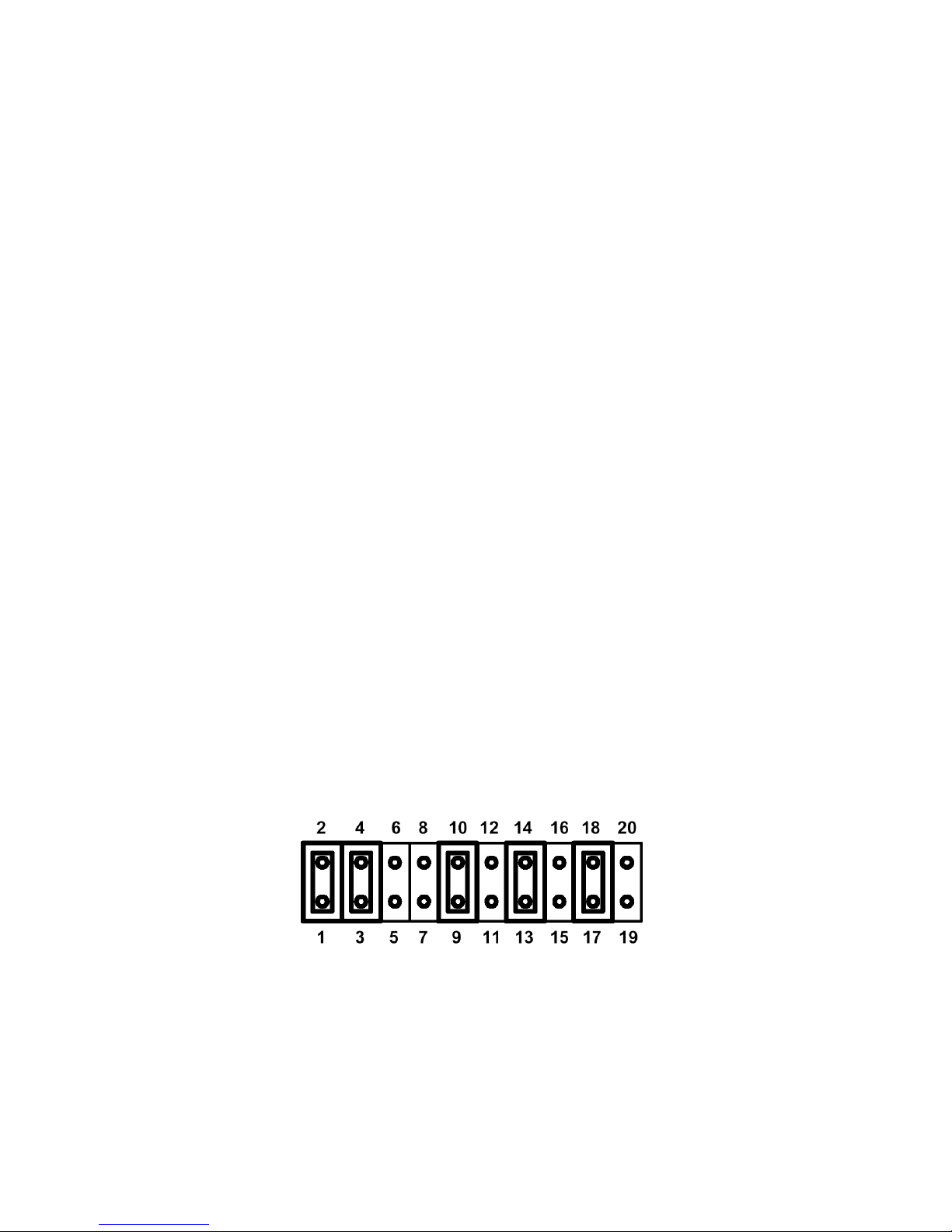
There is a 10 x 2 (20 pin) header block inside the unit that is used to select
the mode of operation. You will need to open up the plastic enclosure and
set the jumper settings to RS-422 mode or RS-485 mode as per the
requirements of your application. After setting the jumpers, plug the
converter into a USB port to start driver installation. The RS-422 & RS-485
Mode Block Configuration Settings are listed below.
Example jumper block setting (RS-422 mode):

- 2 -
RS-422 Mode Block Configuration
Jumper Function
1-2 TxD / RxD Termination of 120 Ohm. This jumper should always be
populated for RS-422.
3-4 CTS/ RTS Termination of 120 Ohm. This jumper should always be
populated for RS-422.
9-10 TxD Driver Always On. As RS-422 is full duplex point to point, the
transmitter should always be enabled.
13-14 RxD Always Enabled. As RS-422 is full duplex point to point, the
receiver should always be enabled.
17-18 Enable CTS Handshaking. This setting allows the data flow to be
controlled using CTS/RTS handshaking if required by the
application.
Note: all other positions = no jumper populated.
RS-485 Mode Block Configuration
Jumper Function
1-2 TxD / RxD Termination of 120 Ohm. This jumper should only be
populated at each end of the cable to meet RS-485 termination
requirements.
5-6
7-8
TxD / RxD Single Pair (half duplex for RS485). Populate both these
jumpers.
11-12 Enable TxD Driver only when transmitting. This is required by RS485
as multiple devices can transmit over the same twisted pair. When a
RS-485 is not transmitting, it’s transmitter must be turned off to
allow other devices to communicate over the same wires.
EITHER
13-14
OR
15 - 16
RxD Always Enabled. In this mode, the same device will also receive
characters transmitted by the RS485 device. These echoed
characters are usually stripped out by the application software.
Transmit Data Echo Suppression Mode. In this mode, characters
transmitted by the RS485 device will NOT be received by the same
device. In this mode there is no need for the application software to
strip out the transmitted data from the received data as it is handled
by the hardware.
19-20 CTS Always Enabled. As there is no hardware handshaking in RS-
485, CTS should be permanently enabled to allow unrestricted flow
of data. If handshaking is required for RS-485 it can be done using X-
On / X-Off handshaking protocol.
Note: all other positions = no jumper populated.

- 3 -
Windows 2000/XP Driver Installation
Note: You will need administrator privileges to install any new drivers under
Windows 2000. To install the driver or update the configuration please log onto
Windows 2000 as "Administrator" or ask your system administrator to install the
USB I/O converter and driver.
Please proceed with the following steps to install the driver:
1. Insert the provided CD-ROM.
2. Plug in the USB connector into the USB port on the 5501 converter, and
connect the USB connector on the other end of the cable to the host
USB port in your computer.
3. Windows will open the "Found New Hardware Wizard". Click "Next".
4. Select "Search for the best driver for my device", and click "Next".
5. Make sure only "CD-Rom drives" is selected and click "Next".
6. Windows searches for drivers for the device "USB to RS422/485
Adapter" and should find suitable drivers on the CD-Rom. Click "Next"
to continue.
7. Windows will copy the necessary files and then has finished installing
the software. Click "Finish".
8. The "Found New Hardware Wizard" appears again, and will complete the
installation for the device "USB Serial Port".
9. Repeat step (4) to (8) to complete installation.
Windows 9x Driver Installation
1. Insert the provided CD-ROM.
2. Plug in the USB connector into the USB port on the 5501 converter, and
connect the USB connector on the other end of the cable to the host
USB port in your computer.
3. Windodws will show “Building Driver Information Database” followed by
the Add New Hardware Wizard.
4. The "Add New Hardware Wizard" searches for drivers for the 5501
converter. Click “Next”.
5. Select “Search for the best driver for your device” and click "Next".
6. Make sure only "CD-Rom drives" is selected and click "Next".
7. Windows searches for drivers for the device "USB to RS422/485
Adapter" and should find suitable drivers on the CD-Rom. Click "Next"
to continue.
8. Windows has finished installing the software. Click "Finish" to complete
installation.

- 4 -
Check Installation
You can verify the installation has completed successfully by opening
Device Manager. (Go there by Start-Settings-Control Panel-System-
Hardware-Device Manager-Select View-Device by connection).
The device should have installed as a "USB Serial Port (COMx)" attached to
" USB to RS422/485 Adapter".
Change COM Port Properties & COM Port Number
To change the virtual COM port properties:
1. Right-click on the “USB Serial Port” in Device Manager and choose
“Properties”
2. Select the "Port Settings" tab, and Click “Advanced”
3. Click the drop down arrow on COM Port Number and scroll to the
required COM number. Select “OK”.
4. Return to the Device Manager Screen. You will see that the USB Serial
Port installation has been changed to the new COM Port Number.
Note: You will not be able to change the number of COM Port already in
use.
Uninstalling Drivers
1. Insert the provided CD-ROM
2. Run Ftdiunin.exe from the root directory of the CD-ROM.
3. Reboot the computer to complete the driver uninstall.

- 5 -
RS-485 Signal Pin-outs of DB-9 Male
Pin 1 Data- (A)
Pin 2 Data+(B)
Pin 5 GND
RS-485 Signal Wiring
Multidrop RS-485 2-Wire Half-duplex
- 6 -
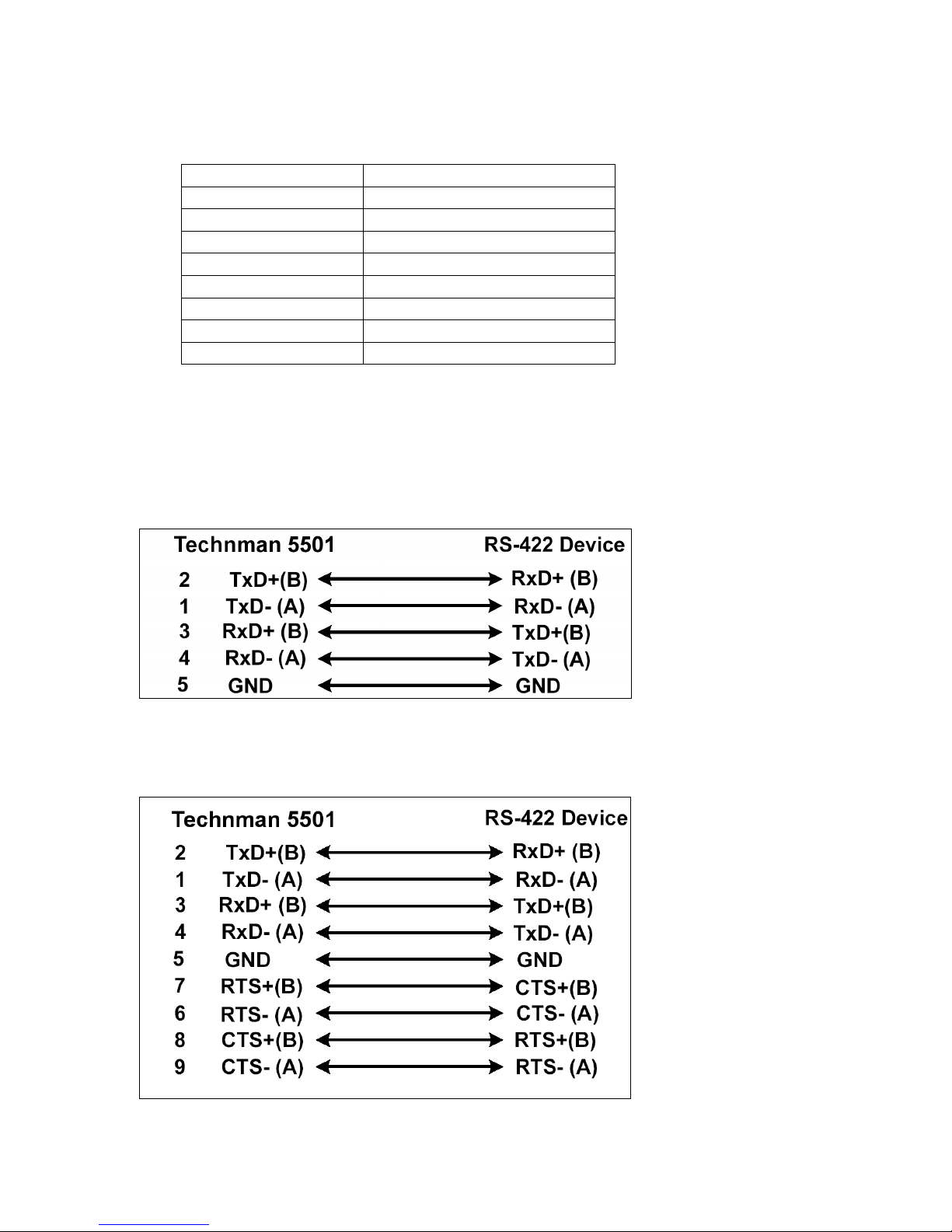
RS-422 Signal Pin-outs of DB-9 Male
Pin 1 TxD- (A)
Pin 2 TxD+(B)
Pin 3 RxD+(B)
Pin 4 RxD-(A)
Pin 5 GND
Pin 6 RTS- (A)
Pin 7 RTS+(B)
Pin 8 CTS+(B)
Pin 9 CTS- (A)
RS-422 Signal Wiring
Point-to-Point 4 Wire Full Duplex
RS-422 with Handshaking

- 7 -
Specifications
Speed Up to 921.6kbps
RS422 signals TxD+/-, RxD+/-, RTS+/-, CTS+/-, GND
RS485 signals Data+/-, GND
Power USB bus powered, no external power supply
Driver Windows 98, ME, 2000, XP, 2003 Server Linux (Kernel
2.4 and up built-in)
Connectors DB9 male
Tabla de contenidos


