
TC Electronic NOVA Modulator NM-1 Manual de usuario

NM-1
NOVA Modulator
USER’S MANUAL


INTRODUCTION
Table of Contents . . . . . . . . . . . . . . . . . . . . . . . . . . . .3
Introduction . . . . . . . . . . . . . . . . . . . . . . . . . . . . . . . .4
SETUP EXAMPLES
Mono . . . . . . . . . . . . . . . . . . . . . . . . . . . . . . . . . . . . .5
Stereo . . . . . . . . . . . . . . . . . . . . . . . . . . . . . . . . . . . . .6
Modulator in Loop . . . . . . . . . . . . . . . . . . . . . . . . . . .7
Stereo Loop Setup . . . . . . . . . . . . . . . . . . . . . . . . . . .8
OVERVIEW
Overview . . . . . . . . . . . . . . . . . . . . . . . . . . . . . . . . . .9
Connections . . . . . . . . . . . . . . . . . . . . . . . . . . . . . . .10
Controls . . . . . . . . . . . . . . . . . . . . . . . . . . . . . . . . . .10
EFFECT TYPES
Chorus . . . . . . . . . . . . . . . . . . . . . . . . . . . . . . . . . . .14
Tri-Chorus . . . . . . . . . . . . . . . . . . . . . . . . . . . . . . . .15
Flanger . . . . . . . . . . . . . . . . . . . . . . . . . . . . . . . . . . .16
Through Zero Flanger . . . . . . . . . . . . . . . . . . . . . . .16
Phaser . . . . . . . . . . . . . . . . . . . . . . . . . . . . . . . . . . .19
Tremolo . . . . . . . . . . . . . . . . . . . . . . . . . . . . . . . . . .21
Vibrato . . . . . . . . . . . . . . . . . . . . . . . . . . . . . . . . . . .24
TABLE OF CONTENTS
3
ADDITIONAL FEATURES
Two Engines . . . . . . . . . . . . . . . . . . . . . . . . . . . . . . .25
LFO Sync . . . . . . . . . . . . . . . . . . . . . . . . . . . . . . . . .25
LFO Trigger . . . . . . . . . . . . . . . . . . . . . . . . . . . . . . .27
PRESETS
Preset modes . . . . . . . . . . . . . . . . . . . . . . . . . . . . . .28
Preset mode . . . . . . . . . . . . . . . . . . . . . . . . . . . . . . .28
Bank mode . . . . . . . . . . . . . . . . . . . . . . . . . . . . . . . .29
Limiting the Number of Presets . . . . . . . . . . . . . . . .30
Store . . . . . . . . . . . . . . . . . . . . . . . . . . . . . . . . . . . . .31
APPENDIX
Calibrating Input Sensitivity . . . . . . . . . . . . . . . . . . .32
Technical Specifications . . . . . . . . . . . . . . . . . . . . . .33
Prod. No: E60508311
English Version

4
Nova Modulator – Creativity Enhanced
Never before have all of TC’s acclaimed modulation effects been packed into a single stompbox. With seven stellar
effects including the brand new Tri-Chorus and Through-Zero-Flanger, Nova Modulator gives you all the modulation
effects you’ll ever need – and then some. This is an effects pedal for the guitarist who has come to terms with the
basics of guitar effects and is now on the lookout for the icing on the cake. With its Dual Engine design, Nova
Modulator allows you to combine Chorus, Flanger, Phaser, Tremolo and Vibrato effects, sync the tempo between
them and even trigger the LFO to start right on the beat. Nova Modulator gives you unlimited sound shaping
possibilities. And with nine presets, there is plenty of room to store your favorite settings.
Destined to spark new inspiration for your music
Nova Modulator Features
• Seven studio-quality modulation effects
• Dual Engine design
• 9/18 user-programmable presets
• LFO synchronization
• LFO trigger
• Tap tempo
• Auto input gain adjustment
• Stereo in/out
INTRODUCTION

SETUP EXAMPLE: MONO
5
This is a standard mono setup consisting only of
your guitar, your amp and the NOVA Modulator.
• Connect your guitar to the left input (L) of the
NOVA Modulator.
• Connect the left output (L) of the NOVA
Modulator to the input of your amp.
We recommend placing the NOVA Modulator
pedal in the signal path after distortion/overdrive
pedals.
For best signal to noise ratio, calibrate
the pedal according to the level of the
input signal. For further information, refer
to this manual’s “Calibration” section.

6
SETUP EXAMPLE: STEREO
This is a classic stereo setup, giving you all
the benefits of the NOVA Modulator’s stereo
effects.
• Connect your guitar to the left input (L) of
the NOVA Modulator.
• Connect the left output (L) of the NOVA
Modulator to the input of one amp, and
the right output (R) to another amp.
For best signal to noise ratio, calibrate
the pedal according to the level of the
input signal. For further information,
refer to this manual’s “Calibration”
section.
7
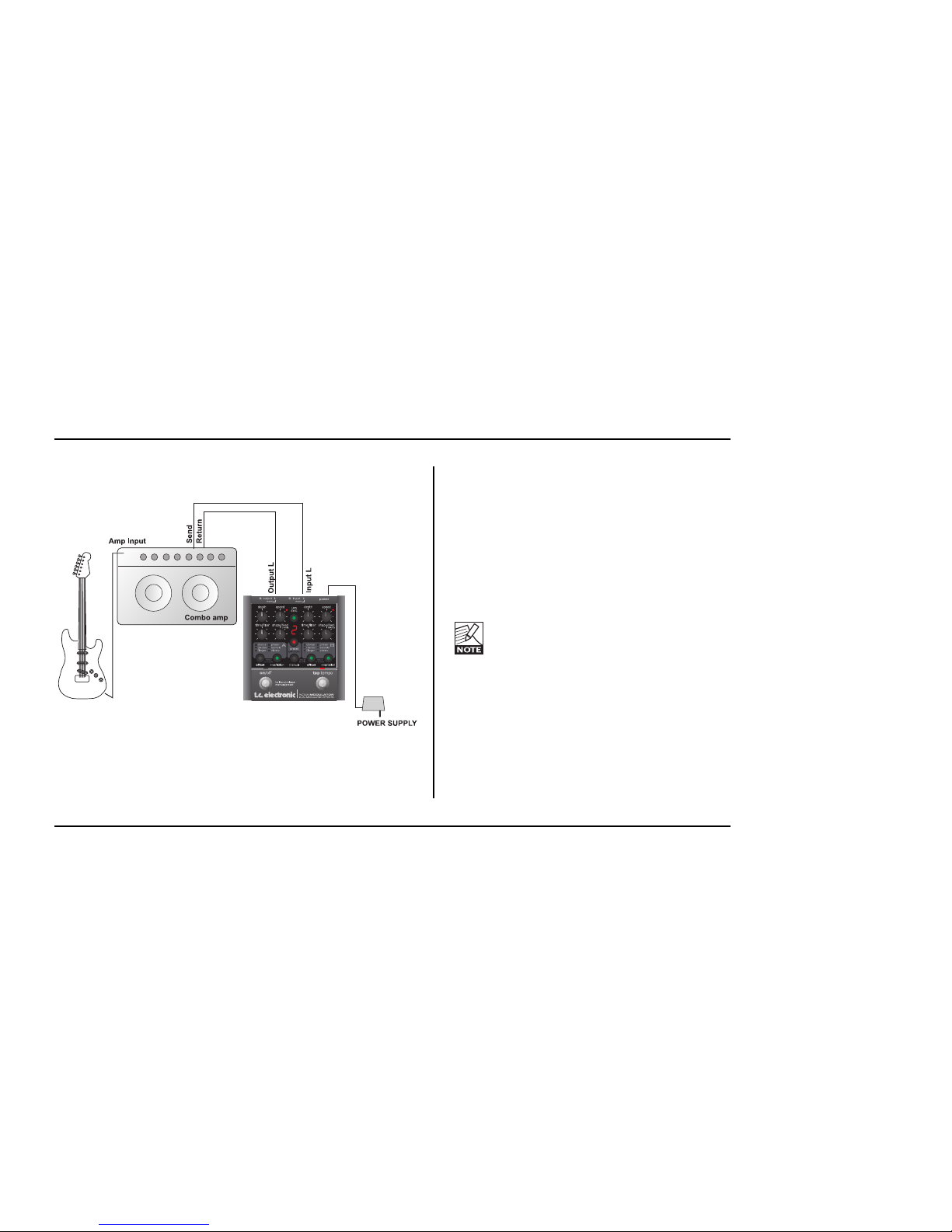
SETUP EXAMPLE: MODULATOR IN LOOP
In this setup, we operate the NOVA Modulator in
the effects loop of a combo amp (i.e., after the
preamp section, before the power amp).
• Connect your guitar to the amp’s input.
• Connect the amp’s effect send to the left
input of the NOVA Modulator.
• Connect the left output of the NOVA
Modulator to the amp’s effect return.
For best signal to noise ratio, calibrate
the pedal according to the level of the
input signal. For further information, refer
to this manual’s “Calibration” section.

SETUP EXAMPLE: STEREO LOOP SETUP
8
In this setup, we use the pre-amp from one of
the combo amps to generate the basic sound
and the NOVA Modulator to split the signal into
stereo. Please note that by connecting one of
the Modulator’s outputs to the return jack of amp
B, we only use the power amp section of that
second amp.
• Connect your guitar to the input of amp A.
• Connect amp A’s effect send to the left input
of the NOVA Modulator.
• Connect the left output of the NOVA
Modulator to amp A’s effect return.
• Connect the left output of the NOVA
Modulator to amp B’s effect return.
For best signal to noise ratio, calibrate
the pedal according to the level of the
input signal. For further information, refer
to this manual’s “Calibration” section.

OVERVIEW
9
NOVA MODULATOR
DUAL MODULATION EFFECTS
inputoutputRRLL
power
mono mono
hold and release
manual/preset
on/off tap tempo
speed LFO
SYNC
speed
shape/feed shape/feed
tri-mix tri-mix
effect effect
depth depth
time/filter time/filter
flanger flangervibrato vibrato
HOLD
to bypass
HOLD
to calib
HOLD
to bypass
tri-chor tri-chortremolo tremolo
chorus chorusphaser phaser
+variation +variation
AB
manual
preset
hold to store

10
OVERVIEW
This section describes in short the functions of the
knobs and buttons on the NOVA Modulator. For
detailed explanations of the various parameters, please
refer to the manual section describing the effects.
Connections
1 – Power
The NOVA Modulator requires 12V DC 300 mA. Use
the power supply provided in the product box or a
power supply with similar specifications.
2 – Inputs
These are ¼" mono jack connectors for signal input.
NOVA Modulator will sense if a signal source is
connected to both inputs and treat these signals as
one stereo source. If you connect a mono source only,
ALWAYS use the left input!
3 – Outputs
These are ¼" mono jack connectors which carry the
signals from channels A and B.
Controls
4 – ON/OFF Switch
The ON/OFF switch has several functions.
• Press the ON/OFF switch once to bypass or
activate the pedal.
• Press and hold the ON/OFF switch for
approximately 0.5 seconds to alternate between
Manual mode and Preset mode.
5 – TAP TEMPO Switch
Tap this switch rhythmically to enter the global tempo.
Typically, you will tap quarter notes.
Example: Preset selection using the ON/OFF and the
TAP TEMPO switches
When you are in Preset mode, you can step through
presets by pressing the PRESET button repeatedly.
The same function can be invoked by first pressing the
TAP/TEMPO switch once and immediately thereafter
pressing the ON/OFF switch multiple times.
Tabla de contenidos


