SYSFORM CP375B Manual de usuario

CP375B Auto Creaser
Operation Manual
Revision: 21/01/22


1
Index
1. Safety Rules…………………………………………………………………………………………………...………………2
2. Specifications…………………………………………………………………….……………..……………………………4
3. Installation..……………………………………………………………………………….…………………………………...5
4. Accessories…………………………………………………………………………………………………………………….8
5. Key Components…………………………………………………………………….………………………………….10
6. Start-up….....................................................…………………………………..………..………..…………….11
7. Paper size settings..…..........…………………………………….….…………….…………………..…....……11
8. Edit Crease Data…..............………………………………………………………….……………………..………12
8.1 Manual Input …......………………………………………………………………...………..…………………..…13
8.1.1Open a defined job….…………………...……………………………….....……..…………….………13
8.2 Cover Crease……………………………………......………..………………………….…....……..………......14
8.3 Multiple Crease……………………………….......……….………………………………..………….….........14
8.4 Standard folding………………………………...…………………………..…….....……..………….…………15
8.5 Partial Blade………………………………...…………………………..…………….....……..………….…………17
9. Run a Job...........................................................................................................................18
10. Settings.............................................................................................................................20
11. Adjustment.......................................................................................................................23
12. Cross Knives(Option)..................................................................................................25
13. Feeders (Option)......................................................................................... ... ... ...........29
14. Pad & Knife for Perforating Blade..........................................................................30
15. Trouble Shooting...........................................................................................................31

2
1. Safety Rules
The machine has many safety features which make it a safe to operate. Regardless of your
experience, safety instructions must be read carefully, completely understood, and
applied to your daily work habits. If you do not understand or are confused by certain
safety instructions presented in this manual, discuss them with your supervisor. Machine
setup, cleanup, and maintenance operation will vary. Therefore, it is essential all
employees to practice safe work habits. SAFE WORK HABITS PREVENT INJURIES. The
main rule to follow is to ALWAYS make sure the main drive is STOPPED and LOCKEDOUT
when performing setup, cleanup, adjustment and maintenance operations.
The safety precautions in this manual provide guidelines for the protection and for that of
fellow workers.
1.1 Precautions
Before any maintenance is performed on the machine, switch off all sources of electrical;
do not operate the equipment when panels and safety covers are not in place. Failure to
observe this warning could result in personal injury.
1.2 Avoid Accidents
Most accidents are caused by the failure of some individual to follow simple and
fundamental safety rules and precautions. For this reason, most accidents can be
prevented by recognizing the real cause and doing something about it before the accident
occurs. With any machinery, a careful and trained operator is the best insurance against
an accident.
1.3 Safety Issues & General Safety Rules
DO
DO NOT
1. Read and understand this manual
before attempting to operate or
service the machine.
1. Do not attempt to operate or service the
machine without reading and understanding
this manual.
2. Be familiar with the machine safety
rules and practices.
2. Do not remove the safety devices.
3. Warn others of an intended action that
may endanger them.
3. Do not clean or lubricate moving parts of a
machine that is running.
4. Perform lubrication and oiling of the
machine only when power is off.
4. Do not unauthorized persons to operate the
machinery.
5. Verify that all guards are installed
before operating the machine.
5. Do not place tools on a machine that is
running.
6. When working on electrical
6. Do not reach into the machine to make

3
equipment, power must be shut off to
all circuits before any work is
attempted. Individual switches must
be opened and the equipment circuits
tested to make sure there is no power.
adjustments while it is running.
7. Be sure all operators are aware of all
areas and operations that require
extra safety measures.
7. Do not allow horseplay in the work area
1.4 AC Supply
1.4.1 Voltage steady state voltage: 0.9 to 1.1 of nominal voltage.
1.4.2 Frequency 099 to 1.01 of nominal frequency continuously; 0.98 to 1.02 for short time.
1.4.3 Harmonics distortion not exceeding 10% of the total r.m.s. voltage between live
conductors for the sum of the 2nd through to the 5th harmonic.
1.4.4 Voltage Interruption Supply interrupted or at zero voltage for not more than 3ms at any
random time in the supply cycle with more than 1 s between successive interruptions.
1.4.5 Voltage dips not exceeding 20% of the peak voltage of the supply for more than one
cycle with more than 1 s between successive dips.
1.5 General Physical Environments
1.5.1 The minimum requirement for all electrical equipment is correct operation between air
temperature of +5゚C and +35゚C.
1.5.2 Electrical equipment is capable of operating correctly when the relative humidity does
not exceeding 50% at a maximum temperature of +45゚C.
1.5.3 Electrical equipment is capable of operating correctly at altitude up to 1000m.
1.5.4 Electrical equipment is designed to withstand to protect against the effects of
transportation, and storage temperature within a range of -25゚C to +55゚C and for short
periods not exceeding 24 hours at up to +70゚C.
1.5.5 Avoid exposing to vibration environment.
1.5.6 Avoid exposing to direct sunlight or heat rays.
1.5.7 Have to connect to the factory grounding system correctly.
1.5.8 Away from electric magnetic interference source sites, such welding, discharge
machine.

4
2.Specifications
Specification
Description
Feeder system
Auto Upper Suction
Feeder capacity
3.94”/ 100mm
Minimum size
1.77”x 3.54”/ 45X90mm
Maximum size
14.57”x 39.37”/ 370X1000mm
Paper stocks
70-450gsm
Minimum crease distance
0.04”/ 1mm
Minimum crease from lead margin
0.04”/ 1mm
Speed (one crease on A4 paper)
10,000 sheets / hr
Accuracy
±0.008”/ ±0.2mm
Quantity of crease in one pass
32
Counter
Yes
Skew adjustment
±0.008”/ ±0.2mm
Crease depth adjustment
Stepless Regulation
Blow adjustment
Stepless Regulation
Paper separator adjustment
Stepless Regulation
Feeding tray
31.5”/ 800mm
Eject stacker
35.43”/ 900mm
Power
115V 50/60Hz
Consumption
500W
Dimensions (H x W x D)
20.47”x 50.39”x 24.41”
520 x 1280 x 620mm
Weight
176.4 lbs / 80Kg
Note: A dedicated AC power line is required.

5
3. Installation
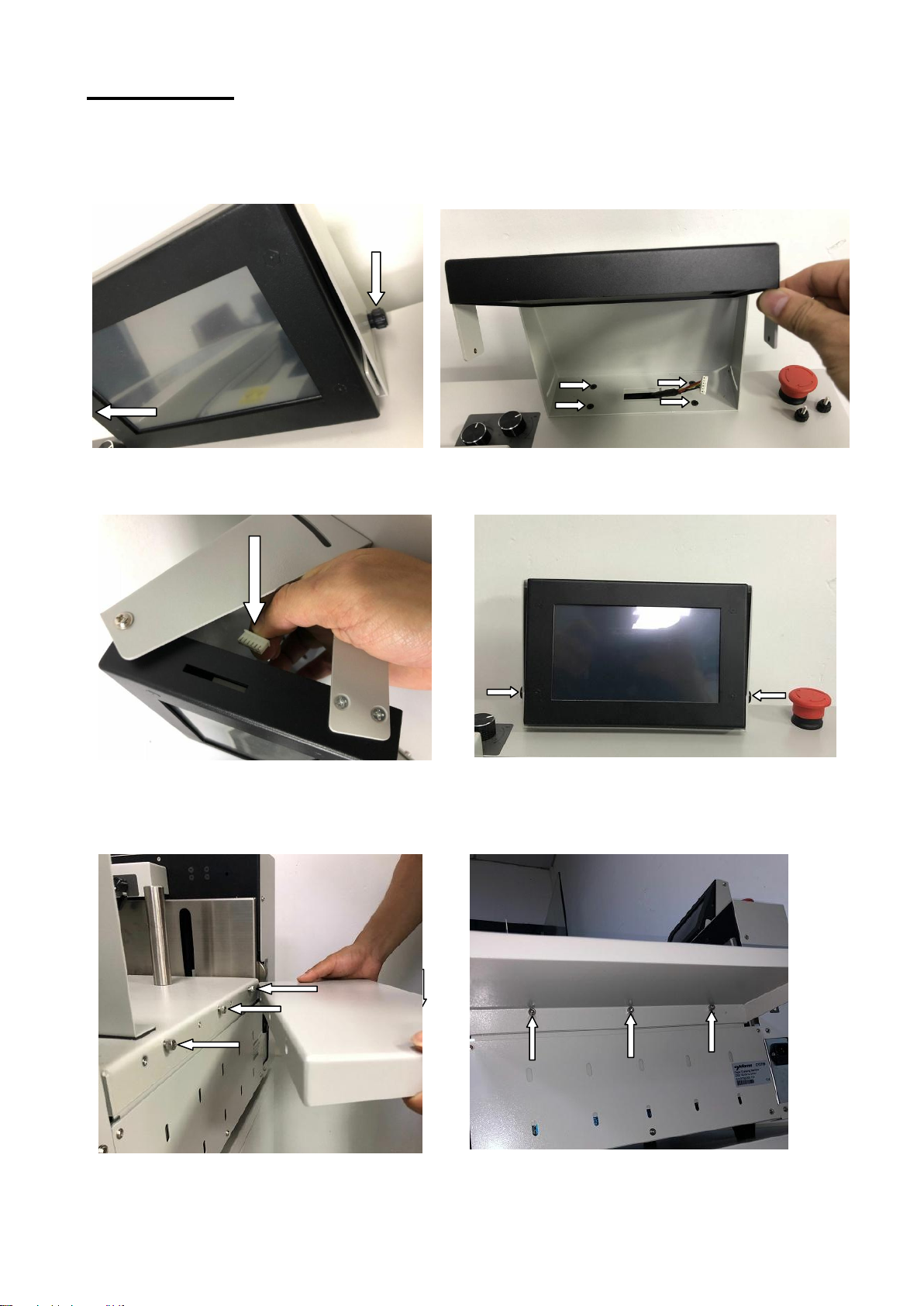
3.1 Install the touchpad.
Step 1: Remove 2 thumb screws. Step 2: Use 4 screws to fix the touchpad base on
the rear cover of the machine.
Step 3: Plug the cable to the touchpad. Step 4: Put 2 thumb screws back and screw up.
3.2 Use 3 screws to fix the extension table to the loading table.
The machine comes with 1 short extension table and 1 long one.

6
3.3 Install the stacker.
Step 1: Insert 2 hooks of the stacker into 2 holes. Step 2: Choose a proper angle then insert the
supporting bar.
3.4 Extension stacker, Side lays & End stop.
Side lay
End stop
Use 3 screws to fix the extension stacker to the stacker. The extension stacker, the side lays
and the end stop should be adjusted according to the ejecting situation.
3.6 Paper press & guides.
Short Paper Press
End Stop
Long Paper Press Cylinder Side
Guide
Side Guide

7
The side guides should be on proper position to hold the paper stack. The paper
press is used to hold the paper on the top to avoid feeding failure as the top paper
is flowing up by the blow flow. To get a smooth feeding, the blow flow, separator
gap and stack height should be adjusted in cooperation.
3.7 Installation of Blade
Step 1: Loosen the 2 screws on the blade gate and turn the blade to left to open it.
Step 2: Push the lever of the blade lock Step 3 :Push the blade all the way into the
to right. machine.
The installation direction refers to the label on the blade gate or on the blade.

8
4. Accessories
4.1 Tools.
4.2 Pad for perforating blade.
4.3 Separator Plate.
Tabla de contenidos
Otros manuales de Máquina encuadernadora de SYSFORM