
Syscom Video HICB355H Manual de usuario

INSTRUCTION MANUAL
DSP COLOR CAMERA
1/3" INTERLINE TRANSFER CCD
STANDARD RESOLUTION
HIGH RESOLUTION
Please read this manual thoroughly before use, and keep it handy for future reference.

ii
ISSUE 1 – DECEMBER 2004

iii
WARNINGS AND CAUTIONS
TO REDUCE THE RISK OF FIRE OR ELECTRIC SHOCK, DO NOT
EXPOSE THIS PRODUCT TO RAIN OR MOISTURE. DO NOT INSERT
ANY METALLIC OBJECTS THROUGH THE VENTILATION GRILLS
OR OTHER OPENINGS ON THE EQUIPMENT.
CAUTION
EXPLANATION OF GRAPHICAL SYMBOLS
The lightning flash with arrowhead symbol, within an
equilateral triangle, is intended to alert the user to the
presence of uninsulated “dangerous voltage” within the
product’s enclosure that may be of sufficient magnitude
to constitute a risk of electric shock to persons.
The exclamation point within an equilateral triangle is
intended to alert the user to the presence of important
operating and maintenance (servicing) instruction in the
literature accompanying the product.

iv
FCC COMPLIANCE STATEMENT
INFORMATION TO THE USER: THIS EQUIPMENT HAS BEEN TESTED AND FOUND
TO COMPLY WITH THE LIMITS FOR A CLASS B DIGITAL DEVICE, PURSUANT TO
PART 15 OF THE FCC RULES. THESE LIMITS ARE DESIGNED TO PROVIDE
REASONABLE PROTECTION AGAINST HARMFUL INTERFERENCE IN A
RESIDENTIAL INSTALLATION. THIS EQUIPMENT GENERATES, USES AND CAN
RADIATE RADIO FREQUENCY ENERGY AND, IF NOT INSTALLED AND USED IN
ACCORDANCE WITH THE INSTRUCTIONS, MAY CAUSE HARMFUL INTERFERENCE
TO RADIO COMMUNICATIONS. HOWEVER, THERE IS NO GUARANTEE THAT
INTERFERENCE WILL NOT OCCUR IN A PARTICULAR INSTALLATION. IF THIS
EQUIPMENT DOES CAUSE HARMFUL INTERFERENCE TO RADIO OR TELEVISION
RECEPTION, WHICH CAN BE DETERMINED BY TURNING THE EQUIPMENT OFF
AND ON, THE USER IS ENCOURAGED TO TRY TO CORRECT THE INTERFERENCE
BY ONE OR MORE OF THE FOLLOWING MEASURES:
- REORIENT OR RELOCATE THE RECEIVING ANTENNA
- INCREASE THE SEPARATION BETWEEN THE EQUIPMENT AND
RECEIVER
- CONNECT THE EQUIPMENT INTO AN OUTLET ON A CIRCUIT DIFFERENT FROM
THAT TO WHICH THE RECEIVER IS CONNECTED
- CONSULT THE DEALER OR AN EXPERIENCED RADIO/TV TECHNICIAN
FOR HELP
CAUTION: CHANGES OR MODIFICATIONS NOT EXPRESSLY APPROVED BY THE
MANUFACTURED COULD VOID THE USER'S AUTHORITY TO OPERATE THE
EQUIPMENT.
THIS CLASS B DIGITAL APPARATUS COMPLIES WITH CANADIAN ICES-003.
CET APPAREIL NUMÉRIQUE DE LA CLASSE B EST CONFORME À LA NORME NMB-
003 DU CANADA.

v
IMPORTANT SAFEGUARDS
1. READ AND RETAIN INSTRUCTIONS
Read the instruction manual before
operating the equipment. Retain the
manual for future reference.
2. CLEANING
Turn the unit off and unplug from the
power outlet before cleaning. Use a
damp cloth for cleaning. Do not use
harsh cleansers or aerosol cleaners.
3. ATTACHMENTS
Do not use attachments unless
recommended by manufactured as they
may affect the functionality of the unit
and result in the risk of fire, electric
shock or injury.
4. MOISTURE
Do not use equipment near water or
other liquids.
5. ACCESSORIES
Equipment should be installed in a safe,
stable location. Any wall or shelf
mounting accessory equipment should
be installed using the manufacture’s
instructions. Care should be used
when moving heavy equipment. Quick
stops, excessive force, and uneven
surfaces may cause the equipment to
fall causing serious injury to persons
and objects.
6. VENTILATION
Openings in the equipment, if any, are
provided for ventilation to ensure
reliable operation of the unit and to
protect if from overheating. These
openings must not be blocked or
covered
7. POWER SOURCES
The equipment should be operated only
from the type of power source indicated
on the marking label. If you are not
sure of the type of power supplied at
the installation location, contact your
dealer. For equipment designed to
operate from battery power, refer to the
operating instructions.
8. GROUNDING OR POLARIZATION
Equipment that is powered through a
polarized plug (a plug with one blade
wider than the other) will fit into the
power outlet only one way. This is a
safety feature. If you are unable to
insert the plug fully into the outlet, try
reversing the plug. Do not defeat the
safety purpose of the polarized plug.
Alternate Warning: If the equipment is
powered through a three-way
grounding-type plug, a plug having a
third (grounding) pin, the plug will only
fit into a grounding-type power outlet.
This is a safety feature. Do not defeat
the safety purpose of the grounding-
type plug. If your outlet does not have
the grounding plug receptacle, contact
your local electrician.
9. CORD AND CABLE PROTECTION
Route power cords and cables in a
manner to protect them from damage
by being walked on or pinched by items
places upon or against them.
10. LIGHTNING
For protection of the equipment during
a lightning storm or when it is left
unattended and unused for long
periods of time, unplug the unit from
the wall outlet. Disconnect any
antennas or cable systems that may be
connected to the equipment. This will
prevent damage to the equipment due
to lightning or power-line surges.
11. OVERLOADING
Do not overload wall outlets and
extension cords as this can result in a
risk of fire or electric shock.
12. SERVICING
Do not attempt to service the video
monitor or equipment yourself as
opening or removing covers may
expose you to dangerous voltage or
other hazards. Refer all servicing to
qualified service personnel.

vi
13. DAMAGE REQUIRING SERVICE
Unplug the equipment from the wall
outlet and refer servicing to qualified
service personnel under the following
conditions:
A. When the power supply cord or the
plug has been damaged.
B. If liquid has spilled or objects have
fallen into the unit.
C. If the equipment has been
exposed to water or other liquids.
D. If the equipment does not operate
normally by following the operating
instructions, adjust only those
controls that are covered by the
operating instructions. Improper
adjustment of other controls may
result in damage to the unit.
E. If the equipment has been dropped
or the casing damaged.
F. When the equipment exhibits a
distinct change in performance.
14. REPLACEMENT PARTS
When replacement parts are required,
be sure the service technician uses
replacement parts specified by the
manufacturer or that have the same
characteristics as the original part.
Unauthorized substitutions may result
in fire, electric shock, or other hazards.
15. SAFETY CHECK
Upon completion of any service or
repairs to the equipment, ask the
service technician to perform safety
checks to verify that the equipment is in
proper operating condition.
16. FIELD INSTALLATION
The installation of equipment should be
made by a qualified service person and
should conform to all local codes.

TABLE OF CONTENTS
INTRODUCTION ......................................................................................1
CAMERA OVERVIEW ...........................................................................2
CONTENTS OF PACKAGE......................................................................6
MANUAL IRIS LENS ADJUSTMENT .......................................................6
VIDEO-TYPE AUTO-IRIS LENS INSTALLATION
AND ADJUSTMENT .................................................................................6
DC-TYPE AUTO-IRIS LENS INSTALLATION
AND ADJUSTMENT .................................................................................8
BACKFOCUS ADJUSTMENT ................................................................10
ZOOM LENS BACKFOCUS ADJUSTMENT ..........................................11
TROUBLESHOOTING AND MAINTENANCE........................................12
SPCIFICATIONS.....................................................................................13
vii

THIS PAGE INTENTIONALLY LEFT BLANK.
viii

1
ABOUT THE 1/3" DSP COLOR CAMERA
INTRODUCTION
The 1/3" DSP color security camera provides SONY, true-color images
especially for closed-circuit television (CCTV) and security surveillance
applications.
Features:
• High-performance 1/3" SONY DSP color CCD technology
• NTSC: 330 lines of resolution (Standard)
480 lines of resolution (High)
• PAL: 320 lines of resolution (Standard)
470 lines of resolution (High)
• 0.5 lux @ F1.2 sensitivity (Standard)
0.8 lux @ F1.2 sensitivity (High)
• C/CS, backfocus cam for easy adjustment
• Auto electronic shutter [1/60(1/50) ~ 1/100,000] and manual
electronic shutter modes
• Auto and manual white balance modes
• Compatible with video- or DC-type lenses with dip switch select
• Quick connect for video or DC lens with 4-pin connector
• Flicker less, BLC, AGC select(Normal/High), AGC, Sync
adjustments
• 12VDC or 24VAC
IMPORTANT: The user of this camera is
responsible for checking and complying with
local, state, and federal laws and statutes
concerning the recording and monitoring of
audio signals.
2
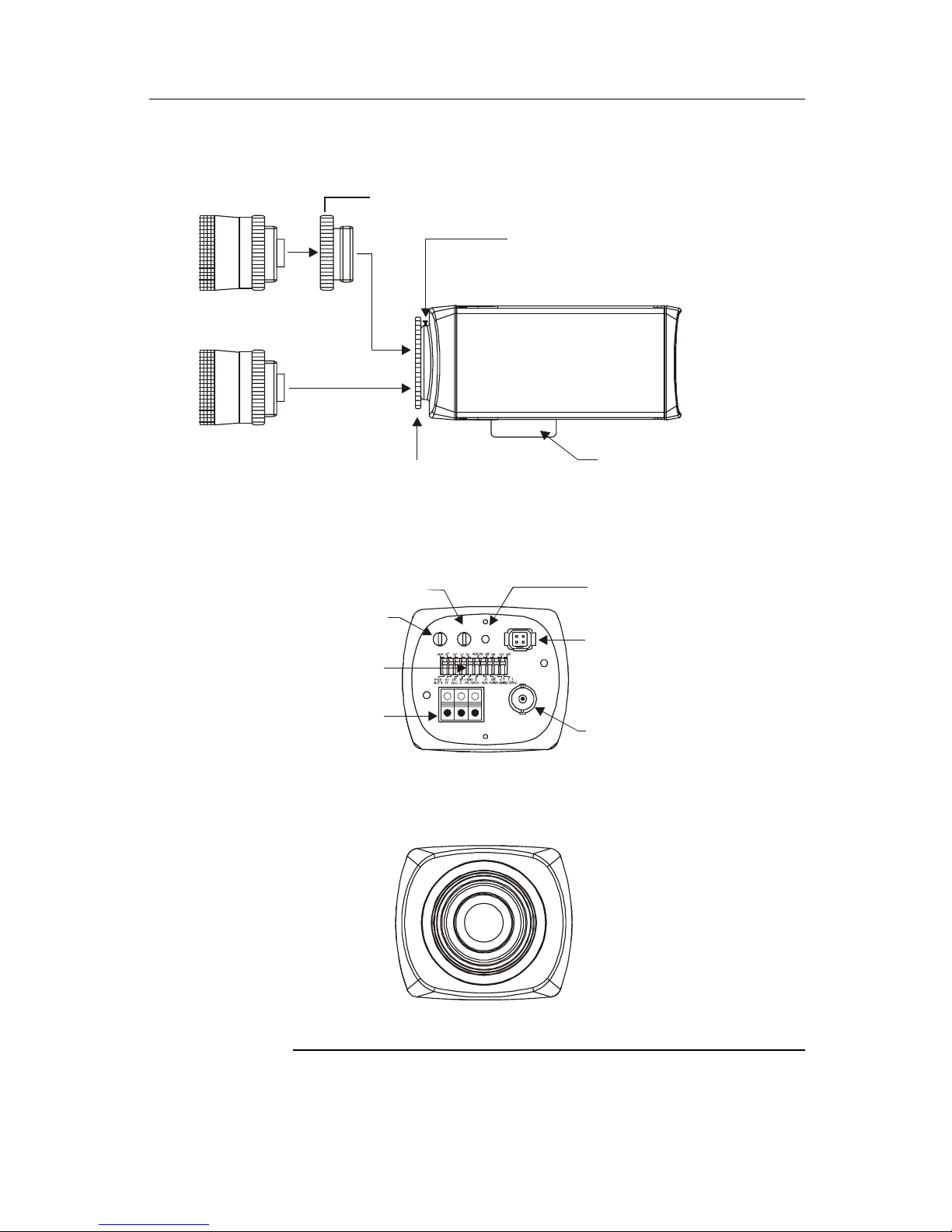
CAMERA OVERVIEW
BACK VIEW (12VDC / 24VAC)
Video Out BNC
Connector
Auto Iris Lens
Connector
FRONT VIEW
SIDE VIE
W
C Mount Ring
Back Focus Lock Screw
Back Focus Ring Camera Mounting Bracket
( C MOUNT LENS )
( CS MOUNT LENS )
Function
Switch
Power LED
Power Input
Terminal
LEVEL PHASE PWR LENS
12VDC / 24VAC CLASS 2
VIDEO OUT
~ G ~
V. Phase Potentiometer
Level potentiometer
(for DC type A/I lens)
Continued on next page
1. Back focus Lock Screw – Allows the user to secure the backfocus
setting.
Este manual sirve para los siguientes modelos
1
Tabla de contenidos
Otros manuales de Cámara a color de Syscom Video

Manuales populares de Cámara a color de otras marcas


Gadgets and Gear
Gadgets and Gear Desktop Spy Clock Hidden Camera Instrucciones de montaje

General Security
General Security MTX600HQ Manual de usuario

WofVision
WofVision EYE-12 Manual de usuario

Leopard
Leopard LI-1080PTZOV Manual de usuario

Microscan
Microscan QX Hawk Manual de usuario

Imperx
Imperx CHEETAH C4080M Instrucciones de uso