
Synido Live 100 Manual de usuario


1. OVERVIEW ..................................................................................................................................
2. HARDWARE FEATURES ..........................................................................................................
3. APPLICATION SCENARIOS .....................................................................................................
4. PC CONTROL PANEL ..............................................................................................................
5. SERVICE & SUPPORT ............................................................................................................
6. RETURNS & WARRANTY .......................................................................................................
7. RAM FORM ................................................................................................................................
1
3
7
10
13
15
16
CONTENTS
1. 产品概述 ..................................................................................................
2. 硬件说明 ..................................................................................................
3. 应用场景 .................................................................................................
4. PC控制面板.............................................................................................
5. 服务与支持..............................................................................................
17
19
23
26
29
目录

Synido Live 100 is a portable, one-stop podcasting studio equipment with DJ
mixer, audio interface and mixer. It is mainly used for live streaming, PC,
recording and gaming. It is equipped with a built-in high performance digital
DSP chip, rich adjustment control knobs, and a computer control panel for fine
control of sound details.
Drive-free design, plug and play
Metal case, noise shielding
DSP chip, digital reverbs
48V power supply, professional recording
One-key reverberation, one-key sound change
One-key dodge, one-key noise reduction
One-key electronic sound, one-key mute
One-key accompaniment, Bluetooth 5.0
Rich interface, multi-player performance
Control panel, simple and practical
Simultaneous live broadcasting with three mobile phones
Six commonly used BGM sound effects, Customizable BGM sound effects
1. OVERVIEW
1.1. Product Introduction
1.2. Product Registration
1.3. Features
User Manual - Overview - 01
Product Model: Live 100
Weight: 950g
Channel: 2In/2Out
SNR: ≥96dB(Record), ≥105dB(music)
THD+N: ≤0.1%(Record), ≤0.005%(music)
Maximum Output Power: 125mW, 32ΩEarphone
Size: 255*216*62mm
Sample Rate: 16bit/44.1KHz
Dynamic Range: 105dB
Synido Live 100
USB-C Data Cable 3.5mm Audio Cable
User Manual
(with Warranty Card) Certificate of Conformity
1.4. Specifications
1.5. Box Content
User Manual - Overview - 02

1.6. Precautions
1.7. Customer Support
User Manual - Hardware Features - 04
(2)
HEADSET (3)
HEADPHONE
(1)
MIC1/2
(1) MIC1/2: 1.MIC1/2: 3.5mm microphone interface, supporting connection with an
electret condenser microphone.
(2) HEADSET: 3.5mm headset interface, supporting connection with headset/in-ear
headset or monitor headphones.
(3) HEADPHONE: 3.5mm headphone jack, supporting connection with monitor
headphones.
User Manual - Hardware Features - 03
2.1. Front View
2. HARDWARE FEATURES
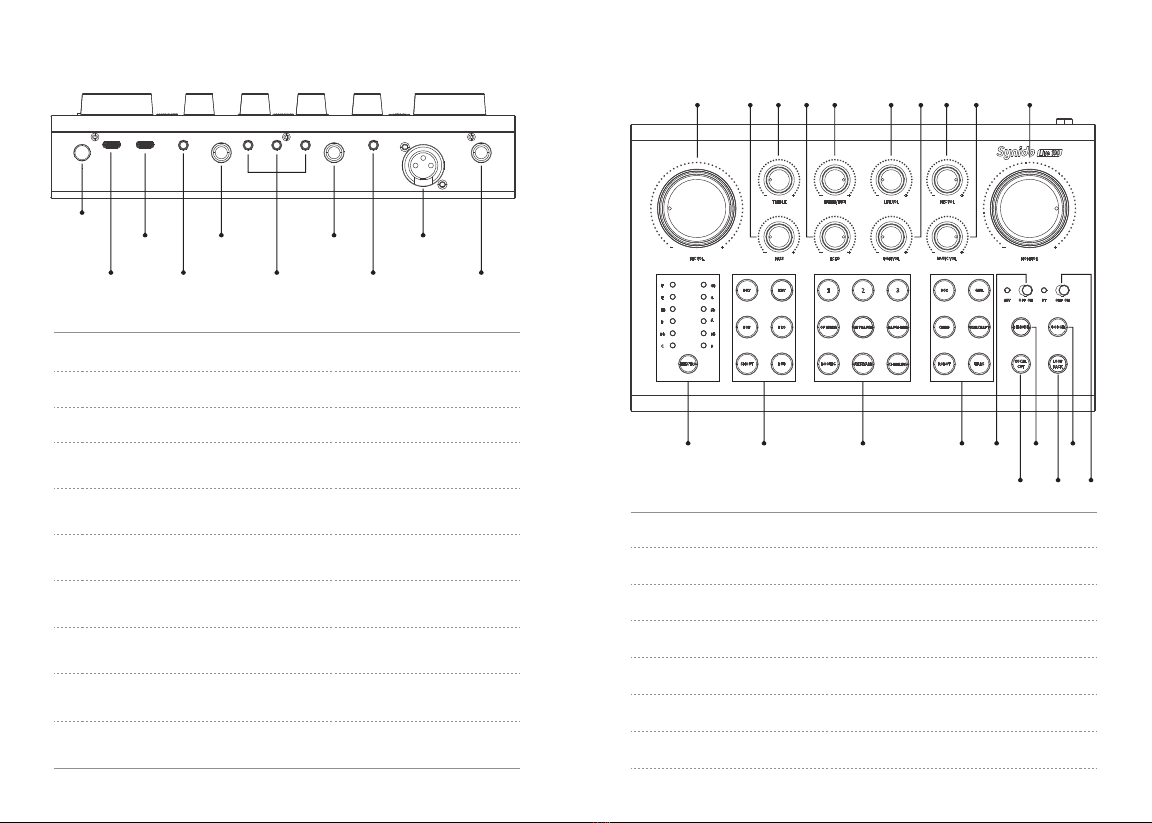
User Manual - Hardware Features - 06
(4)
ON/OFF
(5)
DC 5V
(8)
HEADPHONE
(6)
PC (10)
INST (12)
MIC3
(7)
LINE OUT (11)
LINE IN (13)
MIC4
(9)
LIVE1/2/3
(4) ON/OFF: Main power switch.
(5) DC 5V: USB Type-C device power supply.
(6) PC: USB Type-C cable interface, supporting connection with computer/ phone.
(7) LINE OUT: 3.5mm speaker interface, supporting connection with external
passive speaker/speaker power amplifier.
(8) HEADPHONE: 6.35mm headphone jack, supporting connection with monitor
headphones.
(9) LIVE1/2/3: 3.5mm live broadcasting interface, supporting connection with
an external mobile phone/tablet for live broadcasting.
(10) INST: 6.35mm musical instrument interface, supporting musical instrument
input such as electric guitar and electronic keyboard.
(11) LINE IN: 3.5mm accompaniment interface, supporting external accompaniment
sound source, and mobile accompaniment input.
(12) MIC3: XXLR microphone interface, supporting connection with 48V
large-diaphragm condenser microphone.
(13) MIC4: 6.35mm microphone interface, supporting connection with dynamic
microphone.
2.2. Back View
(1) MIC VOL: Local microphone volume adjustment.
(2) BASS: Microphone low frequency compensation adjustment.
(3) TREBLE: Microphone high frequency compensation adjustment.
(4) ECHO: Echo intensity adjustment.
(5) LINE IN/INST: Line input, instrument input volume adjustment.
(6) LIVE VOL: Live streaming and 3 customized BGM sound effects volume adjustments.
(7) BGM VOL: 6 kinds of fixed BGM warm-up sound effect volume adjustment.
(1)
(11) (12) (13) (14) (15) (16) (17)
(18) (19) (20)
(2) (3) (4) (5) (6) (7) (8) (9) (10)
User Manual - Hardware Features - 05
2.3. Top View

(8) REC VOL: Volume adjustment for USB-C recording to computer.
(9) MUSIC VOL: Volume adjustment for USB-C music to computer.
(10) MONITOR: Local Monitor volume adjustment.
(11) ELECTRO: Turn on and off the electronic sound, short press to switch 12
electronic sound keys selection.
(12) REVERB: Reverberation selection: DRY/KTV/POP/PRO/SHOUT/DUB.
(13) BGM: 6 kinds of fixed auxiliary sound effects and 3 kinds of customized effects.
Long press the CUSTOMIZE button, you can define the BGM with the microphone
recording audio.The ELECTRO lights synchronously display the recording time, and
the maximum duration is 15 seconds. Release button, recording complete.
(15) 48V: The orange indicator lighting up indicates the 48V phantom power
being engaged.
(14) VOICE CHANGER: When the button light is on, the VOICE CHANGER takes effect:
BOY/GIRL/CHILD/WARCRAFT/ROBOT/MARS.
(16) DENOISE: Short press the button to switch the level of denoise. 3 levels to set
the denoise. It will indicate blue, green, and red light separately from the first level
to the third level.
(17) DODGE: When the button light is on, the computer or other input
accompaniment gives way for the microphone to pick up the sound, and the
microphone sound is emphasized. When the microphone is not picking up the
sound, the accompaniment will continue to play.
(18) VOCAL CUT: Remove the vocal from the music and remain with the
accompanying music.
(19) LOOP BACK: Mix the audio played by the computer with the volume input from
the microphone/instrument of the sound card and output it to the computer.
(20) BT: If the orange indicator light is steady on, it means that the Bluetooth is
connected. If it is flashing, it means that the Bluetooth is not connected. If it is
off, it means that the Bluetooth is turned off.
(1) HEADSET + COMPUTER
(3) MICROPHONE + COMPUTER + SPEAKER + MUSICAL INSTRUMENT
(2) MICROPHONE + HEADPHONE + COMPUTER
User Manual - Application Scenarios - 07
3.1. Single Or Multi-person Computer Karaoke/Live Broadcast
3. APPLICATION SCENARIOS
User Manual - Application Scenarios - 08
** Synido Live 100 can be compatible with all kinds of microphones thanks to three different
types of microphone interfaces, supporting a connection with 4 microphones simultaneously.

(1) MICROPHONE + HEADPHONE + COMPUTER + MOBILE PHONE
(2) MICROPHONE + HEADPHONE + COMPUTER + PHONE1 + PHONE2
(for live broadcast)
(for live broadcast)
Phone1
Turn on bluetooth
BT OFF ON
(3) MICROPHONE + HEADPHONE+ USB POWER DELIVERY + PHONE1 + PHONE2
Phone2
(for accompaniment with bluetooth)
Phone2
(for accompaniment with bluetooth)
BT OFF ON
(OTG Adapter required)
3.2. Live Broadcast Through Mobile Phone
Phone1 (for live broadcast)
Turn on bluetooth
User Manual - PC Control Panel - 10
MICROPHONE + HEADPHONE + USB POWER DELIVERY + PHONE1 + PHONE2/3/4
MICROPHONE + HEADPHONE + USB POWER DELIVERY + SPEAKER
+ MOBILE PHONE + MUSICAL INSTRUMENT
Phone2 Phone3 Phone4
User Manual - Application Scenarios - 09
3.3. Simultaneous Live Broadcast With 4 Mobile Phones
3.4. Solo Stage Performance
Phone1 (for live broadcast)
(OTG Adapter required)

4.1. PC Control Panel
4. PC CONTROL PANEL
Synido Live 100 PC Control Panel can be downloaded on:
www.synido.com/support/downloads
This application will let you manage all the special functions that are not
directly accessible on the Synido Live 100 device.
These include:
Play and save the recording or settings
Accurately enter the number to set the volume
Setting dodge speed/threshold/level
Setting denoise level
Setting the vocal cut level
The software is compatible with Windows 7+ and Mac OSX 10.8+.
In order to use the software, you must connect the Synido Live 100.
4.2. Download and Installation Of Mac Software
User Manual - PC Control Panel - 11
STEP 1: SOFTWARE DOWNLOAD
Please go to the official website to download the installation program:
www.synido.com/support/downloads
STEP 2: SOUND CARD CONNECTION
Connect the PC interface to the computer using the USB-C cable included in the
package.
STEP 3: SOFTWARE INSTALLATION
Double-click the downloaded driver and follow the instructions to install it.
STEP 4: SYSTEM SETTINGS
After confirming that Synido Live 100 has been recognized by the computer, go to
SYSTEM PREFERENCES →SOUND →OUTPUT/INPUT, find the audio device list in the
above position, and select Synido Live 100 as your input and output device.
User Manual - PC Control Panel - 12

4.3. Download and Installation of Windows software
STEP 1: SOFTWARE DOWNLOAD
Please go to the official website to download the installation program:
www.synido.com/support/downloads
STEP 2: SOUND CARD CONNECTION
Connect the PC interface to the computer using the USB-C cable included in
the package.
STEP 3: SOFTWARE INSTALLATION
Double-click the downloaded driver and follow the instructions to install it.
STEP 4: SYSTEM SETTINGS
After confirming that the device has been recognized by the computer, right-click
the speaker in the system tray, open the SOUND SETTINGS, find the audio device list,
and select Synido Live 100 as your input and output device.
User Manual - Service & Support - 13 User Manual - Service & Support - 14
5.1. FAQ
5. SERVICE & SUPPORT

User Manual - RAM Form - 16User Manual - Returns & Warranty - 15
6. RETURNS & WARRANTY
Tabla de contenidos
Otros manuales de Equipo de grabación de Synido

Manuales populares de Equipo de grabación de otras marcas


Strymon
Strymon NIGHTSKY Manual de usuario

Mitsubishi Electric
Mitsubishi Electric 16CH DIGITAL RECORDER DX-TL5000U Manual de usuario

Tews Technologies
Tews Technologies TPMC465 Manual de usuario

Honeywell
Honeywell Excel 50 Manual de usuario

SeaLevel
SeaLevel COMM+8.LPCI Manual de usuario

Arturia
Arturia AUDIOFUSE STUDIO Manual de usuario


