Sven AP-U1100MV Manual de usuario

www.sven.fi
USER MANUAL
7.1 Gaming Headphones
with Microphone
AP-U1100MV

ENG
2
7.1 Gaming Headphones
with Microphone
Congratulations on your purchase of the SVEN gaming stereo headphones!
COPYRIGHT
© SVEN PTE. LTD. Version 1.0 (14.07.2021).
This Manual and information contained in it are copyrighted. All rights reserved.
TRADEMARKS
All trademarks are the property of their legal holders.
NOTICE OF RESPONSIBILITY RESTRICTION
Despite the exerted eorts to make this Manual more exact, some discrepancies may oc-
cur. Theinformation in this Manual is given on «as is» terms. The author and the publisher
donobear any liability to a person or an organization for loss or damage which has arisen
from theinformation contained in this Manual.
CONTENTS
ENG ............................................................................................................................................ 2
RUS............................................................................................................................................. 8
UKR .......................................................................................................................................... 14
BUYER RECOMMENDATIONS
• Unpack the device carefully. Make sure there are no accessories left in the box. Check up
the device for damage; if the product was damaged during transportation, address therm
which carried out the delivery; if the product functions incorrectly, address the dealer at once.
• Check up the package contents and availability of the warranty card. Make sure the war-
ranty card has a shop stamp, a legible signature or the seller’s stamp and purchase date,
andthegoods number corresponds to that in the warranty card. Remember: in case of war-
ranty card loss or discrepancy of numbers you forfeit the right for warranty repairs.
• Before installing and using the speaker system, read this Manual carefully and keep it forfu-
ture reference.
• Shipping and transportation equipment is permitted only in the original container.
• Does not require special conditions for realization.
• Dispose of in accordance with regulations for the disposal of household and computer
equipment.
• The date of manufacture of the product is indicated on the box.
APPLICATION
SVEN AP-U1100MV 7.1 gaming headphones with microphone allows you to experience 7.1
surround sound in games, music and movies. Dynamic lighting creates the atmosphere of
this game. Closed style of the headphones with passive noise reduction and superior sound
quality gives you the opportunity to hear the enemy before he will hear you.
Technical support is on www.sven..

ENG
3
AP-U1100MV
User Manual
PACKAGE CONTENTS
• Gaming stereo headphones — 1 pc
• User Manual — 1 pc
• Warranty card — 1 pc
SAFETY PRECAUTIONS
• Don’t use the stereo headphones while driving.
• Don’t use the stereo headphones at high volume for a long time (more than 15 minutes), as
this may cause hearing impairment.
SPECIAL FEATURES
• Surround sound 7.1
• Dynamic backlight
• Optimized for professional gaming
• Headphones with passive noise reduction system
• The highest sound quality
• Non-tangling cable with fabric braid
• Comfortable seating
CONNECTION AND OPERATION
• Connect the USB headphone plug to the USB connector of the signal source (computer,
laptop, etc.) as shown in the diagram (Fig. 1).
• Connect a microphone to the headset (Fig. 2) if the situation requires it. For example, to use
voice chats in games or phone conversations.

ENG
4
7.1 Gaming Headphones
with Microphone
DESCRIPTION
• Installing drivers for the headset is not required, plug & play device!
• On our site you can download additional software to expand the functionality of the headset,
software installation is not required.
• When you connect the headset to a PC, the system identifies the device as a USB Audio
Device. In the system sound settings, the device will be displayed in playback and recording
devices.
• After installing additional software, additional functions will be available. To turn them on,
right-click on the speaker or microphone image.
• In the settings you can change the interface language and the degree of transparency of
the interface window.
• When the headset is connected, the program logo will be displayed on the Windows
taskbar.
• When you click on it, the right menu will display a context menu.
• All available additional functions are displayed in the interface of the top in the form of
abbreviations:
a EQ – Equalizer. Available 11 presets and the ability to save custom settings.
b EM – Environment Eect (environment eects). Spatial audio processing: reverb and echo.
27 available options emulation dierent environ- ments, as well as three variants room size.
c VSS – Virtual Speaker Shifter. This feature enables the emulation of the circular motion
of the sound source (virtual speaker), as well as removal and approach the source to the
listener. There is an opportunity to move separately seven virtual speakers.
Fig. 3.

ENG
5
AP-U1100MV
User Manual
d KS – Key Shifting (pitch oset). The ability to increase and decrease the playback sound
tone. Four semitone up or down. (see. Fig. 4).
e VF – Vocal Fading (attenuation vocals). The decoding of the reproduced signal to partially
remove vocals from songs. (see. Fig. 4).
f SMX – Xear Surround Max. This involves emulation of multi-channel 7.1 surround, stereo
distributing eight virtual channels. This eect will be noticeable when playing video with
multichannel audio stream.
g SF – Sing FX. This feature is included in the microphone settings. It includes the eect of
a delay (echo) from the microphone signal and the «magical voice» – four variants of voice
changes timbre. (see. Fig. 5).
Fig. 4.
Fig. 5.

ENG
6
7.1 Gaming Headphones
with Microphone
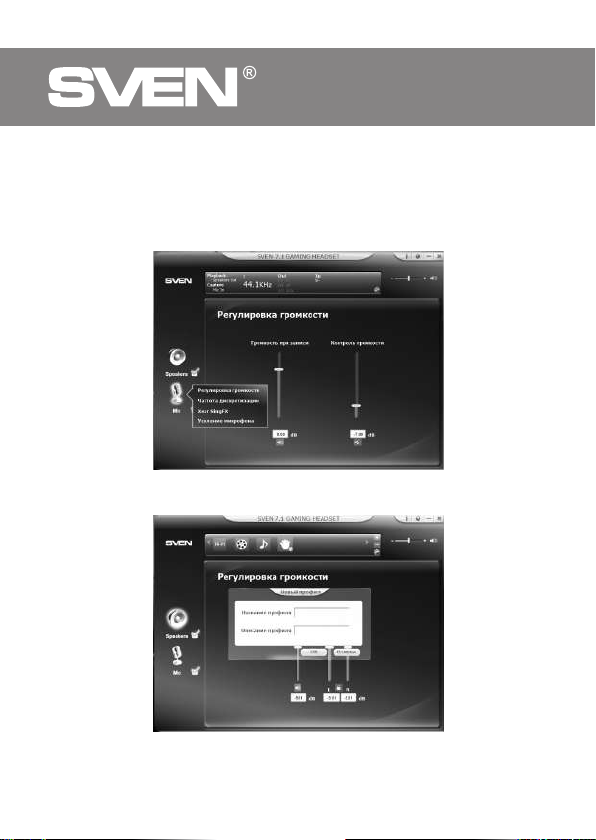
To listen to the signal from the microphone, select the microphone volume screen, there
adjust the input level (slider «volume when recording»), and the monitor volume («Volume
Control» slider). (see. Fig. 6).
By clicking on the round icon with two arrows in the lower right corner of the display at the
top of the interface, you will have access to the preset sound settings with the ability to save
custom settings (prole) (see. Fig. 7).
Fig. 6.
Fig. 7.

ENG
7
AP-U1100MV
User Manual
TECHNICAL SPECIFICATIONS
Parameter, measurement unit Value
Sensitivity, dB headphones: 108 ± 3;
microphone: -42 ± 3
Frequency range, Hz headphones: 50 – 20000;
microphone: 100 – 16000
Impedance, Ohm 32
Membrane, mm Ø 50
Connection type USB
Cable length, m 2.2
Weight, g 320 ± 5
Notes:
• Technical specications given in this table are supplemental information and cannot
give occasion to claims.
• Technical specications are subject to change without notice due to the improvement
of SVEN production.

RUS
8
Игровые наушники 7.1
с микрофоном
Благодарим Вас за покупку игровых стереонаушников ТМ SVEN!
АВТОРСКОЕ ПРАВО
© SVEN PTE. LTD. Версия 1.0 (14.07.2021).
Данное Руководство и содержащаяся в нем информация защищены авторским пра-
вом. Все права защищены.
ТОРГОВЫЕ МАРКИ
Все торговые марки являются собственностью их законных владельцев.
ПРЕДУПРЕЖДЕНИЕ ОБ ОГРАНИЧЕНИИ ОТВЕТСТВЕННОСТИ
Несмотря на приложенные усилия сделать Руководство более точным, возможны неко-
торые несоответствия. Информация данного Руководства предоставлена на условиях
«как есть». Автор и издатель не несут никакой ответственности перед лицом или орга-
низацией за ущерб или повреждения, произошедшие от информации, содержащейся
в данном Руководстве.
СОДЕРЖАНИЕ
ENG ............................................................................................................................................ 2
RUS............................................................................................................................................. 8
UKR .......................................................................................................................................... 14
РЕКОМЕНДАЦИИ ПОКУПАТЕЛЮ
• Аккуратно распакуйте изделие, проследите за тем, чтобы внутри коробки не остались
какие-либо принадлежности. Проверьте устройство на предмет повреждений. Еслииз-
делие повреждено при транспортировке, обратитесь в фирму, осуществляющую доставку;
если изделие не функционирует, сразу же обратитесь к продавцу.
• Проверьте комплектность и наличие гарантийного талона. Убедитесь в том, что вгаран-
тийном
талоне проставлен штамп магазина, разборчивая подпись или штамп продавца
и дата продажи, номер товара совпадает с указанным в талоне. Помните, чтоприутрате
гарантийного талона или несовпадении номеров вы лишаетесь права на гарантийный
ремонт.
• Прежде чем устанавливать и использовать изделие, внимательно ознакомьтесь с на-
стоящим Руководством и сохраните его на весь период использования.
• Перевозка и транспортировка оборудования допускается только в заводской упаковке.
• Не требует специальных условий для реализации.
• Утилизировать в соответствии с правилами утилизации бытовой и компьютерной тех-
ники.
• Дата изготовления продукта указана на коробке.
НАЗНАЧЕНИЕ
Игровые наушники 7.1 с микрофоном SVEN AP-U1100MV позволяют ощутить объемное
звучание 7.1 в играх, музыке и фильмах. Закрытый тип наушников с пассивной систе-
мой шумоподавления и высочайшее качество звучания дает возможность услышать
противника раньше, чем он Вас.
Техническая поддержка размещена на сайте www.sven.fi.
Здесь же Вы сможете найти обновленную версию данного Руководства.

RUS
9
AP-U1100MV
Руководство пользователя
КОМПЛЕКТАЦИЯ
• Игровые наушники — 1 шт.
• Руководство пользователя — 1 шт.
• Гарантийный талон — 1 шт.
МЕРЫ БЕЗОПАСНОСТИ
• Не используйте стереонаушники во время управления транспортом.
• Не используйте стереонаушники на высоком уровне громкости длительное время
(более четверти часа) — это приводит к ухудшению слуха.
ОСОБЕННОСТИ
• Объёмное звучание 7.1
• Динамическая подсветка
• Оптимизированы для профессионального гейминга
• Наушники с пассивной системой шумоподавления
• Высочайшее качество звучания
• Тканевая оплетка кабеля, препятствующая спутыванию
• Комфортная посадка
ПОДКЛЮЧЕНИЕ И ЭКСПЛУАТАЦИЯ
• Подключите USB штекер наушников к USB разъему источника сигнала (компьютер,
ноутбук и т. п.), как показано на схеме (рис. 1).
• Подсоедините к гарнитуре микрофон (рис. 2), если то требует ситуация. Например,
для использования голосовых чатов в играх или разговоров по телефону.

RUS
10
Игровые наушники 7.1
с микрофоном
ОПИСАНИЕ ПО
• Установка драйверов для работы гарнитуры не требуется, устройство plug&play!
• На нашем сайте вы можете скачать дополнительное ПО для расширения функционала
гарнитуры, установка ПО не является обязательной.
• При подключении гарнитуры к ПК система определит устройство как USB Audio
Device. В системных настройках звука устройство будет отображаться в устройствах для
воспроизведения и записи.
• После установки дополнительного ПО станут доступны дополнительные функции.
Чтобы включить их, нажмите правой кнопкой на изображение динамика или микро-
фона.
• В настройках вы можете изменить язык интерфейса и степень прозрачности окна
интерфейса.
• При подключенной гарнитуре на панели задач ОС Windows будет отображаться ло-
готип программы.
• При нажатии на него правой кнопкой будет отображаться контекстное меню.
• Все доступные дополнительные функции отображаются в интерфейсе сверху в виде
аббревиатур:
a EQ — эквалайзер. Доступно 11 предустановок и возможность сохранять пользова-
тельские настройки.
b EM — Environment Eect (Эффекты среды). Пространственная обработка звука: ре-
верберация и эхо. Доступно 27 вариантов эмуляции разных сред, а так же три варианта
размера помещения.
c VSS — Virtual Speaker Shifter. Эта функция позволяет включать эмуляцию кругового
движения источника звука (виртуальных акустических систем), а так же удаления и при-
ближения источника к слушателю. Есть возможность передвигать по-отдельности семь
виртуальных акустических систем.
Рис. 3.
Tabla de contenidos
Idiomas:
Otros manuales de Auriculares de Sven