Supersonic SC-175SWT Manual de usuario

SC‐175SWT

Pleasereadthemanualbeforeuse.
Theinformationinthisdocumentwon'tbemodifiedor
extendedinaccordancewithanynotice.
Thewatchshouldbecharging2hoursatleastbeforeuse.
1.Productspecification
Model:SC‐175SWT
CPURTL8762CARMCortex‐M053MHz
Memory:RAM128Kb+ROM64Mb
Capacitivetouchscreen1.4”240*240pixelIPS
Bluetoothversion5.0
Connectionsystem:Android5.0&IOS10.0
Function:Temperature,HeartRate,PushDial,Donotdisturb,
Dailyactivity,Sleep,Notification(G‐mail,Facebook,Skype,
WhatsAppandsoon)
BatteryLithium‐ion3.7V/160mAh
Packagecontains:1watch;1chargingcable;1manual;1box

2.Productdetails
2.1Productdetails
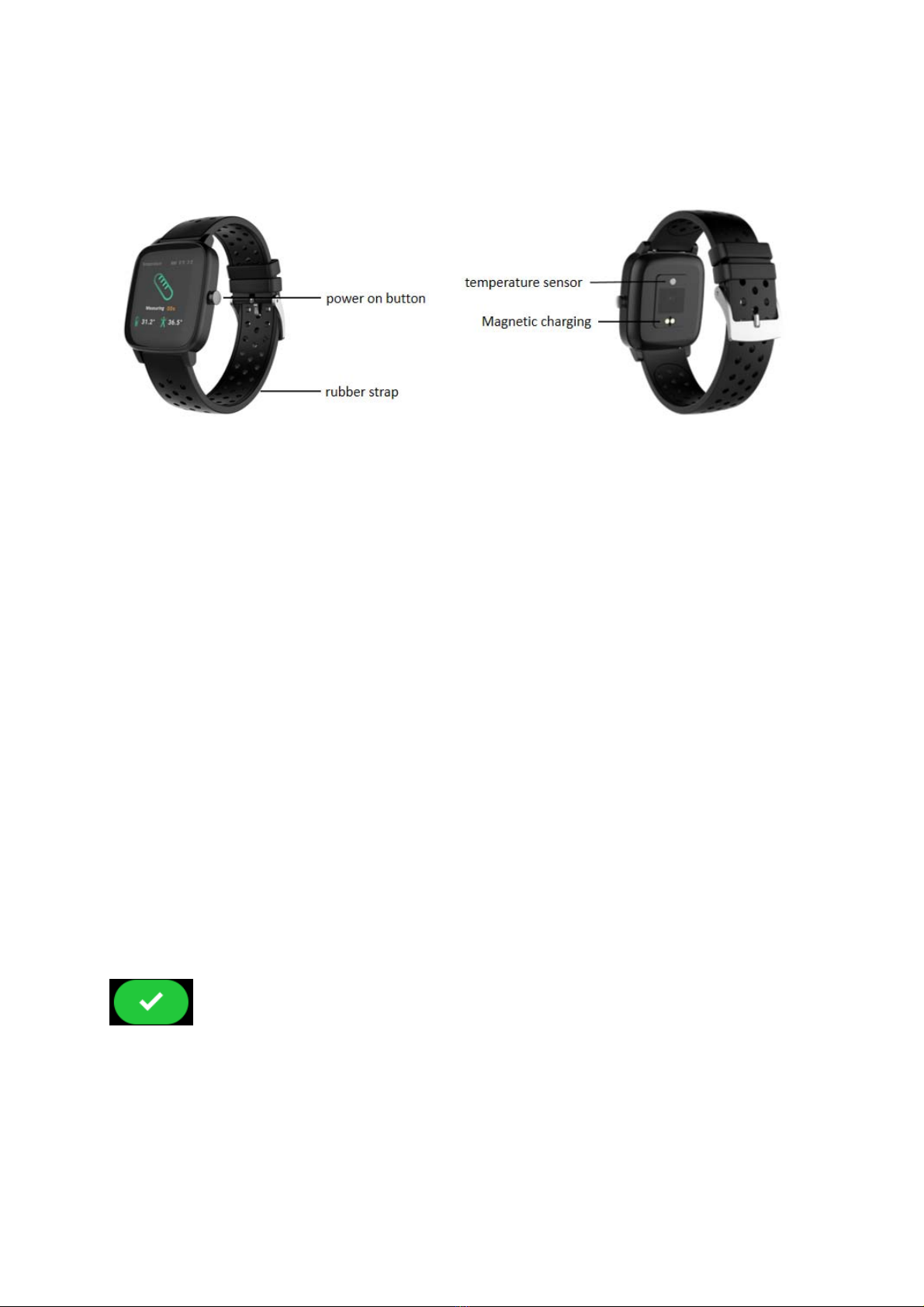
(1)Poweron:Whenthewatchisintheoffstate,pressandholdthe
powerkeyforfivesecondstoturniton,andthemainpageofthe
watchwillbedisplayedafterbooting.
(2)Touchscreenoperation:Swipetotherighttothemenupage,then
tapthefunctionicontoenterthecorrespondingsub‐interface.
(3)Brightscreen:Whenthewatchisinthestateofinterestscreen,
youcantouchthescreenbrightscreen.Iftheturnbuttonisturned
onintheAPP,theusercanalsoachievethebrightscreenbyturning
thewrist,andthewatchisdisplayedafterthescreenisbright.Main
interface.
(4)Shutdown:ClicktheSettingicon,clickSystem‐Shutdown,click
toshutdown.
3.Productsquickinto
3.1Productsquickinto

Touchdialdefinition
(1)Longpressthemaininterface:enterthehomepagethumbnail,
youcanviewitleftandright,clicktouchtoswitchthehomepage.
(2)Slidetotheright:displayfunctionlist‐>Dailyactivity,
Temperature,Heartrate,Message,Sports,Sleep,Weather,Music,
Relax,Timer,Findphone,Setting,etc.,clicktouchtoenterthe
correspondingfunction(listcanbeupanddownSlide)
(3)Slidingdown:Display:date,Bluetooth,powerfunctioniconsare:
Timer,Brightness,Setting,DoNotDisturbmode.
(4)Slideup:informationstorage,heartratemonitoring,Dailyactivity.
(5)Slidetotheleft:displaythestaticicon,clicktoenterthe
correspondingfunction,rightstroketoreturntothepreviouslevel.
3.2ClockDisplay
Settingmethod:
Poweron,whenthewatchinclockmode,pleaselongpressmiddle

screenandsetdifferentclockinterfacesifyoulike.
4. Productquickuse
4.1Magneticcharging
1. Usestandardchargingcable2.MatchMagneticcharging
Attention:Foraccuratetesting,pleasewearthewatchtightly,atleast
onefingerawayfromthewristbone.aspictureshown.
4.2Downloadandinstall
Youhavetodownloadandinstallthe"HitFitPro"AppfromAPP
StoreorGooglePlayStore:
4.3ConnectionandSynchronizedata
4.3.1Bluetoothconnection
4.3.1.1ForAndroid5.0:

OpenHitFitPro‐‐Click“Device”inbottom‐‐“DeviceConnection”
‐‐SearchingDevice.
ClickOKandClickPairtobindwatchasbelow.
Open“HitFitPro”‐leftslidemenubar‐Device‐selectthe
correspondingdeviceicon‐searchforthecorrespondingBluetooth
addresspairing
4.3.1.2ForIOS10.0:
Connectstep1:Open“HitFitPro”app,“Adddevice”on
“Me”screentosearchBluetoothdevicesnearby,findwatchname
DW‐019GT_Tandpaireditinapp.OnceDW‐019GT_Tconnectedwill
showinthephone'sBluetoothmenuscreenasbelowpictures.
Open“HitFitPro”‐leftslidemenubar‐Device‐selectthe
‐correspondingdeviceicon‐searchforthecorrespondingBluetooth
addresspairing.

Connectstep2:NowtheBluetoothmenuinterfacedisplays
DW‐019GT_Tconnectedsuccessfullyasbelowpictureshows.
Afterconnectedsuccessfully,asshownbytheiconontheleft.
4.3.2Synchronizingdata
Pairyourwatchwith"HitfitPro"App,Press" "tosyncdata.
YourdatawillbeshownonAppaccordingly.
Notice:
Pleasedon’tshuttheBluetoothnotifyservicewhenyouare
clearingsoftwarebybackgroundorclosebackgroundapplication
software.Itwillaffectthesyncfunctionbetweenwatchandphoneif
shutit.

4.3.3Appmenuguidedescription
4.4Basicfunction
4.4.1Dailyactivity
(1)Functionintroduction:Thewatchwilldisplaytheuser'stotal
numberofstepsontheday,walkingdistance,caloriesburnedonthe
sameday,andthedatawillbeclearedat0o'clockeveryday.
(2)Operationinstructions:Themaininterfaceslidesleftandrightand
clicksthemotiondatatoswitchtothestepcounterinterface.After
nooperationfor5seconds,thescreenisautomaticallyturnedoff.
4.4.2Sports
Insportsmode:thesingle‐pointfunctioniconallowsyoutoenter
sportsmodessuchaswalking,running,riding,climbing,and
basketball.

4.4.3Heartrate
(1)Functionintroduction:
Heartratemeasurement:Thewatchwillmeasuretheuser'sheart
rateundertheheartratemeasurementinterface.Afterthetestis
completed,thevibrationwilldisplaytheresult.Afternooperation,
thescreenwillautomaticallygoout.
(2)Operatinginstructions:
Heartratemeasurement:slidetotheleftonthemaininterfaceand
clicktheheartratestaticicontoswitchtotheheartrate
measurementinterface.Oncetheinterfaceisentered,the
measurementwillstart.Duringthemeasurement,theinterfacevalue
willbezero.Afterthemeasurementiscompleted,thevaluewillbe
displayed.Iftheresultcannotbedetected,itwillalwaysbedisplayed.
Thedisplayvalueiszerountilstandby.
4.4.4Temperature
(1)Functionintroduction:
Temperaturemeasurement:Thewatchwillmeasuretheuser's
temperatureunderthetemperaturemeasurementinterface.After
thetestiscompleted,thevibrationwilldisplaytheresult.Afterno

operation,thescreenwillautomaticallygoout.
(2)Operatinginstructions:
Temperaturemeasurement:slidetotheleftonthemaininterface
andclickthetemperaturestaticicontoswitchtothetemperature
measurementinterface.Oncetheinterfaceisentered,the
measurementwillstart.TheleftdataisforBodysurfacetemperature,
itischangedinrealtime.TherightdataisforBodytemperature,
measuring60stocompletethemeasurement.Duringthe
measurement,theinterfacevaluewillbeshow“‐‐.‐”.Afterthe
measurementiscompleted,thevaluewillbedisplayed.
Remark:Duringtestingbodytemperature,environmenttemperature
requirewithin18‐30℃.
4.4.5 Sleep
(1)Functionintroduction:Thewatchwilldisplaytheuser'ssleeptime
thenightbefore.(Sleepmeasurementtime21:30‐12:00nextday)
(2)Operationinstructions:slidethemaininterfaceleftandright,click
sleeptoswitchtothesleepinterface,youcanviewthesleeptimeof
thepreviousday.
Tabla de contenidos
Otros manuales de Mirar de Supersonic