Summit Medical ambIT Manual de usuario

.
MORE THAN PAIN RELIEF...
SUPERIOR PAIN CONTROL
CLINICIAN MANUAL
ambIT®Pump
0459
IP22

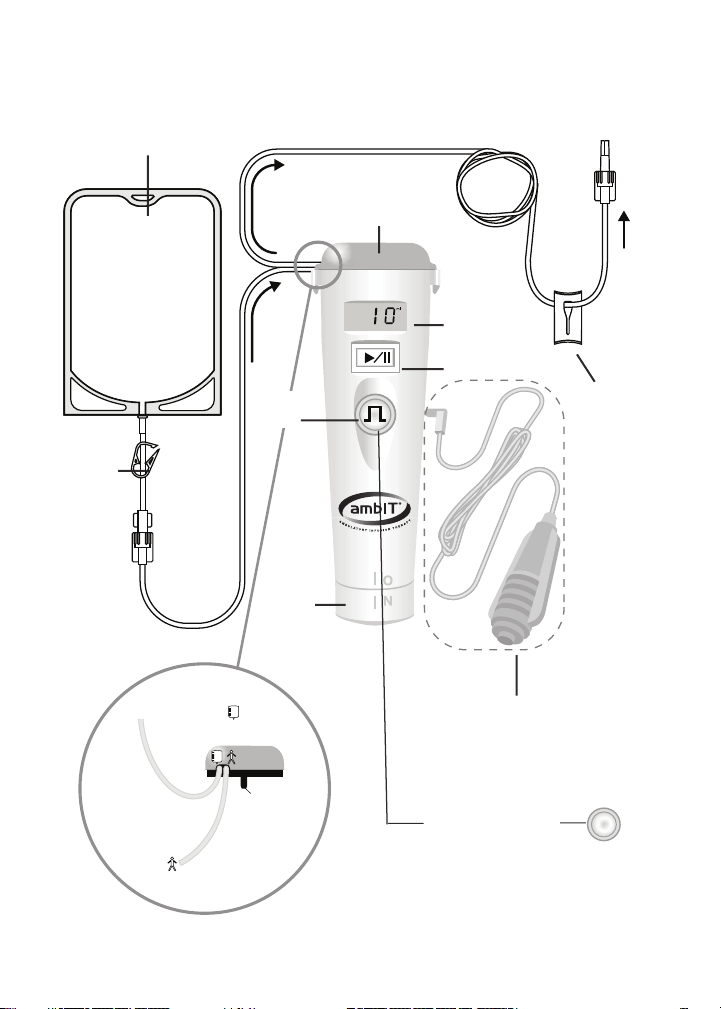
Become familiar with the
ambIT
®
pump
.
Solution container
Tubing
clamp
BOLUS
button
ambIT
®
Pump
ON/OFF
switch
Remote BOLUS Switch
(optional for select models)
Tubing
clamp
Pump display
RUN/PAUSE button
Cassette
To solution container
(Side view of cassette)
Cassette shaft
To patient
Continuous pumps have
FUNCTION button in
place of BOLUS button

i
Table of Contents
SECTION 1 - INTRODUCTION........................................................................................................1
1.1 DenitionsandSymbols.......................................................................................................1
1.1.1 Denitions ....................................................................................................................1
1.1.2 DenitionofSymbols..................................................................................................2
1.2 Warnings.................................................................................................................................6
1.2.1 Sterile, Disposable (Single-Use) Administration Set ..............................................8
1.2.2 Protection From Air Infusion.....................................................................................8
1.2.3 Protection From Unintended Bolus ..........................................................................8
1.2.4 Use of ambIT®Pump in MRI Environment .............................................................8
1.3 Indications for Use.................................................................................................................9
1.3.1 Continuous Pumps......................................................................................................9
1.3.2 PreSet Pumps ...............................................................................................................9
1.3.3 PCA Pumps ..................................................................................................................9
1.3.4 PreSet*PCA Pump .......................................................................................................9
1.4 Overview.................................................................................................................................9
1.4.1 Continuous Pumps....................................................................................................10
1.4.2 PreSet Pumps .............................................................................................................10
1.4.3 PCA Pumps ................................................................................................................10
1.5 Infusion Patterns..................................................................................................................11
SECTION 2 - SET UP .........................................................................................................................13
2.1 Required Materials ..............................................................................................................13
2.2 ambIT
®
Cassette ...................................................................................................................14
2.3 Priming the Cassette ...........................................................................................................14
2.4 Attach Cassette to the Pump..............................................................................................17
2.5 Remove Cassette from the Pump......................................................................................18
2.6 Changing the Fluid Reservoir............................................................................................18
2.7 Battery Installation and Replacement...............................................................................18
2.7.1 Battery Installation ....................................................................................................19
2.7.2 Battery Replacement .................................................................................................19
2.8 Pump Power On and Off....................................................................................................20
SECTION 3 - PROGRAMMING INSTRUCTIONS ....................................................................21
3.1 General Information............................................................................................................21
3.2 ambIT®Pump User Interface .............................................................................................22
3.3 Program Options .................................................................................................................23
3.4 Continuous Pump Programming Steps ...........................................................................23
3.5 PreSet Pump Programming Options ................................................................................24
3.6 PCA Pump Programming Steps........................................................................................29
3.7 Program Review...................................................................................................................31
SECTION 4 - OPERATING INSTRUCTIONS .............................................................................32
4.1 Start Infusion........................................................................................................................32
4.2 Pause Infusion......................................................................................................................33
4.3 Resume Infusion ..................................................................................................................33
4.4 Silence Alarm .......................................................................................................................33
4.5 Bolus Activation...................................................................................................................34
4.5a FUNCTION Button Activation..........................................................................................34
4.6 Summary of Operating Controls for Continuous Pumps .............................................35
4.7 Summary of Operating Controls for PreSet and PCA Pumps......................................35

ii
SECTION 5 - INFUSION HISTORY REPORTS...........................................................................36
5.1 Pump Infusion History.......................................................................................................36
5.2 Clearing Pump Infusion History.......................................................................................37
SECTION 6 - PATIENT LOCKOUT ...............................................................................................38
6.1 Accessing Lockout Mode....................................................................................................38
6.2 To Lock the Pump................................................................................................................38
6.3 To Unlock the Pump ...........................................................................................................39
SECTION 7 - ALARMS AND SIGNALS .......................................................................................40
SECTION 8 - TROUBLESHOOTING.............................................................................................42
SECTION 9 - SPECIFICATIONS.....................................................................................................43
9.1. GeneralSpecicationsApplicabletoAllPumps ............................................................43
9.2. ContinuousPumpSpecications ......................................................................................43
9.3. PreSetandPCAPumpSpecications...............................................................................44
SECTION 10 - DELIVERY RATE ACCURACY............................................................................45
10.1 Data from Volumetric Accuracy Testing .........................................................................46
10.2 Factors That May Affect Volumetric Accuracy...............................................................47
SECTION 11 - GENERAL CARE INSTRUCTIONS....................................................................51
11.1 Warranty Information.........................................................................................................51
11.2 Cleaning and Disinfecting Instructions............................................................................52
SECTION 12 - ELECTROMAGNETIC IMMUNITY (EMC) ......................................................53
SECTION 13 - CUSTOMER ASSISTANCE ..................................................................................55

Section 1 • Introduction
1
SECTION 1 - INTRODUCTION
1.1 DenitionsandSymbols
1.1.1 Denitions
ANALGESIA: Relief from pain.
BASALFLOWRATE:Thecontinuousowrate.Itoccurswhenthepumpisnotdeliveringa
bolus.Thebasalowrateisadjustableandhasunitsofmillilitersperhour(ml/hr).
BOLUS: A volume of medication infused over a relatively short period of time.1The bolus is
infusedatthebolusowrate.Abolusisdeliveredwhenapatientrequestsitbypushingthe
BOLUS button or the optional remote BOLUS switch. A bolus is sometime referred to as a PCA
bolus. The bolus has units of milliliters (ml). Not available on Continuous pumps.
BOLUSFLOWRATE:Theowrateatwhichabolusisdelivered.Itisahigherowratethan
thebasalowrate.IntheambIT®pump,thebolusowrateiseither100ml/hror125ml/hr
(pumpmodeldependant).Thebolusowrateisnotadjustable.
CAUTION: A caution usually appears in front of a procedure or statement. Failure to observe
acautioncouldresultinseriouspatientoruserinjury.Cautionsarefoundthroughoutthis
document emphasized with grey shading.
LOCKOUT TIME: The time between the end of one bolus and the start of the next bolus. The
lockout time has units of hours and minutes (hh:mm).
NOTE: A note highlights information that acts as a reminder or helps explain a concept or
procedure.
PCA: An acronym for patient controlled analgesia. If a pump is in PCA mode and the patient
has been prescribed a bolus volume, then PCA allows for a lay user to periodically give the
patient a bolus of medication. If the infusion is into the epidural space the PCA is referred to as
patient controlled epidural analgesia (PCEA).
VOLUMETOBEINFUSED:Thetotalamountofuidinthesolutioncontainerorreservoirto
be infused. The volume to be infused has units of milliliters (ml).
WARNING: A warning message contains special safety emphasis and must be observed at
all times. Warnings are found at Section 1.2, as well as throughout this document emphasized
with grey shading. Failure to observe a warning message is potentially life threatening.
1 Thebolusisdeliveredatahigherowratethanthebasalrate;therefore,foragivenvolume,thebolusisdeliveredfaster.

Section 1 • Introduction
2
1.1.2 DenitionofSymbols1.1.2 DenitionofSymbols
Consult instructions for use.Consult instructions for use.
International symbolInternational symbol meaningmeaning “Attention, consult accompanying“Attention, consult accompanying
documents.”documents.”
IEIEC symbol for “Type BF Applied Part.” (C symbol for “Type BF Applied Part.” (IECClassication:InternallyIECClassication:Internally
powered.)powered.)
TThehe ambIT® pump complies with ES 60601-1:2012, 1st Edition,ambIT® pump complies with ES 60601-1:2012, 1st Edition,
includingAmend.1;CSAC22.2NO.60601-1:2014,3rdEdition;IECincludingAmend.1;CSAC22.2NO.60601-1:2014,3rdEdition;IEC
60601-1:2005,includingCorr.2:2007andAmend.1:2012;IEC60601-1-60601-1:2005,includingCorr.2:2007andAmend.1:2012;IEC60601-1-
6:2013,Edition3.1;IEC60601-1-8:2012,Edition2.1;IEC60601-1-11:2015;6:2013,Edition3.1;IEC60601-1-8:2012,Edition2.1;IEC60601-1-11:2015;
60601-2-24:2012,Edition2;IEC62304:2006,1stEdition;IEC62366:2007,60601-2-24:2012,Edition2;IEC62304:2006,1stEdition;IEC62366:2007,
1stEdition,andAmend.1:2014;IEC60601-1-2:2014,4thEdition,2014-1stEdition,andAmend.1:2014;IEC60601-1-2:2014,4thEdition,2014-
02.02.
CE symbolCE symbol certifyingcertifying that the product complies with the essentialthat the product complies with the essential
requirements of the Medical Device Directive.requirements of the Medical Device Directive.
The“NRTL/C”indicatoradjacenttotheCSA(CanadianStandardsThe“NRTL/C”indicatoradjacenttotheCSA(CanadianStandards
Association)marksigniesthattheproducthasbeenevaluatedAssociation)marksigniesthattheproducthasbeenevaluated
to the applicable ANSI/UL and CSA standards for use in the U.S.to the applicable ANSI/UL and CSA standards for use in the U.S.
and Canada. NRTL (Nationally Recognized Testing Laboratory) isand Canada. NRTL (Nationally Recognized Testing Laboratory) is
a designation granted by the U.S. Occupational Safety and Healtha designation granted by the U.S. Occupational Safety and Health
Administration (OSHA) to laboratoriesAdministration (OSHA) to laboratories thatthat have been recognized tohave been recognized to
performcerticationtoU.S.standards.performcerticationtoU.S.standards.
The cUL mark applies to products intended for the Canadian market
that have been tested and found to comply with the requirements of
CAN/CSA 22.1-12, which is the Canadian Electrical Code issued by the
Canadian Standards Association.
ProtectedagainstinsertionofngersandwillnotbedamagedorProtectedagainstinsertionofngersandwillnotbedamagedor
become unsafe during a specbecome unsafe during a speciedtestinwhichitisexposedtoiedtestinwhichitisexposedto
vertically or nearly vertically dripping water.vertically or nearly vertically dripping water.
IP22

Section 1 • Introduction
3
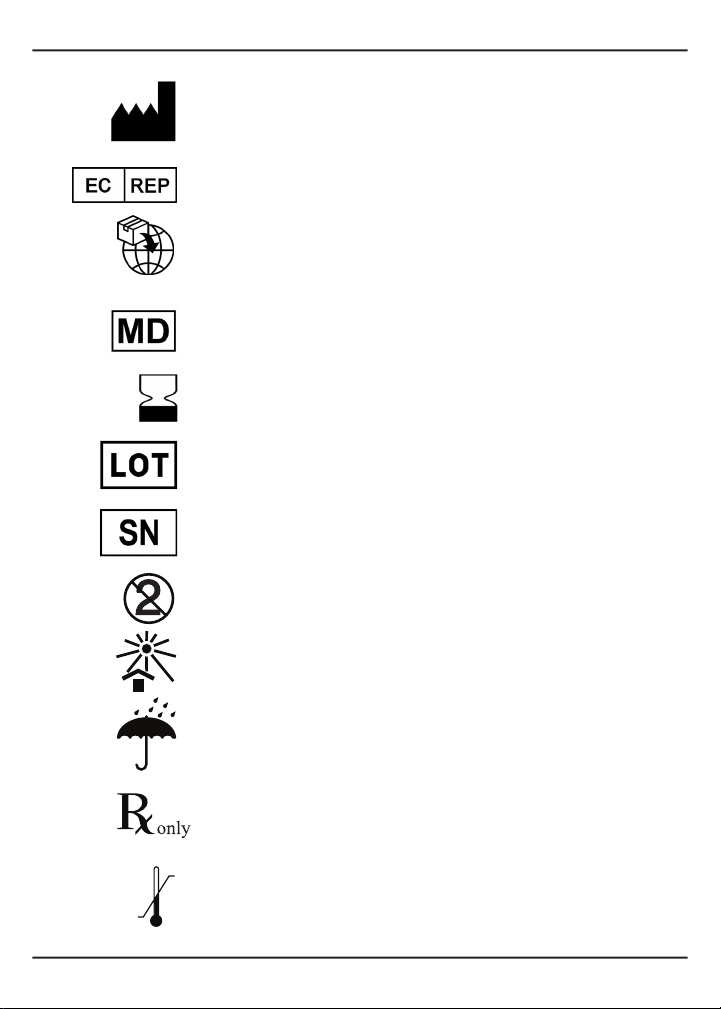
Indicatesthemedicaldevicemanufacturer,asdenedinEUDirectivesIndicatesthemedicaldevicemanufacturer,asdenedinEUDirectives
90/385/EEC, 93/42/EEC and 98/79/EC.90/385/EEC, 93/42/EEC and 98/79/EC.
Indicates the Authorized Representative in the European Community.Indicates the Authorized Representative in the European Community.
Any natural or legal person established within the Union that places a
device from a third country on the Union market.
Medical device
Indicates the date after which the medical device is not to be used.Indicates the date after which the medical device is not to be used.
Indicates the manufacturer’s batch code or lot number so that the batchIndicates the manufacturer’s batch code or lot number so that the batch
orlotcanbeidentied.orlotcanbeidentied.
Indicatesthemanufacturer’sserialnumbersothataspecicmedicalIndicatesthemanufacturer’sserialnumbersothataspecicmedical
devicecanbeidentied.devicecanbeidentied.
SinSingle-use only (cassettes)gle-use only (cassettes)
KKeep away from heateep away from heat
KKeep dryeep dry
CaCaution:ution: This device is restricted to sale by or on the order of aThis device is restricted to sale by or on the order of a
physician.physician.
TeTemperature limitationmperature limitation

Section 1 • Introduction
4
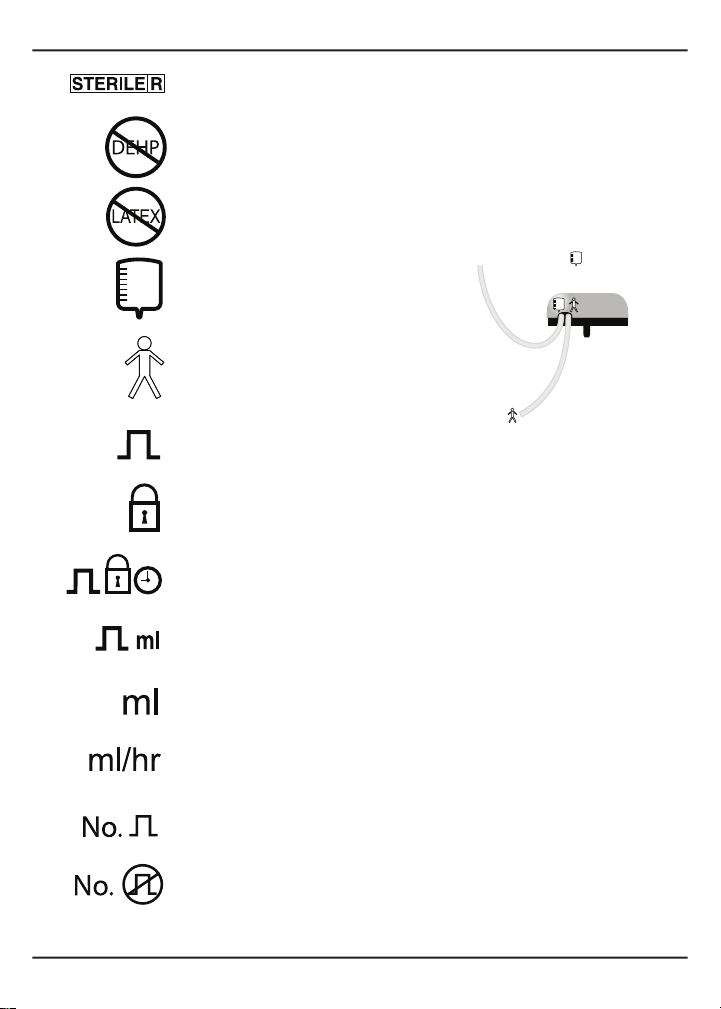
SteSterilized using irradiationrilized using irradiation
DEHP-freeuidpathDEHP-freeuidpath
NoNot made with natural rubber latext made with natural rubber latex
IndIndicates which tubing connects toicates which tubing connects to
the solution containerthe solution container
IndIndicates which tubing connects toicates which tubing connects to
the patientthe patient
BBolusolus
ProProgram lockoutgram lockout
BBolus lockout time in hours:minutesolus lockout time in hours:minutes
BoBolus volume in milliliterslus volume in milliliters
VoVolume in milliliterslume in milliliters
BasBasal infusion rate in ml/hral infusion rate in ml/hr
NumNumber of boluses deliveredber of boluses delivered
Number of bolus requestsNumber of bolus requests
To patient
To solution container
Cassette
shaft
(side view of cassette)

Section 1 • Introduction
5
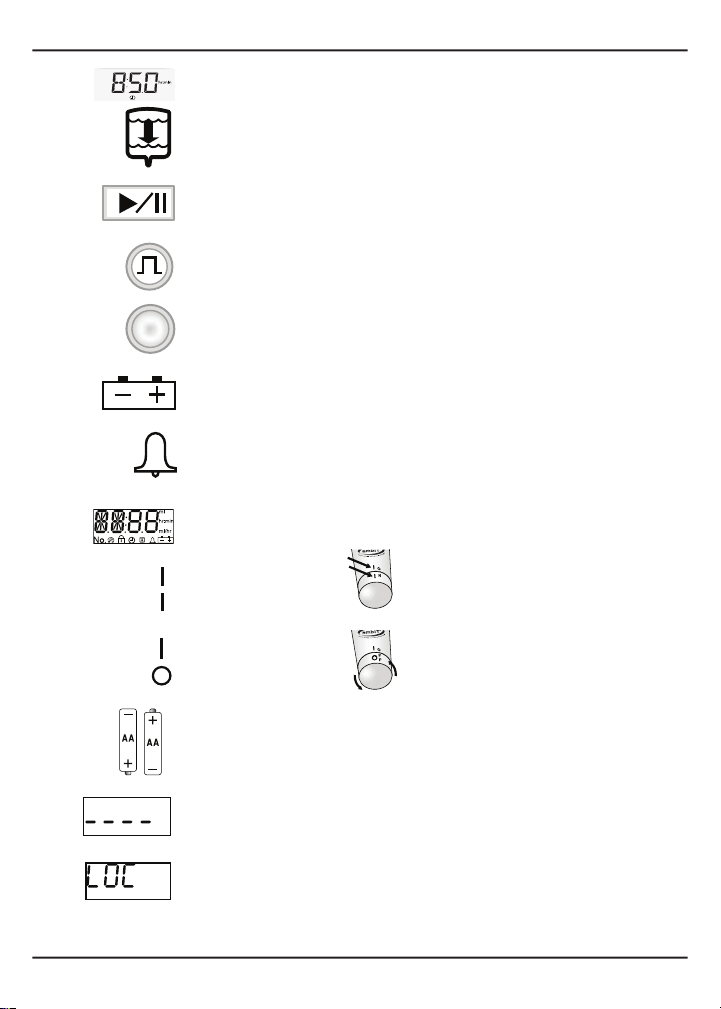
Elapsed timeElapsed time
VolumVolume to be infusede to be infused
RRUN/PAUSE buttonUN/PAUSE button
BOBOLUS buttonLUS button
FUNCTION buttonFUNCTION button
LowLow/dead battery indicator/dead battery indicator
Alarm indicatorAlarm indicator
ambITambIT®pump displaypump display
PumPump power onp power on
Pump poPump power offwer off
BBattery orientationattery orientation
PrProgram lockout codeogram lockout code
ProgrProgram lockout modeam lockout mode

Section 1 • Introduction
6
1.2 Warnings
Federal (U.S.A.) law restricts this device to sale by or on the order of a physician.
Read instructions before use. The pump must be used strictly in accordance with these
instructions.
Safe use of this pump is the primary responsibility of the user. The user is responsible for
monitoring this pump. Contact clinical/technical support if pump appears to be operating
incorrectly.
All patients should be given a Patient Manual and instructed to read it carefully. The pump
must be used only by or on behalf of the person for whom it is prescribed.
Patients should never perform any function or push any button unless instructed by their
healthcare provider.
Do not allow the pump to get wet. If the pump is immersed in any liquid, it must be replaced
with a new pump.
Transport and storage conditions: -25ºC (-13ºF) withoutrelativehumiditycontrol;and+70ºC
(+158ºF)at relative humidity of up to 93%, non-condensing.
The pump will warm from the minimum storage/transportation temperature to room
temperature (about 20ºC [68ºF]) in approximately 30 minutes. The pump will cool to room
temperature from the maximum storage/transportation temperature in about 35 minutes.
Operatingconditions:+5ºCto+40ºC(+41ºFto+104ºF);relativehumidityrangeof15%to93%,
non-condensing;andanatmosphericpressureof700hPato1060hPa(10.2 psi to 15.4 psi).
Never attempt to open the pump case. Only the battery cover may be removed when changing
batteries. If the pump is dropped, it must be replaced with a new pump.
PumpPump program modeprogram mode
Review pReview pump programump program
Infusion history reportInfusion history report
PumPump infusion history clearedp infusion history cleared
Otros manuales para ambIT
1
Tabla de contenidos
Manuales populares de Bomba de agua de otras marcas

Sykes AmeriPumps
Sykes AmeriPumps GP100M Guía de solución de problemas

DUROMAX
DUROMAX XP WX Series Manual de usuario

BRINKMANN PUMPS
BRINKMANN PUMPS SBF550 Manual de usuario

Franklin Electric
Franklin Electric IPS Manual de usuario

Xylem
Xylem e-1532 Series Manual de usuario

Milton Roy
Milton Roy PRIMEROYAL Manual de usuario